
The attcron Attendance Agent
Fingerprint machines are almost always the most awkward device on a company's network. They sit inside a branch office, behind whatever router that branch happens to have, and they expect to be talked to from the same local network. Nama, meanwhile, lives on a server somewhere else entirely — often in a data centre, often behind a firewall that lets nothing in.
attcron is the small application that bridges that gap. It is installed at the branch, next to the attendance machine, where it can reach the machine freely. On a schedule, it collects new punch readings and pushes them out to Nama. Because every connection starts at the branch, no branch needs a fixed IP address and no incoming port needs opening; the branch only needs to be able to reach the Nama server.
Read the configuration page first
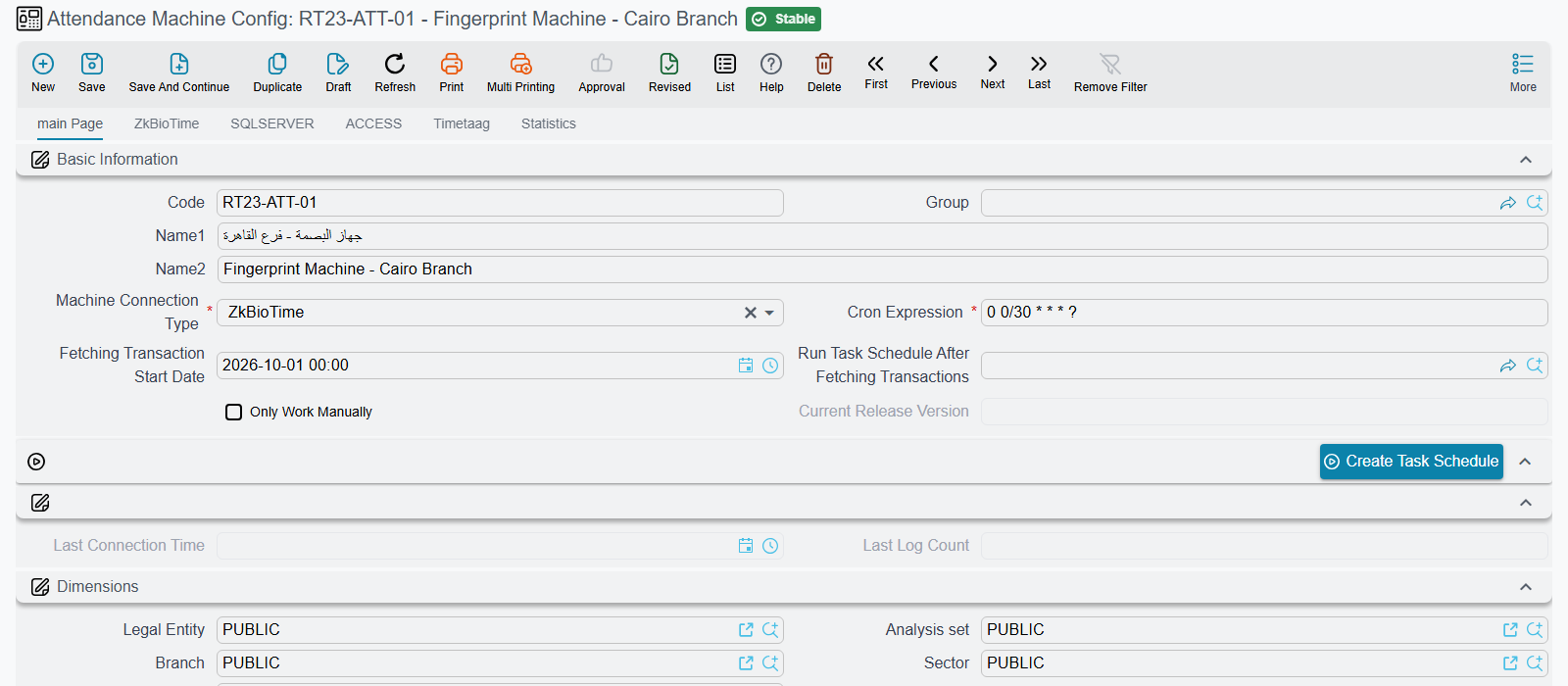
Everything attcron does — which machine, which query, which schedule — is decided by an Attendance Machine Configuration record in Nama. The agent holds almost no settings of its own; it asks Nama for its instructions each time it starts. Set that record up first: Attendance Machines.
The feature requires a separate license. Contact sales or technical support to obtain one.
What you need before you start
On the branch computer that will run the agent — normally the same machine that already runs the attendance machine's own software:
- JDK 21
- Apache Tomcat 10, with its startup type set to Automatic so the agent comes back after a reboot
And in Nama:
- an API Credentials record — keep its Client ID and Client Secret to hand
- a saved Attendance Machine Configuration — keep its Code to hand
Installing
The agent is delivered by a small installer that downloads and unpacks it for you.
- Download the installer from https://namasoft.com/bin/nama-attcron-upgrader.jar.
- Place it inside the Tomcat folder and run it from there. It looks for a
webappsfolder next to itself; run it anywhere else and it stops with "Please run from inside tomcat folder". - It downloads the application, waits for Tomcat to release the previous copy, and puts the new one in place. Messages about waiting for a folder to be deleted are normal — give it up to a minute or two.
- Open a browser on that computer and go to
http://localhost:8080/attcron.
Don't rename the installer
The installer decides what it is installing from its own filename. Renaming it to something that no longer contains "cron" makes it install the wrong thing.
The browser needs internet access
The agent's screens load their styling and icons from public internet sources. On a completely isolated machine the pages still work but appear unstyled, and pop-up messages may not display.
First run: connecting to Nama
The first time you open it, the agent shows a short login form asking for four things:
| Field | What to enter |
|---|---|
| Nama Server URL | The address of your Nama server, e.g. https://erp.example.com. |
| Nama Client Id | From the API Credentials record. |
| Nama Client Secret | From the API Credentials record. |
| Attendance Machine Config File Code | The Code of the Attendance Machine Configuration record. |
You can type the server address in whatever form you have it in — with or without a trailing slash, with or without /erp — and the agent works out the rest.
Press Start. The agent immediately contacts Nama, fetches its configuration, and — unless Only Work Manually is ticked on that configuration — runs a first collection straight away and then settles into its schedule.
Protect the port
Anyone who can open the agent's page can trigger a collection, and on an unconfigured agent, point it at any server they like. Only the Logout action asks for credentials. Keep Tomcat's port firewalled to the local machine, and use https for the Nama server address so the credentials aren't sent over the network in the clear.
The day-to-day screen
Once configured, the agent shows a status page listing recent collections — a date and a count of readings for each — refreshing itself every thirty seconds. Four buttons sit above it:
| Button | What it does |
|---|---|
| Send Now | Runs a collection immediately, as if the schedule had fired. |
| Read For Period | Asks for a From and To date and time, then re-reads exactly that range. |
| Refresh | Reloads the statistics table. |
| Logout | Disconnects the agent from Nama. Requires a valid Nama username and password. |
The version of the agent is shown next to the buttons, and is also reported to Nama on every delivery, where it appears as Current Release Version on the configuration record.
Read For Period is the tool for backfilling
Use it after a machine has been offline, or after fixing a query. It re-reads the range you ask for without disturbing where the scheduled collection has got to, and Nama discards readings it already holds — so re-reading an overlapping period is safe and never creates duplicates.
The statistics table is not history
The list of collections is held in memory only. Restarting Tomcat empties it, and it is trimmed once it grows past about fifty entries. It is a health indicator, not a log. The permanent record is in Nama, on the configuration's Statistics tab.
What happens on each collection
The agent asks Nama for its current configuration, then talks to the machine in whichever way that configuration specifies — the ZkBioTime web interface, a SQL Server database, a Microsoft Access file, or the Timetaag cloud service. It collects everything newer than the point it last reached, sends it to Nama in batches, and remembers its new position.
A few numbers worth knowing when you are watching it work:
- Database collections are delivered in batches of 500 readings, and the position is saved after each batch — so a collection interrupted halfway keeps the progress it made.
- ZkBioTime collections are read a page at a time, 100 readings per page.
- Timetaag collections are also read a page at a time, 100 readings per page, but the Timetaag service filters by date, not by time of day: whatever start and end moments the agent asks for, it returns every reading whose punch time falls on those calendar dates. Each scheduled run therefore re-reads the whole of the current day. Nama discards what it already holds, so this produces no duplicates — but the number in the statistics table is the day's total so far, not a count of new readings.
- If Nama rejects a delivery, the agent retries up to three times a couple of seconds apart before giving up and logging the failure. The next scheduled run tries again from the same position.
- A Read For Period run deliberately does not move the saved position.
Send Now and Read For Period run while you wait, in the browser. A large backfill can take a while and the page will simply sit there until it finishes; that is expected.
Where the agent keeps its state
Two files, both in Tomcat's working folder (normally its bin directory, though this depends on how Tomcat was installed):
attcron.properties holds the four values from the login screen — with the client secret stored scrambled rather than in plain text — plus the timestamp the agent has collected up to.
namasoft.log is the agent's log, rolling over at 100 MB and keeping five compressed archives. This is where the real detail lives when something is failing silently.
Two things follow from this:
- To start over completely, stop Tomcat, delete or empty
attcron.properties, and start it again. The agent returns to its login screen. This is also the way out if you need to re-point the agent at a different server and don't have the Nama credentials that Logout requires. - To reset how far it has collected, edit or remove the stored timestamp in that file. With it gone, the agent works out a fresh starting point — first from the latest reading Nama already holds for the configuration, then from Fetching Transaction Start Date, and failing both, from two months ago.
Upgrading
There is no automatic update. The agent reports its version to Nama on every delivery, and it is displayed as Current Release Version on the Attendance Machine Configuration — comparing that against your server's version is how you notice a branch has fallen behind. To upgrade, run the same installer again on the branch computer.
When something is wrong
Start with the configuration record in Nama. Last Connection Time tells you whether the agent is alive at all; the Statistics tab tells you what has been arriving. Then work backwards:
Last Connection Time is stale. The agent isn't reaching Nama. Check that Tomcat is running on the branch machine, open its page locally, and try Send Now — whatever is wrong will be reported on screen.
Deliveries arrive, but empty. The agent is talking to Nama fine, but the machine is giving it nothing. Check the query on the configuration record and try Read For Period over a range you know has punches.
Readings arrive but nothing appears in the attendance document. They have landed in Nama but not been turned into attendance yet — check the inbox on the configuration's Statistics tab, and the scheduled task named in Run Task Schedule After Fetching Transactions.
Collections seem far apart. If the cron expression is not valid six-field syntax, the agent silently falls back to running every twelve hours.
An Access setup won't start. The agent insists on Machine URL, Username, Password and Cron Expression having values, even though an Access connection uses only the first. Put placeholder text in the others.
Messages you may see
| Message | Meaning |
|---|---|
| Configuration File Does not Exist / File [attcron.properties] is not found. | The agent has never been configured, or its file was removed. Log in again. |
| Wrong Configuration File Data / Error While Reading Configuration File, There are one or more property not found. | The stored settings are incomplete or corrupted. Empty the file and log in again. |
| Could not Find Attendance Machine Config File Data With Code (…) | Nama has no configuration record with that code. Check the code, and that the record is saved. |
| Invalid Attendance Machine Config File Data | The configuration was found but is missing Machine URL, Username, Password or Cron Expression. |
| IO Exception While Calling Nama ERP Server | The branch cannot reach the server address given. Check the URL, the network and any firewall. |
| Failed to save attendance logs after 3 retries: … | Nama rejected the delivery three times; the trailing text is Nama's own reason. |
| UCanAccess driver not found | The Access support component is missing — reinstall the agent. |
| Username And Password are Required | Logout was pressed without credentials. |
A misspelled configuration code fails unhelpfully
If the code stored in the agent doesn't match any configuration record in Nama, the delivery fails with a generic server error rather than a clear "not found" message. If deliveries fail immediately after installation, verify that code first.
Related pages
- Attendance Machines — the configuration record that drives everything the agent does.
- Integration with Attendance Machines — the alternative approach of connecting the machine's database directly to Nama's, with no agent.