
Sample Approval Email Templates
When a document enters an approval workflow, NAMA can send the responsible person an email asking them to approve, reject, or return it. The body of that email is just a Tempo template defined on the approval rule — which means you can make it as plain or as beautiful as you like.
This page collects ready-to-use, good-looking templates you can copy straight into an approval rule's email body. We start with a generic template that works for any document type, and we'll grow this page with templates tailored to specific documents (sales invoices, orders, and so on) over time.
How to use a template
Copy the HTML block, paste it into the email body of your approval rule, and adjust the field names (code, valueDate, firstAuthor, …) if your document uses different ones. The three action buttons rely on the Tempo placeholders {approvelink}, {rejectlink}, and {returnlink} — see Adding Approval Action Links.
A note on styling
Email clients are notoriously picky about CSS. This template uses inline styles and a table-based layout on purpose — the most reliable way to get consistent results across Gmail, Outlook, and mobile clients. To make each button a fully clickable colored pill, we use the plain=true option on the action links (e.g. {approvelink(plain=true)}), which outputs only the URL so we can wrap it in our own styled <a> tag with our own text and icon.
Generic Approval Template (Arabic)
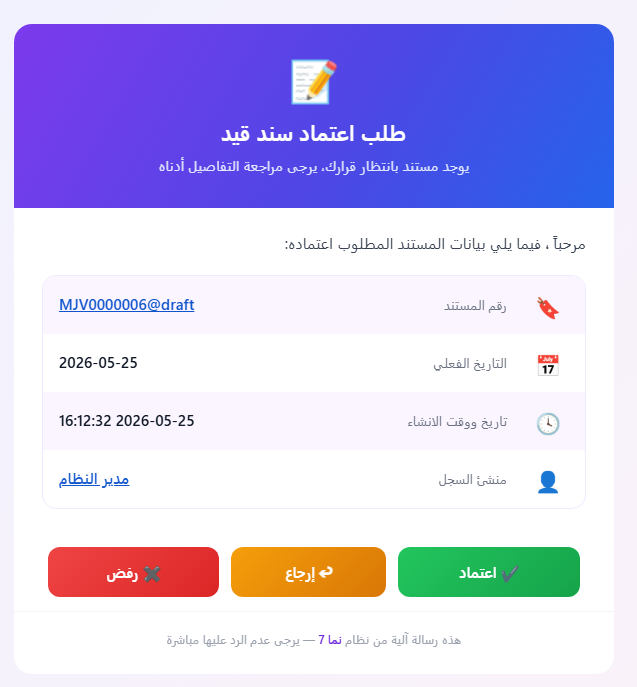
A colorful, right-to-left card whose header shows the (Arabic) document type, with a body listing the code, actual date, creation date & time, and who created the record — followed by three clear, fully-clickable action buttons. The code and the author are clickable links that open the document and the author's record.
It uses these fields, all available on any document:
| Field | Tempo expression | Arabic label |
|---|---|---|
| Document type (in header) | {entityType.$arabic} | — |
| Code (link to document) | {titledlink($this)}{code}{endlink} | رقم المستند |
| Actual date | {valueDate} | التاريخ الفعلي |
| Creation date & time | {$creationDate} | تاريخ ووقت الانشاء |
| Record author (link) | {titledlink(firstAuthor)}{firstAuthor.name1}{endlink} | منشئ السجل |
| Remarks (shown only if present) | {if(remarks)}…{remarks}…{endif} | ملحوظة |
A meaningful subject line
The template opens with a subject: line so the email arrives with a descriptive subject — e.g. طلب اعتماد فاتورة مبيعات - SI-0012 - منشئ السجل: أحمد — instead of a generic one. This must be the very first line of the body (before the <div>); see Setting the Email Subject.
HTML Code
subject:طلب اعتماد {entityType.$arabic} - {code} - منشئ السجل: {firstAuthor.name1}
<div dir="rtl" style="margin:0;padding:24px;background:#eef2ff;background:linear-gradient(135deg,#eef2ff 0%,#fdf2f8 100%);font-family:'Segoe UI',Tahoma,Arial,sans-serif;">
  <table role="presentation" align="center" width="600" cellpadding="0" cellspacing="0" style="max-width:600px;width:100%;margin:0 auto;background:#ffffff;border-radius:18px;overflow:hidden;box-shadow:0 10px 30px rgba(79,70,229,0.18);">

    <!-- Header -->
    <tr>
      <td style="padding:32px 28px;background:#6d28d9;background:linear-gradient(120deg,#7c3aed 0%,#4f46e5 55%,#2563eb 100%);text-align:center;">
        <div style="font-size:40px;line-height:1;">📝</div>
        <div style="margin-top:10px;font-size:22px;font-weight:700;color:#ffffff;">طلب اعتماد {entityType.$arabic}</div>
        <div style="margin-top:6px;font-size:14px;color:#e0e7ff;">يوجد مستند بانتظار قرارك، يرجى مراجعة التفاصيل أدناه</div>
      </td>
    </tr>

    <!-- Greeting -->
    <tr>
      <td style="padding:24px 28px 4px 28px;color:#374151;font-size:15px;">
        مرحباً <strong style="color:#4f46e5;">{$notificationTarget.name1}</strong>، فيما يلي بيانات المستند المطلوب اعتماده:
      </td>
    </tr>

    <!-- Info card -->
    <tr>
      <td style="padding:16px 28px 8px 28px;">
        <table role="presentation" width="100%" cellpadding="0" cellspacing="0" style="border:1px solid #ede9fe;border-radius:14px;overflow:hidden;">

          <tr style="background:#faf5ff;">
            <td width="46" style="padding:14px;text-align:center;font-size:20px;">🔖</td>
            <td style="padding:14px 4px;color:#6b7280;font-size:13px;">رقم المستند</td>
            <td style="padding:14px 16px;text-align:left;color:#111827;font-size:15px;font-weight:600;">{titledlink($this)}{code}{endlink}</td>
          </tr>

          <tr style="border-top:1px solid #f3f4f6;">
            <td width="46" style="padding:14px;text-align:center;font-size:20px;">📅</td>
            <td style="padding:14px 4px;color:#6b7280;font-size:13px;">التاريخ الفعلي</td>
            <td style="padding:14px 16px;text-align:left;color:#111827;font-size:15px;font-weight:600;">{formatDate(valueDate, "yyyy-MM-dd")}</td>
          </tr>

          <tr style="background:#faf5ff;border-top:1px solid #f3f4f6;">
            <td width="46" style="padding:14px;text-align:center;font-size:20px;">🕓</td>
            <td style="padding:14px 4px;color:#6b7280;font-size:13px;">تاريخ ووقت الانشاء</td>
            <td style="padding:14px 16px;text-align:left;color:#111827;font-size:15px;font-weight:600;">{formatDate($creationDate, "yyyy-MM-dd HH:mm:ss")}</td>
          </tr>

          <tr style="border-top:1px solid #f3f4f6;">
            <td width="46" style="padding:14px;text-align:center;font-size:20px;">👤</td>
            <td style="padding:14px 4px;color:#6b7280;font-size:13px;">منشئ السجل</td>
            <td style="padding:14px 16px;text-align:left;color:#111827;font-size:15px;font-weight:600;">{titledlink(firstAuthor)}{firstAuthor.name1}{endlink}</td>
          </tr>

          {if(remarks)}
          <tr style="background:#faf5ff;border-top:1px solid #f3f4f6;">
            <td width="46" style="padding:14px;text-align:center;font-size:20px;">📝</td>
            <td style="padding:14px 4px;color:#6b7280;font-size:13px;">ملحوظة</td>
            <td style="padding:14px 16px;text-align:left;color:#111827;font-size:15px;font-weight:600;">{remarks}</td>
          </tr>
          {endif}

        </table>
      </td>
    </tr>

    <!-- Action buttons (each whole pill is a clickable approval link) -->
    <tr>
      <td style="padding:24px 28px 8px 28px;">
        <table role="presentation" width="100%" cellpadding="0" cellspacing="0">
          <tr>
            <td style="padding:6px;" align="center">
              <a href="{approvelink(plain=true)}" style="display:block;padding:14px 10px;background:#16a34a;background:linear-gradient(135deg,#22c55e,#16a34a);color:#ffffff;text-decoration:none;font-size:15px;font-weight:700;border-radius:12px;box-shadow:0 4px 12px rgba(22,163,74,0.35);">✔ اعتماد</a>
            </td>
            <td style="padding:6px;" align="center">
              <a href="{returnlink(plain=true)}" style="display:block;padding:14px 10px;background:#d97706;background:linear-gradient(135deg,#f59e0b,#d97706);color:#ffffff;text-decoration:none;font-size:15px;font-weight:700;border-radius:12px;box-shadow:0 4px 12px rgba(217,119,6,0.35);">↩ إرجاع</a>
            </td>
            <td style="padding:6px;" align="center">
              <a href="{rejectlink(plain=true)}" style="display:block;padding:14px 10px;background:#dc2626;background:linear-gradient(135deg,#ef4444,#dc2626);color:#ffffff;text-decoration:none;font-size:15px;font-weight:700;border-radius:12px;box-shadow:0 4px 12px rgba(220,38,38,0.35);">✖ رفض</a>
            </td>
          </tr>
        </table>
      </td>
    </tr>

    <!-- Footer -->
    <tr>
      <td style="padding:18px 28px 26px 28px;text-align:center;color:#9ca3af;font-size:12px;border-top:1px solid #f3f4f6;">
        هذه رسالة آلية من نظام <a href="https://{translate("appUrl")}" style="color:#6d28d9;text-decoration:none;font-weight:600;">{translate("applicationName")}</a> — يرجى عدم الرد عليها مباشرة
      </td>
    </tr>

  </table>
</div>
Here is how the rendered email looks in the inbox:
About the buttons
Each button wraps an action URL produced by {approvelink(plain=true)}, {returnlink(plain=true)}, and {rejectlink(plain=true)}. Because plain=true emits only the URL, the entire colored pill is clickable and you control its text and icon. If you prefer NAMA's default rendering, drop plain=true and use the bare {approvelink} / {returnlink} / {rejectlink}, which generate their own anchor text.
The header shows the document's Arabic type via {entityType.$arabic}. For document-specific templates you can replace it with a fixed name (e.g. فاتورة مبيعات, أمر بيع) — which is exactly what the upcoming sections will do.
Branding-aware footer
The footer uses {translate("applicationName")} and {translate("appUrl")} instead of a hardcoded product name and link. These keys resolve to the running installation's branding — so the same template shows Nama ERP / namasoft.com, Capital Solutions ERP, Exceed ERP / exceed-erp.com, and so on, without editing. See Branding Keys: Application Name and URL.
Sales/Inventory Documents Template (Arabic)
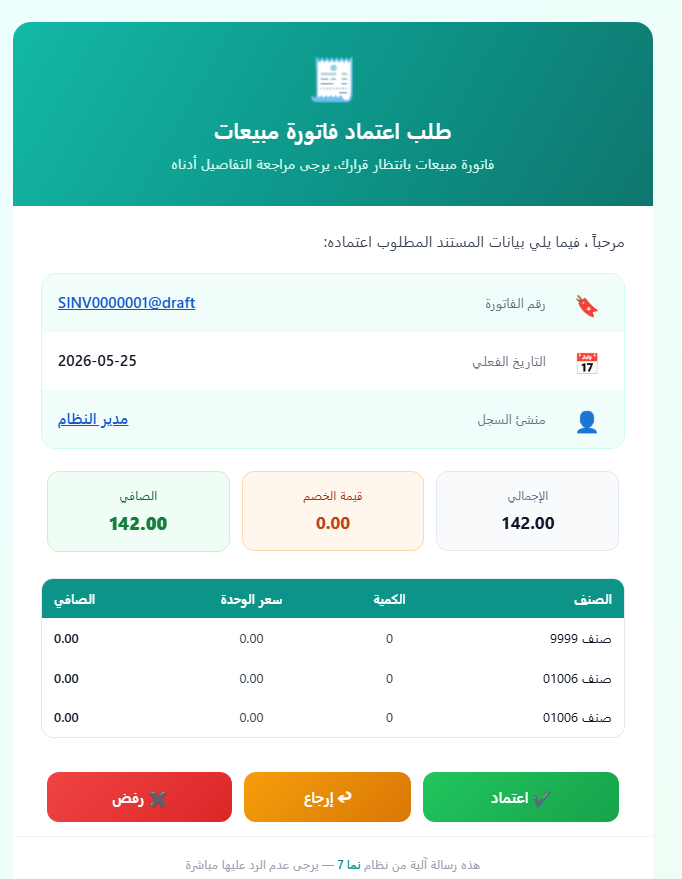
While the generic template above works for any document, a sales invoice carries information that really deserves to be shown in the email itself — how much is being approved and what it's made of. This template builds on the generic card and adds two things tailored to such documents: a money summary (total, header discount, and net value) and an itemized table of the lines (item, quantity, unit price, and net value per line).
Although it's written here with a sales invoice in mind, the exact same template works unchanged for the whole family of sales/inventory documents — sales orders, sales returns, purchase invoices, purchase orders, quotations, and so on. They all share the same money.* header fields and the same details line structure, and the header title adapts automatically via {entityType.$arabic}. So you can copy this block onto any of those documents' approval rules without editing a thing.
It uses these fields, all confirmed against the SalesInvoice entity (and shared by its siblings):
| Field | Tempo expression | Arabic label |
|---|---|---|
| Total | {money.total} | الإجمالي |
| Header discount | {money.headerDiscount.value} | قيمة الخصم |
| Net value | {money.netValue} | الصافي |
| Line item (in loop) | {#details.item.item.name1} | الصنف |
| Line quantity (in loop) | {#details.quantity.quantity.primeQty.value} | الكمية |
| Line unit price (in loop) | {#details.price.unitPrice} | سعر الوحدة |
| Line net value (in loop) | {#details.price.netValue} | الصافي |
Why the # and loop for line fields
The header money fields ({money.total}, …) are read straight off the document. The line fields live inside the details collection, so they must appear inside a {loop(details)}…{endloop} block, and each is prefixed with # (e.g. {#details.price.netValue}) so Tempo resolves it against the current row of the loop. See Looping Through Repeated Data.
Formatting the money values
The amounts are wrapped in {formatNumber(…, "###,##0.00")} so they render as grouped, two-decimal figures (e.g. 12,500.00) instead of raw numbers. See Formatting Numbers.
HTML Code
subject:طلب اعتماد {entityType.$arabic} - {code} - الصافي: {formatNumber(money.netValue, "###,##0.00")}
<div dir="rtl" style="margin:0;padding:24px;background:#ecfeff;background:linear-gradient(135deg,#ecfeff 0%,#f0fdf4 100%);font-family:'Segoe UI',Tahoma,Arial,sans-serif;">
  <table role="presentation" align="center" width="640" cellpadding="0" cellspacing="0" style="max-width:640px;width:100%;margin:0 auto;background:#ffffff;border-radius:18px;overflow:hidden;box-shadow:0 10px 30px rgba(13,148,136,0.18);">

    <!-- Header -->
    <tr>
      <td style="padding:32px 28px;background:#0d9488;background:linear-gradient(120deg,#14b8a6 0%,#0d9488 55%,#0f766e 100%);text-align:center;">
        <div style="font-size:40px;line-height:1;">🧾</div>
        <div style="margin-top:10px;font-size:22px;font-weight:700;color:#ffffff;">طلب اعتماد {entityType.$arabic}</div>
        <div style="margin-top:6px;font-size:14px;color:#ccfbf1;">{entityType.$arabic} بانتظار قرارك، يرجى مراجعة التفاصيل أدناه</div>
      </td>
    </tr>

    <!-- Greeting -->
    <tr>
      <td style="padding:24px 28px 4px 28px;color:#374151;font-size:15px;">
        مرحباً <strong style="color:#0d9488;">{$notificationTarget.name1}</strong>، فيما يلي بيانات المستند المطلوب اعتماده:
      </td>
    </tr>

    <!-- Info card -->
    <tr>
      <td style="padding:16px 28px 8px 28px;">
        <table role="presentation" width="100%" cellpadding="0" cellspacing="0" style="border:1px solid #ccfbf1;border-radius:14px;overflow:hidden;">

          <tr style="background:#f0fdfa;">
            <td width="46" style="padding:14px;text-align:center;font-size:20px;">🔖</td>
            <td style="padding:14px 4px;color:#6b7280;font-size:13px;">رقم الفاتورة</td>
            <td style="padding:14px 16px;text-align:left;color:#111827;font-size:15px;font-weight:600;">{titledlink($this)}{code}{endlink}</td>
          </tr>

          <tr style="border-top:1px solid #f3f4f6;">
            <td width="46" style="padding:14px;text-align:center;font-size:20px;">📅</td>
            <td style="padding:14px 4px;color:#6b7280;font-size:13px;">التاريخ الفعلي</td>
            <td style="padding:14px 16px;text-align:left;color:#111827;font-size:15px;font-weight:600;">{formatDate(valueDate, "yyyy-MM-dd")}</td>
          </tr>

          <tr style="background:#f0fdfa;border-top:1px solid #f3f4f6;">
            <td width="46" style="padding:14px;text-align:center;font-size:20px;">👤</td>
            <td style="padding:14px 4px;color:#6b7280;font-size:13px;">منشئ السجل</td>
            <td style="padding:14px 16px;text-align:left;color:#111827;font-size:15px;font-weight:600;">{titledlink(firstAuthor)}{firstAuthor.name1}{endlink}</td>
          </tr>

        </table>
      </td>
    </tr>

    <!-- Money summary -->
    <tr>
      <td style="padding:8px 28px;">
        <table role="presentation" width="100%" cellpadding="0" cellspacing="0">
          <tr>
            <td width="33%" style="padding:6px;" align="center">
              <div style="padding:14px 8px;background:#f8fafc;border:1px solid #e2e8f0;border-radius:12px;">
                <div style="color:#64748b;font-size:12px;">الإجمالي</div>
                <div style="margin-top:6px;color:#0f172a;font-size:17px;font-weight:700;">{formatNumber(money.total, "###,##0.00")}</div>
              </div>
            </td>
            <td width="33%" style="padding:6px;" align="center">
              <div style="padding:14px 8px;background:#fff7ed;border:1px solid #fed7aa;border-radius:12px;">
                <div style="color:#9a3412;font-size:12px;">قيمة الخصم</div>
                <div style="margin-top:6px;color:#c2410c;font-size:17px;font-weight:700;">{formatNumber(money.headerDiscount.value, "###,##0.00")}</div>
              </div>
            </td>
            <td width="33%" style="padding:6px;" align="center">
              <div style="padding:14px 8px;background:#f0fdf4;border:1px solid #bbf7d0;border-radius:12px;">
                <div style="color:#166534;font-size:12px;">الصافي</div>
                <div style="margin-top:6px;color:#15803d;font-size:18px;font-weight:800;">{formatNumber(money.netValue, "###,##0.00")}</div>
              </div>
            </td>
          </tr>
        </table>
      </td>
    </tr>

    <!-- Items table -->
    <tr>
      <td style="padding:12px 28px 8px 28px;">
        <table role="presentation" width="100%" cellpadding="0" cellspacing="0" style="border:1px solid #e5e7eb;border-radius:12px;overflow:hidden;font-size:13px;">
          <tr style="background:#0d9488;color:#ffffff;">
            <td style="padding:10px 12px;font-weight:700;">الصنف</td>
            <td style="padding:10px 12px;font-weight:700;text-align:center;">الكمية</td>
            <td style="padding:10px 12px;font-weight:700;text-align:center;">سعر الوحدة</td>
            <td style="padding:10px 12px;font-weight:700;text-align:left;">الصافي</td>
          </tr>
          {loop(details)}
          <tr style="border-top:1px solid #f3f4f6;">
            <td style="padding:10px 12px;color:#111827;">{#details.item.item.name1}</td>
            <td style="padding:10px 12px;color:#374151;text-align:center;">{formatNumber(#details.quantity.quantity.primeQty.value, "###,##0.##")}</td>
            <td style="padding:10px 12px;color:#374151;text-align:center;">{formatNumber(#details.price.unitPrice, "###,##0.00")}</td>
            <td style="padding:10px 12px;color:#111827;font-weight:600;text-align:left;">{formatNumber(#details.price.netValue, "###,##0.00")}</td>
          </tr>
          {endloop}
        </table>
      </td>
    </tr>

    <!-- Action buttons (each whole pill is a clickable approval link) -->
    <tr>
      <td style="padding:20px 28px 8px 28px;">
        <table role="presentation" width="100%" cellpadding="0" cellspacing="0">
          <tr>
            <td style="padding:6px;" align="center">
              <a href="{approvelink(plain=true)}" style="display:block;padding:14px 10px;background:#16a34a;background:linear-gradient(135deg,#22c55e,#16a34a);color:#ffffff;text-decoration:none;font-size:15px;font-weight:700;border-radius:12px;box-shadow:0 4px 12px rgba(22,163,74,0.35);">✔ اعتماد</a>
            </td>
            <td style="padding:6px;" align="center">
              <a href="{returnlink(plain=true)}" style="display:block;padding:14px 10px;background:#d97706;background:linear-gradient(135deg,#f59e0b,#d97706);color:#ffffff;text-decoration:none;font-size:15px;font-weight:700;border-radius:12px;box-shadow:0 4px 12px rgba(217,119,6,0.35);">↩ إرجاع</a>
            </td>
            <td style="padding:6px;" align="center">
              <a href="{rejectlink(plain=true)}" style="display:block;padding:14px 10px;background:#dc2626;background:linear-gradient(135deg,#ef4444,#dc2626);color:#ffffff;text-decoration:none;font-size:15px;font-weight:700;border-radius:12px;box-shadow:0 4px 12px rgba(220,38,38,0.35);">✖ رفض</a>
            </td>
          </tr>
        </table>
      </td>
    </tr>

    <!-- Footer -->
    <tr>
      <td style="padding:18px 28px 26px 28px;text-align:center;color:#9ca3af;font-size:12px;border-top:1px solid #f3f4f6;">
        هذه رسالة آلية من نظام <a href="https://{translate("appUrl")}" style="color:#0d9488;text-decoration:none;font-weight:600;">{translate("applicationName")}</a> — يرجى عدم الرد عليها مباشرة
      </td>
    </tr>

  </table>
</div>
Here is how the rendered email looks in the inbox:
Showing the item code instead of its name
The table shows each line's item by its Arabic name via {#details.item.item.name1} (use name2 for the English name). If you prefer the item code, swap it for {#details.item.item.code}; to show both, combine them: {#details.item.item.code} — {#details.item.item.name1}.
More templates for specific document types (sales/purchase orders, receipt vouchers, …) will be added below as we expand this page.