
Financial Commitments
A company carries many recurring obligations that aren't invoices yet but are very real: a yearly rent paid in quarterly installments, an insurance policy, a financing agreement with a fixed repayment schedule. The financial-commitments system is where you register these obligations, lay out their installment schedule, and track what's been paid against what's still due — a regulation-and-tracking layer that sits beside your ordinary vouchers.
Required license
Financial commitments are part of the accounting-financial-commitments-regulation license.
A tracking layer, not a posting document
The commitment and its payment document do not post to the general ledger themselves. They track the obligation and its settlement against the schedule; the actual money movement is recorded by your normal receipt/payment vouchers. Think of this system as the planner and watchdog over those obligations, not a replacement for the vouchers that move the cash.
The pieces
All screens are under the Accounting > Financial Commitment Management root:
- Financial Commitment Category — a master file for classifying commitments (rent, insurance, financing…), so you can group and report on them.
- Financial Commitment — the obligation itself: its total value, its category, a start date, a repayment period (every n months/…), and the resulting installment schedule.
- Financial Commitment Payment Document — records a payment against a specific installment, updating that installment's paid/remaining figures.
- Financial Commitment Reschedule — changes the schedule after the fact (add, edit or remove installments), keeping a before/after record of the change.
Setting up a commitment
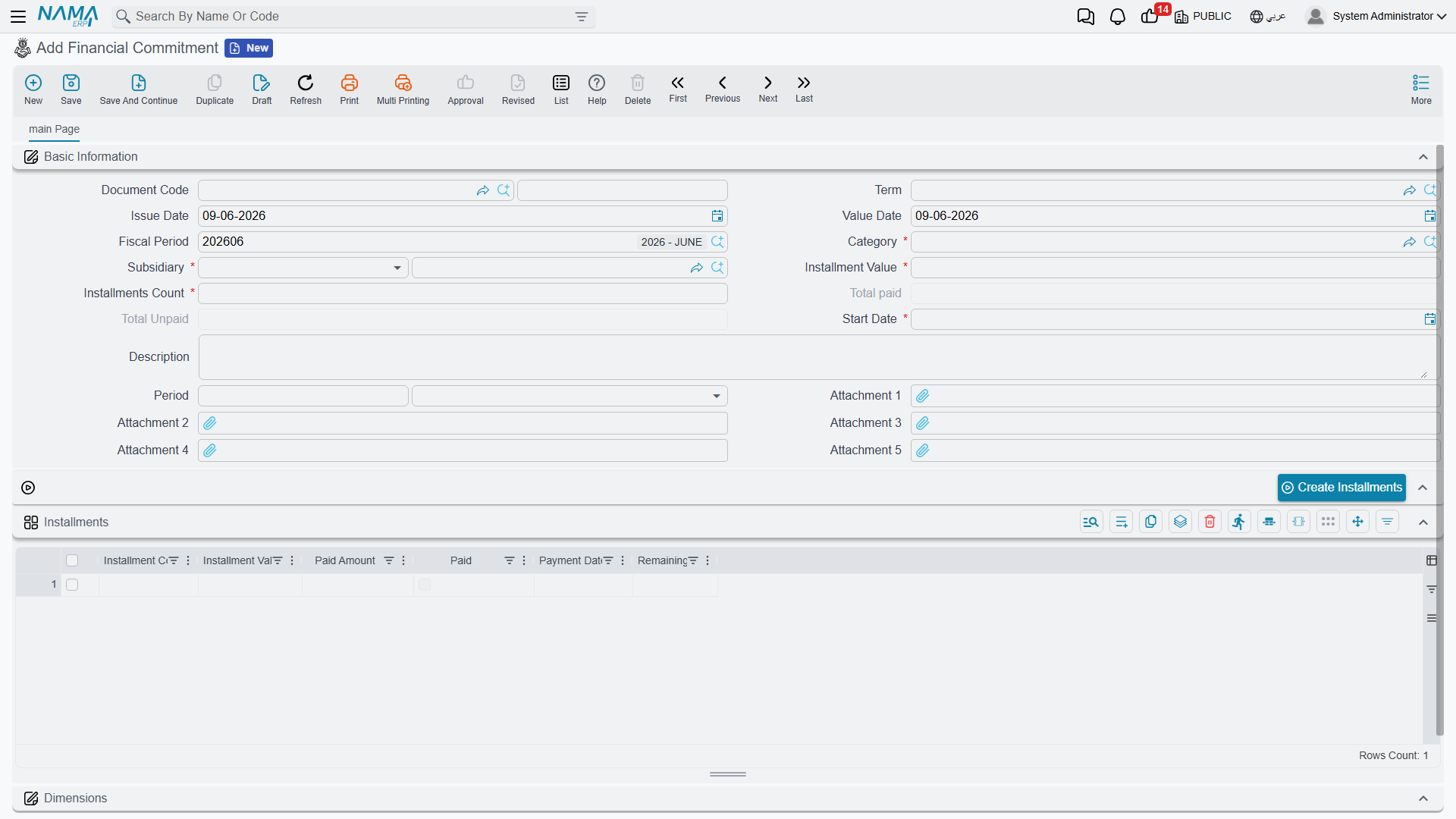
On the Financial Commitment (Accounting > Financial Commitment Management > Financial Commitment) you enter the obligation's category, its start date, the installments count and installments value, and the recurrence period (value + unit, e.g. every 1 month). From these the Installments grid is built — one line per installment carrying its installment code, value, payment date, and the running paid amount / remaining and a paid flag. The header keeps the rolling total paid and total unpaid so you can see at a glance where the obligation stands.
Paying an installment
The Financial Commitment Payment Document (Accounting > Financial Commitment Management > Financial Commitment Payment Document) points at a financial commitment and records a payment against it. When committed, it updates the matching installment's paid amount and remaining, and flips the installment to paid once fully settled — so the commitment's totals always reflect reality.

Rescheduling
Plans change — an installment is deferred, the amounts are renegotiated. The Financial Commitment Reschedule (Accounting > Financial Commitment Management > Financial Commitment Reschedule) lets you add, edit or delete installment lines on an existing commitment. It keeps two grids — the details (the new schedule) and the details before edit (the schedule as it was) — so the change is auditable.
For Support
- "The commitment didn't create a journal entry" — that's expected; commitments and their payment documents don't post to the ledger. Record the actual cash movement with a normal receipt/payment voucher.
- "The paid/remaining figures look wrong" — they're driven by the payment documents linked to the commitment; check that each payment is committed and points at the right installment.
- "I need to change the schedule" — use a Reschedule document rather than editing the original commitment; it preserves the before/after history.
- "An installment still shows unpaid after I paid it" — confirm the payment document fully covered the installment value; partial payments leave a remaining balance until topped up.