
Journal Entries & Adjustments
Most entries in Nama are generated automatically from other documents (an invoice, a stock issue, a payroll run...), but there's always a need to record manual entries: an adjustment, a petty expense, an opening balance, clearing a suspense account. That's the job of the Journal Entry. Alongside it are specialized entry documents that handle particular cases: the Currency Diff Journal, the Exchange Rate Update, and the Inter-Company Transfer.
Required license
The journal entry, currency-difference journal, and inter-company transfer are part of the core accounting license. The Exchange Rate Update, however, is a feature within the banks license accounting-banks.
The Journal Entry
The journal entry (Accounting > Documents > Journal Entry) is the balanced document where you enter the debit and credit lines yourself — with the condition that total debit equals total credit before the system will accept it.
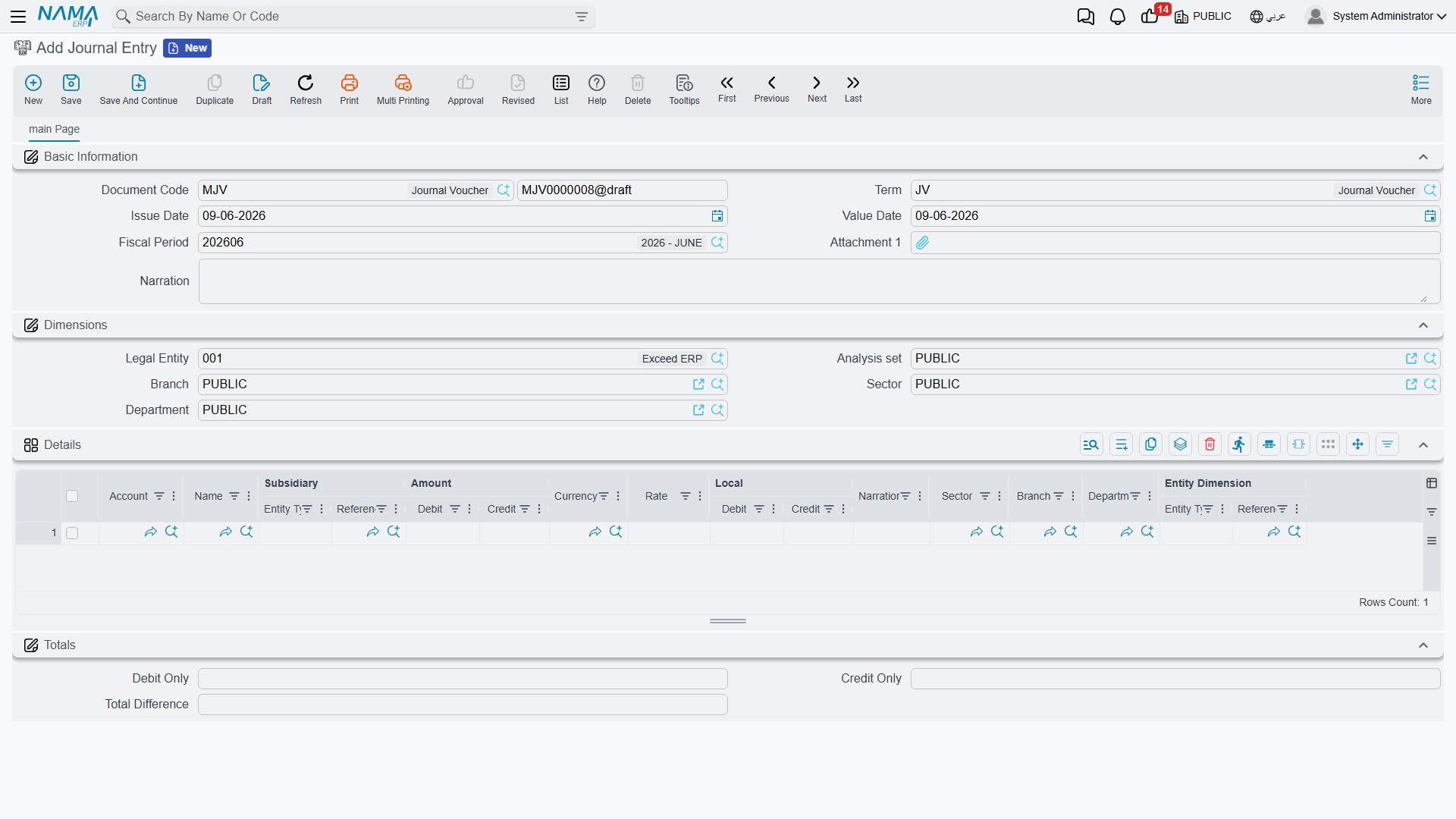
Document header
In the header you set:
- Document Term — the term (
توجيه) that governs the entry's behavior and where its special accounts (such as the difference account) come from. Term details are in the Document terms reference. - Document Number and Creation Date — the serial number and the document's creation date.
- Value Date — the accounting date the effect is recorded under (which determines the period), and may differ from the creation date.
- Period — the accounting period the value date falls in; the system sets it automatically, and if it's closed the save is rejected.
- Narration and dimensions (legal entity, branch, sector, department, analysis set) at the document level.
Detail lines
In the Details grid each line carries:
- Account and Subsidiary (the party, if the account is of subsidiary type).
- Debit Amount or Credit Amount — the line's value on its side, in the line's currency, with the corresponding local value shown after translation at the exchange rate.
- Reference, Narration, and line dimensions (sector/branch/department) for whoever needs finer detail than the document header.
- Tax fields (tax 1 and 2 percentage and value) appear when the tax features are enabled, linking the manual entry to its tax effect.
Balancing and the difference account
At the bottom of the screen the Totals show: Total Debit, Total Credit, and Total Difference. As long as the total difference is non-zero, the entry is unbalanced and won't save. The term lets you specify a difference account that absorbs small rounding differences automatically so the entry balances — so you don't have to chase fractions by hand.
Cost allocation
The Cost Allocation grid lets you distribute the entry's value across cost centers/dimensions independently of the debit and credit lines, for managerial analysis.
Currency Diff Journal
The Currency Diff Journal (Accounting > Documents > Currency Diff Journal) is a specialized entry for recording the differences arising from exchange-rate fluctuations on foreign-currency balances. It's most often generated automatically as a result of an Exchange Rate Update (see below), but it remains a standalone document you can review and print.
Exchange Rate Update
When currency rates change, your foreign-currency balances need revaluation at the new rate. The Exchange Rate Update (Accounting > Documents > Exchange Rate Update) does this in one batch: you specify the account (or a range of accounts), the currency, the new exchange rate, and the mediator account where revaluation differences are recorded; the system computes the difference for each balance and generates the corresponding currency-difference entries.
WARNING
Accounts with Do Not Auto-Include In Exchange Rate Update enabled (see Accounts) are excluded from revaluation. This is a feature within the banks license accounting-banks.
Inter-Company Transfer
When transferring value between two companies in the same group, the Inter-Company Transfer (Accounting > Documents > Inter Company Transfer) records both sides in one step: it generates a journal entry in the first company and a matching one in the second, so the "inter-company current" accounts stay in sync without double manual entry.
Reports and forms
- Entry and daily-movement statements (
SYSR-ACCjournal statements) are covered on the Account statements & trial balance page. - The printed form for the journal entry is
SYSF-ACC001, for the currency-difference journalSYSF-ACC008, and for the inter-company transferSYSF-ACC007.
For Support
- "The entry won't save — unbalanced" — check the Total Difference; it must be zero. If it's a tiny fraction, enable/review the difference account in the term.
- "Save rejected because of the period" — the value date falls in a closed period or no period covers it; see Year-end & period control.
- "Tax fields don't appear on the entry" — the tax features aren't enabled in the Accounting configuration catalog.
- "Where does the difference account / the term's accounts come from?" — from the document term; details in the Document terms reference.
- How a document turns into an accounting effect and how to reprocess a stuck entry are in How documents are processed into accounting effects.