
Omniful Integration Guide
Overview
Nama ERP integrates with Omniful, a unified supply chain platform that provides comprehensive warehouse management and order fulfillment capabilities. This integration enables seamless data synchronization between Nama ERP and Omniful for inventory management, order processing, and supply chain operations.
Integration Architecture
The integration operates in two directions:
- Outbound (Nama ERP → Omniful): Master data and transactions are sent from Nama ERP to Omniful using Entity Flows
- Inbound (Omniful → Nama ERP): Orders, stock transfers, purchase orders, and receipts are received from Omniful via webhooks
Configuration Setup
1. Omniful Configuration Entity
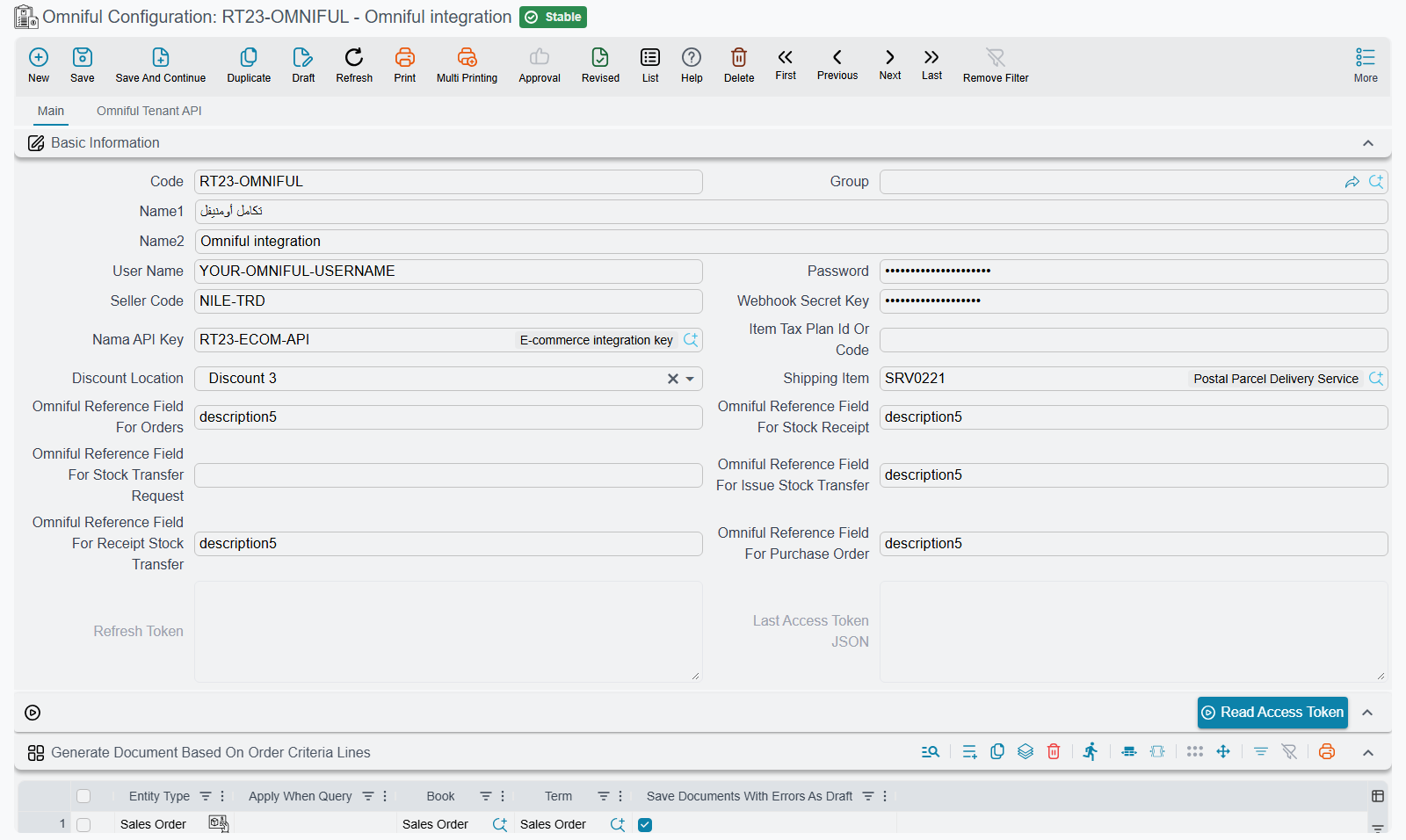
Navigate to e-Commerce Integration → Master Files → Omniful Configuration to create and configure the integration settings.
Required Fields
| Field | Arabic Name | Description |
|---|---|---|
| User Name | - | Omniful API username |
| Password | - | Omniful API password |
| Seller Code | اسم البائع | Unique seller identifier in Omniful |
| Webhook Secret Key | - | Secret key for webhook authentication |
| Tenant API Username | المستخدم | Tenant API username for advanced operations |
| Tenant API Password | كلمة المرور | Tenant API password |
| Nama API Key | - | API credentials for Nama ERP access |
Reference Field Configuration
These fields map Omniful IDs to specific fields in Nama ERP entities:
| Field | Arabic Name | Purpose |
|---|---|---|
| Omniful Reference Field For Orders | حقل مرجع أومنيفل في الطلبات | Maps sales orders to Omniful order IDs |
| Omniful Reference Field For Issue Stock Transfer | حقل مرجع أومنيفل في صرف تحويل مخزني | Maps stock issue transfers |
| Omniful Reference Field For Receipt Stock Transfer | حقل مرجع أومنيفل في استلام تحويل مخزني | Maps stock receipt transfers |
| Omniful Reference Field For Purchase Order | حقل مرجع أومنيفل في أمر شراء | Maps purchase orders |
| Omniful Reference Field For Stock Transfer Request | حقل مرجع أومنيفل في طلب التحويل المخزني | Maps stock transfer requests |
| Omniful Reference Field For Stock Receipt | حقل مرجع أومنيفل في التوريد المخزني | Maps stock receipts |
Prices, discounts and shipping
These fields shape the lines of the documents that come in from Omniful:
| Field | Arabic Name | Purpose |
|---|---|---|
| Item Tax Plan Id Or Code | معرف أو كود ملف سياسة ضريبة الأصناف | The code (or ID) of the item tax plan whose items arrive from Omniful with VAT-inclusive prices. For an item on this plan, Nama divides the Omniful unit price by 1.15 — unless Omniful sends a tax amount on a line that is not marked tax-inclusive. Items on any other plan keep Omniful's price as it is. Empty means no price is ever divided. |
| Discount Location | مكان التخفيض | Which discount column of the line receives Omniful's line discount (Discount 1 to Discount 8). Empty puts it in Discount 3. |
| Shipping Item | صنف الشحن | A service item; the configuration will not save with a stock item here. When it is set, an incoming sales order whose Omniful invoice carries a shipping price gets one extra line of this item, quantity 1, priced at the shipping price (divided by 1.15 when Omniful marks the shipping as tax-inclusive). Re-reading the order replaces that line instead of adding a second one. |
Accepted Order Statuses Per Sales Channel
Omniful sends an order event every time an order changes, and by default every order status creates or updates the Sales Order — new_order included. This grid narrows that per sales channel. Each line has two columns:
| Column | Arabic Name | What to put there |
|---|---|---|
| Sales Channel | قناة البيع (مصدر الطلب) | Part of the sales channel name as Omniful sends it, for example Salla. Case does not matter, and the line applies to every channel whose name contains this text. Leave it empty for a line that applies to orders that come with no sales channel. |
| Accepted Order Statuses (CSV) | حالات الطلب المقبولة (CSV) | The Omniful order statuses that may create or update a document for that channel, separated by commas, exactly as Omniful names them. Case does not matter. |
Nama takes the first line that matches the order's sales channel. If the order's status is in that line's list, the order is saved; if not, the event is skipped silently and nothing is created. A channel that matches no line — and every channel, while the grid is empty — accepts every status. The same rule applies to stock transfer orders that would create an Issue Stock Transfer, and to the on-demand reading actions further down.
2. Document Generation Configuration
For each document type that will be received from Omniful, configure the Document Generation Info Lines:
Supported Document Types
- Sales Order (
SalesOrder) - Issue Stock Transfer (
IssueStockTransfer) - Receipt Stock Transfer (
ReceiptStockTransfer) - Stock Transfer Request (
StockTransferReq) - Purchase Order (
PurchaseOrder) - Stock Receipt (
StockReceipt)
Configuration Fields
| Field | Description |
|---|---|
| Entity Type | Select the document type from the dropdown |
| Apply When Query | Optional query to conditionally apply this configuration |
| Book | Document book to assign to generated documents |
| Term | Document term to assign to generated documents |
| Save Doc With Errors As Draft | If enabled, documents with validation errors will be saved as drafts instead of failing |
Important
- At least one configuration line must be defined for the integration to work
- Either Webhook Secret Key or Nama API Key must be configured
- Five of the six reference fields are required (Omniful Reference Field For Stock Transfer Request may stay empty), and each must point to a valid custom field in the respective entity
Outbound Data Synchronization (Nama ERP → Omniful)
Data goes to Omniful through actions that run on the record being sent. Add the action to an entity flow on the matching screen, and put its full name in the Class Name column of a detail line: com.namasoft.modules.magento.utils.omniful. followed by the short name, for example com.namasoft.modules.magento.utils.omniful.EASendCustomerToOmniful. The short name on its own is not found — type the short name and pick the full name from the suggestion list. Parameters are plain text. Parameter 1 is always the code (or ID) of the Omniful Configuration record, and a parameter that names a field takes the field's ID.
Which action sends what
| Action | Runs on | Arrives in Omniful as | Parameter 2 |
|---|---|---|---|
EASendCustomerToOmniful | Customer | Customer | Field that holds the customer's Omniful ID (required) |
EASendSupplierToOmniful | Supplier | Supplier | — |
EASendItemToOmniful | Item | One SKU per Sizes and Colors line | Yes/no field — ticked means update (required) |
EASendWarehouseToOmniful | Warehouse | Hub | Yes/no field — ticked means update (required) |
EASendSalesInvoiceToOmniful | Sales Invoice | Sales order | Field that holds the Omniful order ID (required) |
EASendSalesQuotationToOmniful | Sales Quotation | Sales order | Field that receives the Omniful order ID (required) |
EASendReturnInvoiceToOmniful | Sales Return | Return on the original order | Field that points to the document the order was sent from (required) |
EASendPurchaseOrderToOmniful | Purchase Order | Purchase order | — |
EASendStockTransferReqToOmniful | Stock Transfer Request | Stock transfer order (STO) | Yes/no field — ticked means update (required) |
EASendStockTransferReqAsPurchaseOrderToOmniful | Stock Transfer Request | Purchase order into the destination hub | Field that holds the supplier (optional) |
EASendIssueStockTransferToOmniful | Issue Stock Transfer | Purchase order into the receiving hub | Field that holds the supplier (optional) |
Create or update — how each action decides
- By an ID field. Customer, Sales Invoice and Sales Quotation are created in Omniful while the field in parameter 2 is empty, and the ID Omniful returns is written into that field. For the Customer and the Sales Invoice, a filled field makes the next run send an update.
- By a yes/no field. Item, Warehouse and Stock Transfer Request (as STO) send an update when the yes/no field in parameter 2 is ticked, otherwise a create. Use a flag that becomes ticked once the record has been sent, such as a "committed before" field.
- By the configuration's reference field. Purchase Order, Stock Transfer Request (as purchase order) and Issue Stock Transfer read the reference field set on the Omniful Configuration — Omniful Reference Field For Purchase Order, Omniful Reference Field For Stock Transfer Request and Omniful Reference Field For Issue Stock Transfer. An empty field means create, and the Omniful purchase order ID that comes back is written into it.
- Supplier always creates, and Sales Return always sends a new return.
What each action sends
- Customer — Arabic name as first name, English name as last name, email, mobile, Telephone 1 as the alternate number, gender, birth date, the contact address (the country defaults to Saudi Arabia when the address has none) and the passport, if there is one.
- Supplier — code, name, email and mobile.
- Item — every line of the item's Sizes and Colors grid becomes one SKU, whose code is used as both the SKU code and its barcode. An item with no Sizes and Colors lines sends nothing. The SKU is live unless the item is marked Prevent Usage. New SKUs go 50 at a time.
- Warehouse — the warehouse code becomes the Omniful hub code. Every document later finds its hub by that code, so keep the two the same.
- Sales Invoice / Sales Quotation — the document code as the order alias, the warehouse as the hub, the customer, billing and shipping addresses, the lines (price, discount, tax, net), the totals and the first payment line's method. The quotation's code matters on the way back: an order Omniful later sends with that code as its alias is linked to the quotation.
- Sales Return — each line's item, quantity, price, discount and net value, with the line remarks as the return reason.
- Purchase Order — the supplier, the warehouse as hub, the lines with their unit price, the remarks and the currency.
- Stock Transfer Request (as STO) — the lines, the warehouse as the source hub and the To Warehouse as the destination hub.
- Stock Transfer Request / Issue Stock Transfer (as purchase order) — the lines and the supplier from parameter 2, received into the To Warehouse (request) or the Send To Warehouse (issue transfer).
Quantities are always sent in the item's base unit, as whole numbers.
Inbound Data Synchronization (Omniful → Nama ERP)
Webhook Endpoint
Configure Omniful to send webhooks to your Nama ERP webhook endpoint with the following events:
Supported Events
Order Events
sto.request-approve.event→ Creates a Stock Transfer Request when an STO request is approved in Omniful (once per request; a repeated event creates nothing)order.*withtype: "sto"→ Creates Stock Transfer Requests or Issue Stock Transfersorder.*(non-STO) → Creates Sales Orders
Purchase Events
purchase.*→ Creates Purchase Orders
GRN Events
grn.*→ Creates Stock Receipts or Receipt Stock Transfers
Document Creation Logic
Sales Orders
- Created when receiving
orderevents (non-STO type) in any status that the Accepted Order Statuses Per Sales Channel grid accepts — with an empty grid, every status - A later event for the same Omniful order updates the Sales Order that already holds its Omniful order ID instead of creating a second one
- The Omniful sales channel name is written into Description 6
- Maps customer information, billing/shipping addresses, and order items
- Links to existing Sales Quotations if
order_aliasis provided
Stock Transfer Operations
- Stock Transfer Request: Created for STO orders with status "new_order"
- Issue Stock Transfer: Created for STO orders with status ≠ "new_order", subject to the accepted-statuses grid
- Receipt Stock Transfer: Created from GRN events when matching Issue Stock Transfer exists
Purchase Orders
- Created from
purchaseevents - Includes supplier information, warehouse details, and purchase items
Stock Receipts
- Created from GRN events when no matching Issue Stock Transfer exists
- Links to existing Purchase Orders via
entity_idreference
Webhook Payload Processing
The webhook handler:
- Validates the webhook secret key against the configuration
- Parses the JSON payload to extract event type and data
- Routes the event to the appropriate document creation method
- Maps Omniful data to Nama ERP entities
- Saves documents according to the Document Generation Info configuration
- Updates reference fields with Omniful IDs for future synchronization
To see exactly what Omniful sent, set log-omniful-requests=true in nama.properties: every webhook body is then written to the server log.
Reading Orders From Omniful On Demand
The webhook is the normal way orders arrive. Three actions pull orders from Omniful instead — for orders the webhook missed (for example while the ERP was down), for a past period, or to refresh one order. All three save an order exactly as the order webhook would: the configuration's accepted statuses, document generation lines (book and term), customer, warehouse, lines and addresses all apply, and a Sales Order already holding the same Omniful order ID is updated rather than duplicated. Each order is saved on its own, so one bad order does not undo the others.
They follow the same full-name rule as the sending actions, and parameter 1 is again the Omniful Configuration's code or ID. The run stops if that configuration is not found or its Omniful Reference Field For Orders is empty.
| Action | Use it to | Run it from |
|---|---|---|
EAReadOmnifulOrders | Pull every order in a status and date range | A Task Schedule — on a schedule as a safety net, or with Run Now |
EAReadOmnifulOrdersByIds | Pull particular orders by their sales channel order numbers | A Task Schedule with Run Now |
EAReReadOmnifulOrder | Refresh the order behind the record the flow runs on | An entity flow on the Sales Order |
EAReadOmnifulOrders parameters:
| # | Parameter | Meaning |
|---|---|---|
| 2 | Order Status | An Omniful order status, passed to Omniful as is. Empty reads every status. |
| 3 | Created From (yyyy-MM-dd) | Only orders created on or after this date, for example 2026-10-01. |
| 4 | Created To (yyyy-MM-dd) | Only orders created up to this date. |
| 5 | Allow Update (true/false) | true re-reads and updates orders already in Nama. Empty or false reads only the new ones. |
It asks Omniful for 100 orders at a time, page after page, until a page comes back with fewer.
EAReadOmnifulOrdersByIds parameters:
| # | Parameter | Meaning |
|---|---|---|
| 2 | Sales Channel Order IDs (CSV) | The order numbers as the sales channel knows them, separated by commas, for example 100045, 100046. Required — empty fails with "No order IDs provided". |
| 3 | Allow Update (true/false) | As above. |
An order number Omniful does not know is counted as failed. Both actions end with the warning "Saved N order(s), M failed. Failed order aliases: ..." naming the orders that could not be read.
EAReReadOmnifulOrder takes the Omniful order ID from the record it runs on. Parameter 2 is the ID of the field that holds it — on a Sales Order, the same field that is set as Omniful Reference Field For Orders. An empty parameter or field fails the run ("No order ID field provided" / "No order ID provided"). There is no "already in Nama" check: the order is always read again.
Data Mapping
Customer Data Mapping
| Nama ERP Field | Omniful Field |
|---|---|
| Name1 | first_name |
| Name2 | last_name |
| Contact Info → Email | |
| Contact Info → Mobile | mobile |
| Gender | gender |
| Birth Date | date_of_birth |
| Contact Info → Address | address object |
| Passport Details | documents array |
Item Data Mapping
| Nama ERP Field | Omniful Field |
|---|---|
| Size/Color Code | sku_code |
| Item Name | name |
| Code + Color | description |
| Prevent Usage | status ("live"/"un_sync") |
| Base UOM | uom |
| Net Purchase Value | cost |
| Current Price | selling_price, retail_price |
Order Data Mapping
| Nama ERP Field | Omniful Field |
|---|---|
| ID | order_id |
| Code | order_alias |
| Warehouse Code | hub_code |
| Customer ID | customer.id |
| Billing Address | billing_address |
| Shipping Address | shipping_address |
| Order Items | order_items array |
| Payment Method | payment_method |
Error Handling
Document Creation Errors
When webhook processing encounters errors:
- Save as Draft: If "Save Doc With Errors As Draft" is enabled in the configuration, the document is saved as a draft
- Exception Throwing: If draft saving is disabled, the process throws an exception and returns an error response
Validation Requirements
Before processing, the system validates:
- Omniful Configuration exists and is properly configured
- Document Generation Info Lines are defined
- Required reference fields are configured
- Webhook secret key matches the configuration
API Clients
The integration uses two API client types:
OmnifulSalesChannelAPIClient
- Used for customer and order-related operations
- Handles sales channel API endpoints
- Manages customer creation and updates
OmnifulTenantAPIClient
- Used for warehouse management and inventory operations
- Handles tenant-level API endpoints
- Manages items, warehouses, and supply chain operations