
HR Years, Periods & Salary Issuance
Before any salary can be calculated, Nama needs to know two things: which time slice the run belongs to, and which pay stream it belongs to. The first question is answered by the payroll calendar — HR Year and HR Period. The second is answered by a small but easily misunderstood setting called Salary Issuance.
The payroll calendar: HR Year and HR Period
An HR Year (سنة رواتب) is a payroll-only calendar year — it is deliberately separate from the accounting fiscal year, because a company's pay cycle doesn't have to line up with its financial year. You find it at Payroll > Settings > HR Year.
| Field | Purpose |
|---|---|
| Code / Group / Arabic Name / English Name | Identification, as with any master file. |
| Start Date / End Date (تاريخ البداية / تاريخ النهاية) | The boundaries of the payroll year. |
| HR Calendar (تقويم الرواتب) | Which HR Calendar this year's math runs against — a company can maintain more than one calendar, so this is where a year picks its own. |
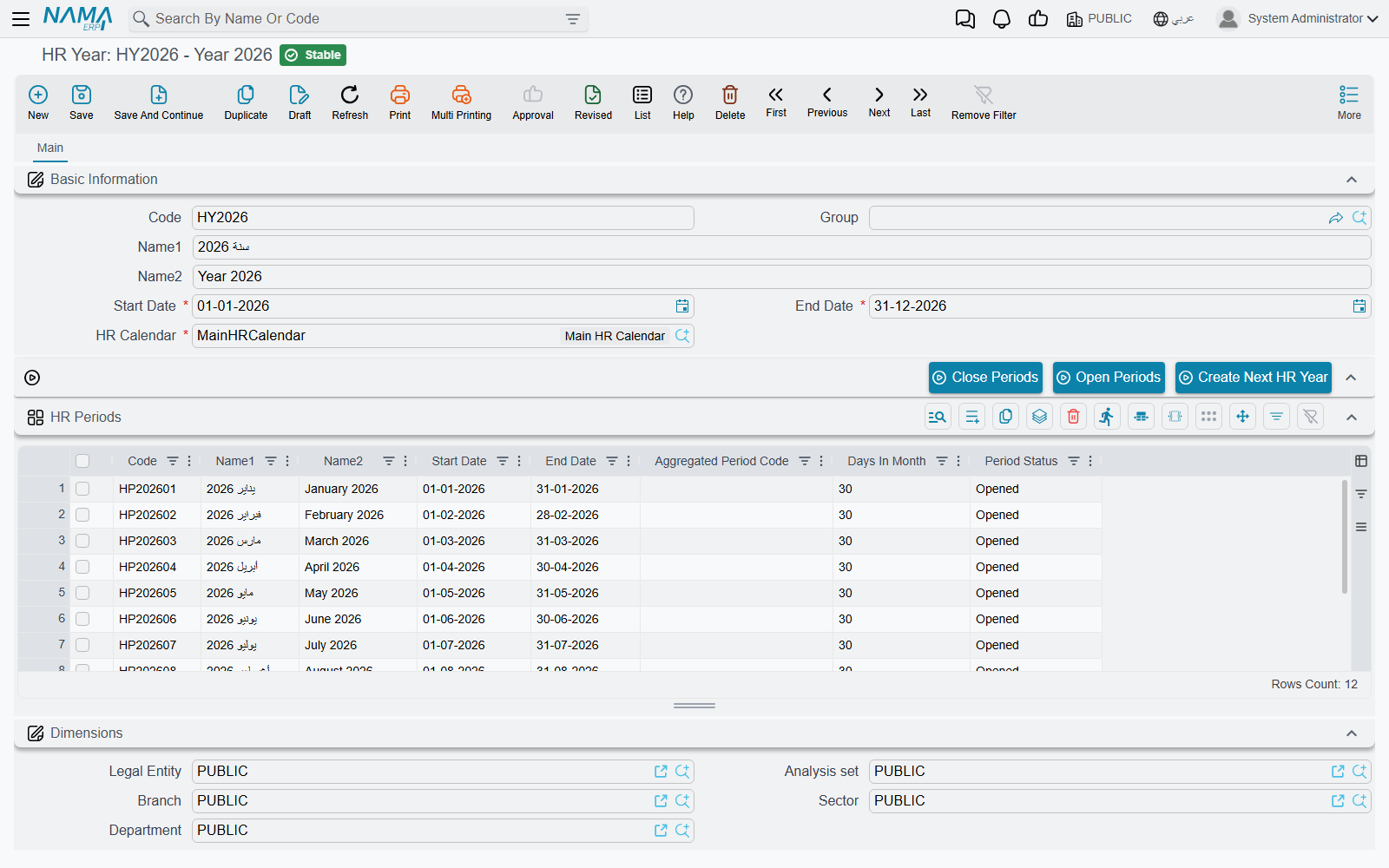
An HR Year owns an embedded grid of HR Periods (فترات الرواتب) — typically twelve, one per month, though nothing forces that shape. Each period line carries its own Code, Arabic Name/English Name, Start/End Date, Days In Month (عدد ايام الشهر — the day-count convention used for daily-rate math), an Aggregated Period Code (كود الفترة المجمعة), and a Period Status (حالة الفترة) of either Opened (مفتوح) or Closed (مغلقة).
The same period record also exists as its own standalone entity at Payroll > Settings > HR Period, with identical fields plus a reference back to its HR Year — useful when you need to look up or report on a single period without opening the whole year.
Aggregated Period Code
Two ordinary periods can share the same Aggregated Period Code, which lets reports and aggregated documents roll several periods up under one label — for example, treating two half-month runs as a single reporting month. It doesn't change how salary is calculated; it only affects how periods are grouped afterwards.
Actions on this screen
Three buttons sit on the HR Year screen, above the periods grid. The first two act on every period in the grid at once; to close or reopen a single month, change that line's Status by hand instead. Either way, the change only counts once you save the year.
- Close Periods (غلق الفترات) — sets every period's status to Closed, which blocks further salary generation against them. This is the safety switch once the year's payroll is finalized. Every payroll document that names a closed period is refused with Hr period {0} is closed — «فترة الرواتب {0} حالتها مغلقة» — salary sheets, payslips, loans and increases alike, so this one message on a payroll screen almost always means "someone closed the month".
- Open Periods (فتح الفترات) — sets every period back to Opened.
- Create Next HR Year (إنشاء سنة الرواتب التالية) — opens a new HR Year one year on: same HR calendar, start and end dates moved forward a year, coded with the new year's number, and a copy of every period (dates, days in month and aggregated period code carried over, codes and names regenerated). The new periods start Closed, so open the ones you are about to use before running payroll. The current year must be saved first, and the new one is not stored until you save it.
Salary Issuance: a payroll-stream tag, not a payment
Salary Issuance does not pay anyone
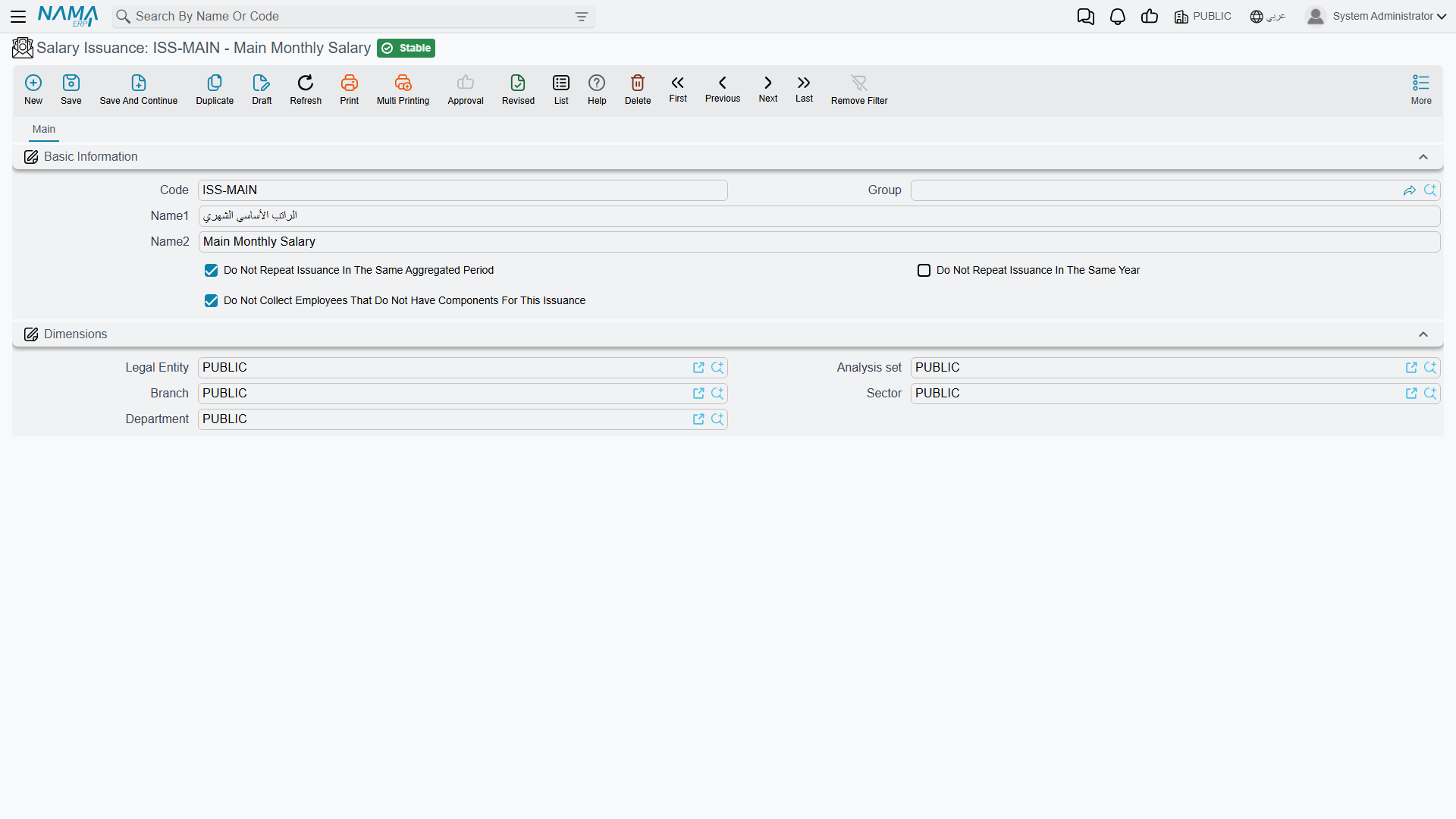
A Salary Issuance (صرفية راتب, Payroll > Settings > Salary Issuance) does not post accounting and does not move money. It is a classifier — a tag on a stream of pay that lets the same period produce more than one parallel salary run. Think of it as a label, not a payment step; the money still flows entirely through the salary sheet and salary document described in How Salary Is Calculated.
Why would one period need more than one stream? A common case: a company runs its main monthly salary under one issuance ("Main Salary"), and a separate commissions or bonus run for the same month under a second issuance ("Commissions"). Both target the same HR Period, but they generate independent salary sheets and salary documents, and each employee's salary component lines can be tagged so they only feed the issuance they belong to.
Beyond the identification fields (Code, Group, Arabic Name, English Name), an issuance carries three repeat-control flags whose whole job is to stop a stream from accidentally running twice:
| Flag | What it prevents |
|---|---|
| Do Not Repeat Issuance In The Same Aggregated Period (عدم تكرار الصرفية خلال نفس فترة الرواتب المجمعة) | Generating this issuance more than once for periods sharing the same Aggregated Period Code. |
| Do Not Repeat Issuance In The Same Year (عدم تكرار الصرفية خلال نفس السنة) | Generating this issuance more than once anywhere within the same HR Year. |
| Do Not Collect Employees That Do Not Have Components For This Issuance (عدم تجميع الموظفين الذين ليس لهم مفردات لهذه الصرفية) | Pulling in employees who have no salary component lines tagged for this issuance at all — keeps a "Commissions" run, say, from collecting every employee in the company. |
When a salary sheet is generated, it is built for one HR Period + Issuance combination at a time — which is exactly what makes parallel streams possible without them colliding.
Putting it together
A typical year looks like this: an HR Year "2026" is created (via Create Next HR Year from 2025), carrying twelve HR Periods, January through December, all tied to one HR Calendar. Every month, payroll runs a salary sheet for that month's period under the "Main Salary" issuance; a separate team runs a second salary sheet for the same period under a "Commissions" issuance, restricted to sales staff. Once a month's numbers are confirmed, its period is closed, so no further generation can touch it by accident.
Related pages
- How Salary Is Calculated — the full five-step pipeline that a salary sheet actually runs.
- HR Calendar, Holidays & Weekends — the calendar an HR Year points to.
- Employee HR Information — where per-employee component lines are tagged with an issuance.