
Employee HR Information
Once someone joins the company, their record splits naturally into two layers. Their personal and job details — name, contact information, passport and residency, department, job position, bank account — live on their own employee master record. Everything the salary engine needs on top of that — which calendar they follow, which allowances apply to them, and their own personal salary component lines — lives on a companion record: Employee HR Information.
Employee HR Information (معلومات شئون الموظفين) — the payroll layer
Found at Payroll > Main > Employee HR Information, this is a master file with one record per employee. It matters more than its short field list suggests, because it's exactly what How Salary Is Calculated means when it says "the employee's own component lines are read first; a salary structure is only consulted when the employee has none." Those personal lines are here.
Basic Information:
| Field | Purpose |
|---|---|
| Code / Group / Arabic Name / English Name | Identification (mirrors the employee's own name). |
| Salary Structure (هيكل راتب) | The reusable salary structure that acts as a fallback if this employee has no component lines of their own. |
Details:
| Field | Purpose |
|---|---|
| Calendar (التقويم) | Which HR Calendar this employee's payroll math follows. |
| Transportation Allowance (بدل مواصلات) / Housing Allowance (بدل سكن) | Each one of None (بدون), Applicable (مطبق), or Insured (مؤمن) — and this is precisely the switch behind the salary-engine warning that "Housing/Transportation allowances self-zero unless actually enabled on the employee's own record." A structure alone is not enough; it has to be turned on here. |
| Days For Worth Paid Vacation — Number Of Days In Year For Balance Calculation (عدد الأيام لاستحقاق بدل الأجازة) | The day-count basis used to calculate this employee's paid-vacation entitlement. |
| Contract Period In Months (مدة العقد بالشهور) | For fixed-term contracts. |
A Vacations grid lists per-employee entitlement overrides — Vacation Type, Assigned Vacation Days, and the Vacation Balance Range File (see Vacation Types & Balances) — followed by a read-only Totals block (Total Additions / Deductions / Other / Salary) so support staff can sanity-check an employee's overall pay at a glance without opening a salary document.
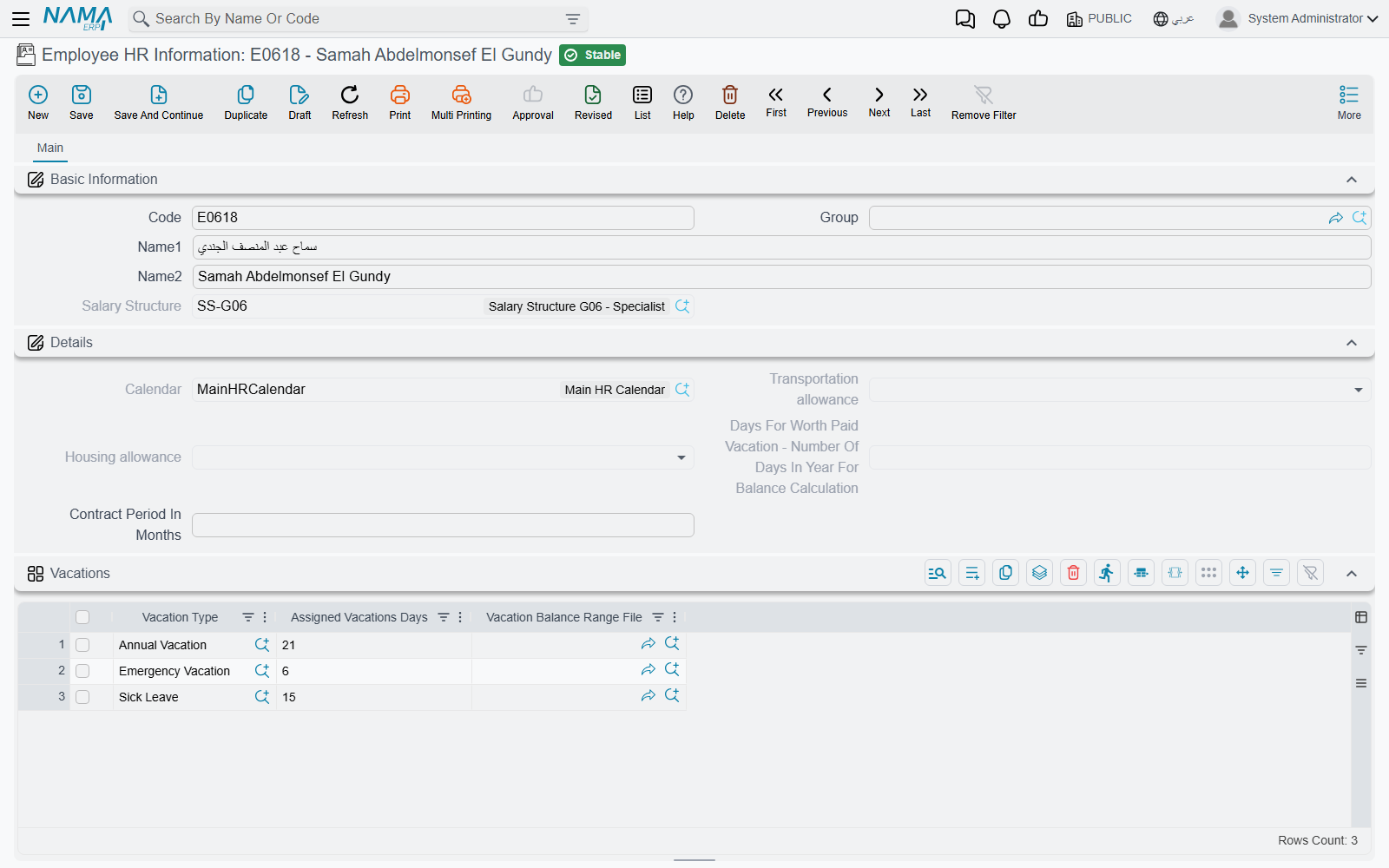
The most important part of the screen is the Salary Components grid (مفردات رواتب): HR Calendar, Component Type, Salary Component Value, Component Calculation Formula, Issuance (الصرفية), From Date, To Date. This is the actual list of personal component lines the salary engine reads first. Two things worth noticing:
- Each line can be dated (From/To), so a raise, a temporary allowance, or an end date can be scheduled without ever deleting history.
- Each line is tagged with an Issuance — see HR Years, Periods & Salary Issuance — so one employee can carry a "Main Salary" set of components and a separate "Commissions" set, each feeding only its own payroll stream.
Employment Information (بيان توظيف) — bulk onboarding
Employment Information, at Human Resources > Recruitment > Employment Information, is a different kind of thing entirely: not a master file but a document, built for onboarding a whole batch of new hires at once instead of opening each employee's HR Information record one at a time.
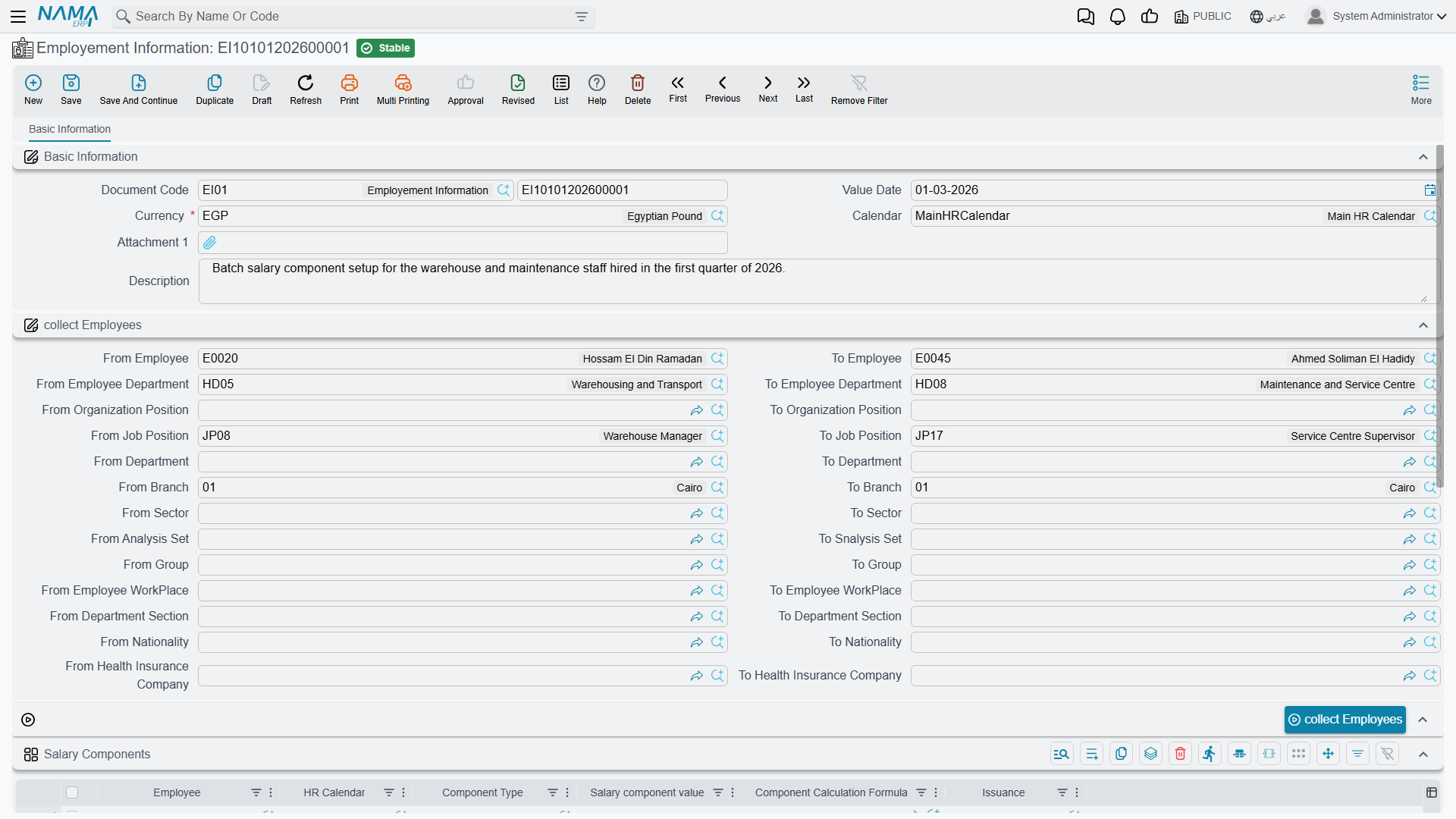
Its Collect Employees block defines a range or criteria — from/to employee, department, organization position, job position, branch, sector, analysis set, group, work place, department section, nationality, health insurance company — and a Collect Employees (تجميع الموظفين) button pulls in every employee that matches. Once collected:
- A Salary Components grid (the same shape as HR Information's: employee, HR calendar, component type, value, formula, issuance) lets HR key in the same component setup for the whole batch in one pass.
- A Collect Vacations (تجميع الأجازات) button populates a Vacancies grid so assigned vacation days can be pre-set for the same batch.
Not a payroll or accounting document
Employment Information generates no accounting effect and runs no payroll on its own. It's purely a convenience tool for writing the same component and vacation setup into many employees' records in one operation — typically right after a batch of hires has gone through work starting.
Actions on this screen
The Employee HR Information screen has no buttons of its own. Employment Information has two:
- Collect Employees — adds a line for every employee matching the range or criteria. It does not check what is already in the grid, so pressing it twice lists the same employees twice; clear the grid first if you change the range.
- Collect Vacations — fills the Vacancies grid with the vacation types that apply to the first employee on the grid, each with its type's default days. The grid is rebuilt, not added to. At least one employee must be on the grid.
How it fits into onboarding
A new hire's record usually comes together in this order: a job offer proposes a salary structure, a work starting document creates the employee (and their HR Information record), and — if a whole cohort joined at once — Employment Information bulk-fills their component lines and vacation entitlements in a single pass. From then on, day-to-day adjustments for one person happen directly on their Employee HR Information record.
The employee's own master record also carries the official identity and travel documents — passport, residency, work license, social insurance — that the government relations processes later read and update as visas and residencies are renewed.
Related pages
- How Salary Is Calculated — why the component lines on this page take priority over a salary structure.
- Work Starting — how a new employee's record and HR Information come into existence.
- Government Relations — where the employee's official documents are tracked and renewed.