
Employee Services (Vehicles, Transport & Meals)
Beyond salary, most companies run a handful of side benefits for their staff — a car to do the job with, a bus to get to the site, a hot meal at the canteen. These three areas share nothing in common functionally, but they share a home in Nama because they are all catalog-driven employee perks: someone maintains a small master list once (car problem codes, meal types, pickup routes), and the rest of the department repeatedly draws from it. This page walks through all three: Vehicles (assigning and servicing company cars, and insuring them), Transport (the routes a company driver runs to bring employees to and from work), and Meals (what is served, to whom, and when it is delivered).
Not government traffic penalties
A Car Action or Car Problem here means something that happened to the vehicle — an accident, a repair, a routine service. Government traffic fines and violations against the company are a completely different, Gulf-specific area — see Government Penalties instead.
Vehicles
Recording what happened to a car: Car Action
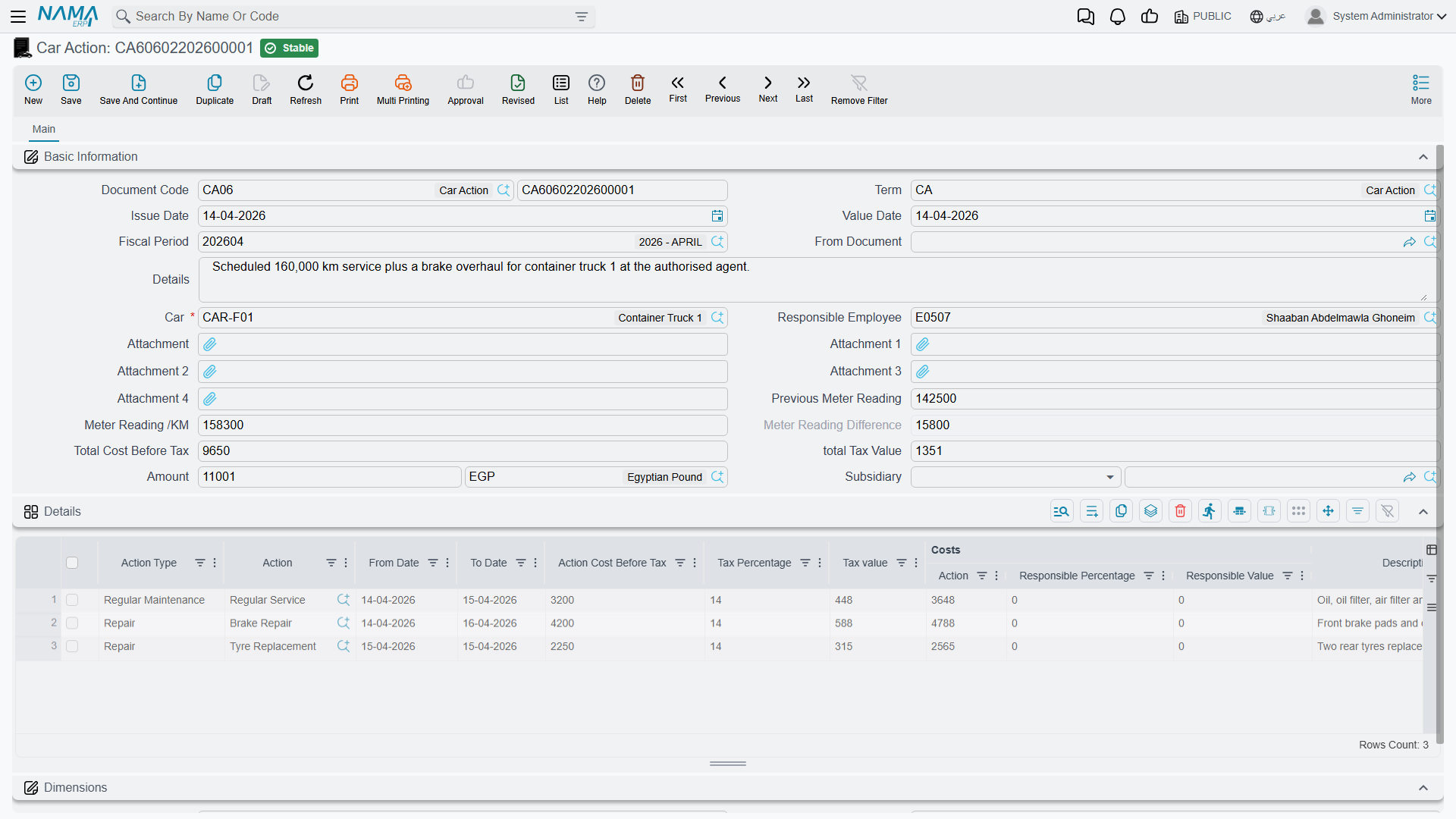
Every time a company car needs maintenance, gets into an accident, has its licence renewed, or incurs any other cost, that event is logged as a Car Action (إجراء سيارة) — found under Human Resources → Vehicles → Car Action (الموارد البشرية > السيارات > إجراء سيارة). One document can carry several such events for the same car in its Details grid, each line picking a broad Action Type (License Renewal, Accident, Violation, Regular Maintenance, Repair, or one of three open "Other" categories) and then a specific Action drawn from the Car Problem (عطل سيارة) catalog described below — the exact accident type, service item or repair being billed.
| Field (English) | Arabic label | Purpose |
|---|---|---|
| Car | السيارة | The vehicle the document is about. |
| Responsible Employee | الموظف المسئول | The employee (usually the driver) the car is assigned to. |
| Previous Meter Reading / Meter Reading /KM | قراءة العداد السابقة / قراءة العداد /كم | The odometer reading before and after, so mileage between actions is tracked automatically. |
| Action Type | نوع الإجراء | The broad category of what happened (accident, maintenance, repair, licence renewal…). |
| Action | الإجراء | The specific catalog entry from Car Problem that this line bills. |
| Action Cost Before Tax | تكلفة الإجراء قبل الضريبة | What the action cost, before tax. |
| Responsible Percentage / Responsible Value | نسبة تحمل المسئول / قيمة تحمل المسئول | How much of that cost is charged to the responsible employee rather than the company (e.g. an at-fault accident). |
A related Car Action Request (طلب إجراء سيارة) exists for the same events but without an accounting effect — a lighter intake form (who processed it, what happened, the estimated cost) that can be raised before a formal, ledger-posting Car Action is written up.
How it's processed
Saving a Car Action raises a background business request (Business Request) that posts the cost split to the ledger: the debit side covers the action's cost (net of the responsible employee's share), the responsible employee's share and its tax are posted separately, and the tax on the whole action is posted on its own pair of accounts. If that request fails, retry it from the Business Requests view.
The catalog of things that happen to a car: Car Problem
Car Problem (عطل سيارة) is the master file both Car Action and Car Action Request draw their Action field from — the actual list of accidents, services and repairs a company car can go through, each carrying its own accounting configuration (accounts bag, tax exemptions) so every action of the same kind posts consistently. Maintain it under Human Resources → Vehicles → Car Problem before logging actions against it.
Moving a car between drivers or departments: Car Info Updater
When a car changes hands — a new driver takes it over, it moves to a different branch or department, its status changes (Active, Suspended, in an Accident, under Maintenance…), or its running kilometres need correcting — record that with a Car Info Updater (تحديث بيانات سيارة). Its Details grid is built as current value / new value pairs, one line per car, so the change is explicit and auditable rather than a silent overwrite: current driver vs. new driver, current status vs. new status, current running KM vs. new running KM, and the same before/after pairing for legal entity, branch, sector, department and analysis set. It does not post to the ledger — it only rewrites the car's own master data.
Car insurance
Insuring the company fleet runs through its own small lifecycle, separate from day-to-day Car Actions:
- Get a quote. A Car Insurance Offer Document (
سند عرض تأمين سيارات) records what an insurance company quoted — the insurance period, the type of cover, and a Details grid priced by car type rather than by named vehicle (number of cars, estimated price, driver/passenger insurance values, an insurance percentage or minimum, an endurance percentage/limit, and an instalment breakdown). It has no accounting effect of its own — it is a quote to compare, not a commitment. - Commit to the policy. Once an offer is accepted, a Cars Insurance Policy (
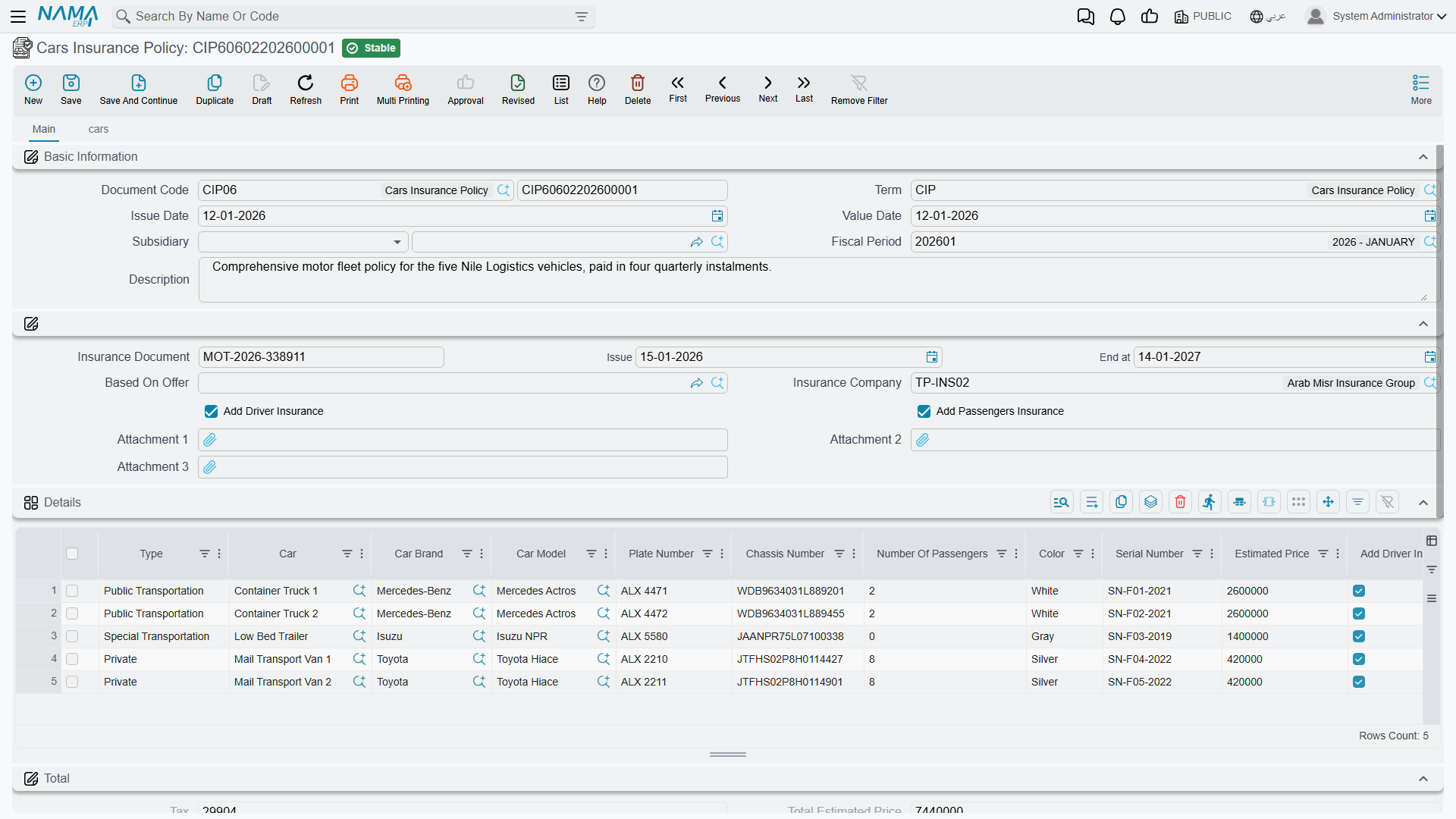
بوليصة تأمين سيارات) is opened — optionally Based On Offer so it inherits the quote's pricing — naming the insurance company and the policy document's number/issue/end dates. Its Details grid now lists actual cars, one line each, with plate number, chassis number, brand, model, colour, passenger count, driver/passenger insurance values, discount and tax, so the policy's net value is built up car by car. A cars tab on the policy lists every Car Insurance Adding Document and Car Insurance Removing Document raised against it, so the full history of what was added or dropped from the policy is visible from one place. - Add or remove cars mid-term. Cars bought or sold after the policy was signed are handled by a Car Insurance Adding Document (
سند إضافة تأمين سيارات) or a Car Insurance Removing Document (سند حذف سيارات من التأمين) referencing the Cars Insurance Policy they amend. The removing document additionally works out a Recovered Price — the refund due for dropping a car before the policy period ends. - Recognise instalments. Because a policy is usually paid in instalments, a Car Insurance Installment Proof Document (
قيد إثبات استحقاق قسط تأمين السيارة) records the accounting entry that recognises one instalment as due, referencing the policy or amendment document it belongs to.
| Field (English) | Arabic label | Purpose |
|---|---|---|
| Based On Offer | بناءا على عرض | Links the policy back to the offer whose pricing it copied. |
| Insurance Document (Number / Issue / End at) | وثيقة التأمين (رقم / تاريخ الإصدار / تاريخ الأنتهاء) | The insurer's own document reference and validity dates. |
| Plate Number / Chassis Number | رقم اللوحه / رقم الهيكل | The specific vehicle a policy line covers. |
| Add Driver Insurance / Add Passengers Insurance | إضافة تأمين السائق / إضافة تأمين الركاب | Whether this line's price includes cover for the driver and/or passengers. |
| Total After Discount / Policy Net Value After Taxes | الصافي بعد الخصم / صافي قيمة البوليصة بعد الضرائب | The policy's running totals after discount and after tax. |
How it's processed
The Cars Insurance Policy, the Adding and Removing documents, and the Installment Proof Document each raise a background business request that posts the contracting cost, discount and any fees (plus tax on the fees) to the accounts configured on their document term. Only the Insurance Offer Document has no ledger effect — it is a quote, not yet a commitment. If a posting fails, retry it from the Business Requests view.
Transport: Pickup Plan
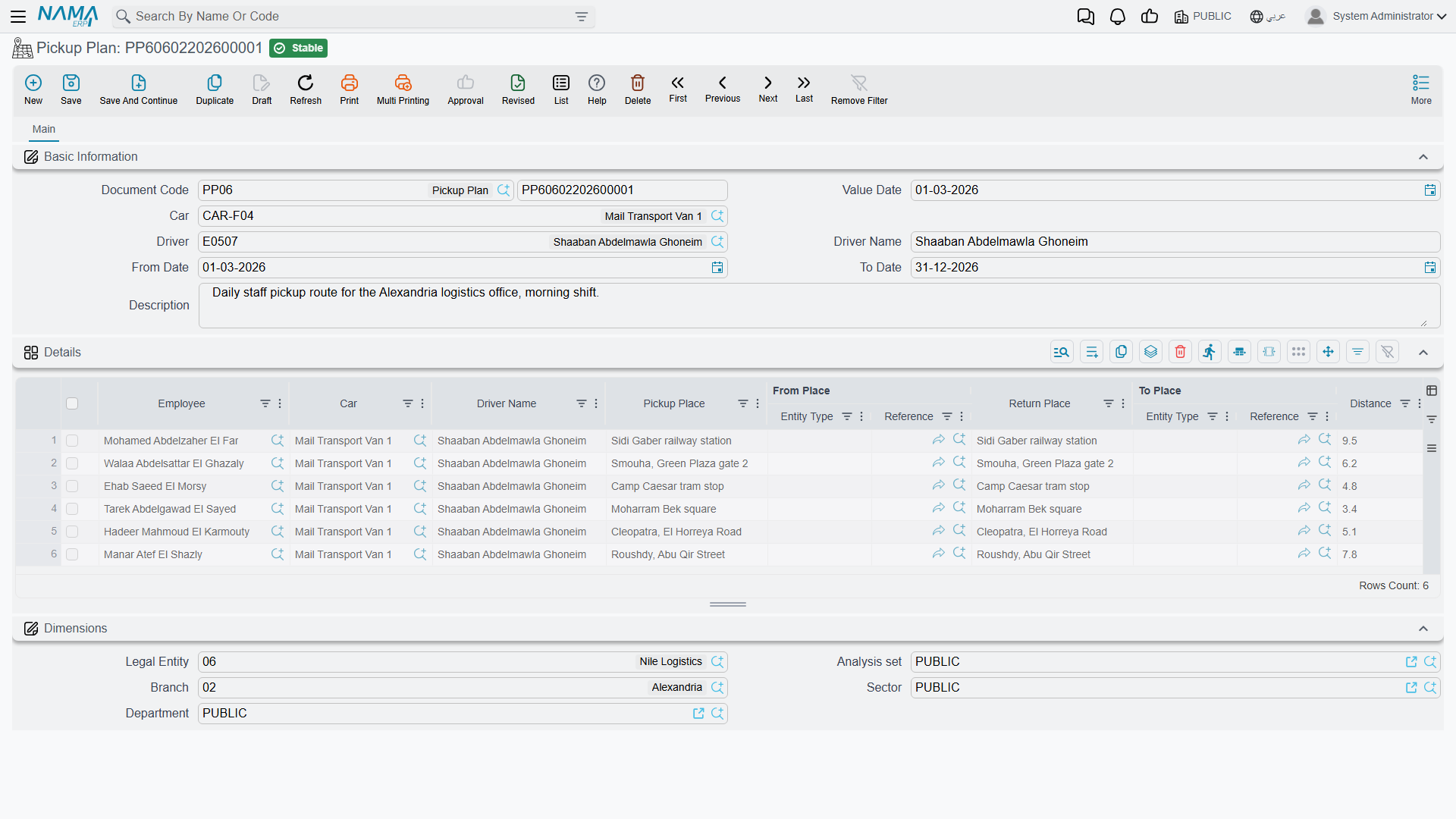
A Pickup Plan (خط سير, literally "route") is a company driver's daily run: which car, which driver, over what date range, and — line by line in its Details grid — which employees are picked up from where and dropped off where, at what time, and how far each leg is. It is found under Human Resources → Vehicles → Pickup Plan (الموارد البشرية > السيارات > خط سير) and does not post to the ledger; it is purely an operational schedule for HR and transport staff to know who is riding which route.
| Field (English) | Arabic label | Purpose |
|---|---|---|
| Car / Driver / Driver Name | السيارة / السائق / إسم السائق | The vehicle and driver running this route. |
| From Date / To Date | من تاريخ / إلى تاريخ | The period this route is valid for. |
| Employee | الموظف | The employee riding this leg of the route. |
| Pickup Place / From Place | مكان الالتقاط / من المكان | Where the employee is collected. |
| Return Place / To Place | مكان التوصيل / إلى المكان | Where the employee is dropped off. |
| Pickup Time / Return Time | وقت الالتقاط / وقت التوصيل | The scheduled times for this leg. |
| Distance | المسافة | The distance covered by this leg. |
Meals
Feeding employees runs on the same catalog-then-apply pattern as most other employee-services areas:
Define what is served: Meal Type. A Meal Type (
نوع وجبة) fixes the cost, the delivery time and a per-employee Allowance Value for a given meal (say, "night-shift dinner"). Its Apply For tab is what makes it automatic: a criteria definition plus a from/to time window, an employee/department/position range, and a set of weekday checkboxes together decide which employees qualify for this meal type on which days, without anyone hand-picking names.Field (English) Arabic label Purpose Meal Cost التكلفة What one instance of this meal costs. Allowance Value قيمة البدلات The cash allowance paid instead of the meal, where applicable. Time وقت التوصيل The scheduled delivery time for this meal. Criteria المعايير The filter that, combined with the employee/department/position range and weekdays below it, decides eligibility. From Employee / To Employee من موظف / الي موظف The employee range this meal type applies to. Friday … Thursday الجمعة … الخميس Which weekdays this meal type is served on. 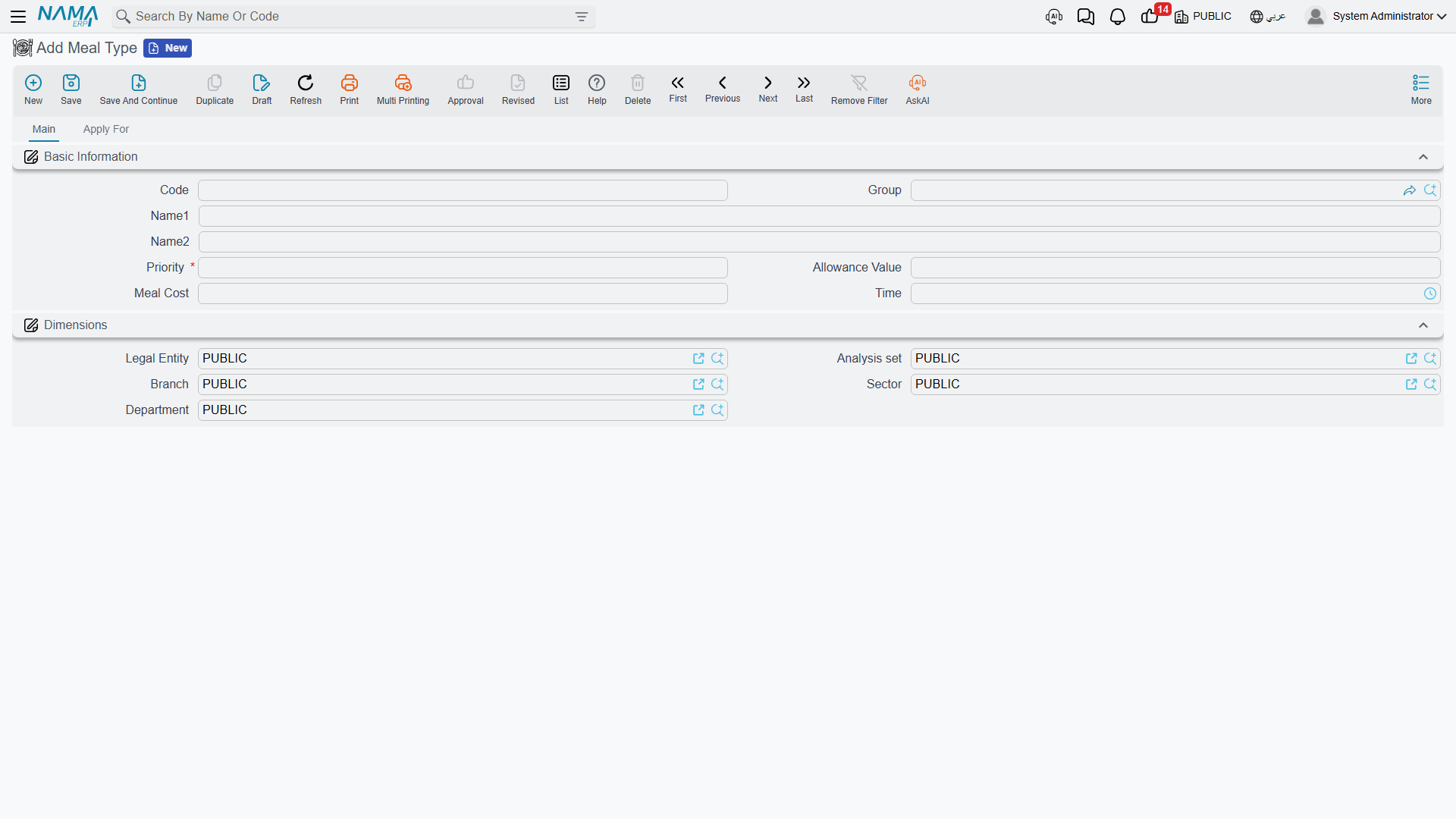
Handle exceptions: Meals Details. When a specific employee needs a one-off adjustment — swap the meal for its cash allowance, cancel it for a date range, or otherwise override the automatic eligibility from Meal Type — record it on a Meals Details (
تفاصيل الوجبات) document: one line per employee, date range, meal type and the desired Allowance Type (Meal, Meal Allowance, or Cancelled).Generate and track the actual delivery: Meal Delivery Plan. A Meal Delivery Plan (
خطة توصيل الوجبة) is the operational plan that actually gets meals to people. Set a from/to date range and an employee/department/position range, then use Collect Meals (تجميع الوجبات) to list the employees and the meal type each one gets. Each line carries a delivery date, cost and a Status (Planned, Delivered, Cancelled); as meals actually go out, Update Status (تحديث الحالة) moves lines from one status to another in bulk. Both buttons are described under Actions on this screen below.
None of the three meal documents post to the general ledger — meal cost here is an operational and allowance-tracking figure, not an accounting entry.
Actions on this screen
The vehicle, insurance, transport, Meal Type and Meals Details screens on this page have no buttons of their own. The Meal Delivery Plan has two:
- Collect Meals — rebuilds the grid with one line per employee in the plan's From/To Employee range, carrying the meal type whose own employee range covers that employee; when several meal types do, the one with the lowest Priority number wins. The department and position ranges on the plan narrow which meal types are considered. Employees no meal type covers are left out.
- Update Status — asks for a From Date, an optional To Date, an optional From Status and a To Status, and sets every line delivered between the dates (and, if given, currently in the From Status) to the To Status. The dates themselves are not included: a line dated exactly on the From Date or To Date keeps its status. From Date and To Status are required.
Messages you may see
| Message | Why | What to do |
|---|---|---|
| the request is processed by another action — «تم عمل إجراء من قبل بناءاً على هذا الطلب» | The Car Action's From Doc points at a Car Action Request that a different Car Action has already processed. | Open the request to see which action consumed it; raise a fresh request for the extra work instead of reusing this one. |
| Can not Change Meter Reading — «لايمكن تغير قراءة العداد» | A Car Action generated from a request changed the Meter Reading or Previous Meter Reading the request carried. | Restore the readings the request recorded; if the odometer was misread, correct the request first. |
| Cant change actionType — «لايمكن تغير نوع الاجراء» | A details line of a Car Action generated from a request has a different Action Type from the matching request line. | Put the original action type back, or start from a new request that says what you mean. |
| Cant change problem — «لايمكن تغير الإجراء» | Same check on the line's Action — the specific Car Problem entry no longer matches the request. | Restore the action the request named; a different repair needs its own request. |
| Cant change Date — «لايمكن تغير التاريخ» | A details line's From Date or To Date differs from the request's line. | Keep the request's dates on the action, or amend the request. |
| This Document Cant be Change It ProcessedBy {0} — «لايمكن التغير فى هذا المستند تم معالجتة ب {0}» | The Car Action Request has already been processed by the Car Action named in the message, so the request itself is frozen. | Make the change on the Car Action instead; the request is only the intake form. |
| Please Fill Insurance Document (Number , Issue , End) — «يجب ان تملا حقول الوثيقه الرقم وتاريخ الاصدار و تاريخ الانتهاء الخاص ببوليصة التأمين» | The Cars Insurance Policy is missing at least one of the insurer's own document fields — Number, Issue date or End at date. | Fill all three from the insurer's policy paper; the adding and removing documents validate their dates against them. |
| Empty Main Field — «حقل رئيسي فارغ» | An instalment line on the Car Insurance Offer Document has no Percentage, so its value cannot be derived from the total insurance price. The message is flagged against the line's car-type column even though it is the percentage that is missing. | Enter the percentage of the total each instalment represents, or delete the empty instalment line. |
| The car {0} was already added in another adding document {1} — «السيارة {0} مضافة بالفعل فى سند اضافة اخر{1}» | The car is already covered by another Car Insurance Adding Document on the same policy, and this document's term does not have Allow Adding Car To Insurance If It Found In Policy enabled. | Remove the duplicate line, or enable that option on the document term if a second cover really is intended. |
| End date {0} must be after issue date {1} — «تاريخ الأنتهاء {0} يجب ان يكون بعد تاريخ الاصدار {1}» | On an adding line the cover's End at date falls before its Issue date. | Correct the line's dates. |
| End date {0} is after policy end date {1} — «تاريخ الأنتهاء {0} بعد تاريخ انتهاء البوليصة {1}» | A car is being added with cover that runs past the end of the policy it is attached to. | Shorten the line to the policy's end date, or add the car under a policy that runs that long. |
| Removing date {0} must be after issue date {1} — «تاريخ الحذف {0} يجب ان يكون بعد تاريخ الاصدار {1}» | On a Car Insurance Removing Document the Removing Date is on or before the date the cover was issued, so there is no cover period to refund. | Set the removing date inside the cover period. |
| Removing date {0} must be before end date {1} — «تاريخ الحذف {0} يجب ان يكون قبل تاريخ الانتهاء{1}» | The removing date is on or after the cover's end date — the cover has already run out, so nothing is recovered by removing the car. | Either use a date inside the period, or drop the line: expired cover needs no removing document. |
| The car {0} was not found in policy {1} or any adding document for the same policy — «السيارة {0} غير موجودة بالبوليصة {1} او اى سند اضافة اخر على نفس البوليصة» | The car being removed was never on that policy — or was already taken off it by an earlier removing document. | Check the policy's cars tab for what the policy currently covers, and remove only cars listed there. |
Related
- Employee HR Information — the employee master record that Car Action's responsible employee, Pickup Plan's riders, and Meal Delivery Plan's eligible staff are all drawn from.