
Job Offers & Tests
A candidate who clears interviews and testing doesn't just get hired on a handshake — Nama puts the proposed terms of employment into their own document first, so the job title, salary package, and start date discussed with the candidate are on record before anyone signs anything.
Job Offer
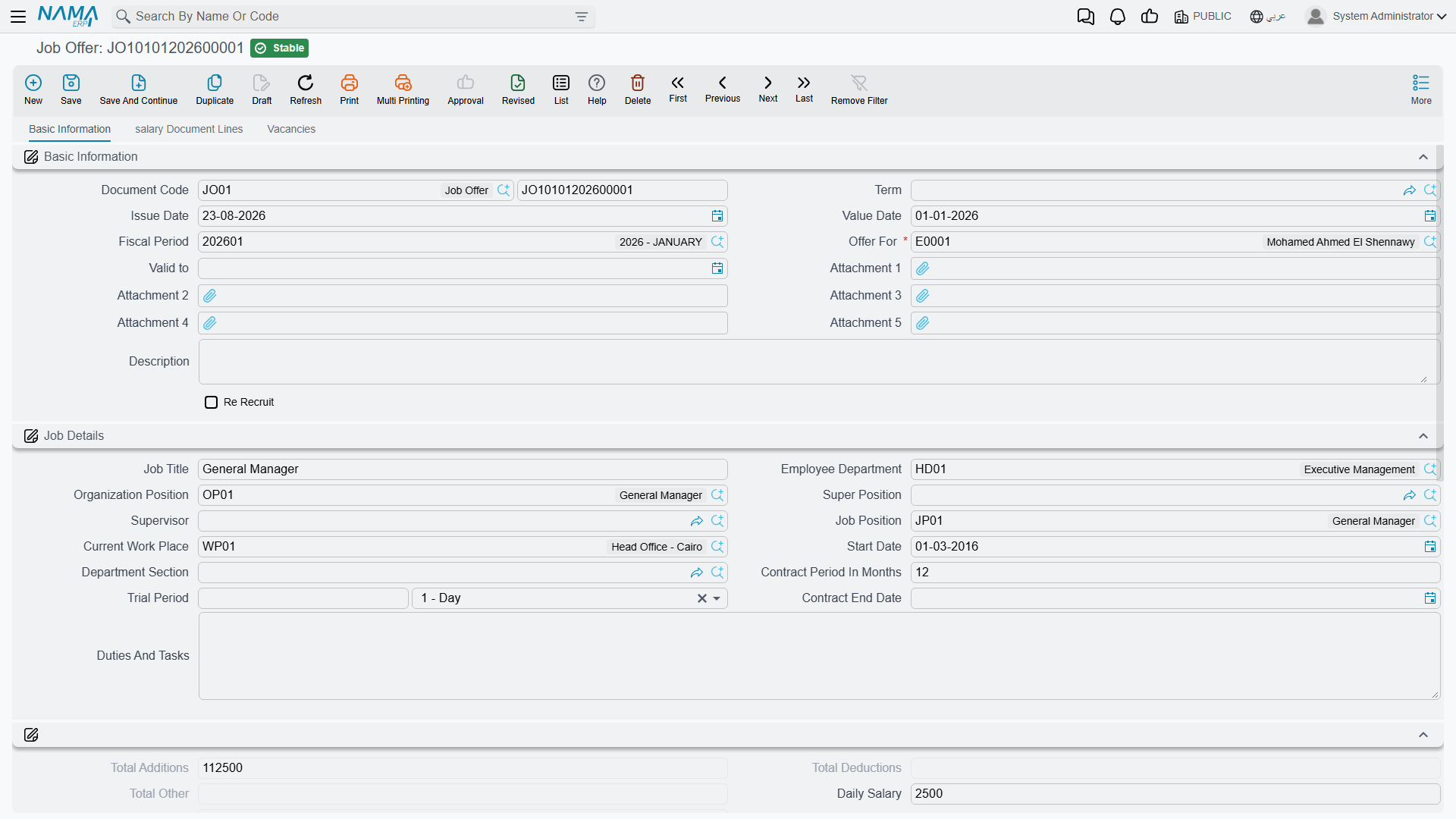
Found at Payroll > Recruitment > Job Offer, a Job Offer (عرض وظيفي) is a document that spells out what's being offered: who it's for, the job details, and the full salary package.
Basic Information & Job Details:
| Field | Purpose |
|---|---|
| Document Code / Term / Issue Date / Value Date / Fiscal Period | The standard document identity fields shared by every Nama document. |
| Offer For | Who the offer targets — this is a generic reference, so it can point at a registered candidate or, for a returning hire, an existing employee. |
| Re Recruit | Marks the offer as re-hiring someone who worked for the company before. |
| Valid To | The offer's expiry date. |
| Job Title / Employee Department / Organization Position / Super Position / Supervisor / Job Position | Where the role sits in the org chart. |
| Current Work Place | The physical work location assigned. |
| Start Date / Contract Period In Months / Contract End Date / Trial Period | The employment term being proposed. |
| Duties And Tasks | A description of the role's responsibilities. |
Employee Details carries the personal terms — Nationality, Marital Status, Residency ID, Ensured Legal Entity (for social insurance), Calendar, Offer State (Offered, Accepted, or Rejected), Tickets/Classification, and banking details (Bank ID, Bank Account, IBAN).
A job offer copies the salary structure
The Salary Structure field on a job offer works exactly like it does anywhere else in HR — see Salary Structures. Whatever structure is picked here becomes the fallback for every component the offer's own Salary Components grid doesn't explicitly price, and — because the offer becomes the new hire's first HR record — that same structure carries forward as the employee's own fallback once they're appointed. Proposing the right structure on the offer is effectively proposing the employee's whole pay package in one move.
The Salary Components page repeats the familiar shape (HR Calendar, Component Type, Salary Component Value, Component Calculation Formula, Issuance, From/To Date, Criteria) alongside Housing and Transportation allowance switches, ticket entitlements, and the read-only Total Additions / Deductions / Other / Salary figures — so the whole package can be reviewed as one number before it's sent to the candidate. A Vacancies page lets the offer pre-assign vacation entitlement (vacation type, assigned days, balance range) for the new hire, the same information that later appears on their Employee HR Information record.
Two actions sit on the Salary Components page: Collect Vacations (تجميع الأجازات) fills the vacations grid with every vacation type that applies to the employee the offer is for, at each type's default days, and Reject (رفض) sets the Offer State to Rejected when the candidate — or the company — walks away.
Candidate Job Offer
Candidate Job Offer (عرض وظيفي لمتقدم للعمل), at Payroll > Recruitment > Candidate Job Offer, is the same idea narrowed to one specific use: it carries a direct Candidate field instead of the generic "Offer For" reference, and it is the offer you make before the applicant is an employee. Once it is accepted, Transfer To Employee And Create Job Offer — on this document or on the candidate's record — turns it into an employee and a plain Job Offer. Everything else — job details, salary components, vacancies — mirrors the plain Job Offer.
Aggregated Job Offer
Hiring rarely happens one person at a time when a whole cohort starts together — a new branch opening, a seasonal intake. Aggregated Job Offer (عرض وظيفي مجمع), at Payroll > Recruitment > Aggregated Job Offer, is the batch version: define an employee range or criteria (department, organization position, job position, branch, sector, nationality, and more) in its Collect Employees block, click Collect Employees (تجميع الموظفين), and Nama pulls every matching employee whose Employee State is still empty — someone registered but not yet working — into the Employees grid — one line each, with a back-pointer to the individual Job Offer it will generate.
The same Job Details, Salary Components, and Vacancies pages appear here, applied once to every collected line; a Generated Doc Book / Term pair tells Nama which book and term to use for the individual offers it spawns, and Create Offers Only And Do Not Update When Saving controls whether re-saving the batch is allowed to touch offers it already created. As with any aggregated document, work in the batch — not in the generated singles underneath it.
HR Test
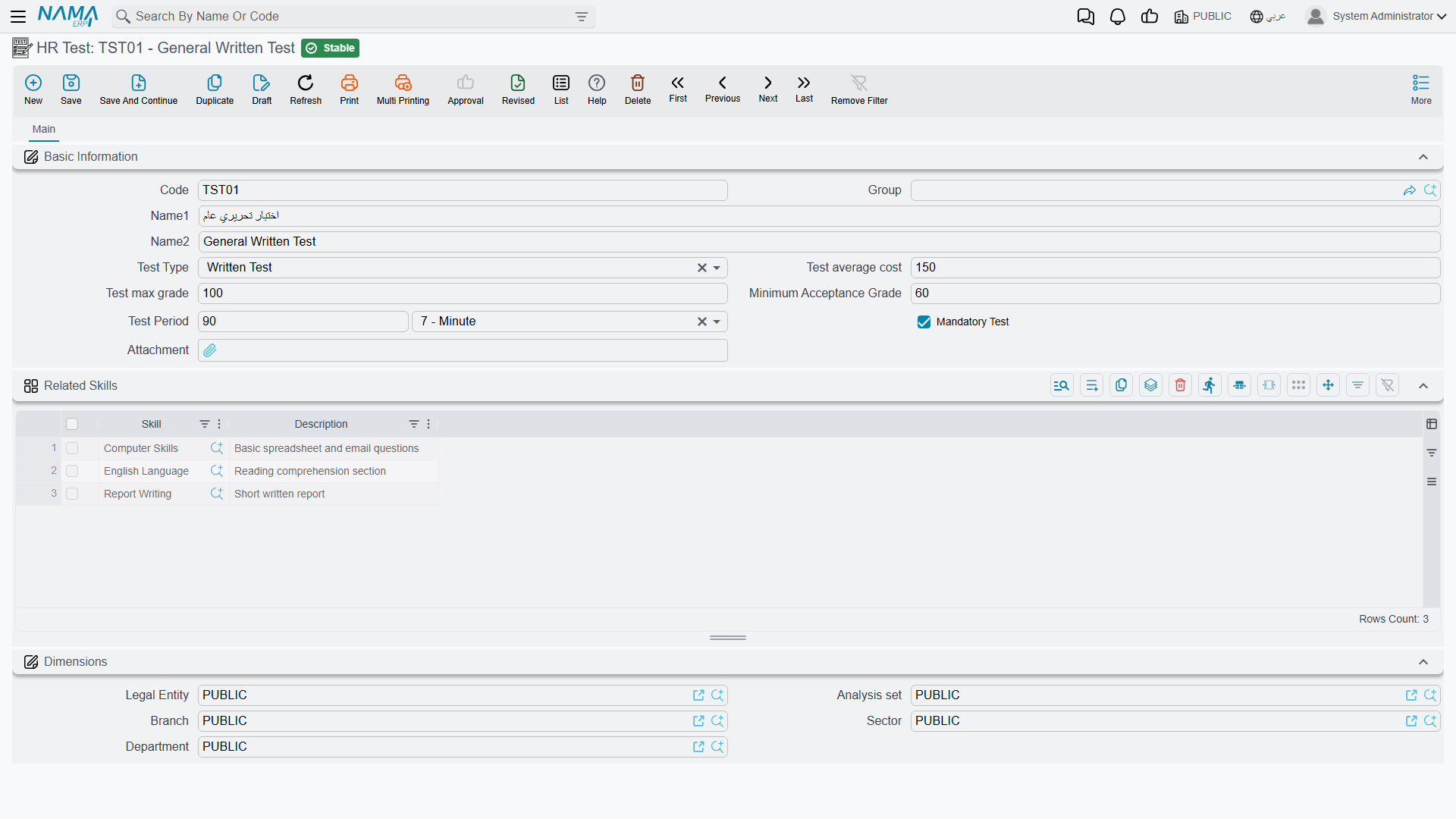
Found at Payroll > Recruitment > HR Test, an HR Test (إختبار) defines one assessment style a candidate can be put through on the way to an offer: Test Type (Written Test, Interview, Trial Work, or one of three custom types), Test Average Cost, Test Max Grade, Minimum Acceptance Grade, Test Period, whether it's Mandatory, and a Related Skills grid linking it to the skills it measures. A vacancy type (see Vacancies & Candidates) lists the tests expected of anyone applying under it, with its own per-vacancy-type weight and passing grade.
HR Test Result
HR Test Result (نتائج الإختبار), at Payroll > Recruitment > Test Result, is where the actual scoring happens. Pick the Vacancy and the Test being scored, use Collect Candidates (تجميع المتقدمين) to add every candidate who applied for that vacancy and is not already in the grid, then fill each candidate's Test Score in the Details grid; Nama compares it against the Minimum Acceptance Grade and records a Test Conclusion — Passed, Partial Passed, or Failed — for that line. Those per-test conclusions are what a candidate's own Tests Total Grade and Tests Status summarise.
From offer to employee
Accepting an offer isn't a separate click on the offer itself — the hire happens back on the candidate's record, whose Create Employee or Transfer To Employee And Create Job Offer button turns the applicant into a real employee. From there, onboarding continues with Work Starting, which puts the new hire on the payroll and creates their Employee HR Information record.
Actions on this screen
On the Job Offer (on the Salary Components page):
- Collect Vacations — replaces the vacations grid with every vacation type that applies to the employee in Offer For, each at its default days, and copies the employee's bank, bank account and IBAN onto the offer. It does nothing when the offer is not made to an employee.
- Reject — sets Offer State to Rejected. An offer whose state is already set is refused with Can Not Modify Processed Offer — «لا يمكن تعديل حالة العرض».
On the Candidate Job Offer:
- Transfer To Employee And Create Job Offer — asks for a Start Date, creates an employee from the candidate (or reuses the one already created from them), then creates and commits a plain Job Offer for that employee carrying this offer's terms. The candidate job offer must be saved first, and its document term must name the Generated Job Offer Book and Generated Job Offer Term.
On the Aggregated Job Offer:
- Collect Employees — replaces the Employees grid with every employee who matches the Collect Employees range and has no Employee State yet.
On the Test Result:
- Collect Candidates — adds every candidate who applied for the chosen Vacancy and is not already in the Details grid; existing lines are kept. It does nothing until a vacancy is chosen.
The HR Test has no buttons of its own.
Messages you may see
| Message | Why | What to do |
|---|---|---|
| You must use candidate job offer document instead of this document — «يجب استخدام مستند عرض وظيفي للمتقدم للعمل بدلاً من هذا المستند» | Offer For on a plain Job Offer points at a registered candidate rather than an employee. | Raise a Candidate Job Offer instead — or, for a returning hire, point the offer at the existing employee record. |
| Candidate {0} already has candidate job offer {1} — «المتقدم للعمل {0} لديه بالفعل عرض وظيفي للمتقدم للعمل {1}» | A committed Candidate Job Offer already exists for that candidate; a candidate carries one offer at a time. | Amend the existing offer named in the message, or reject it before writing a new one. |
| Salary Component Type {0} Repeated — «نوع مفرد المكون {0} مكرر» | The Salary Components grid prices the same component type twice, so the package total would double-count it. | Keep one line per component type and put the whole amount there. |
| JobOffer {0} was created in the same date {1} for employee {2} — «العرض الوظيفي {0} تم إنشاؤه في نفس التاريخ {1} للموظف {2}» | Another committed job offer for the same person already carries this Value Date, which would leave two competing packages effective on the same day. | Move this offer to a different value date, or cancel the earlier one. |
| Document {0} was created in the same date {1} — «{1} السند {0} تم إنشاؤه في نفس التاريخ» | A committed Update Employee Info document for the same employee already has this value date, so it is unclear which of the two sets the employee's terms that day. | Give the offer a different value date, or fold the change into the existing update document. |
| Can not edit the document for employee {0} because the document {1} was created after this — «لا يمكن تعديل المستند للموظف {0} لأن المستند {1} تم إنشاءه بعد هذا المستند» | HR Configuration's Prevent Editing Job Offers And Update Emp Info Docs If There A Doc After is enabled, and a later job offer or update-info document already builds on this one. | Edit the latest document in the chain instead, or cancel the later documents first. |
| Vacation Balance {0} Less Than Consumed {1} — «المخصص من الاجازات {0} اقل من المستهلك {1}» | The Assigned Vacations Days given on a vacancies line is smaller than what the employee has already taken in that year, so the balance would go negative from day one. | Raise the assigned days, or enable HR Configuration's Do Not Check Consumed Vacation With Update Doc if balances are being restated deliberately. |
| Vacation balance range in vacation type {0} and vacation balance range in line and assigned vacation days are all empty, You must fill at least one of them — «لا يمكن ترك كلا من ملف أرصدة الاجازات الموجوده داخل نوع الاجازه وأرصدة الاجازات الموجوده علي السطر و أيام الاجازات المخصصه فارغين,يجب اضافة واحد منهم علي الاقل» | A vacancies line names a vacation type but nothing says how much leave it grants: neither the type's balance-range file, nor a range on the line, nor a number of assigned days. | Fill one of the three — normally the balance-range file on the vacation type, or a flat number of days on the line. |
| You must fill only one option vacation balance range or assigned vacations days — «يجب عليك اختيار واحد فقط ملف ارصدة الاجازات او ايام الاجازات المخصصه» | The opposite problem: the line has both a balance range (its own or the vacation type's) and a number of assigned days, so two different entitlements are being claimed. | Clear one of them — the range for seniority-scaled entitlement, the assigned days for a flat grant. |
| Number of days of year is less than 350 days for vacation type {0} — «عدد أيام السنة أقل من 350 يوم لنوع الإجازة {0}» | A vacancies line's Number Of Days Of Year is under 350, which usually means a mistyped figure rather than a real calendar. This is a warning: the offer still saves. | Check the figure; accruals divide by it, so a wrong value quietly distorts every balance the offer grants. |
| The employee {0} Already has Update Info document ,you can not delete it — «لا يمكنك حذف المستند لان الموظف {0} لديه مستند تحديث بيانات» | You are deleting a job offer for an employee whose terms have since been amended by an Update Employee Info document that depends on it. | Delete the update-info documents first, or cancel the offer instead of deleting it. |
Related pages
- Vacancies & Candidates — opening the position and screening the applicants that eventually reach an offer.
- Salary Structures — the fallback package a job offer proposes and carries forward.
- Work Starting — the onboarding step that follows an accepted offer.
- HR Requests, Documents & Aggregated Documents — the general aggregation pattern behind Aggregated Job Offer.