
Vacancies & Candidates
Hiring in Nama starts before anyone applies. You first decide what you're hiring for — a vacancy — and only then does a pipeline of applicants get matched against it. Keeping the two separate is what lets HR track "how many people have we interviewed for this one opening" instead of drowning every CV in one undifferentiated pile.
HR Vacancy Type — the reusable job profile
Found at Payroll > Recruitment > Vacancy Type, an HR Vacancy Type (نوع فرصة عمل) is a template you define once for a role that gets opened repeatedly — "Sales Representative", say — so you don't have to re-enter its skill and testing requirements every time a new opening for that role comes up.
| Field | Purpose |
|---|---|
| Code / Group / Arabic Name / English Name | Identification. |
| Organization Position / Employee Department | The job grade and department this profile normally belongs to. |
| Average Monthly Salary / Average Monthly Other Cost | Budgeting figures used when planning headcount for the role. |
Two grids carry the profile's real content:
- Skills — each line names a Skill, the Skill Level required (from Not Found up through Very Weak, Weak, Good, Very Good, to Excellent), and whether it's Required.
- Tests — each line names a Test (see HR Test further down this page), its Test Order, its Test Weight, and the Minimum Acceptance Grade a candidate must clear.
Neither grid forces anything automatically onto a vacancy — they're a reference profile a recruiter reads while screening candidates for any vacancy opened under that type.
HR Vacancy — the actual opening
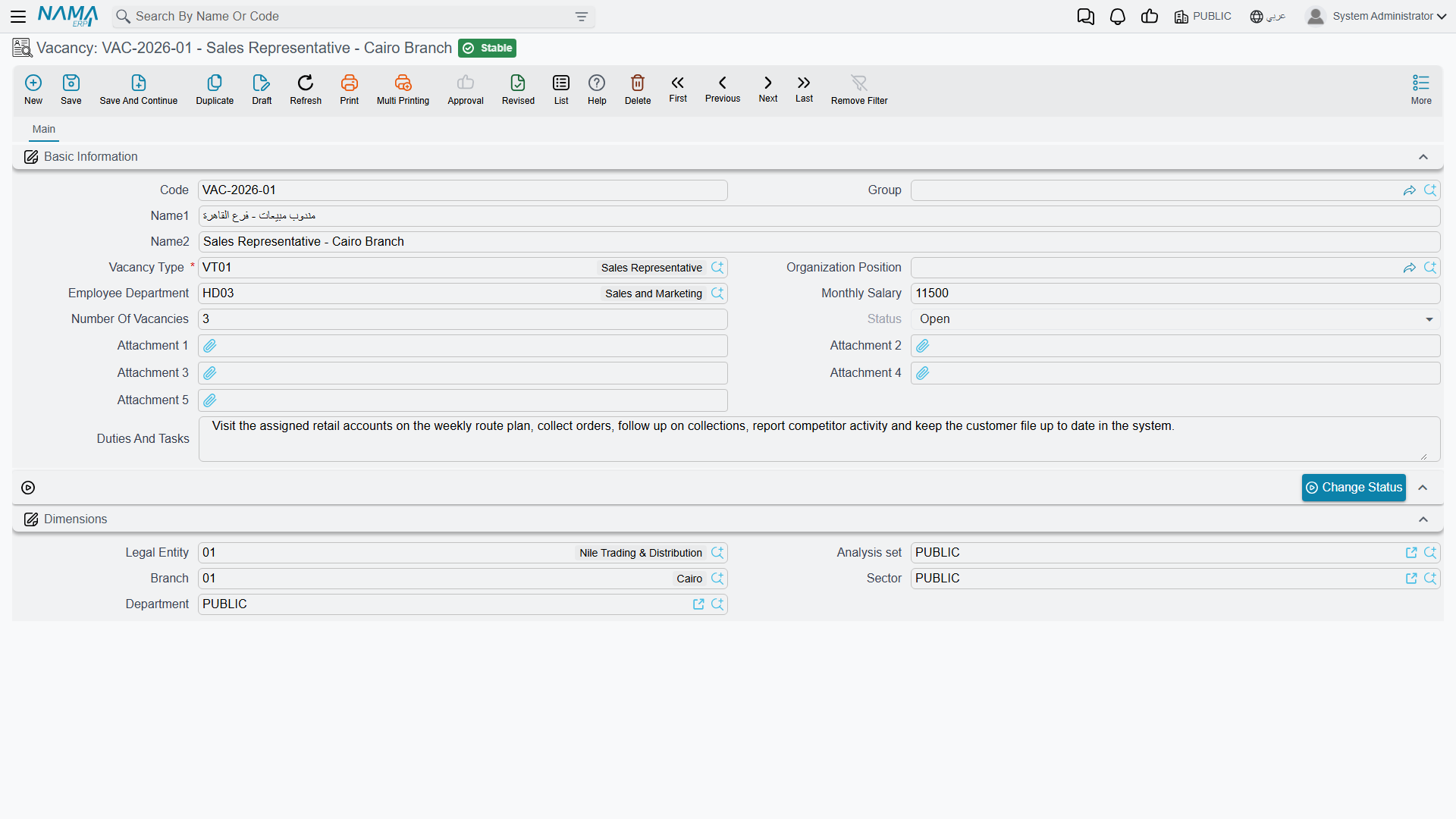
Found at Payroll > Recruitment > Vacancy, an HR Vacancy (فرصة عمل) is the specific position you're recruiting for right now.
| Field | Purpose |
|---|---|
| Code / Group / Arabic Name / English Name | Identification. |
| Vacancy Type | The job profile (HR Vacancy Type, above) this opening was created from. |
| Organization Position / Employee Department | Where the new hire will sit once appointed. |
| Monthly Salary | The budgeted pay for this specific opening. |
| Number Of Vacancies | How many people are needed to fill it — a single vacancy can represent several open seats. |
| Status | Open (مفتوحة) or Closed (مغلقة). |
| Duties And Tasks | A free-text description of the role, useful for job postings and interviews alike. |
A vacancy also carries the standard Dimensions (legal entity, branch, sector, department, analysis set), so recruitment can be scoped the same way as every other master record in Nama.
Once every seat is filled — or the opening is called off — a recruiter uses the Change Status button (تغيير الحالة), which asks for the new status — Open, Closed or Pending — to close it, rather than deleting it; the closed vacancy stays on record as a history of what was hired for and when.
HR Candidate — registering an applicant
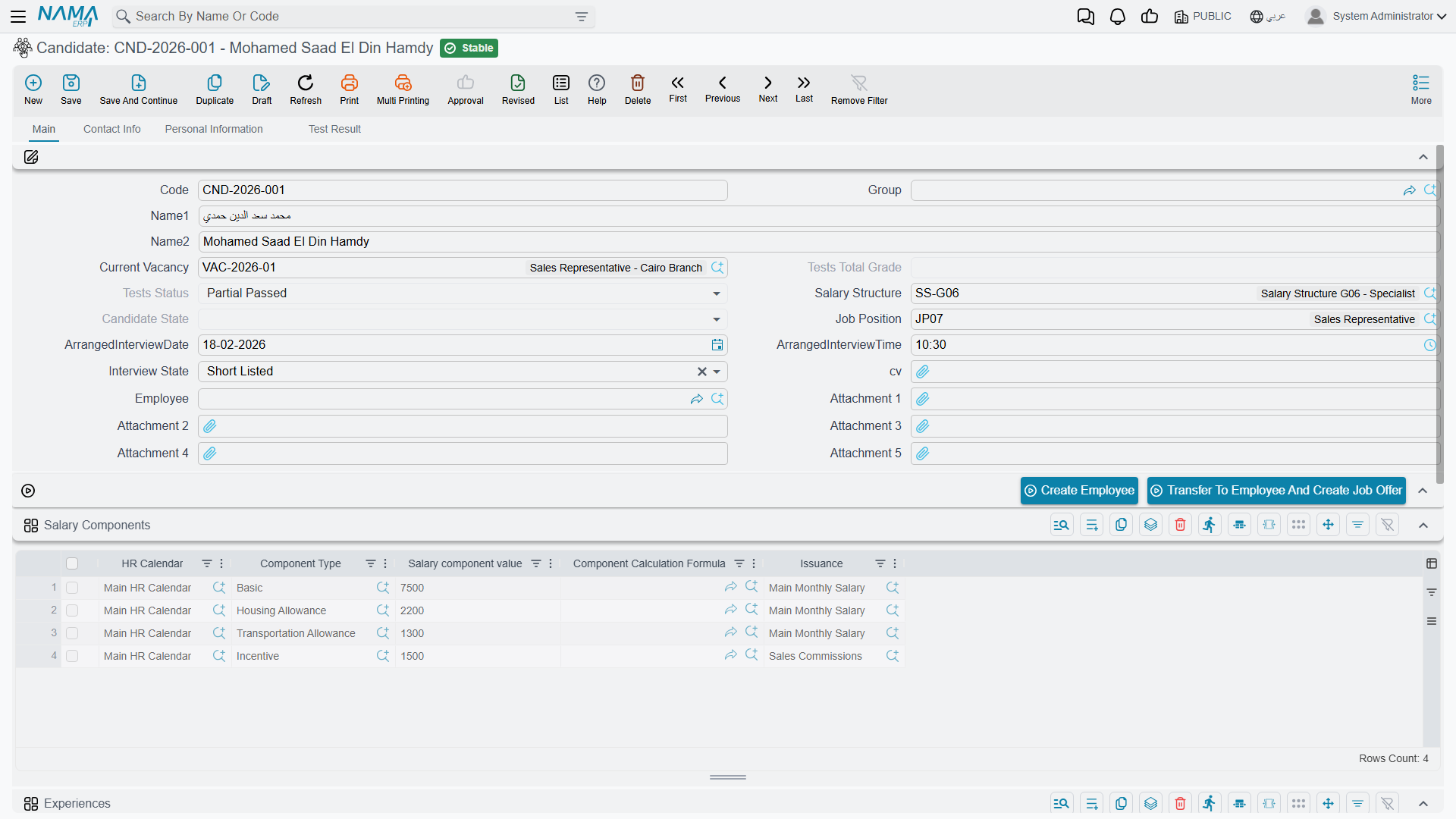
Found at Payroll > Recruitment > Candidate, an HR Candidate (متقدم للعمل) is one person's application file. It carries far more than a name and a CV — it's the record a recruiter lives in from the first phone screen through to the hiring decision.
Basic Information:
| Field | Purpose |
|---|---|
| Code / Group / Arabic Name / English Name | Identification. |
| Current Vacancy | The vacancy this application is being evaluated against right now. |
| Job Position | The specific position applied for. |
| Salary Structure | A proposed salary structure — carried forward if this candidate is later offered the job. |
| Candidate State | Tracks the applicant's standing — Offered (بأنتظار الموافقة) while a decision is pending, Appointed (مُعين) once hired, plus the same working-life states (Working, Resigned, Dismissed, Suspended, Pension, In Vacation…) used elsewhere for an employee's own record, since a candidate who is hired keeps this same field going forward. |
| Tests Total Grade / Tests Status | The candidate's combined score across all recorded test results (see HR Test Result further down), and the resulting conclusion — Passed, Partial Passed, or Failed. |
| Arranged Interview Date / Time | When the interview is scheduled. |
| Interview State | Where the candidate sits in the interview funnel: Not Called, No Answer, Not Available, Waiting Interview, Interviewed, Short Listed, Accepted, Rejected, Awaiting Another Interview, or Interviewed Second Time. |
| CV | The candidate's attached résumé. |
| Employee | Filled in automatically once the candidate is hired and becomes an employee record. |
Three tabs round out the file:
- Contact Info — address and phone/email details, the same shape used across Nama's contact-info block.
- Personal Information — gender, nationality, birth date/place, marital status, religion, plus a Qualifications grid (qualification, institute, graduation date, grade).
- Test Result — a read-only list of every HR Test Result line recorded for this candidate.
Two grids on the main page carry the working history and the application scope:
- Experiences — job title, company name, project name, from/to dates, years/months of experience, and a description — the candidate's work history.
- Vacancies — one line per HR Vacancy this same person has applied to, with a remarks column. A single candidate can be tracked against more than one opening at once.
There's also a Salary Components grid, identical in shape to the one on Employee HR Information — a place to pencil in the pay components being discussed with this candidate before any formal offer exists.
Two ways to turn a candidate into an employee
A candidate's record carries two buttons for closing out a successful application:
- Create Employee (إنشاء موظف) — opens a new employee record filled in from the candidate (code, names, contact details, gender, birth date, nationality, qualifications, residency and so on) for you to complete and save, with no job offer document in between.
- Transfer To Employee And Create Job Offer (تحويل المتقدم للعمل لموظف وإنشاء عرض وظيفي) — asks for a Start Date, then creates the employee and a job offer from the candidate's committed Candidate Job Offer in one step, so the terms that were discussed are captured on paper. The candidate job offer must exist first.
Most organisations use the second path so there's always a documented offer behind every hire — see Job Offers & Tests for what that document looks like.
HR Test and HR Test Result
Found at Payroll > Recruitment > HR Test, an HR Test (إختبار) defines one assessment a candidate might be put through — a written test, an interview, or trial work — with its own Test Type, Average Cost, Max Grade, Minimum Acceptance Grade, Test Period, whether it's Mandatory, and a Related Skills grid tying it back to the skills it's meant to measure.
HR Test Result (نتائج الإختبار), at Payroll > Recruitment > Test Result, records the outcome: pick the Vacancy and the Test, use the Collect Candidates button (تجميع المتقدمين) to add every candidate who applied for that vacancy and is not already listed, then score each one in the Details grid — Test Score and the resulting Test Conclusion (Passed / Partial Passed / Failed). Those per-test conclusions are what roll up into a candidate's own Tests Total Grade and Tests Status.
Actions on this screen
On the Vacancy:
- Change Status — asks for the new status (Open, Closed or Pending) and sets the vacancy to it.
On the Candidate (both explained in the tip above):
- Create Employee — opens a new employee record filled in from the candidate, for you to complete and save. The candidate must be saved first.
- Transfer To Employee And Create Job Offer — asks for a Start Date and creates the employee and a job offer from the candidate's committed candidate job offer. The candidate must be saved first.
On the Test Result:
- Collect Candidates — adds every candidate who applied for the chosen Vacancy and is not already in the grid.
The Vacancy Type and the HR Test have no buttons of their own.
Where this leads
Once a candidate clears interviews and tests, the natural next step is making it official — see Job Offers & Tests for how an offer is drawn up (carrying forward the salary structure proposed here) and how it turns into an actual hire.