
Eltezam Code Tables
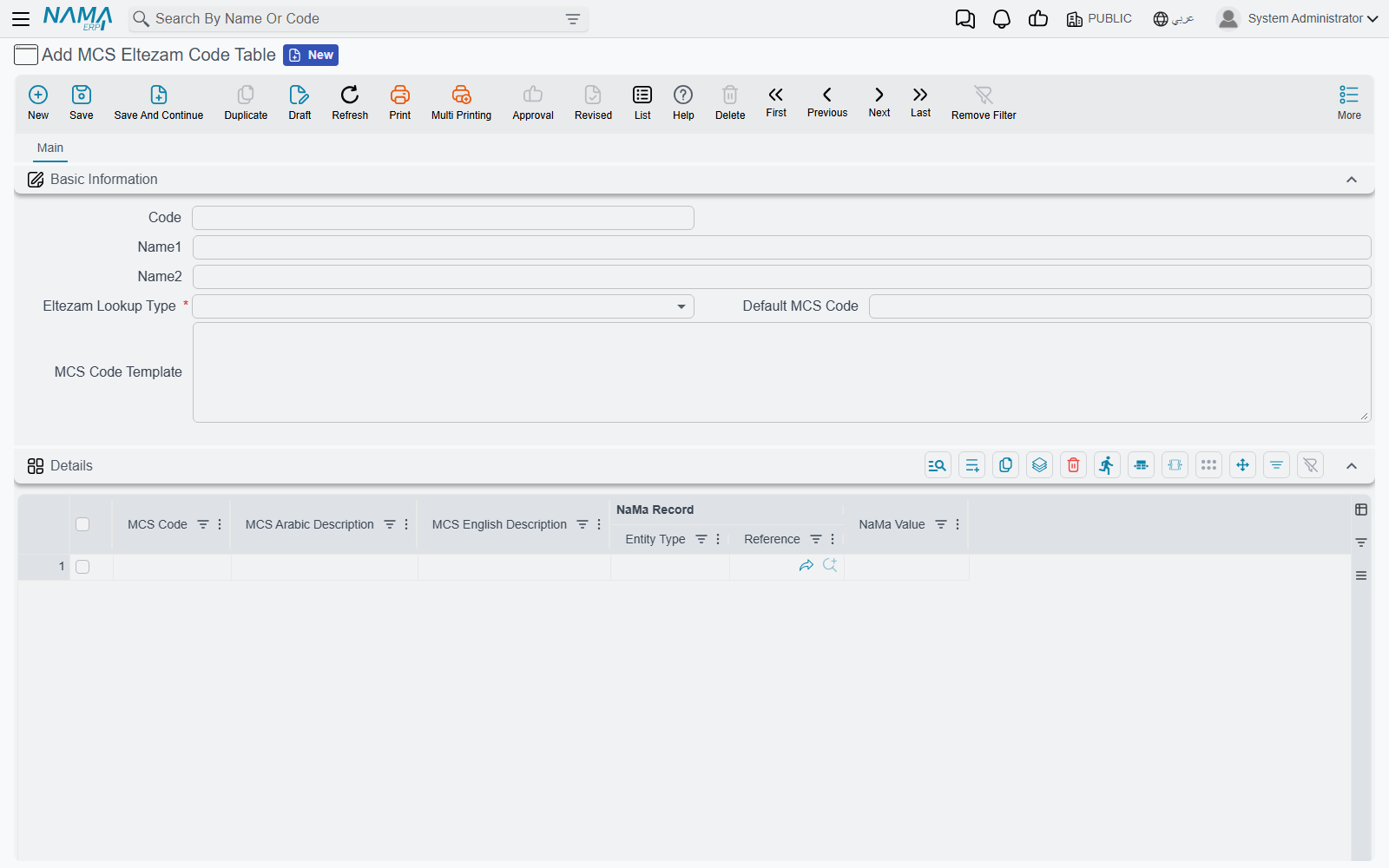
The ministry does not want to hear that an employee is "Male", works in "Riyadh Branch" and holds the position "Senior Accountant". It wants M, a seven-digit location code and a nine-digit job name code — each taken from a code list MCS publishes. Nama, meanwhile, stores the agency's own records and wording. The MCS Eltezam Code Table (جدول أكواد التزام) is the dictionary between the two: one table for each MCS code list, each row saying "this Nama record, or this Nama value, is that MCS code".
You find it under Master Files → MCS Eltezam Code Table in the integrations menu.
Creating all the tables at once
MCS publishes 29 code lists, and there can be only one table per list — saving a second table for a list that already has one is refused. Rather than create them one by one, run the entity action EACreateEltezamCodeTables once. It takes no parameters and can run from anywhere; the simplest way is a task schedule of type Action that you run with Run Now (see Scheduled Tasks). In Class Name, write the full name com.namasoft.modules.integrations.utils.actions.EACreateEltezamCodeTables, or type the short name and pick the full one from the suggestion list.
The action creates an empty table for every list that does not have one yet, with the list name as both its code and its names (JobClassCode, Gender, …), and opens it to every legal entity, sector, branch, department and analysis set, because the ministry's codes are agency-wide. Running it again is harmless: it skips the tables that already exist.
The table screen
The header says which list the table covers and what to do when no row matches:
| Field | Meaning |
|---|---|
| Code / Name1 / Name2 | The table's own reference — the creation action uses the list name |
| Eltezam Lookup Type (نوع جدول أكواد التزام) | Required. The MCS code list this table translates, by its MCS name (JobClassCode, NationalityCode, …) |
| Default MCS Code (كود الوزارة الافتراضي) | The code to send when nothing else matches. For a list where the whole agency uses one value, this is all you need |
| MCS Code Template (قالب كود الوزارة) | A field to read the code (or a value to translate) from, written like the employee-field boxes on the configuration: description5, {ref4}, ref4.name1. It is read on the Nama record first and then on the employee |
The Details grid holds the mapping rows:
| Column | Meaning |
|---|---|
| MCS Code (كود وزارة الخدمة المدنية) | Required. The code exactly as MCS lists it |
| MCS Arabic Description (الوصف العربي لكود الوزارة) | The ministry's Arabic description — for your reference |
| MCS English Description (الوصف الإنجليزي لكود الوزارة) | The ministry's English description — for your reference |
| NaMa Record (سجل نما) | The Nama record that means this code — an organizational position, a work place, a salary component… |
| NaMa Value (قيمة نما) | Or the Nama text that means this code — a nationality, a gender, a specialization… |
How Nama picks a code
For each value it sends, Nama looks in the matching table in this order and stops at the first hit:
- A grid row for the record. A row whose NaMa Record is the record being sent. If you typed the record in NaMa Value instead of picking it, that works too: a NaMa Value equal to the record's code, Arabic name or English name counts. The first matching row wins.
- The MCS Code Template, read from the record and then from the employee.
- The Default MCS Code.
For LocationCode and TransactionCode the template works one step differently: what it reads is a value of your own — say description5 holds "Riyadh Branch" — which a grid row then translates by its NaMa Value. So you can keep something readable on the employee and map it once. For every other list, whatever the template reads is sent as the MCS code itself.
Numeric codes that MCS expects at a fixed width are padded with leading zeros: job class to 5 digits, job name and job position to 9, location to 7.
Which Nama data each list is keyed on
Knowing what each list is matched against tells you whether to fill NaMa Record or NaMa Value.
Keyed on a record — fill NaMa Record:
| List | Record |
|---|---|
| JobClassCode, JobNameCode, JobCatChain, EmploymentTypeCode, RankCode | The employee's organizational position |
| LocationCode | The employee's work place (or its template) |
| ElementCode | The salary component of each salary document line |
| ConsolidationSetID | The issuance of the salary document |
| QualificationCode | The qualification on the employee's qualification line |
| VacationCode | The vacation type of the vacation document |
| AppraisalTypeCode | The evaluation type of the employee evaluation |
Keyed on a value — fill NaMa Value with the text as Nama holds it:
| List | Value |
|---|---|
| EmployeeStatusCode | The employee state (Working, Resigned, …) |
| TerminationReasonCode | The employee state of an employee with a firing date |
| Gender, Religion, MaritalStatus | The matching option on the employee |
| NationalityCode | The employee's nationality |
| MajorCode | The specialization text of the qualification line |
| UniversityCode | The institute text of the qualification line |
| EduGrade | The grade text of the qualification line |
Template or default only — HealthStatus, BloodType and TransactionCode are read through the MCS Code Template on the employee, or fall back to the Default MCS Code. PositionStatus and JobTransactionCode use the Default MCS Code only.
Words, not numbers, for some lists
For Gender, Religion, BloodType, MaritalStatus and HealthStatus the ministry expects the word it publishes — M, Muslim, O-Positive, Single, Healthy — not a number. Copy the MCS code list exactly.
University codes 998 and 999
When a qualification's institute maps to the university code 998 or 999 ("other"), Nama sends the institute's own name alongside the code, so an institute that is not on the ministry's list can still be reported. Map any unlisted institute to 999 rather than leaving it without a code.
Ratings work as thresholds
The RatingCode table is read differently from all the others. Its NaMa Value is a percentage: the lowest final evaluation percentage that earns that rating. With rows at 0, 60, 75 and 90, an evaluation of 82% gets the code of the 75 row. An evaluation with no final percentage falls back to the Default MCS Code.
Next: send a submission.