
Eltezam Submissions and Sending
Every time the agency reports to MCS — the monthly payslips, a batch of new hires, the year's appraisals — it does so through an MCS Eltezam Submission (إرسال بيانات التزام), under Documents → MCS Eltezam Submission in the integrations menu. The document says who is being reported, for which period and what is being sent. Once it has been sent, it becomes the record of what happened: which employees went through, which failed, and every request with the ministry's answer.
Filling in the document
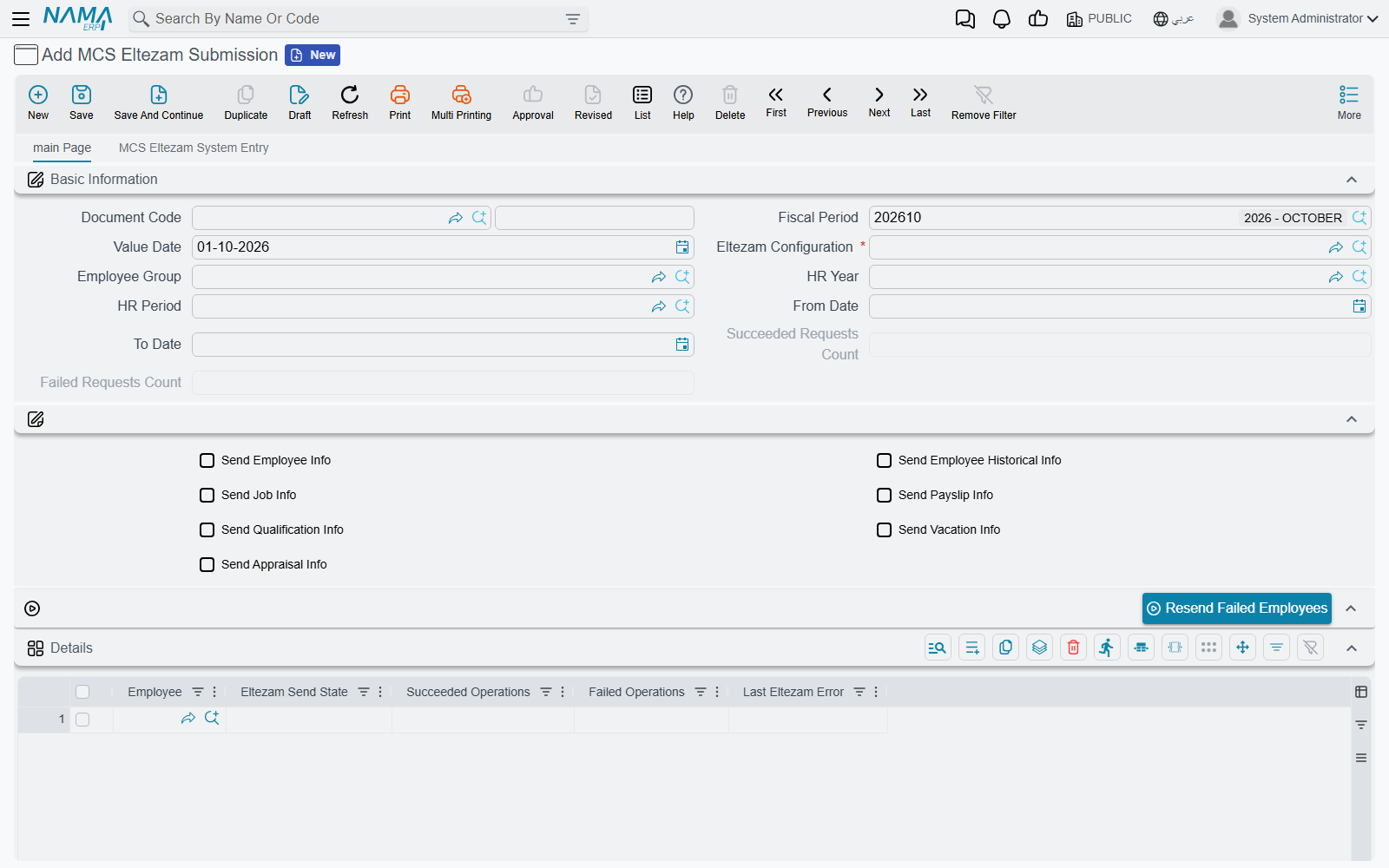
| Field | Meaning |
|---|---|
| Document Code, Fiscal Period, Value Date | As on any document. The value date is also the date vacation balances are computed at |
| Eltezam Configuration (إعدادات التزام) | Required. The configuration to send with |
| Employee Group (مجموعة موظفين) | The employees to report. Leave it empty to use the configuration's group |
| HR Year (سنة الرواتب), HR Period (فترة الرواتب), From Date (من تاريخ), To Date (إلى تاريخ) | The period whose documents are sent — see which documents count as "in the period". Leave all four empty to send the whole history |
| The seven Send … check boxes | Which operations this submission sends. Leave them all unticked to take the configuration's choice |
| Succeeded Requests Count (عدد الطلبات الناجحة), Failed Requests Count (عدد الطلبات الفاشلة) | Filled in by the system after each send |
When you save, Nama completes the document for you:
- an empty Employee Group is copied from the configuration;
- if no Send … box is ticked, all seven are copied from the configuration;
- if the Details grid is empty, it is filled with one line per employee of the group.
You can then remove employees from the grid, or add others by hand, before committing. The document needs no document term.
The Details grid
| Column | Meaning |
|---|---|
| Employee (الموظف) | The employee reported on this line |
| Eltezam Send State (حالة الإرسال لالتزام) | Not Sent (لم يرسل بعد), Succeeded (نجح) or Failed (فشل) |
| Succeeded Operations (العمليات الناجحة) | The operations the ministry accepted for this employee |
| Failed Operations (العمليات الفاشلة) | The operations that failed |
| Last Eltezam Error (آخر خطأ من التزام) | The latest error for this employee |
A line is Failed if any of its requests failed, Succeeded if at least one request went through and none failed, and Not Sent if nothing was produced or sent for it — for example an employee with no salary document in the period when only payslips are being sent.
Committing does not send
Committing the submission checks that it has employees and at least one operation, and then stops. Nothing is sent to the ministry when you commit, and there is no Send button on the screen. Sending is done by one of two entity actions, run from an entity flow or a task schedule. Setting one of them up is a one-time job for whoever administers the system.
In the Class Name field of the entity flow line or the task schedule, the action must be written with its full name: com.namasoft.modules.integrations.utils.actions. followed by the short name used on this page — for example com.namasoft.modules.integrations.utils.actions.EASendEltezamSubmissionDoc. The short name on its own is not found. Type the short name into the field and pick the full name from its suggestion list.
Sending on commit: EASendEltezamSubmissionDoc
The usual arrangement is an entity flow on MCS Eltezam Submission that runs EASendEltezamSubmissionDoc on Post Commit, so every submission is sent the moment it is committed (see Introduction to Entity Flows). The action runs only on a committed submission.
| Parameter | Meaning |
|---|---|
| 1. MCS Server (IP, host or full URL) | Required. Where to send |
| 2. Eltezam Configuration Code (Can be Empty) | A configuration to use instead of the document's |
| 3. From Date (yyyy-MM-dd, Can be Empty) | Overrides the document's From Date for this run |
| 4. To Date (yyyy-MM-dd, Can be Empty) | Overrides the document's To Date |
| 5. HR Period Code (Can be Empty) | Overrides the document's HR Period |
| 6. HR Year Code (Can be Empty) | Overrides the document's HR Year |
Each period parameter that is filled wins over the document's own value for that run only — the document itself is not changed. Dates must be written as yyyy-MM-dd, for example 2026-01-31.
Sending on a schedule: EASubmitEltezamData
For sending at night or re-sending on demand, use a task schedule of type Action with EASubmitEltezamData (see Scheduled Tasks).
| Parameter | Meaning |
|---|---|
| 1. Eltezam Configuration Code (Can be Empty when documents are given) | The configuration to send with |
| 2. MCS Server (IP, host or full URL) | Required. Where to send |
| 3. Eltezam Submission Document Codes (Comma Separated, Can be Empty) | The committed submissions to send, e.g. EZS-0012, EZS-0013 |
| 4–7. From Date, To Date, HR Period Code, HR Year Code | The same period overrides as above |
With document codes, each listed submission is sent exactly as the post-commit flow would send it, and its grid and log are updated. Without document codes, the action sends the employees of the configuration's group directly, with no submission document involved — the requests are made, but no document shows their results. Use submissions whenever you want to review what happened.
The MCS Server parameter
Both actions require the server parameter, even when the configuration has a Service URL. What you write there combines with the Service URL:
- a full URL (
http://10.1.2.3/EltezamDataService.svc) is used as it is; - a bare host or IP (
10.1.2.3) keeps the scheme and path of the configuration's Service URL and only swaps the host — handy when the same service path is reached through a different gateway.
What happens during a send
- The document's previous request log is cleared.
- For every employee line and every selected operation, Nama builds the requests from the HR data, checks them (see Do Not Send Records Having Validation Errors on the configuration), and sends them to the ministry one by one.
- Each request is logged with the ministry's answer, and each line's state and the document's counts are updated.
A request succeeds when the ministry answers with a request number. Anything else is a failure and the ministry's error code and message are kept.
If the ministry's server does not answer — unreachable, timing out, answering with a web page — three times in a row, Nama stops rather than wait out every remaining employee. The lines not reached stay Not Sent and the run reports that it stopped; see troubleshooting.
The request log (second page)
The second page of the document, MCS Eltezam System Entry (قيد التزام النظامي), holds two collapsible lists.
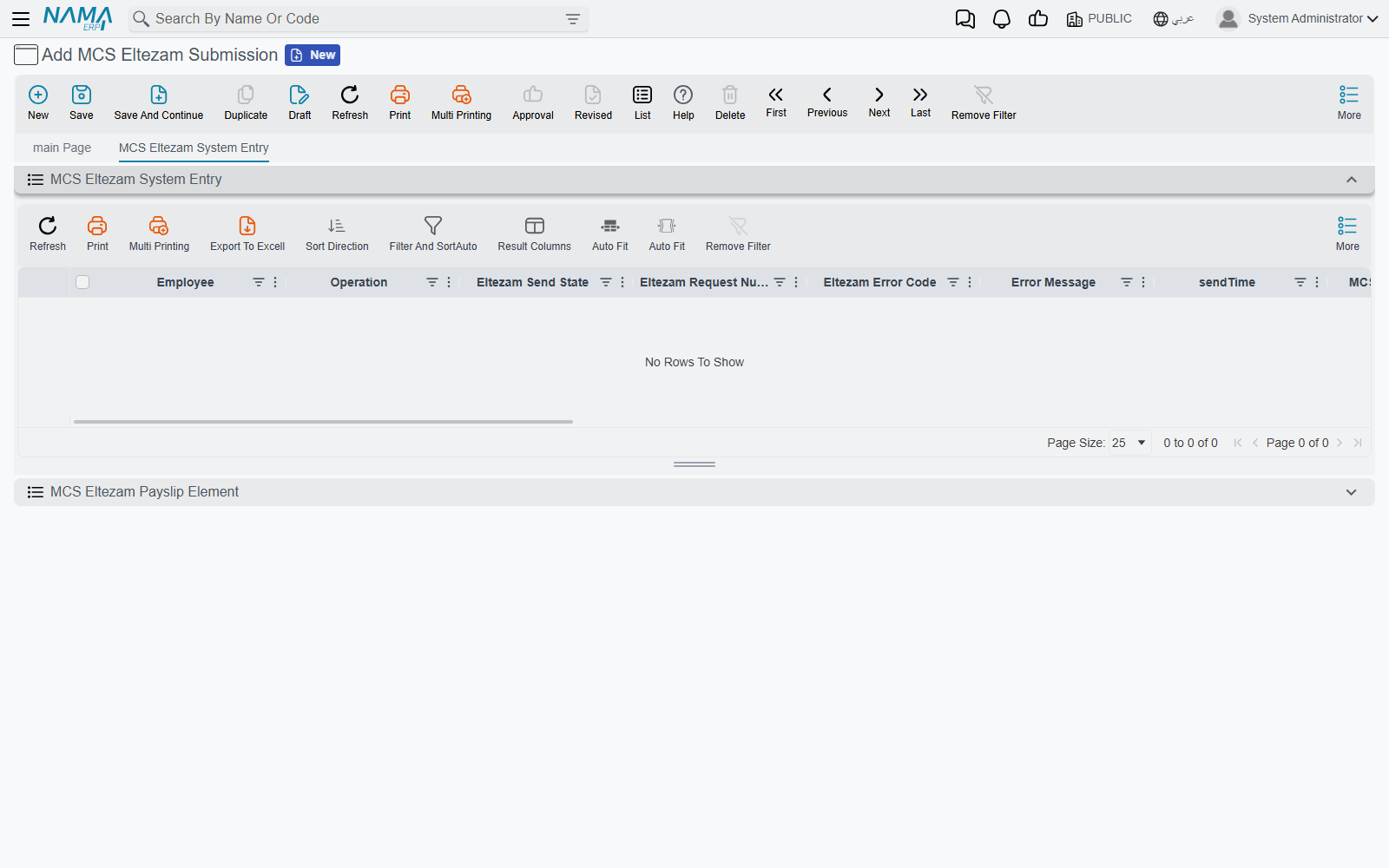
MCS Eltezam System Entry has one row per request: employee, operation, send state, Request Number (رقم طلب التزام) returned by the ministry, Error Code (كود خطأ التزام), Error Message (رسالة الخطأ), send time, and the key values that were sent — employee ID, job number, job codes, organization, location, transaction code, gender, health status, basic salary and IsActive. Many more columns are hidden and can be shown from the column chooser, including Request XML (ملف الإرسال) and Response XML (ملف الرد): the exact envelope sent and the exact answer received, unless the configuration's Do Not Store Request XML is ticked. Filter the list by employee, operation, send state, request number or error code.
MCS Eltezam Payslip Element (عنصر مسير رواتب التزام) has one row per payslip element sent: employee, state, MCS employee ID, Hijri year and month, consolidation set, element code, name and classification, amount, net pay and paid date. Filter it by employee, state or Hijri year and month.
Saving a sent submission again clears its log
Saving a committed submission again — even without changing anything — empties the request log on the second page, while the grid keeps its Succeeded / Failed states. It does not send the submission again. Check the log before editing a submission you have already sent, and to send it again, list it in the EASubmitEltezamData task schedule or use Resend Failed Employees.
Resending the employees that failed
Once the data or the code tables are fixed, press Resend Failed Employees (إعادة إرسال الموظفين الذين فشل إرسالهم), in the actions block of the submission and in the More Actions menu.
It asks one question — MCS Server (leave empty to use the configuration Service URL) (خادم الوزارة (اتركه فارغا لاستخدام عنوان الخدمة بالإعدادات)) — and then resends every line that is not Succeeded. Only those employees' old log rows are replaced; the successful employees' rows are kept. The counts are recalculated, and a summary appears, one line per employee:
Retried 3 employees: 5 requests succeeded, 1 failed
1045 Ahmed Ali: 2 succeeded, 0 failed
1046 Sara Omar: 1 succeeded, 1 failed (the ministry's error for her failed request)
…
If the ministry's server stops answering during the resend, the summary ends with the same "Sending stopped…" line as a normal send.
The resend uses the document's own configuration and period, not the overrides an entity flow or task schedule may have passed.