
Selling to the Client
A travel agency sells nights, seats, transfers, entrance tickets and guiding hours. None of that sits on a shelf, none of it has a warehouse, and none of it can be counted at the end of the month. But every bit of it has a price, a discount, a tax, and a client who has to be billed and chased for the money — which is exactly what an invoice is for.
That tension is why the Travel module ships its own selling documents instead of reusing the ordinary sales invoice, and it is the first thing to understand before you open any of them.
Why Travel has its own sales invoice
Open an ordinary Nama sales invoice and a line asks you for an item, a warehouse, a unit of measure and a quantity, because behind the scenes that line has to move stock out of a store and carry the item's cost with it. A travel line has none of those things to give.
A line on a Travel Service Sales Invoice names a Tour Service — "Full-day Luxor sightseeing", "Airport transfer, private car", "5-night half board, double room" — and that is the whole of it. There is no warehouse to issue from, no unit of measure, no quantity on hand to run down, and no item cost to relieve. Nothing at all moves in inventory when you commit a travel sales invoice.
Everything else is the ordinary engine
Money, discount levels, taxes, payment methods, instalment plans, contract clauses, dimensions, document books and e-invoicing all come from the same shared machinery the rest of Nama uses. If you already know the supply-chain sales invoice, this screen will feel familiar the moment you open it — the details grid is the only part that looks different, and it looks different for one reason only: it sells a service, not a thing.
The three documents live under Travel > Documents:
- Travel Service Sales Order — the booking the client agreed to.
- Travel Service Sales Invoice — the bill, and the document that collects the money.
- Travel Service Sales Return — the reversal, raised against one specific invoice.
Travel Service Sales Order
The order is where you record what the client has committed to before you bill them: the agreed services, the agreed prices, the discount that was negotiated, the instalment plan that was promised, and the contractual clauses that will be printed on the contract.
Its header is short: the Document Code (book and code), the Term, Issue Date, Value Date and Fiscal Period, the Customer, the Salesman, and the Currency with its Currency Rate (which default to the working currency at rate 1). Below that sit the usual Dimensions — Legal Entity, Analysis Set, Branch, Sector and Department — and six attachment slots for the signed booking form, passport scans, and anything else worth keeping with the file.
The Details grid is the same one described under the invoice below, minus the per-line currency columns: a sales order line is priced in the document's own currency. The order also has no payment-method grid — money taken at the counter belongs on the invoice — but it does carry the instalment grid and the standard-terms grid, so the payment plan and the contract clauses can be agreed at order time and copied forward.
The order takes a document term, and that term is a financial one
This is the point people miss. A Travel Service Sales Order is not a memo — it carries a Term just like the invoice does, and when it is committed its effects are created and processed exactly the way an invoice's are. If that term carries debit and credit account sides, the order books to the general ledger.
So set the order's term up deliberately. Give the order its own term rather than pointing it at the invoice's, and leave that term's account sides empty if you want the order to stay a purely commercial document and let only the invoice raise revenue. See Document Terms for how the sides are configured.
When you are ready to bill, open a new Travel Service Sales Invoice and pick the order in the From Document field. The system copies the header's payment template and money block and, line by line, the tour service, quantity, prices and discounts — so you bill what was booked without retyping it.
Travel Service Sales Invoice
This is the main document of the sales side: it prices the services, calculates the discounts and taxes, takes whatever money the client hands over at the counter, tracks what is still owed, and raises the receivable against the client.
The header
Along with the document code, term, issue date, value date and fiscal period, the header asks for:
- Customer — the client being billed. This is who gets debited.
- Salesman — the employee credited with the sale.
- From Document — the order (or another document) this invoice was built from.
- Currency and Currency Rate — the currency the invoice is priced and processed in.
- Description and the six attachment slots.
- The Dimensions group: Legal Entity, Analysis Set, Branch, Sector, Department.
The tax setup of the document — which tax plan applies, and whether the invoice is taxable at all — comes from the Term, so changing the term changes the tax treatment. That, together with the account sides the term carries, is what makes choosing the right term the single most consequential decision on the header.
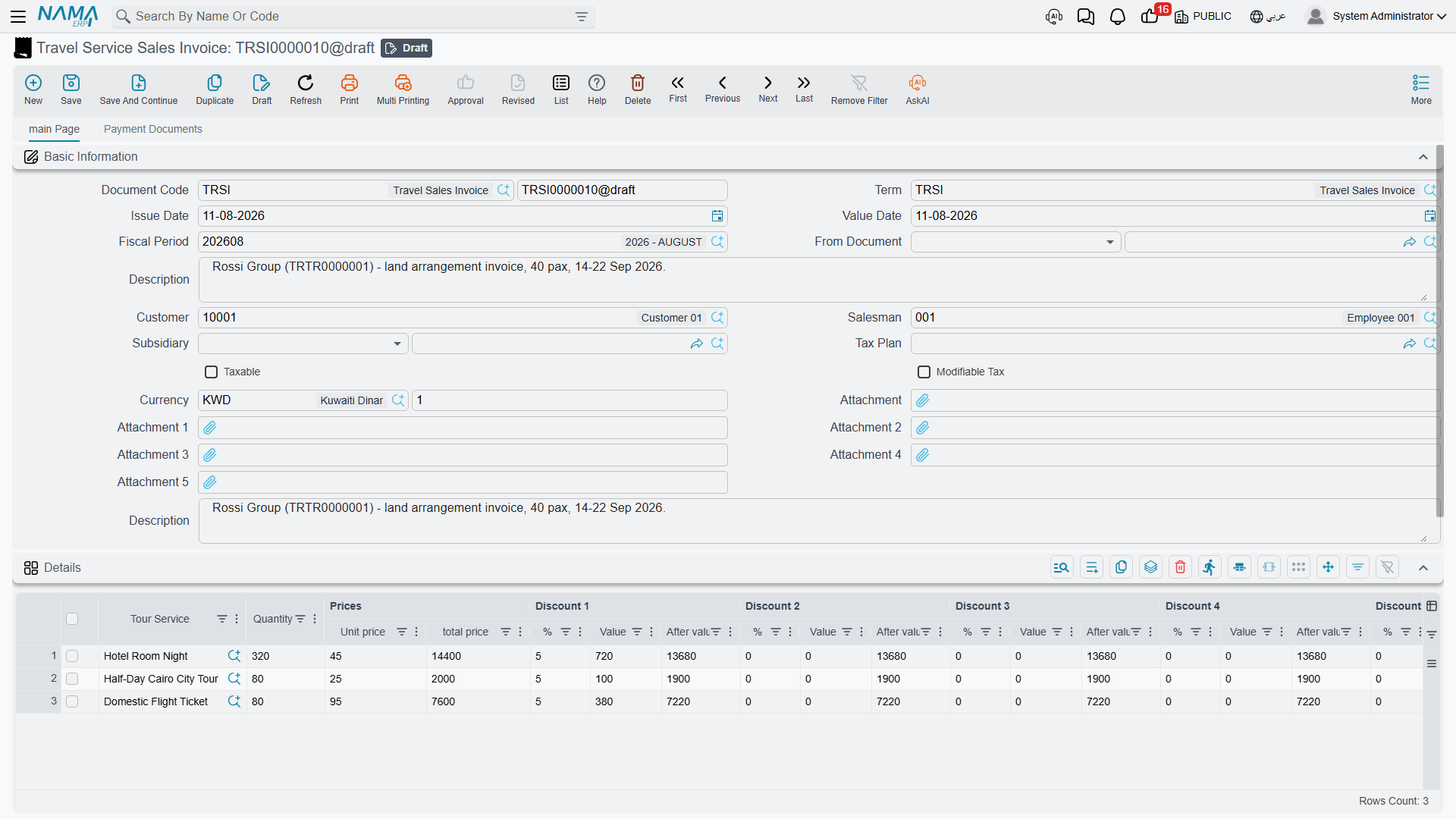
The Details grid — what is being sold
Each line answers one question: which service, how many, at what price, less what, plus what tax.
| Column | What goes in it |
|---|---|
| Tour Service | The service master file being sold. |
| Quantity | How many — pax, nights, rooms, transfers. Required on every line. |
| Unit price / total price | The rate per unit, and the line's gross value. |
| Discount 1 … Discount 8 | Eight independent levels, each with a %, a Value and the After value it leaves behind. They apply in sequence, so discount 2 works on what discount 1 left. |
| Item Tax, Tax 2, Tax 3, Tax 4 | Four tax levels, each with its percentage and its value. The percentages come from the tax plan carried by the tour service. |
| Net value | What this line is finally worth. |
| Currency and Rate | For a line priced in a currency other than the document's. |
| Line Subsidiary | The party this particular line is attributable to, when it is not the header's. |
| Description | Free text — flight number, room type, whatever the client should see on the bill. |
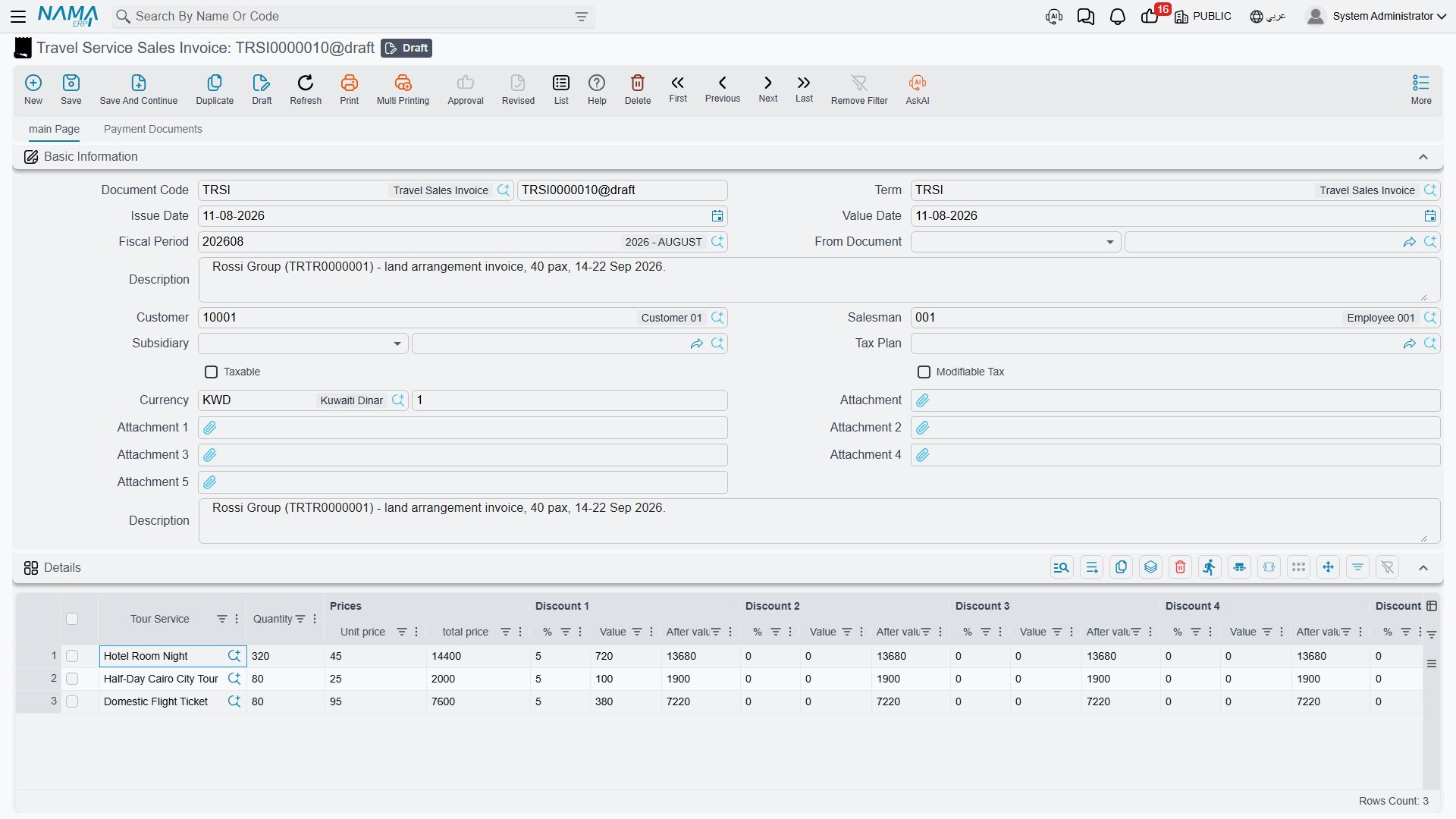
A worked example. A tour operator books a 40-pax group from Cairo for five nights. One line carries the tour service Cairo 5-night full package, quantity 40, unit price 1,850 — a gross 74,000. The agreed 5% group discount goes into Discount 1, taking 3,700 off and leaving 70,300. VAT at 14% adds 9,842, so the line's net value is 80,142.
Under the grid the money block adds up what the lines produced: the Total, the running Net after Discount 1..4, the header-level Discount, Tax 3 and Tax 4 applied to the whole invoice, the Net, and then the collection side — Cash Paid, Total Paid and Remaining. The Totals group repeats the same figures broken out per discount level and per tax level, which is what you read when a client asks you to justify a number.
Remaining is simply the net less everything already collected: the cash taken at the counter, the payment-method lines, and any receipt vouchers linked to the invoice.
What happens when you save
Committing the invoice does not stop to write ledger entries. The document creates its effects as a business request that is processed in the background, so the save itself is instant and the work is retryable. You can watch its processing status, and reprocess it if something in the setup was wrong, from the Business Requests list view.
What that request contains, for our 40-pax invoice:
- The client is debited with what is still owed — the net value less the cash taken, less the payment-method lines, less anything flagged as not affecting the remaining.
- Revenue is credited with the gross line price, before any discount is taken off.
- Each tax level gets its own pair of sides — sales tax 1 and 2, and the two invoice-level taxes — each raised separately, so the tax accounts can be reconciled against the returns you file.
- Each discount level gets its own pair — the header discount and discounts 1 to 8 — so a given discount lands in its own account instead of quietly shrinking revenue.
- Cash taken at the counter is debited to the cash side.
- Each payment-method line is debited to the account that payment method carries — the card settlement account, the cheques-under-collection account, the till — along with the merchant fee and the tax on that fee where the method charges them.
- Receipt vouchers linked to the invoice are handled according to the term's external-effects rules.
Every one of those accounts comes from the document Term. A term with no debit and credit sides configured produces a request with nothing in it, and the invoice books nothing at all — which is occasionally what you want, and never what you want by accident. Again, see Document Terms.
If you correct a committed invoice and commit it again, the same ledger transaction is updated rather than a second one being created.
Collecting the money
Three of the grids on the invoice are about payment rather than about what was sold, and they get a page of their own — Payments, Instalments & Contract Terms — because they behave the same way on the purchase side. In outline:
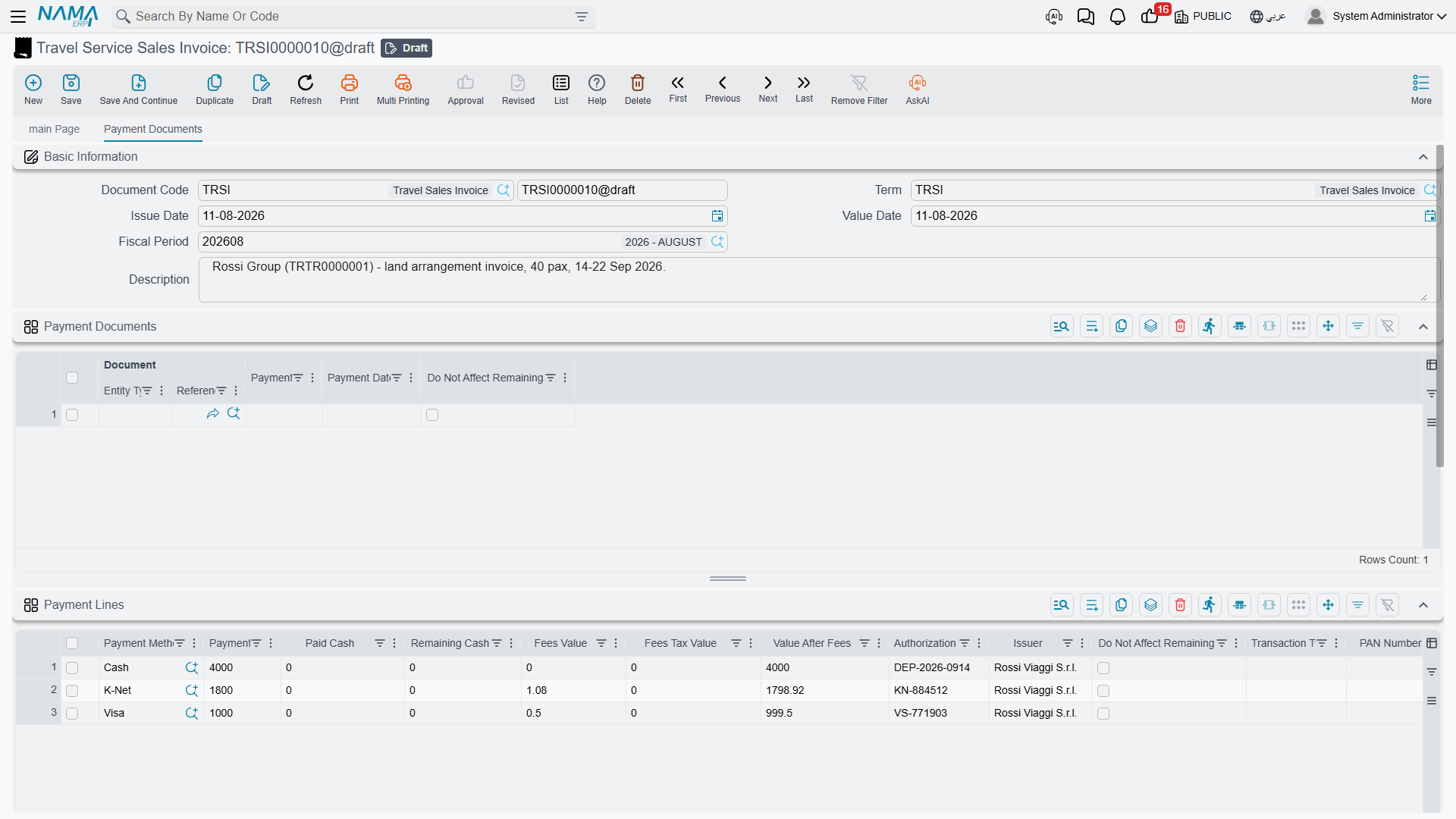
Payment Lines record how the client paid right now, one line per method: cash, card, cheque. Each line carries the amount, the cash tendered and the change given back, the merchant fee and its tax, the authorization number and the issuer, and — for a card taken on a connected terminal — the terminal's own echo of the transaction. This grid is on the invoice and on the return, not on the order.
Payments is the instalment plan: an instalment code and description, the percentage or value due, the due date, what has been paid against it and what remains. A payment template on the header plus the Generate Payments action will build the whole schedule for you from a down payment, a number of instalments and a period. The schedule has to reconcile with what is still outstanding on the invoice before the document will commit.
Standard Terms are the contractual clauses attached to the sale — cancellation policy, visa responsibility, the deadline for the balance — each with its planned end date and, where the clause is one that has to be fulfilled, the date it was fulfilled. These lines are contractual text; they book nothing.
Alongside those, the Payment Documents grid shows the receipt vouchers raised against this invoice. You do not type into it: when a receipt voucher is committed against the invoice its line appears here, and if the voucher is later amended or cancelled the line follows.
Travel Service Sales Return
A return reverses part or all of one specific travel sales invoice — the group shrank from 40 to 32, the optional Luxor day was dropped, the client cancelled inside the free window.
It looks like the invoice: same header, same details grid, same payment, instalment and standard-terms grids. Two things make it different.
It must be raised from an invoice. The From Document field is mandatory on a return, and it will only accept a Travel Service Sales Invoice. There is no such thing as a free-standing travel sales return. Pick the invoice and the services, quantities and prices are copied in for you; delete the lines you are not returning and reduce the quantities on the ones you are.
Everything you return is checked against what that invoice actually sold — and against what has already been returned on earlier returns from the same invoice. Before the return will commit, the system verifies that:
- every service and unit price on the return exists as a line on the source invoice;
- the total quantity returned across all returns against that invoice does not exceed the quantity the invoice sold — so eight seats returned today plus four returned last week cannot add up to more than the forty that were billed;
- the unit price you are refunding is not higher than the unit price the invoice charged;
- no discount percentage on the return exceeds the discount percentage the invoice gave.
If any of those fail, the return names the service and the figures that are at odds and refuses to commit until you fix them.
When it does commit, its effects mirror the invoice's exactly: the client is credited instead of debited, revenue is debited, and the tax, discount and cash sides all swap. As with the invoice, the accounts come from the return's own document term.
Taxes and e-invoicing
Travel sales invoices take part in tax-authority e-invoicing on the same footing as any other Nama invoice. The invoice carries the tax-authority fields the integration needs, and each tour service master file carries its own tax-authority code, so the service can be identified on the submitted document.
The standard actions are on the screen: one that checks the document against the tax authority's rules before you send it, and ones that open the submitted invoice on the authority's portal, as the issuing user or as a visitor. Which authority you are talking to, and the credentials and certificates behind it, are set up once for the installation and then apply to travel invoices without any travel-specific configuration.
Where the sales cycle sits next to operations
It is worth being clear about the division of labour. The tour is the operations file: who is travelling, where, when, in which hotels, with which guide, on which coach. It carries no prices and no money at all — see Tours. Nothing on a tour bills anybody.
The client's price is raised here, on the sales side, by billing the tour services the client bought. So the rhythm in an agency is: build the tour to run the trip, and raise the sales order and the sales invoice to charge for it, choosing the tour services that describe what the client is paying for. The two halves are worked side by side by the same team, and the sales invoice is the only place the client's money appears.
Messages you may see
All four belong to the Travel Service Sales Return — they are the checks described above, in the words the screen uses.
| Message | Why | What to do |
|---|---|---|
| Could not find line with the service {0} and unit price {1} in invoice {2} — «لا يمكن إيجاد سطر مع الخدمة {0} وسعر الوحدة {1} في الفاتورة» | A return line's tour service and unit price together match no line on the source invoice — usually because the unit price was edited on the return. | Put the invoice's own unit price back on the line, or return the service the invoice actually sold. |
| The total returned quantity {0} of the tour service {1} can not be greater thant the total quantity {2} of the tour service in the invoice — «لا يمكن ان يكون اجمالي الكمية المرتجعة {0} من الخدمة السياحية {1} أكبر من الكمية {2} الموجودة فى الفاتورة» | The quantity on this return, plus everything already returned on earlier returns from the same invoice, exceeds what the invoice sold. | Check the earlier returns against that invoice before reducing the quantity here. |
| Unit price {0} of tour service {1} must be less than or equal to unit price {2} in invoice {3} — «سعر الوحدة {0} للخدمة السياحية {1} يجب أن تكون أقل من او تساوي سعر الوحدة {2} فى الفاتورة» | The line refunds more per unit than the invoice charged. | Lower the unit price to the invoiced one; a return may never give back more than was taken. |
| Discount{0} percentage {1} for tour service {2} is greater thant discount{0} percentage {3} in the invoice — «نسبة الخصم{0} وقيمته {1} للخدمة السياحية {2} فى السطر {3} أكبر من نسبة الخصم{0} و قيمته {4} فى الفاتورة» | One of the eight discount levels on the return line carries a higher percentage than the same level on the invoice line; {0} is the discount number. | Copy the invoice's percentage for that discount level, or clear it. |