
Business Requests
When you save an invoice, the accounting entry behind it is not written while you wait. Nama takes the save, hands you the screen back, and raises a business request — a small instruction to itself, saying "this document needs its accounting effect". A moment later a background worker picks that instruction up and writes the entry.
The point of the arrangement is that saving stays instant however heavy the consequences are, and that a consequence which goes wrong can be looked at and run again without touching the document. The cost is that a document can be saved and correct while its effects are missing — and when that happens, this is the screen that tells you why.
Where to find it
Administration → Settings → Business Requests. The neighbouring entry, Saved Business Requests, is part of the same machinery and is covered further down.
The two kinds you will actually see
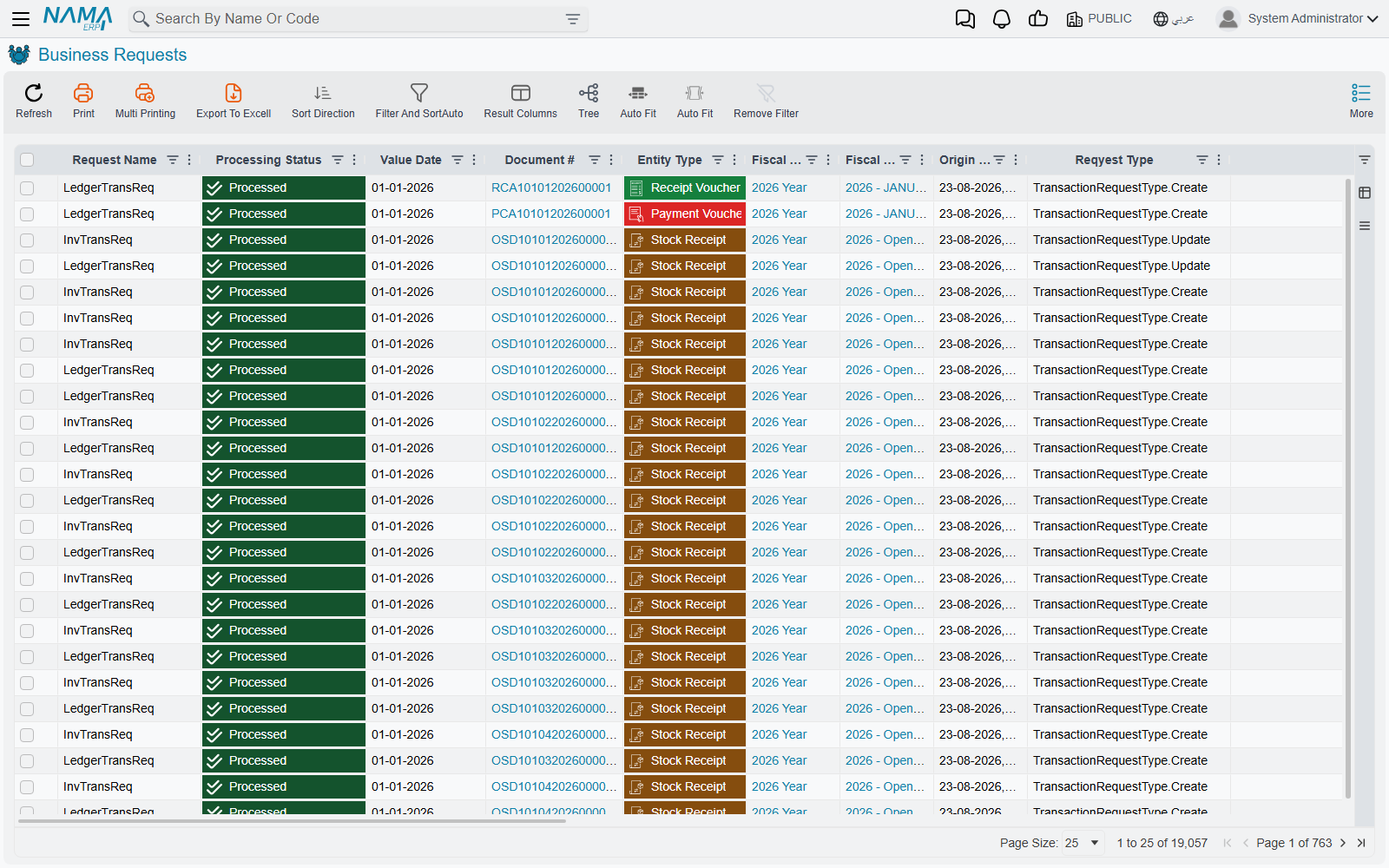
Every document that has consequences raises one or both of these:
- an accounting request, which writes the document's entry into the ledger, and
- an inventory request, which moves quantities and costs in the stores.
A sales invoice normally raises both. A journal entry raises only the first. A stock transfer raises only the second.
There is no third kind to learn. The Request Name column tells you which one a row is, and the Reqyest Type column — spelled that way on screen, so search for it as it appears — says whether the request was raised by creating the document, updating it, or deleting it. Deleting a committed document raises a request too: the effects have to be unwound, and that unwinding can fail exactly as the original could.
Reading the Processing Status
This is the column everything else hangs off.
| Status | What it means |
|---|---|
| Waiting Processing | Raised, not yet picked up. Normal for a few seconds. |
| Retry Processing | Queued for another attempt after somebody asked for one. |
| Processing | Being worked on right now. Only inventory costing sits here for any length of time. |
| Processed | Done. The effect exists. |
| Processing Failed | The system understood the work and refused it — a closed period, a missing account, a rule that said no. |
| Failed By Exception | The work broke unexpectedly. Usually a configuration gap rather than a business rule. |
The difference between the last two matters when you are triaging. Processing Failed almost always names its own cause in the Error Message column and is fixable by an implementer: open the period, set the missing account, correct the term. Failed By Exception is more often something structurally wrong, and the detail you need is in Error Desciption — again, spelled that way on screen — which carries the full technical text rather than the one-line summary.
Nothing retries a failed request on its own
There is no attempt counter, no maximum, no backoff, no eventual give-up. The worker only ever looks for requests that are waiting or have been explicitly queued for retry, so the moment a request lands on Processing Failed it stops being anybody's business but yours. It will sit there, unchanged, for as long as the database exists.
This is the single most important thing to know about the screen. A quiet system is not evidence that nothing failed — it is only evidence that nothing is asking. Filter by status and look.
Finding what went wrong
Filter Processing Status to the two failed values and sort by Value Date. That is the whole triage.
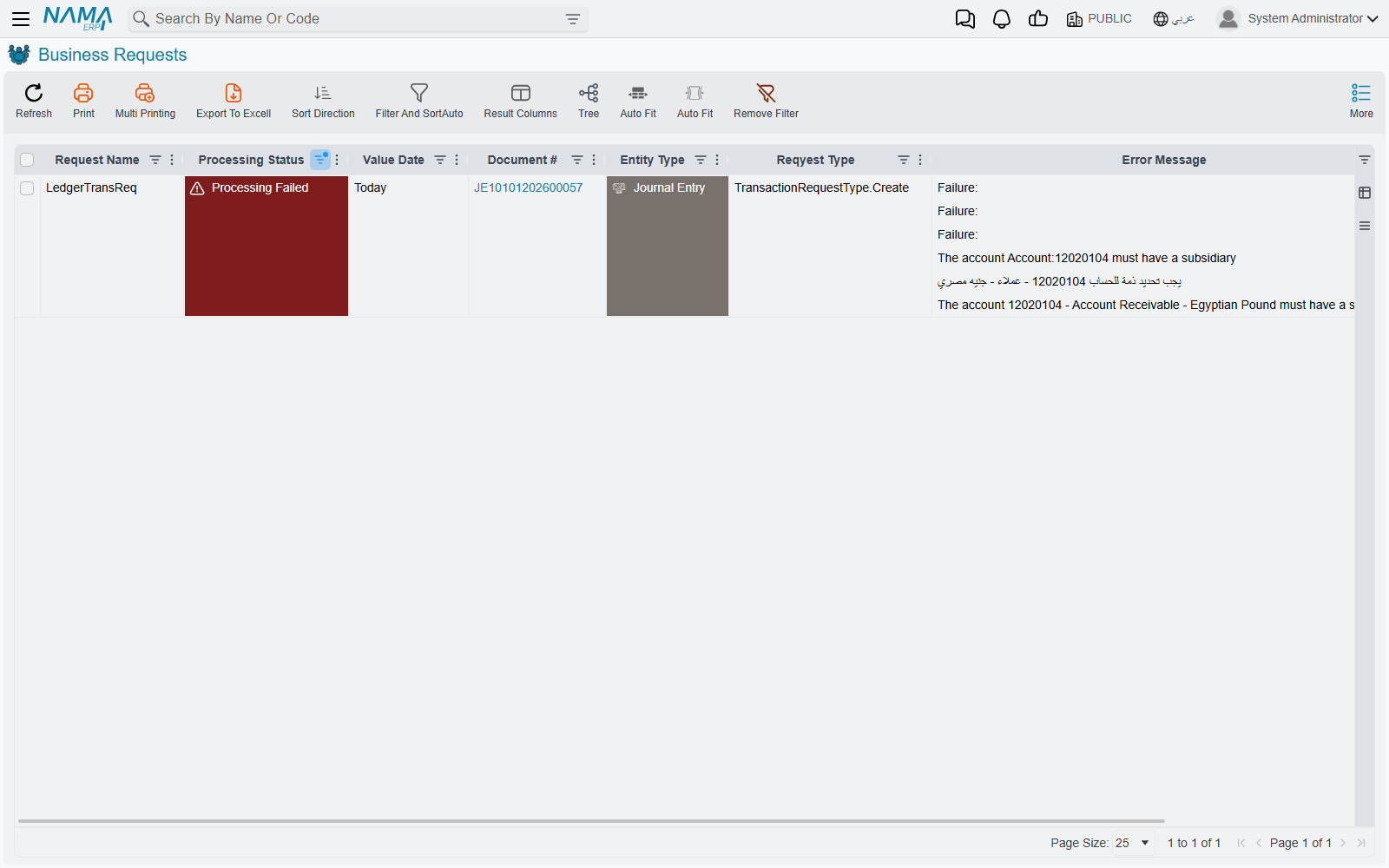
What you get back is one row per broken effect, each carrying the document number, the document type, the fiscal year and period, and the error text.
Two columns are worth knowing about because they answer the question "when did this break, and has anyone touched it since": Origin Last Update Date is when the document itself last changed, and Value Date is the date the effect belongs to. A request whose document was updated after the failure usually means somebody has already tried to fix the cause and simply never re-ran the request.
The Initiator column names the operation that raised the request, which is how you tell an effect raised by a user saving a document from one raised by a scheduled job or a bulk tool.
You can get to the same rows from a dimension
Every legal entity, sector, branch, department and analysis set has a System Tables tab, and three of the lists on it are the accounting requests, the inventory requests and their statuses, already narrowed to that dimension. It is a quicker route when you know the problem is confined to one company.
The two things you can do about it
Select the rows and open the More menu. Two of its entries belong to this screen — the rest are the generic ones every list has — and choosing between those two is the whole skill.
Reprocess
Reprocess puts the request back in the queue. It changes nothing about the document and nothing about the request except its status, and the worker picks it up within about a second.
This is what you want when the request failed for a reason that has since been fixed and the document itself was always right — the period was closed and is now open, the account was missing and now exists, the exchange rate was absent and has been entered. The request is re-run exactly as it was first raised.
Recommit
Recommit is heavier. It goes back to the source document and commits it again from scratch, which discards the existing request and raises a fresh one from the document's current contents.
Use it when the document has changed since the request was raised, or when you suspect the request itself was built wrongly rather than merely executed at a bad moment. Because it re-commits real documents, it runs every rule and validation the document has, and it can fail for reasons that have nothing to do with the original problem.
Recommit needs permission to edit committed records
Reprocess is available to anyone who can see the More menu here. Recommit additionally requires the right to edit records after they are committed, and on installations where that right is withheld the button is simply absent. If two people are looking at the same screen and only one of them can see Recommit, this is why.
Try Reprocess first
Reprocess is the smaller, safer instrument, and when the underlying cause has genuinely been fixed it is usually enough. Recommit is the answer when Reprocess has been tried and the request fails the same way, which tells you the request itself — not its timing — is the problem.
Saved Business Requests
The neighbouring screen shows the same information for requests at an earlier stage. When a document commits, the request is first written down in full, and only when the worker picks it up is it turned into the live request you see on the main screen — at which point the written-down copy is removed.
So on a healthy system this screen is empty, or nearly so. Rows appearing and vanishing within seconds are the machinery working. Rows that sit there and accumulate mean the worker is not running at all, which is a different and more serious problem than any individual failure: it is a server-level issue, not a document-level one.
There are no actions on this screen. It is there to be looked at.
When the work actually happens
Each kind of request has its own worker, and each worker runs on its own, one request at a time. Left alone it wakes on a timer; but every save nudges it, so on a busy system requests are picked up within a second or so of being raised, and the timer only matters on a quiet one.
Nothing processes for the first few minutes after a restart
The workers deliberately hold back for several minutes after the server starts, so that a restarting system is not immediately hit with a backlog while it is still warming up. A pile of Waiting Processing rows straight after a restart is expected and clears itself.
One case is worth recognising because it looks like a failure and is not. An accounting request that cannot be written because the period it belongs to has a closing entry over it stays at Waiting Processing — it is never marked failed, because nothing went wrong; the work simply cannot be done yet. Requests that have been waiting far longer than a restart would explain are usually this.
See also
- Pending Tasks — the outbound message queue, a different queue with a similar screen
- Report Monitoring — watching reports run
- Fiscal Period Control — the closed-period rule behind a large share of failed accounting requests