
Currencies and Exchange Rates
"Where do I enter today's dollar rate?" is one of the first questions any company that buys or sells in a foreign currency asks. The answer is the Exchange Rate screen — not the Exchange Rate Update document, which is a different thing that revalues balances you already hold. This page covers the currency master file, the Exchange Rate screen, and how a document picks its rate from it.
The local currency comes from the ledger
Every legal entity points at a Ledger (دفتر الحسابات), and the ledger's Main Currency is that legal entity's local currency — the currency the books are kept in. Every amount on a document is stored twice: in the document's own currency, and as a Local amount in the main currency. The link between the two is the Currency Rate on the document: local amount = amount × rate. A rate of 48.5 on a USD invoice means one dollar is worth 48.5 units of the local currency.
The ledger also has a Reporting Currency field. It is recorded on the ledger and printed on its form, but no document or report converts amounts into it.
Once a legal entity uses a ledger, its main currency is fixed — changing it is refused with Cannot change record after using it.
The Currency master file
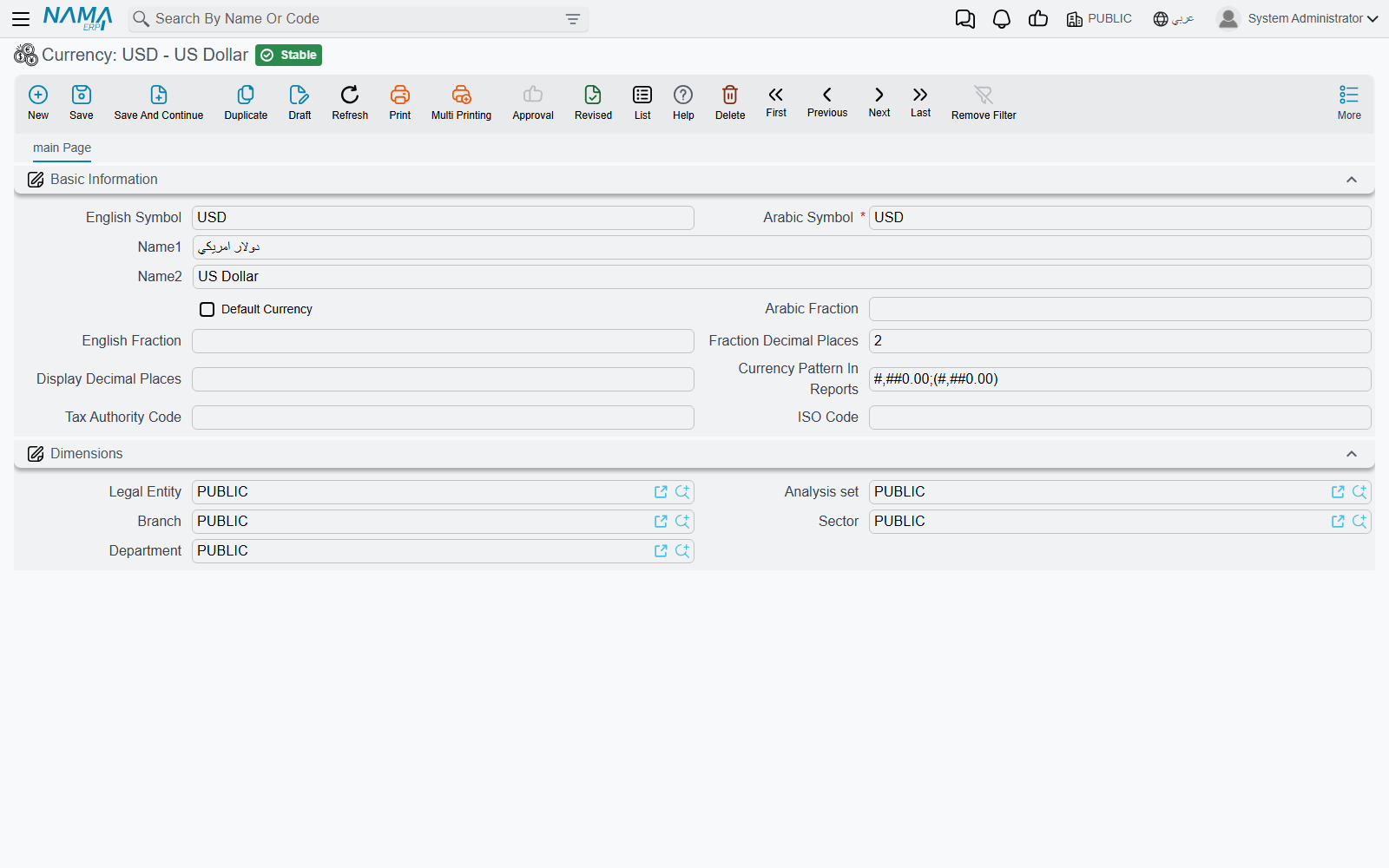
Currency (Basic → Master Files → Currency, also under the accounting settings menu) holds one record per currency. Besides the code and the two names, it has:
- English Code — a required second code.
- Arabic Fraction / English Fraction — the name of the fractional unit (piaster, halala, cent).
- Fraction Decimal Places — how many decimals an amount in this currency carries. A new currency starts at 2; set 3 for dinars that split into 1000 fils.
- Tax Authority Code and ISO Code — the codes the e-invoicing integrations send for this currency.
Writing an amount in words ("one thousand pounds only") is configured separately, on the Currencies Tafqeet tab of the global configuration.
The Exchange Rate screen
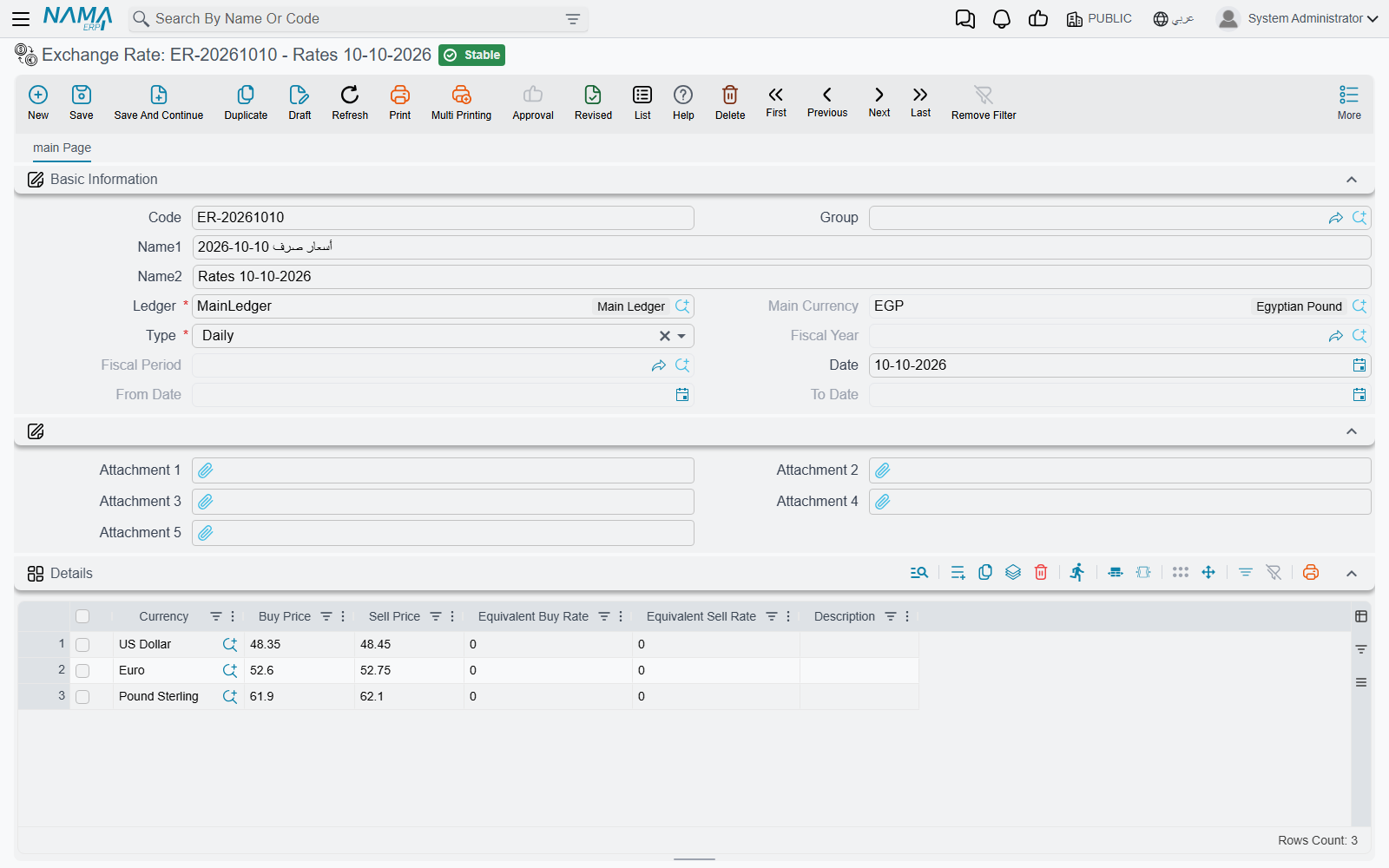
Exchange Rate (Basic → Documents → Exchange Rate, also in the accounting documents menu) is where rates are entered. One record holds the rates of several currencies against one ledger's main currency for one stretch of time:
- Ledger — required; Main Currency fills itself from it.
- Type — how long the record is valid, which decides which date fields open:
- Daily — one Date.
- Date Range — a From Date and To Date.
- Period — a Fiscal Year and Fiscal Period.
- Annual — a Fiscal Year.
- The grid: one line per Currency with a Buy Price and a Sell Price. Type the buy price and an empty sell price is filled with the same figure; the two Equivalent columns show the inverse rate (1 ÷ rate) for reference.
Only the Buy Price is used
Documents take the Buy Price — for sales and purchases alike. The Sell Price and the equivalent rates are kept for reference only.
A company that changes its rate every day creates one Daily record per day. A company that fixes a rate for the month creates a Period record. Both can live side by side.
How a document picks its rate
When you pick a currency on a document, the system looks up the rate for the document's legal entity's ledger, its value date, its fiscal period and its fiscal year, in this order:
- a Daily record for exactly the value date;
- a Date Range record whose range contains the value date;
- a Period record for the document's fiscal period;
- an Annual record for its fiscal year.
The first match wins. A currency that is the main currency itself always gets rate 1.
There is no "latest earlier rate" fallback. A Daily rate entered for 9 October does not serve a document dated 10 October; if nothing matches, the rate is left empty for you to type. If your rates are not entered every day, keep a Period or Annual record behind the daily ones as a safety net.
The rate is fetched when the currency is chosen and is an ordinary field after that: you can overwrite it, and the document keeps the figure it was saved with. Correcting a rate on the Exchange Rate screen does not reach back into documents already saved. (The salary document term has an Update Currency Rate Value With Save option that re-fetches on every save — see HR salary terms.)
Related settings
- Rate Fractional Decimal Places (global configuration, default 5) — how many decimals a rate field accepts. See Global Configuration → General.
- Subsidiary Currency Should Match Accounts Currency — see Accounting settings.
- Add Currency And Rate Source To Terms — lets a document term supply the currency and rate. See Documents settings.
- Rate Pattern In Reports — how rates print. See Reports settings.
When rates move: revaluation
The Exchange Rate screen only feeds new documents. To restate the local value of a foreign balance you already hold, use the Exchange Rate Update document, described in Journal entries & adjustments, with the background in Fiscal periods, period locking & multi-currency.
Messages you may see
Most of these have no Arabic text in the product and appear in English on Arabic screens too.
| Message | Why | What to do |
|---|---|---|
| There is another record with same date | A Daily record for this ledger and date already exists. | Open the existing record and edit its lines. |
| There is another record with same period / There is another record with same year | The same, for a Period or Annual record. | Edit the existing record. |
| Can not specify exchange rate for the main currency | A grid line names the ledger's main currency, whose rate is always 1. | Delete the line. |
| Currency repeated in line {0} | The same currency appears on two lines. | Keep one line per currency. |
| Fiscal year does not belong to the ledger calendar {0} | The fiscal year belongs to another calendar than the ledger's. | Pick a year of the ledger's calendar. |
| Fiscal period does not belong to the selected fiscal year {0} | The period and the year do not match. | Pick a period of that year. |
| Cannot change record after using it — «لا يمكن تعديل السجل بعد إستخدامه» | You changed the main currency, reporting currency, chart type or calendar of a ledger that a legal entity uses. | These cannot change once the ledger is in use. |
| Currency must be the account currency ({0}) or the local currency ({1}). Account {2}, transaction currency {3} — «يجب ان تكون العملة عملة الحساب {0} أو العملة المحلية {1}. الحساب {2} - عملة الحركة {3}» | A line posts to an account held in one foreign currency using a different foreign currency. | Use the account's currency or the local currency on that line. |
| Rate must be 1 because the currency is the same as the local currency — «المعدل يجب ان يكون 1.0» | A line in the local currency carries a rate other than 1. | Set the rate to 1. |