
Documents and Books
Every document in Nama gets its number from a book and its behaviour from a document term. This tab governs that machinery: how books and terms are picked, what a term is allowed to control, how drafts are numbered, how master files are coded automatically, how installments are generated, and who may save documents into a closed fiscal period.
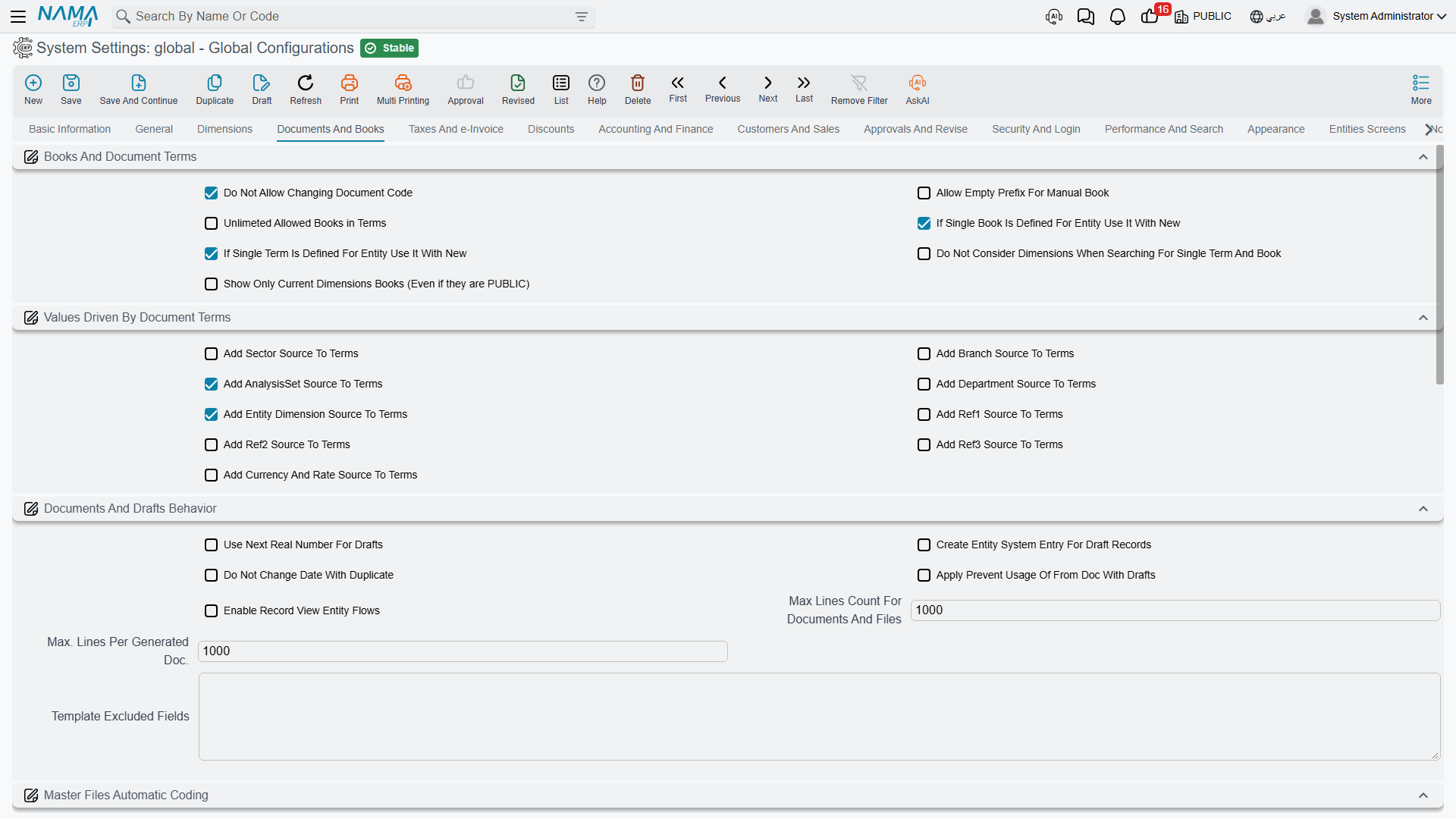
Books and document terms
Do Not Allow Changing Document Code value.info.doNotAllowSpecifyingDocCode (default on) — Users cannot type a document code by hand; the number always comes from the book's auto-coder. This is on by default for a good reason — hand-typed codes create gaps and duplicates that are painful to reconcile later.
Allow Empty Prefix For Manual Book value.info.allowEmptyPrefixForManualBook — A manually coded book normally needs a code prefix so its documents can be told apart. Turn this on if you have a book whose numbers should stand alone.
Unlimited Allowed Books in Terms value.info.unlimtedAllowedBooksInTerms — A document term lists the books it allows. That list is stored in a field capped at 700 characters, and a term that allows many books overflows it. Turning this on moves the list to a long field with no practical limit.
Re-save your terms after enabling this
The allowed-books list is written when a term is saved. Switching this option on does not rewrite existing terms — you must re-save every document term afterwards, or they will keep using the old short list.
If Single Book Is Defined For Entity Use It With New value.info.ifSingleBookIsDefinedForEntityUseItWithNew — When only one book fits the document being created, select it automatically instead of asking. A small thing that removes a click from every single document.
If Single Term Is Defined For Entity Use It With New value.info.ifSingleTermIsDefinedForEntityUseItWithNew — The same for document terms.
Do Not Consider Dimensions When Searching For Single Term And Book value.info.doNotConsiderDimensionsWhenSearchingForSingleTermBook — By default the "is there only one?" check above is made within the current dimensions. With this on, the search ignores dimensions, so a term or book that fits regardless of branch is still auto-selected.
Show Only Current Dimensions Books (Even if they are PUBLIC) value.info.showOnlyCurrentDimensionBooks — Filters the Book selector down to books matching the record's dimensions. Useful once each branch has its own numbering series and you want to stop staff picking another branch's book.
Values driven by document terms
A document term can supply values to the document it governs — a term for Cairo branch sales can force the branch, the reference fields, even the currency. Each option here adds one such source column to the Document Term screen. They are off by default because every column you add is another decision the person maintaining terms has to make.
- Add Sector Source To Terms
value.info.addSectorSourceToTerms - Add Branch Source To Terms
value.info.addBranchSourceToTerms - Add AnalysisSet Source To Terms
value.info.addAnalysisSourceToTerms(default on) - Add Department Source To Terms
value.info.addDeptSourceToTerms - Add Entity Dimension Source To Terms
value.info.addEntityDimSourceToTerms - Add Ref1 Source To Terms / Add Ref2 Source To Terms / Add Ref3 Source To Terms
value.info.addRef1SourceToTerms,...addRef2SourceToTerms,...addRef3SourceToTerms - Add Currency And Rate Source To Terms
value.info.addCurrencyAndRateSourceToTerms
Documents and drafts behaviour
Use Next Real Number For Drafts value.info.useNextRealNumberForDrafts — Drafts normally draw from a separate draft sequence, so a draft that is never committed doesn't consume a real number. Turn this on and a draft takes the next real number instead, which keeps the committed series gap-free at the cost of burning numbers on abandoned drafts. Individual auto-coders can override this.
Create Entity System Entry For Draft Records value.info.createEntitySystemEntryForDraftRecord — Writes a system entry for drafts as well as committed records. Needed when an integration or a report has to see documents before they are committed.
Do Not Change Date With Duplicate value.info.doNotChangeDateWithDuplicate — The Duplicate action normally resets the new document's date to today. With this on it keeps the source document's date — the right behaviour when you duplicate to correct a historical entry.
Apply Prevent Usage Of From Doc With Drafts value.info.applyPreventUsageOfFromDocWithDrafts — A source document can be marked so it may only be consumed once. Normally that rule is checked at commit. This applies it at draft-save time too, so two people can't both start drafts from the same source.
Enable Record View Entity Flows value.info.enableRecordViewEntityFlows — Allows entity flows whose trigger is Record View, running them whenever a record is opened. Off by default, and worth leaving off unless you need it: it adds work to every single record open. The system refuses to save an entity flow using that trigger while this is off.
Max Lines Count For Documents And Files value.info.maxLinesCount (default 750) — The default cap on how many detail lines one record may hold. It protects the server from a single enormous document. Individual entity/grid combinations can be given their own limit that overrides this.
Max. Lines Per Generated Doc. value.info.maxLinesPerGeneratedDoc (default 1000) — When the year-end closing produces its entries, it splits them across several documents rather than building one giant entry. This is the number of lines per generated document.
Template Excluded Fields value.info.defaultValuesExcludedFields — When a user saves a record as a "default values" template, everything on it is copied. List field ids here — one per line — to keep them out of such templates. Dates, codes and reference numbers are the usual candidates.
Master files automatic coding
Items, accounts and other master files can be coded by formula rather than by hand. This group defines those formulas; the system checks them when you save the configuration.
Documents, items, and everything else
Keep the three apart. A document's number comes from its book's auto-coder, not from here. The formulas below cover items and their revisions and variants. Any other master file — customers, suppliers, cost centres — is coded by its Master Group if it has one, and otherwise by a line in Fields and Entities Settings, where you name the record type and give it a formula of the same kind.
Prevent Manual Coding for Autocoded books value.info.preventManualCoding — Refuses to save a record whose code was typed by hand when its auto-coder is set to code automatically. The strict counterpart to the document-code option above.
Code Calculation Formula value.info.itemCodingFormula.codeCalculationFormula — Builds the code itself, typically from the item's group, category and a running number.
Code Validity Query (Skip code if 1 is returned, and calculate next) value.info.itemCodingFormula.codeValidityQuery — A check the generated code must pass. If the query matches an existing record, the code is rejected and the next number is tried. This is how you enforce "no two items may share this code shape".
Code Sequence Prefix value.info.itemCodingFormula.codeSequencePrefix — A formula producing the prefix whose counter the numeric suffix belongs to, so each product family gets its own independent series.
Code Suffix Length / Suffix First Number value.info.itemCodingFormula.codeSuffixLength, ...codeSuffixFirstNumber — The width of the numeric part (zero-padded) and the number it starts from.
Name1 Calculation Formula / Name2 Calculation Formula value.info.itemCodingFormula.name1CalculationFormula, ...name2CalculationFormula — Formulas that build the Arabic and English names, so a generated item is fully described without typing.
Alternate Code Formula value.info.itemCodingFormula.altCodeFormula — Builds the alternative code.
Revision Code Calculation Formula, Name 1 Encoding Formula For Revision / Name 2 Encoding Formula For Revision value.info.itemCodingFormula.revCodeCalculationFormula, ...rvName1Formula, ...rvName2Formula — The same three formulas applied to generated item revisions.
Size And Color Code Calculation Formula, Name 1 Encoding Formula For Colour And Size / Name 2 Encoding Formula For Colour And Size value.info.itemCodingFormula.sizeAndColorCodeCalculationFormula, ...szName1Formula, ...szName2Formula — And again for generated size and colour variants, which is where auto-coding really pays: a shirt in five sizes and four colours becomes twenty correctly named records with no typing.
Do Not Reset Code With Update value.info.itemCodingFormula.doNotResetCodeWithUpdate — Keeps the existing code when the record is edited, even if the formula's inputs changed.
Update Revision If Empty Only / Update Color and Size If Empty Only value.info.itemCodingFormula.updateRevisionIfEmpty, ...updateColorAndSizeIfEmpty — Fill those codes only when they are currently blank, leaving anything already coded untouched.
Installments
Installment Coding Method value.info.installmentCodingMethod — How generated installments are numbered: Document Code and Line Number, Installment Date and Line Number, or Formula.
Installment Coding Formula value.info.installmentCodingFormula — The formula used when the method is Formula.
Ignored Value When Paying Installments value.info.ignoredValueWhenPayingInstallments — The tolerance when checking a payment against an installment amount. Set it just above your smallest currency unit so a one-piastre rounding difference doesn't block a settlement.
Do Not Compare Remaining With Payment Total In Invoices value.info.doNotCompareRemainingWithPaymentTotalInInvoices — Skips the validation that an invoice's remaining amount equals the total of its payment schedule. Use it only where the two genuinely diverge by design.
Fiscal periods and closing
Do Not Prevent Modifying Documents Before Last Close Entry Date value.info.doNotPreventModifyingDocsBeforeLastCloseEntry — Normally a document dated before the last closing entry is locked, because editing it would change a period that has already been closed and reported. This lifts that lock.
Allow Reprocessing Of Ledger Trans Requests Before Closing Entry value.info.allowReprocessingOfLedgerTransRequestsBeforeClosingEntry — Allows the accounting effects of documents dated before a closing entry to be reprocessed.
Allow Reprocessing Of Inventory Trans Requests Before Closing Entry value.info.allowReprocessingOfInvTransRequestsBeforeClosingEntry — The same for inventory effects.
Only a Namasoft support session can switch these two on
Switching either option on is not an ordinary edit. Both sit at a protected security level, and a save that turns one on from a normal session is refused with "You are not authorized to change the field {0} because it belongs to the security level {1}, please contact technical support team" — «انت لا تمتلك صلاحية التعديل على الحقل {0} لأنه ينتمى لمستوى الأمان {1} برجاء التواصل مع الدعم الفنى» — with the option's id and L2Dangerous filling the two placeholders. Turning them back off is not gated.
That is deliberate: reprocessing across a closing entry rewrites figures that a closed period was built from, so balances that were reported to management or to an auditor can silently change. While either option is on, every login shows the critical error The option {0} in {1} config is enabled, it should be disabled. Please contact our support team. — see Critical errors. Switch them on for a supervised correction, then off again.
Enable Fiscal Year Status Update value.info.enableFiscalYearStatusUpdateFile — Activates the Fiscal Year Status Update file, which closes an open period further for a specific combination of entity, dimensions and user. It cannot reopen a period that is closed — see Fiscal Period Control.
Ignore Closed Periods In value.info.ignoreClosedPeriodsIn (table) — A more surgical alternative to the options above. Each row grants one user (or one "allow for" group) the right to save documents into a named fiscal period and year, for one entity type, optionally narrowed to specific dimensions. This is how you let the accountant finish last month's adjustments without unlocking the period for everybody.
Settings on this tab
Every field on this tab with its exact on-screen label in both languages, so you can find a setting by the name you see. The last column points to the section that explains it.
| Field id | English label | Arabic label | Meaning |
|---|---|---|---|
value.info.doNotAllowSpecifyingDocCode | Do Not Allow Changing Document Code | عدم السماح بتغيير الكود في المستندات | Books and document terms |
value.info.allowEmptyPrefixForManualBook | Allow Empty Prefix For Manual Book | السماح بترك بادئة التكويد فارغة في الدفاتر اليدوية | Books and document terms |
value.info.unlimtedAllowedBooksInTerms | Unlimited Allowed Books in Terms | السماح باستعمال دفاتر مسموح بها دون حد أقصى في التوجيه | Books and document terms |
value.info.ifSingleBookIsDefinedForEntityUseItWithNew | If Single Book Is Defined For Entity Use It With New | اذا وجد دفتر واحد لمستند يتم استعماله مباشرة عند إنشاء جديد | Books and document terms |
value.info.ifSingleTermIsDefinedForEntityUseItWithNew | If Single Term Is Defined For Entity Use It With New | اذا وجد توجيه واحد لمستند يتم استعماله مباشرة عند إنشاء جديد | Books and document terms |
value.info.doNotConsiderDimensionsWhenSearchingForSingleTermBook | Do Not Consider Dimensions When Searching For Single Term And Book | تجاهل محددات الدخول عند البحث عن دفتر و توجيه واحد | Books and document terms |
value.info.showOnlyCurrentDimensionBooks | Show Only Current Dimensions Books (Even if they are PUBLIC) | اظهار دفاتر المحددات الحالية فقط حتي لو كانت عام | Books and document terms |
value.info.addSectorSourceToTerms | Add Sector Source To Terms | إضافة تفاصيل القطاع للتوجيه | Values driven by document terms |
value.info.addBranchSourceToTerms | Add Branch Source To Terms | إضافة تفاصيل الفرع للتوجيه | Values driven by document terms |
value.info.addAnalysisSourceToTerms | Add AnalysisSet Source To Terms | إضافة تفاصيل المجموعة التحليلية للتوجيه | Values driven by document terms |
value.info.addDeptSourceToTerms | Add Department Source To Terms | إضافة تفاصيل الإدارة للتوجيه | Values driven by document terms |
value.info.addEntityDimSourceToTerms | Add Entity Dimension Source To Terms | إضافة تفاصيل مصدر السجل للتوجيه | Values driven by document terms |
value.info.addRef1SourceToTerms | Add Ref1 Source To Terms | إضافة تفاصيل مصدر مرجع 1 للتوجيه | Values driven by document terms |
value.info.addRef2SourceToTerms | Add Ref2 Source To Terms | إضافة تفاصيل مصدر مرجع 2 للتوجيه | Values driven by document terms |
value.info.addRef3SourceToTerms | Add Ref3 Source To Terms | إضافة تفاصيل مصدر مرجع 3 للتوجيه | Values driven by document terms |
value.info.addCurrencyAndRateSourceToTerms | Add Currency And Rate Source To Terms | إضافة مصدر العملة و المعدل للتوجيه | Values driven by document terms |
value.info.useNextRealNumberForDrafts | Use Next Real Number For Drafts | استعمال الرقم التالي الحقيقي للمسودات | Documents and drafts behaviour |
value.info.createEntitySystemEntryForDraftRecord | Create Entity System Entry For Draft Records | Create Entity System Entry For Draft Records | Documents and drafts behaviour |
value.info.doNotChangeDateWithDuplicate | Do Not Change Date With Duplicate | منع تغيير التاريخ مع النسخة المماثلة | Documents and drafts behaviour |
value.info.applyPreventUsageOfFromDocWithDrafts | Apply Prevent Usage Of From Doc With Drafts | تفعيل منع مستند بناءا على من الاستعمال عند حفظ المسودة | Documents and drafts behaviour |
value.info.enableRecordViewEntityFlows | Enable Record View Entity Flows | Enable Record View Entity Flows | Documents and drafts behaviour |
value.info.maxLinesCount | Max Lines Count For Documents And Files | أقصى عدد لسطور السندات والملفات | Documents and drafts behaviour |
value.info.maxLinesPerGeneratedDoc | Max. Lines Per Generated Doc. | اقصي عدد من السطور عند إنشاء مستندات | Documents and drafts behaviour |
value.info.defaultValuesExcludedFields | Template Excluded Fields | الحقول المستبعدة من القوالب | Documents and drafts behaviour |
value.info.preventManualCoding | Prevent Manual Coding for Autocoded books | منع التكويد اليدوي للدفاتر الالية | Master files automatic coding |
value.info.itemCodingFormula.codeCalculationFormula | Code Calculation Formula | صيغة حساب الكود | Master files automatic coding |
value.info.itemCodingFormula.codeValidityQuery | Code Validity Query (Skip code if 1 is returned, and calculate next) | Code Validity Query (Skip code if 1 is returned, and calculate next) | Master files automatic coding |
value.info.itemCodingFormula.codeSequencePrefix | Code Sequence Prefix | بادئة حساب التسلسل | Master files automatic coding |
value.info.itemCodingFormula.codeSuffixLength | Code Suffix Length | طول لاحقة الكود | Master files automatic coding |
value.info.itemCodingFormula.codeSuffixFirstNumber | Suffix First Number | أول رقم في لاحقة الكود | Master files automatic coding |
value.info.itemCodingFormula.name1CalculationFormula | Name1 Calculation Formula | صيغة حساب الاسم العربي | Master files automatic coding |
value.info.itemCodingFormula.name2CalculationFormula | Name2 Calculation Formula | صيغة حساب الاسم الإنجليزي | Master files automatic coding |
value.info.itemCodingFormula.altCodeFormula | Alternate Code Formula | صيغه الكود البديل | Master files automatic coding |
value.info.itemCodingFormula.revCodeCalculationFormula | Revision Code Calculation Formula | صيغة حساب الكود للإصدارات | Master files automatic coding |
value.info.itemCodingFormula.rvName1Formula | Name 1 Encoding Formula For Revision | صيغة تكويد اسم 1 للاصدارة | Master files automatic coding |
value.info.itemCodingFormula.rvName2Formula | Name 2 Encoding Formula For Revision | صيغة تكويد اسم 2 للاصدارة | Master files automatic coding |
value.info.itemCodingFormula.sizeAndColorCodeCalculationFormula | Size And Color Code Calculation Formula | صيغة حساب الكود للمقاس و اللون | Master files automatic coding |
value.info.itemCodingFormula.szName1Formula | Name 1 Encoding Formula For Colour And Size | صيغة تكويد اسم 1 للون والمقاس | Master files automatic coding |
value.info.itemCodingFormula.szName2Formula | Name 2 Encoding Formula For Colour And Size | صيغة تكويد اسم 2 للون والمقاس | Master files automatic coding |
value.info.itemCodingFormula.doNotResetCodeWithUpdate | Do Not Reset Code With Update | عدم تحديث الكود مع التعديل | Master files automatic coding |
value.info.itemCodingFormula.updateRevisionIfEmpty | Update Revision If Empty Only | تحديث الإصدار إذا كان فارغا فقط | Master files automatic coding |
value.info.itemCodingFormula.updateColorAndSizeIfEmpty | Update Color and Size If Empty Only | تحديث اللون والمقاس إذا كانا فارغين فقط | Master files automatic coding |
value.info.installmentCodingMethod | Installment Coding Method | طريقة تكويد الأقساط | Installments |
value.info.installmentCodingFormula | Installment Coding Formula | معادلة حساب كود القسط | Installments |
value.info.ignoredValueWhenPayingInstallments | Ignored Value When Paying Installments | القيمة المتجاهلة عند مقارنة المدفوع بالأقساط (الدفعات) | Installments |
value.info.doNotCompareRemainingWithPaymentTotalInInvoices | Do Not Compare Remaining With Payment Total In Invoices | عدم مقارنة المتبقي بإجمالي الدفعات في الفواتير | Installments |
value.info.doNotPreventModifyingDocsBeforeLastCloseEntry | Do Not Prevent Modifying Documents Before Last Close Entry Date | السماح بتعديل المستندات قبل تاريخ القيد الختامى | Fiscal periods and closing |
value.info.allowReprocessingOfLedgerTransRequestsBeforeClosingEntry | Allow Reprocessing Of Ledger Trans Requests Before Closing Entry | Allow Reprocessing Of Ledger Trans Requests Before Closing Entry | Fiscal periods and closing |
value.info.allowReprocessingOfInvTransRequestsBeforeClosingEntry | Allow Reprocessing Of Inventory Trans Requests Before Closing Entry | Allow Reprocessing Of Inventory Trans Requests Before Closing Entry | Fiscal periods and closing |
value.info.enableFiscalYearStatusUpdateFile | Enable Fiscal Year Status Update | تفعيل تحديث حالة السنة المالية | Fiscal periods and closing |
value.info.ignoreClosedPeriodsIn | Ignore Closed Periods In | تجاهل الفترات المغلقة في | Fiscal periods and closing |
value.info.ignoreClosedPeriodsIn.entityType | Entity Type | النوع | Fiscal periods and closing |
value.info.ignoreClosedPeriodsIn.fiscalPeriod | Fiscal Period | الفترة | Fiscal periods and closing |
value.info.ignoreClosedPeriodsIn.fiscalYear | Fiscal Year | السنة المالية | Fiscal periods and closing |
value.info.ignoreClosedPeriodsIn.user | User | المستخدم | Fiscal periods and closing |
value.info.ignoreClosedPeriodsIn.allowFor | Allow For | السماح ل | Fiscal periods and closing |
value.info.ignoreClosedPeriodsIn.legalEntity | Legal Entity | الشركة | Fiscal periods and closing |
value.info.ignoreClosedPeriodsIn.analysisSet | Analysis set | المجموعة التحليلية | Fiscal periods and closing |
value.info.ignoreClosedPeriodsIn.sector | Sector | القطاع | Fiscal periods and closing |
value.info.ignoreClosedPeriodsIn.branch | Branch | الفرع | Fiscal periods and closing |
value.info.ignoreClosedPeriodsIn.department | Department | الإدارة | Fiscal periods and closing |