
Notifications and Messaging
Everything the system needs in order to tell someone something: in-app notifications and their sounds, and the email and SMS accounts it sends through.
For how notifications are defined and triggered, see the Notifications system and SMS and WhatsApp.
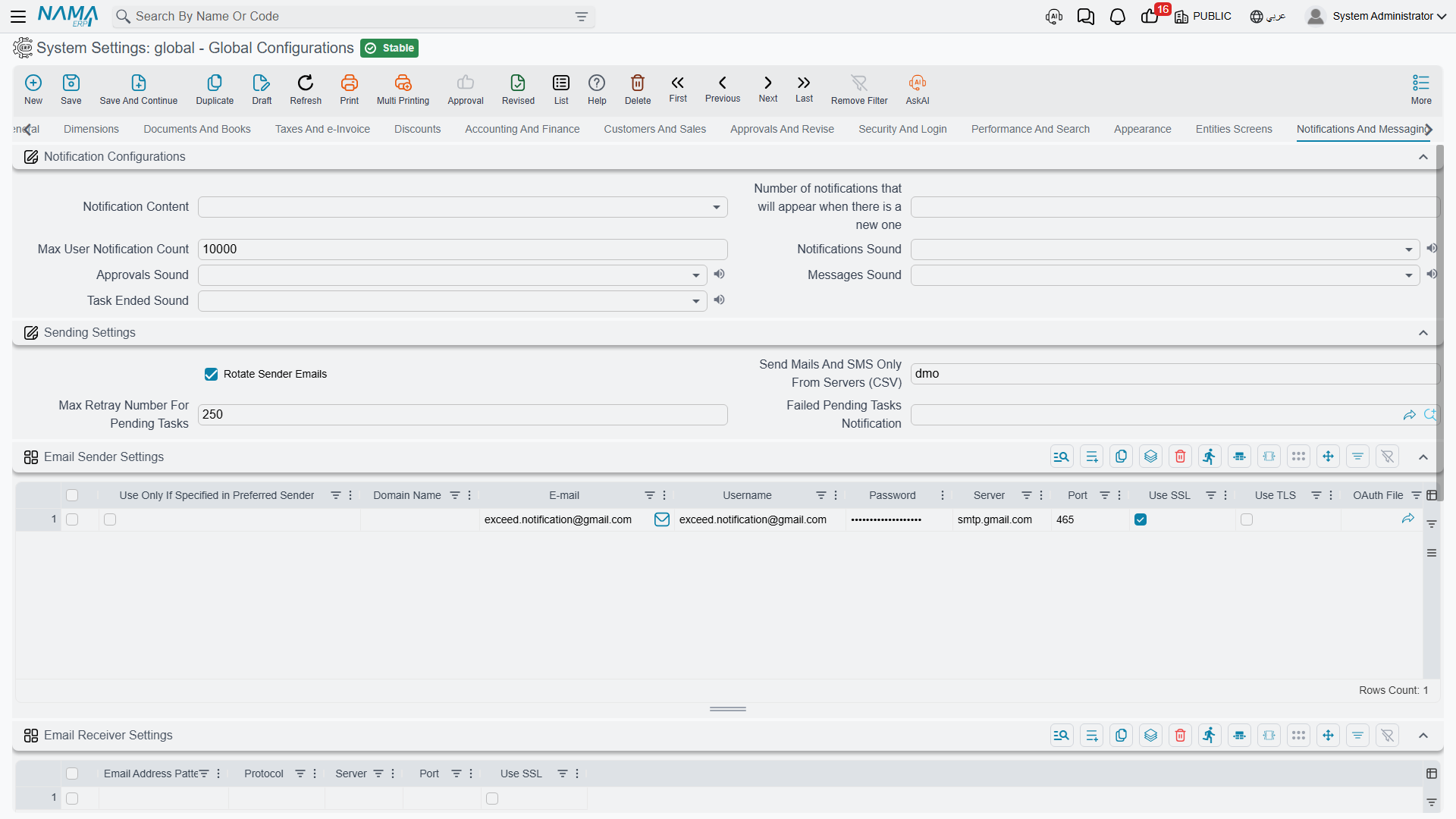
Notifications
Notification Content value.info.notificationContent — Whether the notification text itself is shown (View Content) or only a neutral "you have a notification" hint (Do Not View Content). Choose Do Not View Content where notifications may carry salary figures, customer details or anything else that shouldn't sit on an unattended screen.
Number of notifications that will appear when there is a new one value.info.notificationsCount — How many notifications are listed in the panel.
Max User Notification Count value.info.maxUserNotificationCount (default 10000) — A retention cap per user. Once exceeded, the system raises a critical message. Without a cap, notification history on a busy installation grows without limit.
Do Not Send Notifications To Delegated Employee value.info.doNotSendNotificationsToDelegates — Normally, when an employee has an active delegation, notifications aimed at them are raised for their stand-in as well, marked with Delegated From. Tick this to switch that off everywhere. Prefer the Do Not Apply Delegation field on the individual notification definition when only a few sensitive notifications should stay with their original recipient — see Notifications system.
Ignore Employee State When Sending Notifications value.info.ignoreEmployeeStateWhenSendingNotifications — Normally the system silently drops a recipient whose employee is Resigned, Dismissed, Pension or Suspended, and any user linked to such an employee. Tick this to stop that check for the whole installation, so former employees keep receiving notifications. Users with Prevent Login ticked are still dropped either way — see Why a notification was not delivered.
Notifications Sound / Approvals Sound / Messages Sound / Task Ended Sound value.info.notificationsSound, value.info.approvalsSound, value.info.messagesSound, value.info.taskEndedSound — Each can be None or one of five sounds. Giving approvals a distinct sound from general notifications is genuinely useful for people who approve all day; giving all four the same sound is just noise.
Sending settings
Rotate Sender Emails value.info.rotateSenderEmails (default on) — Cycles through the configured sender accounts instead of always using the first. This spreads volume across accounts, which matters because most mail providers throttle a single account.
Send Mails And SMS Only From Servers (CSV) value.info.sendMailsAndSMSOnlyFromServers — A list of server identifiers permitted to actually send. It defaults to this server's own identifier, and that default is a safety feature worth understanding.
This is what stops a test copy emailing your customers
When you restore a production database onto a test server, every scheduled notification comes with it. Because this field holds the production server's identifier and the test server's identifier is different, the test copy quietly declines to send anything. Leave it filled in, and when you deliberately move production to a new server, remember to update it — otherwise the new production server will stop sending too.
Max Retry Number For Pending Tasks value.info.maxRetrayNumForPendingTasks (default 250) — How many times a pending task is retried before it is abandoned.
Failed Pending Tasks Notification value.info.failedPendingTasksNotification — The notification raised when a task finally gives up, so a human learns that messages are not going out.
Email sender accounts
Email Sender Settings value.info.emailSettings (table) — One row per sending account. Each row carries the domain name, email, username, password, server, port, and the use SSL / use TLS flags, plus an optional OAuth file for providers that require it rather than a password.
Use Only If Preferred marks an account that should be used only when something explicitly asks for it, rather than entering the general rotation.
The five dimension columns — legal entity, sector, branch, department, analysis set — let an account be scoped, so each company in a group sends from its own address.
OAuth accounts are validated on save
If a row references an OAuth file, saving checks three things: the file must be authorised (open it and use Start OAuth if it isn't), it must be marked for sending emails from Gmail, and its user email must be identical to the row's username. Each failure names the file and says exactly what is wrong.
Email receiving
Email Receiver Settings value.info.emailReceiverSettings (table) — Incoming mail accounts, for workflows that create records from received email. Each row has an email pattern, a protocol, a server, a port and a use SSL flag.
SMS providers
SMS Settings value.info.smsSettings (table) — One row per SMS or messaging provider, with the same five dimension columns for scoping.
Alongside provider, sender, username, password and use only if preferred, the row carries what a generic HTTP provider needs: use POST method, HTTP headers, request body template, success indicator (the text in the response that means it worked) and other settings.
Phone Number Corrector is a query that rewrites numbers into the format the provider expects — turning a locally stored 01012345678 into 201012345678, for example.
Two providers have extra requirements
WaboxApp only accepts numbers in international format, so a phone number corrector is required — the system refuses to save the row without one. A generic URL provider requires the target URL in other settings, and likewise won't save without it. In both cases the error names the row.
Legacy mail server
Server / Port / Connection Type / Authenticated / User Name / Password value.info.mailServerSettings.server and friends — A single SMTP account, from before the sender table above existed. It is still used as a fallback when no row in the email settings table matches. New installations should configure the table and leave this empty.
Settings on this tab
Every field on this tab with its exact on-screen label in both languages, so you can find a setting by the name you see. The last column points to the section that explains it.
| Field id | English label | Arabic label | Meaning |
|---|---|---|---|
value.info.notificationContent | Notification Content | محتوى التنبيه | Notifications |
value.info.notificationsCount | Number of notifications that will appear when there is a new one | عدد التنبيهات اللتى سوف تظهر عند وجود تنبيه جديد | Notifications |
value.info.maxUserNotificationCount | Max User Notification Count | أقصى عدد لإشعارات المستخدم | Notifications |
value.info.notificationsSound | Notifications Sound | صوت الاشعارات | Notifications |
value.info.approvalsSound | Approvals Sound | صوت إشعار الموافقات | Notifications |
value.info.messagesSound | Messages Sound | صوت الرسائل | Notifications |
value.info.taskEndedSound | Task Ended Sound | صوت انتهاء المهمة | Notifications |
value.info.doNotSendNotificationsToDelegates | Do Not Send Notifications To Delegated Employee | عدم إرسال التنبيهات للموظف المفوض | Notifications |
value.info.ignoreEmployeeStateWhenSendingNotifications | Ignore Employee State When Sending Notifications | تجاهل حالة الموظف عند إرسال التنبيهات | Notifications |
value.info.rotateSenderEmails | Rotate Sender Emails | Rotate Sender Emails | Sending settings |
value.info.sendMailsAndSMSOnlyFromServers | Send Mails And SMS Only From Servers (CSV) | ارسال البريد و الرسائل من الخوادم (CSV) | Sending settings |
value.info.maxRetrayNumForPendingTasks | Max Retry Number For Pending Tasks | أقصى عدد محاولات للمهام المعلقة | Sending settings |
value.info.failedPendingTasksNotification | Failed Pending Tasks Notification | Failed Pending Tasks Notification | Sending settings |
value.info.emailSettings | Email Sender Settings | إعدادات البريد المرسل | Email sender accounts |
value.info.emailSettings.useOnlyIfPreferred | Use Only If Specified in Preferred Sender | يتسعمل فقط اذا كان مضافا في المرسل المفضل | Email sender accounts |
value.info.emailSettings.domainName | Domain Name | Domain Name | Email sender accounts |
value.info.emailSettings.email | إيميل | Email sender accounts | |
value.info.emailSettings.username | Username | اسم المستخدم | Email sender accounts |
value.info.emailSettings.password | Password | كلمة المرور | Email sender accounts |
value.info.emailSettings.server | Server | الخادم | Email sender accounts |
value.info.emailSettings.port | Port | المنفذ | Email sender accounts |
value.info.emailSettings.useSSL | Use SSL | استخدام SSL | Email sender accounts |
value.info.emailSettings.useTLS | Use TLS | استخدام TLS | Email sender accounts |
value.info.emailSettings.oAuthFile | OAuth File | OAuth File | Email sender accounts |
value.info.emailSettings.dimensions.legalEntity | Legal Entity | الشركة | Email sender accounts |
value.info.emailSettings.dimensions.sector | Sector | القطاع | Email sender accounts |
value.info.emailSettings.dimensions.branch | Branch | الفرع | Email sender accounts |
value.info.emailSettings.dimensions.analysisSet | Analysis set | المجموعة التحليلية | Email sender accounts |
value.info.emailSettings.dimensions.department | Department | الإدارة | Email sender accounts |
value.info.emailReceiverSettings | Email Receiver Settings | إعدادات البريد المستقبل | Email receiving |
value.info.emailReceiverSettings.emailPattern | Email Address Pattern | العنوان المستعمل | Email receiving |
value.info.emailReceiverSettings.protocol | Protocol | البروتوكول | Email receiving |
value.info.emailReceiverSettings.server | Server | الخادم | Email receiving |
value.info.emailReceiverSettings.port | Port | المنفذ | Email receiving |
value.info.emailReceiverSettings.useSSL | Use SSL | استخدام SSL | Email receiving |
value.info.smsSettings | SMS Settings | إعدادات الرسائل القصيرة | SMS providers |
value.info.smsSettings.provider | Service Provider | مزود الخدمة | SMS providers |
value.info.smsSettings.useOnlyIfPreferred | Use Only If Specified in Preferred Sender | يتسعمل فقط اذا كان مضافا في المرسل المفضل | SMS providers |
value.info.smsSettings.sender | Sender | المرسل | SMS providers |
value.info.smsSettings.username | Username | اسم المستخدم | SMS providers |
value.info.smsSettings.password | Password | كلمة المرور | SMS providers |
value.info.smsSettings.otherSettings | Other Settings | إعدادات أخرى | SMS providers |
value.info.smsSettings.phoneNumberCorrector | Phone Number Corrector Query | استعلام تصحيح رقم الهاتف | SMS providers |
value.info.smsSettings.usePOSTMethod | Use POST Method | Use POST Method | SMS providers |
value.info.smsSettings.httpHeaders | HTTP Headers(header1==>value2) - Multiple Headers Should Be in Separate Lines | HTTP Headers(header1==>value2) - Multiple Headers Should Be in Separate Lines | SMS providers |
value.info.smsSettings.requestBodyTemplate | Request Body Template (Can Be Used For JSON and XML requests) | Request Body Template (Can Be Used For JSON and XML requests) | SMS providers |
value.info.smsSettings.successIndicator | Success Indicator (String that must be included in the response to consider the send operation successful) | Success Indicator (String that must be included in the response to consider the send operation successful) | SMS providers |
value.info.smsSettings.dimensions.legalEntity | Legal Entity | الشركة | SMS providers |
value.info.smsSettings.dimensions.sector | Sector | القطاع | SMS providers |
value.info.smsSettings.dimensions.branch | Branch | الفرع | SMS providers |
value.info.smsSettings.dimensions.analysisSet | Analysis set | المجموعة التحليلية | SMS providers |
value.info.smsSettings.dimensions.department | Department | الإدارة | SMS providers |
value.info.mailServerSettings.server | Server | الخادم | Legacy mail server |
value.info.mailServerSettings.port | Port | المنفذ | Email sender accounts |
value.info.mailServerSettings.connectionType | Connection Type | نوع الإتصال | Legacy mail server |
value.info.mailServerSettings.authenticated | Authenticated | يحتاج كلمة سر | Legacy mail server |
value.info.mailServerSettings.userName | User Name | اسم المستخدم | Legacy mail server |
value.info.mailServerSettings.password | Password | كلمة المرور | Email sender accounts |