
Customers and Sales
A short tab with three unrelated jobs: deciding who counts as the salesman on a document, how customer codes are formed, and how this installation talks to Nama CRM.
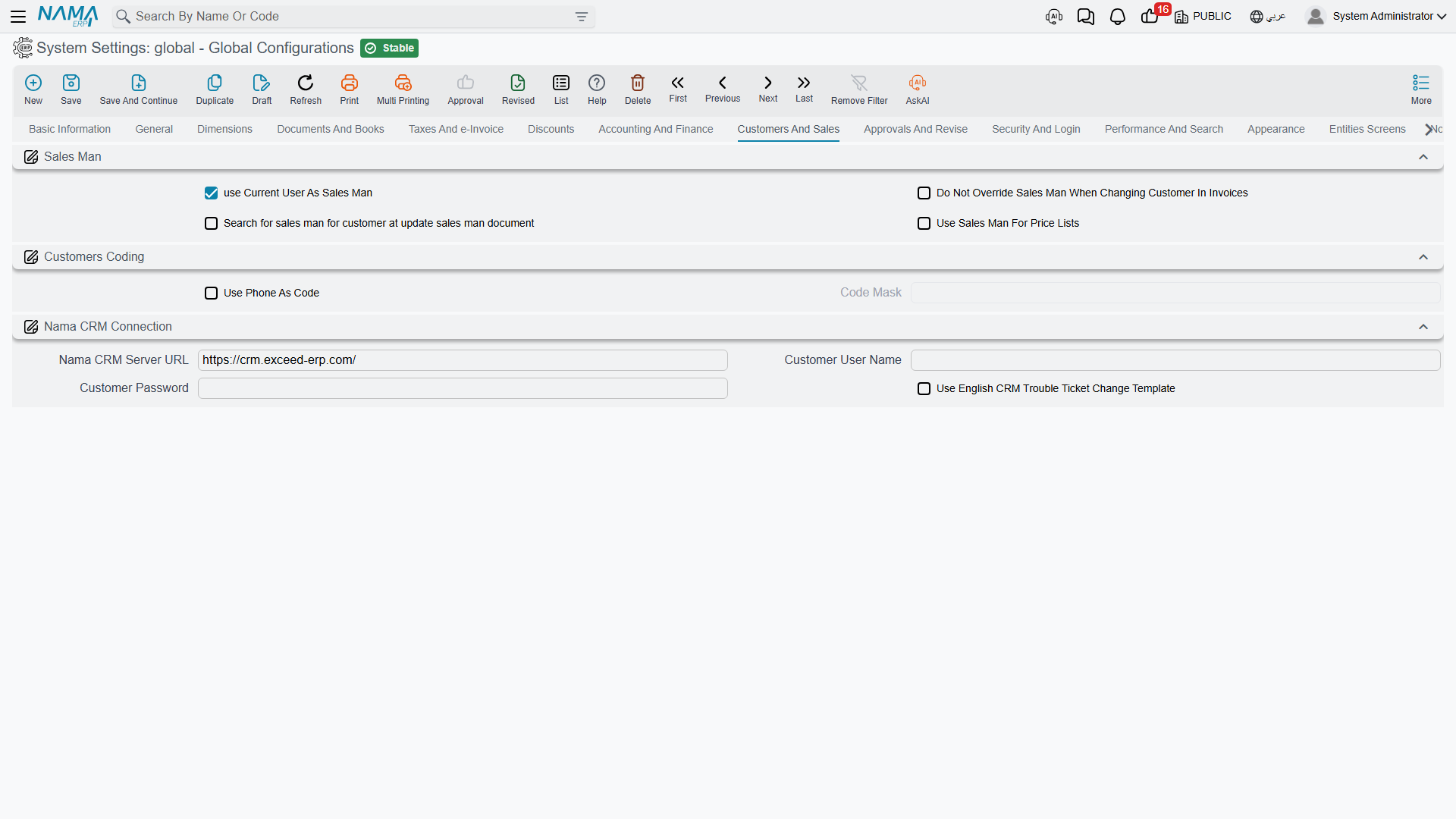
Salesman
The salesman on a sales document drives commission, targets and often pricing, so it matters that the right name lands there without anyone having to think about it. These four options describe how the system chooses.
use Current User As Sales Man value.info.useCurrentUserAsSalesMan (default on) — The logged-in user's employee record becomes the document's salesman, provided that employee is flagged as a salesman. This is the natural setting where the person entering the order is the person who sold it — a showroom, a counter, a field sales tablet. It also decides whose discount limits a sales document is checked against: with it on, the logged-in user's employee; with it off, the document's salesman — see Salesman Discount Limits.
Do Not Override Sales Man When Changing Customer In Invoices value.info.doNotOverrideSalesManWithCustomer — Customers can have a default salesman, and selecting the customer normally applies it, overwriting whatever was there. With this on, a salesman already chosen on the document is left alone. Turn it on where the person selling is not always the customer's assigned representative.
Search for sales man for customer at update sales man document value.info.salesManSearch — The salesman lookup on a sales document goes through a customer-aware service instead of a plain search, so the list offered is the salesmen actually linked to that customer.
Use Sales Man For Price Lists value.info.useSalesManAsEmployeeForPriceLists — Price lists can be resolved per employee. With this on, the document's salesman is the employee used for pricing; with it off, the logged-in user's employee is used. The difference matters in a back office where one clerk enters orders on behalf of many salespeople — there, the salesman is almost always the right answer.
Customer coding
Use Phone As Code value.info.useUserPhoneAsCode — The customer's phone number becomes the customer code. Retail and delivery businesses like this because the phone number is what the customer knows and what the call centre searches by.
Code Mask value.info.userCodeMask — A pattern the generated code must match, which is how you enforce a phone-number shape rather than accepting any digits. This is required when the option above is on; the system refuses to save otherwise.
Nama CRM connection
Support tickets can be exchanged with a Nama CRM instance. These three settings are the connection to it.
Nama CRM Server URL value.info.namaServerUrl (default https://crm.namasoft.com/) — The address of the CRM instance.
Customer User Name / Customer Password value.info.customerUserName, value.info.customerPassword — The credentials this installation uses to authenticate against it.
Settings on this tab
Every field on this tab with its exact on-screen label in both languages, so you can find a setting by the name you see. The last column points to the section that explains it.
| Field id | English label | Arabic label | Meaning |
|---|---|---|---|
value.info.useCurrentUserAsSalesMan | use Current User As Sales Man | استخدام الموظف الحالي كبائع آليا | Salesman |
value.info.doNotOverrideSalesManWithCustomer | Do Not Override Sales Man When Changing Customer In Invoices | عدم تغيير المندوب في الفواتير ان وجد مع اختيار العميل | Salesman |
value.info.salesManSearch | Search for sales man for customer at update sales man document | البحث عن بائع للعميل في سند تحديث مندوب مبيعات | Salesman |
value.info.useSalesManAsEmployeeForPriceLists | Use Sales Man For Price Lists | استعمال البائع بدلا من المستخدم للأسعار | Salesman |
value.info.useUserPhoneAsCode | Use Phone As Code | أستخدام هاتف المستخدم ككود | Customer coding |
value.info.userCodeMask | Code Mask | هيئة الكود | Customer coding |
value.info.namaServerUrl | Nama CRM Server URL | رابط خادم Nama CRM | Nama CRM connection |
value.info.customerUserName | Customer User Name | إسم المستخدم للعميل | Nama CRM connection |
value.info.customerPassword | Customer Password | كلمة سر العميل | Nama CRM connection |
value.info.useEnglishCRMTroubleTicketChangeTemplate | Use English CRM Trouble Ticket Change Template | إستخدام قالب تغير طلب الدعم الإنجليزي | The notification a user gets when the status of their support ticket changes on the Nama CRM is written from the English template instead of the Arabic one. |