
Entities Screens
This tab is unusual: nothing on it changes how the system behaves. Everything on it changes what other entities' screens look like — which extra pages appear on a customer, whether an item's picture shows in search results, which records get colour coding.
That makes it a good place to start when someone asks "why does our supplier screen have a Contacts page and the demo one doesn't?".
The per-field counterpart
What you set here is a default for a whole record type. The screen that does the same job one field at a time is Fields and Entities Settings, reached from Basic → Settings — display masks and styles, icons and colours, input rules, how a reference lookup searches, calculated fields, and more. Reach for that screen when the answer is "only on this one field".
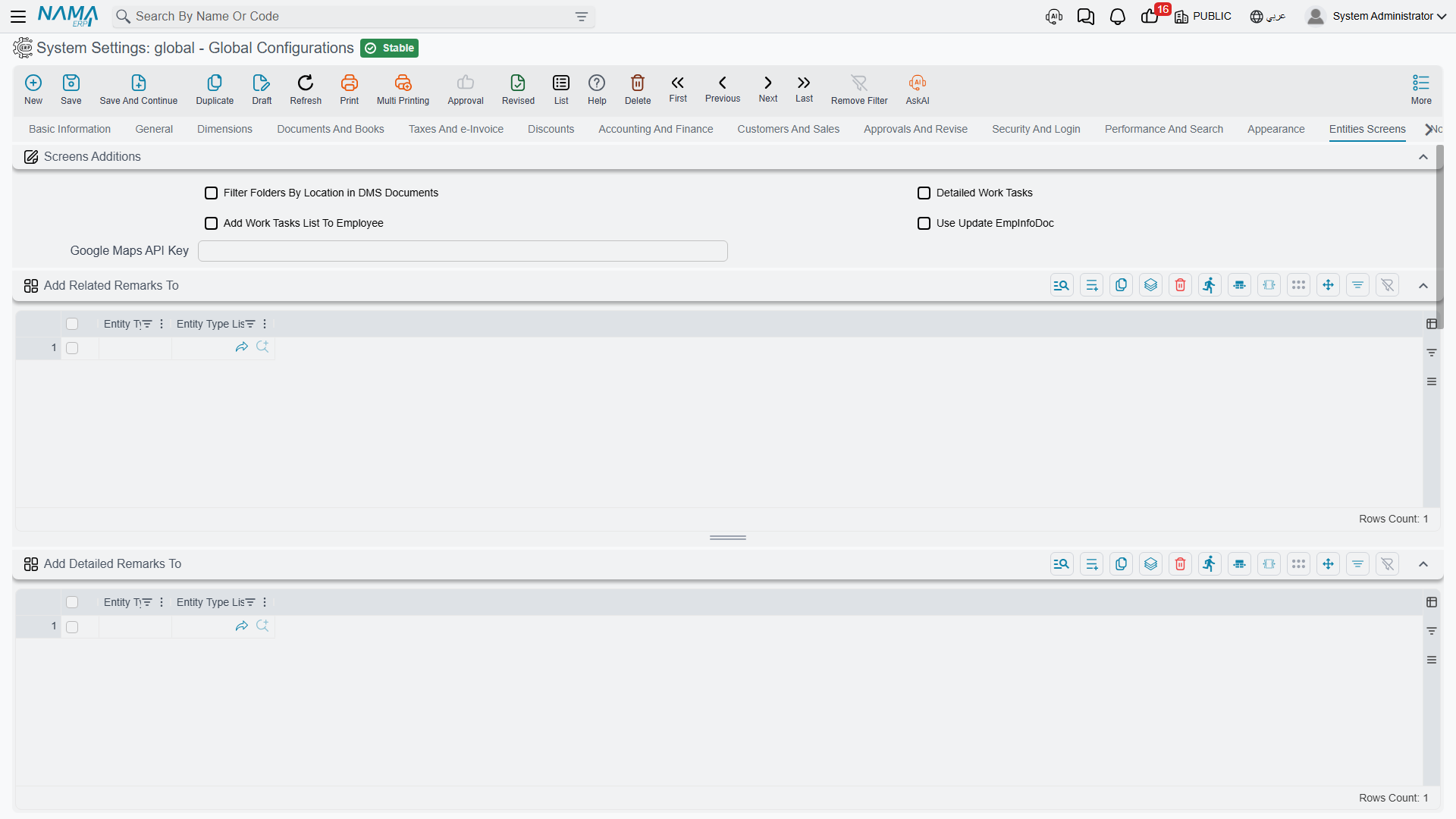
Screen additions
Filter Folders By Location in DMS Documents value.info.dmsDocFilterFoldersByLocation — Filters the folder selector on an archived document down to folders whose default archive matches the one chosen on the document, so a user in one office doesn't have to scroll past every other office's filing structure. See Settings and Integration.
Detailed Work Tasks value.info.detailedWorkTasks — Switches the work-task screens to their detailed layout, which carries more fields per task.
Add Work Tasks List To Employee value.info.addWorkTasksListToEmployee — Adds a list of the employee's work tasks to the Employee screen, so a manager can see someone's workload from their record rather than running a separate query.
Use Update EmpInfoDoc value.useUpdateEmpInfoDoc — Employee data is changed through a dedicated Update Employee Info document instead of being edited directly on the Employee screen. This is how you get an approval trail and a dated history for HR changes: the change becomes a document that can be reviewed, approved and reported on, rather than a silent edit.
Google Maps API Key value.info.googleMapsApiKey — The key used by the map picker on location fields and by the delivery application. Without it, map-based fields fall back to manual entry.
Extra pages on other entities
Each of these tables names the entity types that should receive one extra page. Add a row per entity type, or use the entity-type list column to cover several at once.
Add Related Remarks To value.info.addRemarksPageTo — Adds a Remarks page. Comes preset for Employee, Supplier, Customer, Fixed Asset and Third Party.
Add Detailed Remarks To value.info.addDetailedRemarksPageTo — Adds the detailed remarks page, which records remarks as structured, dated entries rather than free text.
Add Meeting Remarks Page To value.info.addMeetingRemarksPageTo — Adds a page for meeting notes.
Add Contacts Page To value.info.addContactsPageTo — Adds a Contacts page, for the named people at that customer or supplier.
Add Related Archive Docs To value.info.addDMSDocsTo — Adds a DMS Documents page to each listed entity type, so archived paperwork is visible on the record it belongs to. Preset with the five types that can own an archived document. See Document Management.
Add Subsidiary Balance To value.info.addSubsidiaryBalanceTo — Adds an account balances block, so you can open a customer and see what they owe without leaving the screen.
Add pages where they will be used, not everywhere
Every page added here appears for every user who opens that entity. A Contacts page on Customer earns its place; the same page on twelve other entities that nobody fills in is just twelve more empty tabs to scroll past.
Record colours
Use Color For value.info.useColorFor — The scope of record colour coding: All Documents, All Master Files, All Entities, or Specific Entities.
Use Colors In value.info.useColorsIn (table) — When the scope is Specific Entities, this is the list. Colour coding is most useful when it is rare — apply it to the handful of screens where a status needs to jump out, not across the board.
Entity images
Entity Images value.info.entityImages (table) — Nama can show a record's picture in a lot of places, and this table controls each one independently, per entity type.
For every entity you add, you choose whether its image appears — and at what width and height — in:
- Use In Suggestion (
useInSuggestion,widthInSuggestion,heightInSuggestion) — the dropdown that appears as a user types into a reference field. - Use In Grid Columns (
useInGridColumns,widthInGridColumns,heightInGridColumns) — inside detail grids. - Show In Separate Column (
showInSeparateColumn,widthOfSeparateColumns,heightOfSeparateColumns) — as its own column rather than beside the text. - Use In Search View (
useInSearch,widthInSearcher,heightInSearcher). - Use In List View (
useInList,widthInList,heightInList). - Use In Header Fields (
useInHeaderFields,widthInHeaderFields,heightInHeaderFields) — beside a reference field on the document header. - Show In Popup With Code Hover (
showInPopupWithCode).
Image Width Percent (mainFileWidthPercent) sets how much of the record's own screen the main image occupies.
The obvious case is a product catalogue, where a picture in the suggestion list makes picking the right item far faster than reading codes. It costs bandwidth on every list that shows it, so enable the places where the picture genuinely helps and leave the rest off.
Settings on this tab
Every field on this tab with its exact on-screen label in both languages, so you can find a setting by the name you see. The last column points to the section that explains it.
| Field id | English label | Arabic label | Meaning |
|---|---|---|---|
value.info.dmsDocFilterFoldersByLocation | Filter Folders By Location in DMS Documents | فلترة المجلدات حسب الأرشيف في المستندات الأرشيفية | Screen additions |
value.info.detailedWorkTasks | Detailed Work Tasks | مهام العمل التفصيلية | Screen additions |
value.info.addWorkTasksListToEmployee | Add Work Tasks List To Employee | إضافة مهام العمل لشاشة الموظف | Screen additions |
value.useUpdateEmpInfoDoc | Use Update EmpInfoDoc | إستخدام مستند تحديث موظف | Screen additions |
value.info.googleMapsApiKey | Google Maps API Key | Google Maps API Key | Screen additions |
value.info.addRemarksPageTo | Add Related Remarks To | إضافة الملحوظات إلي | Extra pages on other entities |
value.info.addRemarksPageTo.entityType | Entity Type | النوع | Extra pages on other entities |
value.info.addRemarksPageTo.entityTypeList | Entity Type List | قائمة الأنواع | Extra pages on other entities |
value.info.addDetailedRemarksPageTo | Add Detailed Remarks To | إضافة الملحوظات التفصيلية إلي | Extra pages on other entities |
value.info.addDetailedRemarksPageTo.entityType | Entity Type | النوع | Extra pages on other entities |
value.info.addDetailedRemarksPageTo.entityTypeList | Entity Type List | قائمة الأنواع | Extra pages on other entities |
value.info.addMeetingRemarksPageTo | Add Meeting Remarks Page To | إضافة ملحوظات الإجتماع إلي | Extra pages on other entities |
value.info.addMeetingRemarksPageTo.entityType | Entity Type | النوع | Extra pages on other entities |
value.info.addMeetingRemarksPageTo.entityTypeList | Entity Type List | قائمة الأنواع | Extra pages on other entities |
value.info.addContactsPageTo | Add Contacts Page To | إضافة جهات الاتصال إلي | Extra pages on other entities |
value.info.addContactsPageTo.entityType | Entity Type | النوع | Extra pages on other entities |
value.info.addContactsPageTo.entityTypeList | Entity Type List | قائمة الأنواع | Extra pages on other entities |
value.info.addDMSDocsTo | Add Related Archive Docs To | إضافة المستندات الارشيفية إلي | Extra pages on other entities |
value.info.addDMSDocsTo.entityType | Entity Type | النوع | Extra pages on other entities |
value.info.addDMSDocsTo.entityTypeList | Entity Type List | قائمة الأنواع | Extra pages on other entities |
value.info.addSubsidiaryBalanceTo | Add Subsidiary Balance To | إضافة أرصدة الذمم إلي | Extra pages on other entities |
value.info.addSubsidiaryBalanceTo.entityType | Entity Type | النوع | Extra pages on other entities |
value.info.useColorFor | Use Color For | استعمال الألوان في | Record colours |
value.info.useColorsIn | Use Colors In | استعمال الألوان في | Record colours |
value.info.useColorsIn.entityType | Entity Type | النوع | Record colours |
value.info.useColorsIn.entityTypeList | Entity Type List | قائمة الأنواع | Record colours |
value.info.entityImages | Entity Images | صور الملفات | Entity images |
value.info.entityImages.entityType | Entity Type | النوع | Entity images |
value.info.entityImages.targetEntities | Entity Type List | قائمة الأنواع | Entity images |
value.info.entityImages.useInSuggestion | Use In Suggestion | استعمال بقائمة المقترحات | Entity images |
value.info.entityImages.widthInSuggestion | Width In Suggestion | العرض بالمقترحات | Entity images |
value.info.entityImages.heightInSuggestion | Height In Suggestion | الارتفاع بالمقترحات | Entity images |
value.info.entityImages.useInGridColumns | Use In Grid Columns | استعمال بالجداول | Entity images |
value.info.entityImages.widthInGridColumns | Width In GridColumns | العرض بالجدوال | Entity images |
value.info.entityImages.heightInGridColumns | Height In Grid Columns | الارتفاع بالجداول | Entity images |
value.info.entityImages.showInSeparateColumn | Show In Separate Column | اظهار الصورة في عمود منفصل في الجداول | Entity images |
value.info.entityImages.widthOfSeparateColumns | Width Of Separate Column | عرض العمود المنفصل | Entity images |
value.info.entityImages.heightOfSeparateColumns | Height Of Separate Column | ارتفاع العمود المنفصل | Entity images |
value.info.entityImages.useInSearch | Use In Search View | استعمال بشاشة البحث | Entity images |
value.info.entityImages.widthInSearcher | Width In Searcher | العرض بالبحث | Entity images |
value.info.entityImages.heightInSearcher | Height In Searcher | الارتفاع بالبحث | Entity images |
value.info.entityImages.useInList | Use In List View | استعمال بعرض القائمة | Entity images |
value.info.entityImages.widthInList | Width In List | العرض بالقائمة | Entity images |
value.info.entityImages.heightInList | Height In List | الارتفاع بالقائمة | Entity images |
value.info.entityImages.useInHeaderFields | Use In Header Fields | استعمال بالحقول | Entity images |
value.info.entityImages.widthInHeaderFields | Width In Header Fields | العرض بالحقول | Entity images |
value.info.entityImages.heightInHeaderFields | Height In Header Fields | الارتفاع بالحقول | Entity images |
value.info.entityImages.mainFileWidthPercent | Image Width Percent | نسبة عرض الصورة | Entity images |
value.info.entityImages.showInPopupWithCode | Show In Popup With Code Hover | عرض في نافذة مع الاقتراب من الكود | Entity images |