
Replication
Replication keeps several Nama sites in step — a head office and its branches, or servers in different countries. Records created at one site are packaged as messages and delivered to the others. This tab decides which records travel where, and what happens when delivery fails.
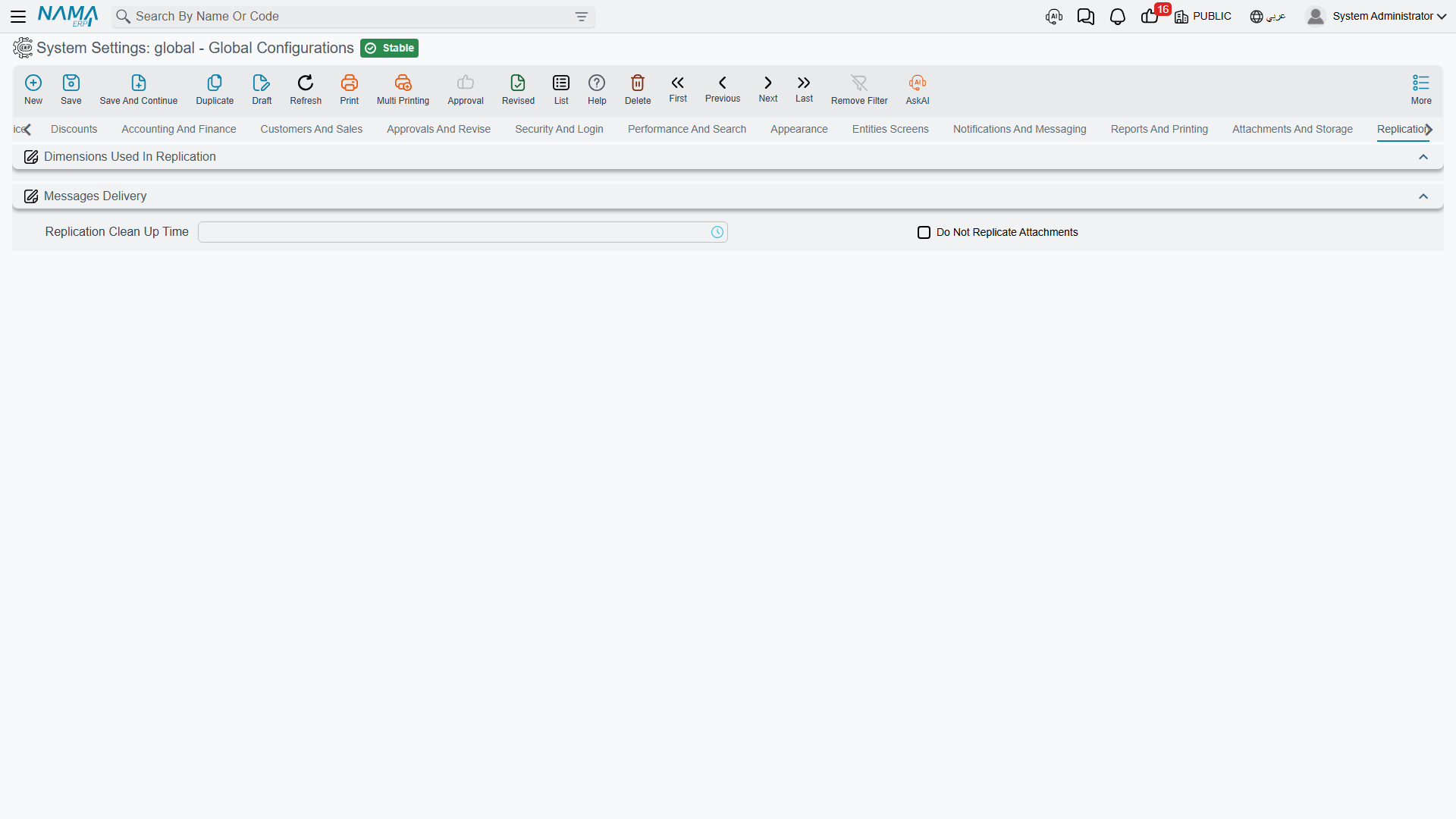
You may not see this tab's options
Replication is licensed separately, and its options are hidden entirely rather than greyed out when the licence is absent. The screenshot above is from an installation without it — only the two group headers and the handful of options that aren't licence-gated appear. On a licensed installation the same tab carries all the fields described below plus two tables.
Dimensions used in replication
The first question replication has to answer is which site does this record belong to? — and the answer comes from the record's dimensions. These five switches decide which dimensions take part.
Use Legal Entity in Replication value.info.useLegalEntityInReplication — The legal entity participates in routing.
Use Sector in Replication value.info.useSectorInReplication, Use Branch in Replication value.info.useBranchInReplication (default on), Use Department in Replication value.info.useDepartmentInReplication, Use Analysis Set in Replication value.info.useAnalysisSetInReplication — The same for the other four.
Branch is on by default because the usual topology is one server per branch. Enable a second dimension only where routing genuinely depends on it — every dimension you add makes the routing rules harder to reason about when a record doesn't arrive where it was expected.
Message delivery
Max Trials When Replication Failures Occur value.info.maxTrialsForMessages (default 0, meaning unlimited) — How many times delivery of a replication message is attempted before it is given up on.
Request ReCommit After Messages Fail value.info.requestReCommitAfterFailures — After repeated failures, asks the originating site to commit the record again rather than continuing to retry the same message.
Replication Clean Up Time value.info.replicationCleanUpTime — The time of day when delivered messages are purged. Set it to a quiet hour: the clean-up touches a lot of rows.
Do Not Replicate Attachments value.info.donotReplicateAttachments — Leaves attachments out of replication payloads. Frequently the right choice on a slow or metered link, where a few scanned pages can hold up every other message behind them.
Prevent Using Branches When Headoffice Is Online value.info.preventUsingBranchesWhenHeadOfficeIsOnline — Branch servers refuse to work locally while the head office is reachable, so everyone writes to one place and there is nothing to reconcile. The branch server becomes a fallback for when the link is down rather than a peer.
Prevent Using Branches Timeout value.info.preventUsingBranchesWhenHeadOfficeIsOnlineTimeout (default 60) — How many seconds without an answer before the head office counts as unreachable and the branch takes over. Too short and a slow link flips the branch into local mode repeatedly; too long and staff wait a minute before they can work during a genuine outage.
Replication Autocoding Arabic Error / Replication Autocoding English Error value.info.replicationBookArabicError, value.info.replicationBookEnglishError — The message shown when someone tries to create a record on the wrong site for its auto-coder's replication site. Both accept two placeholders: {0} is the server the record should have been created on, and {1} is the replication site the coder belongs to. The defaults already name both, which is what makes this error self-explanatory to a branch user.
What not to replicate
Do Not Replicate value.info.doNotReplicate (table) — Entity types that never replicate. Each row names an entity type, or a list of them. Use it for anything genuinely local — a site's own hardware configuration, for instance.
Do Not Replicate Entities In Sites value.info.noReplicationInSites (table) — More selective: each row names an entity type and a replication site, so a record type can be shared with most sites but withheld from one. This is how you keep, say, payroll data out of a site that has no business seeing it.
Settings on this tab
Every field on this tab with its exact on-screen label in both languages, so you can find a setting by the name you see. The last column points to the section that explains it.
| Field id | English label | Arabic label | Meaning |
|---|---|---|---|
value.info.useLegalEntityInReplication | Use In Replication | مستخدم في التكرار | Dimensions used in replication |
value.info.useSectorInReplication | Use In Replication | مستخدم في التكرار | Dimensions used in replication |
value.info.useBranchInReplication | Use In Replication | مستخدم في التكرار | Dimensions used in replication |
value.info.useDepartmentInReplication | Use In Replication | مستخدم في التكرار | Dimensions used in replication |
value.info.useAnalysisSetInReplication | Use In Replication | مستخدم في التكرار | Dimensions used in replication |
value.info.maxTrialsForMessages | Max Trials When Replication Failures Occur | أقصي عدد محاولات عند فشل الرسائل | Message delivery |
value.info.requestReCommitAfterFailures | Request ReCommit After Messages Fail | طلب إعادة الإرسال بعد فشل الرسائل | Message delivery |
value.info.replicationCleanUpTime | Replication Clean Up Time | وقت مسح الرسائل المرسلة التي تم معالجتها | Message delivery |
value.info.donotReplicateAttachments | Do Not Replicate Attachments | Do Not Replicate Attachments | Message delivery |
value.info.preventUsingBranchesWhenHeadOfficeIsOnline | Prevent Using Branches When Headoffice Is Online | منع استعمال سيرفرات الفروع حال عمل الرئيسي | Message delivery |
value.info.preventUsingBranchesWhenHeadOfficeIsOnlineTimeout | Prevent Using Branches Timeout | اقل توقيت لمنع استعمال سيرفرات الفروع | Message delivery |
value.info.replicationBookArabicError | Replication Autocoding Arabic Error | رسالة خطا التكويد الالي مع موقع التكرار - عربي | Message delivery |
value.info.replicationBookEnglishError | Replication Autocoding English Error | رسالة خطا التكويد الالي مع موقع التكرار - إنجليزي | Message delivery |
value.info.doNotReplicate | Do Not Replicate | Do Not Replicate | What not to replicate |
value.info.doNotReplicate.entityType | Entity Type | النوع | What not to replicate |
value.info.doNotReplicate.entityTypeList | Entity Type List | قائمة الأنواع | What not to replicate |
value.info.noReplicationInSites | Do Not Replicate Entities In Sites | Do Not Replicate Entities In Sites | What not to replicate |
value.info.noReplicationInSites.entityType | Entity Type | النوع | What not to replicate |
value.info.noReplicationInSites.entityTypeList | Entity Type List | قائمة الأنواع | What not to replicate |
value.info.noReplicationInSites.replicationSite | Replication Site | موقع التكرار | What not to replicate |