
General
The General tab holds the settings that don't belong to any one business area but shape how numbers, dates and text look everywhere: what the second interface language is, how many decimal places a rate carries, how a Hijri date is written, and what the three item measure fields mean.
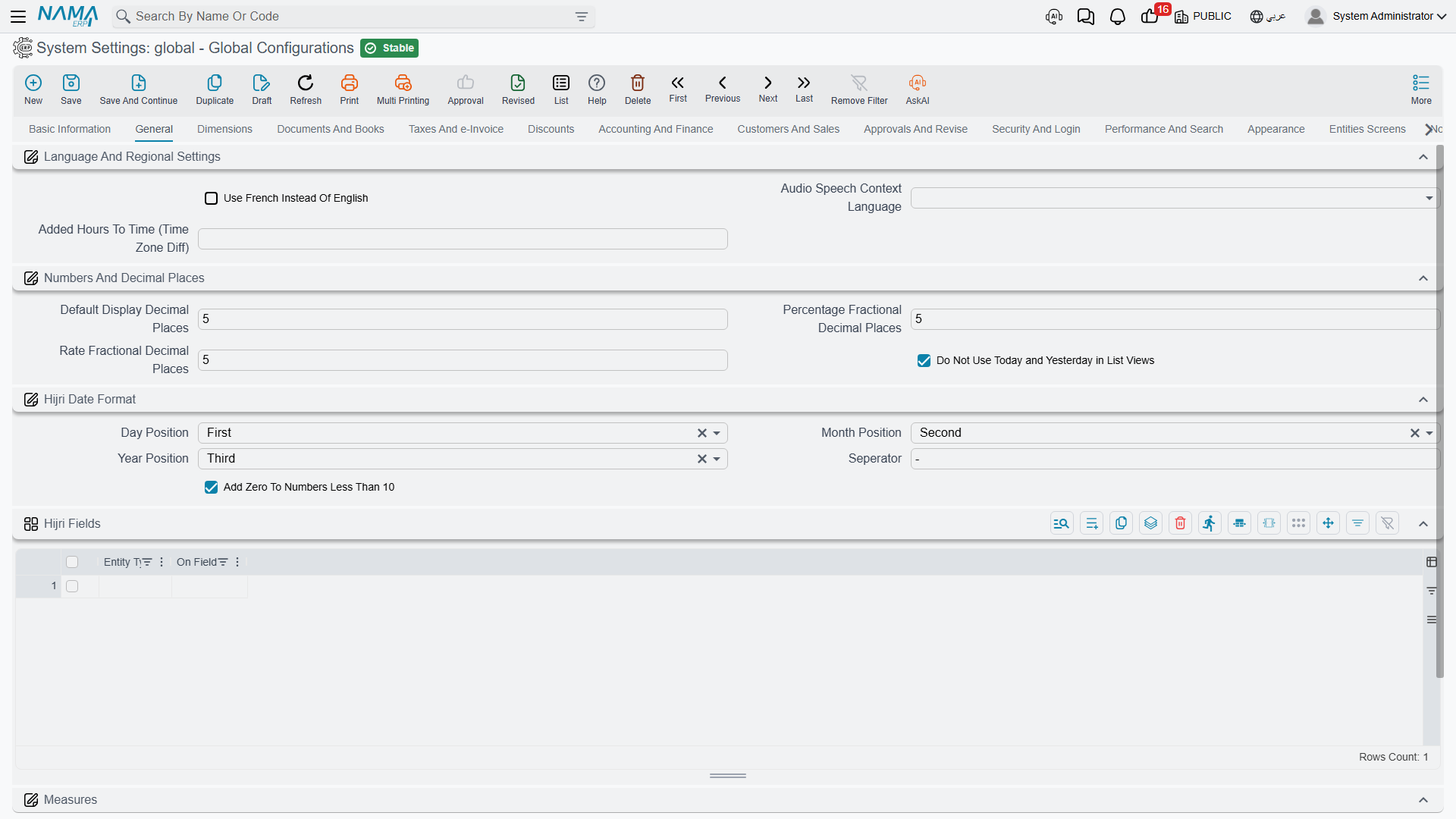
Language and regional settings
Use French Instead Of English value.info.useFrenchInsteadOfEnglish — Nama ships with an Arabic and an English interface. Turning this on replaces the English side with French everywhere: menus, field labels, action names and report text. It is a swap, not an addition — you get Arabic and French, not all three.
Audio Speech Context Language value.info.audioSpeechContextLanguage — When a user dictates into a field instead of typing, the speech service needs to know which language and accent to expect. The choices are Egyptian Arabic, Saudi Arabic, Kuwaiti Arabic, US English and French. Picking the variant your users actually speak makes a noticeable difference to recognition accuracy.
Added Hours To Time (Time Zone Diff) value.info.addedHoursToTime — A fixed number of hours added whenever the system stamps the current time. This exists for the common case where the database server sits in one time zone and the business operates in another: rather than move the server, you shift the clock the application sees. Enter 3 if the business runs three hours ahead of the server, or -2 if it runs two hours behind. Because it affects every "now" the system records, set it once at implementation and leave it alone.
Numbers and decimal places
Nama stores amounts at full precision; these three settings control how many fractional digits are kept and shown for the three kinds of numbers that usually need more than two.
Default Display Decimal Places value.info.defaultDisplayDecimalPlaces (default 5) — Used for a decimal field that doesn't declare its own precision.
Percentage Fractional Decimal Places value.info.percentageFractionalDecimalPlaces (default 5) — Applies to every percentage field: discount and tax percentages, contracting assay percentages, point-of-sale percentages. Five places sounds generous, but percentages are usually intermediate values that get multiplied by large amounts, so the extra digits stop rounding errors from accumulating.
Rate Fractional Decimal Places value.info.rateFractionalDecimalPlaces (default 5) — Applies to exchange-rate fields. Currencies with a large ratio to the base currency need the precision.
Do Not Use Today and Yesterday in List Views value.info.doNotUseTodayAndYesterdayForDates — By default a date within the last day or two is displayed as the words "Today" or "Yesterday", which reads well but hides the actual date. Turn this on when users need to see the real date everywhere — typically in operations where documents are compared by date all day long.
Hijri date format
These options decide how a Hijri date is written when Nama writes one out — for example through the Tempo expression $asHijriString in printed text and messages (see Hijri Table).
Day Position / Month Position / Year Position value.info.hijriFormat.dayPosition, ...monthPosition, ...yearPosition — Each part is placed First, Second or Third. The defaults give day-month-year; set day to Third and year to First for the year-first style.
Separator value.info.hijriFormat.seperator (default -) — The character between the parts.
Add Zero To Numbers Less Than 10 value.info.hijriFormat.addZeroToNumbersLessThan10 (default on) — Writes 05 instead of 5, so dates line up in columns.
Measures
Many businesses describe an item by three physical measures rather than a single quantity: a sheet of glass is 2 metres by 1.5, a length of cable is 200 metres. Nama carries three measure fields on document lines, and this group decides what they are called and how they combine.
Length / Width / Height value.measuresConfiguration.length, ...width, ...height — The label shown for each measure. Leaving one empty hides that measure from the screens that use them, which is what you want when only two of the three are meaningful.
Separator value.measuresConfiguration.seperator (default *) — The character used when the three measures are written as one descriptive string, giving 2*1.5. The system restores the default if you save this empty.
Calculate Count Based On Qty in Invoices value.info.calculateCountBasedOnQty (default on) — With this on, the count on a line is derived from the quantity multiplied by the measures rather than typed by hand, so entering 10 sheets of 2 × 1.5 gives a count of 30 square metres automatically. The unit of measure decides which measures participate: a unit flagged to ignore length or width leaves that factor out of the multiplication.
Notes and reloading
Notes info — A free text field on the configuration record itself. Useful for recording why an unusual option was switched on, and when.
The Reload Configuration action in the toolbar forces every server node to drop its cached copy and re-read the record. You rarely need it — saving already refreshes the cache — but it is the first thing to try if one node appears to be behaving differently from another.
Settings on this tab
Every field on this tab with its exact on-screen label in both languages, so you can find a setting by the name you see. The last column points to the section that explains it.
| Field id | English label | Arabic label | Meaning |
|---|---|---|---|
value.info.useFrenchInsteadOfEnglish | Use French Instead Of English | استعمال الفرنسية بدلا من الإنجليزية | Language and regional settings |
value.info.audioSpeechContextLanguage | Audio Speech Context Language | لغة التعرف على الصوت | Language and regional settings |
value.info.addedHoursToTime | Added Hours To Time (Time Zone Diff) | الساعات المضافة للوقت (Time Zone Diff) | Language and regional settings |
value.info.defaultDisplayDecimalPlaces | Default Display Decimal Places | عدد خانات الكسر الافتراضي | Numbers and decimal places |
value.info.percentageFractionalDecimalPlaces | Percentage Fractional Decimal Places | عدد خانات النسب المئوية | Numbers and decimal places |
value.info.rateFractionalDecimalPlaces | Rate Fractional Decimal Places | عدد خانات معدل العملة | Numbers and decimal places |
value.info.doNotUseTodayAndYesterdayForDates | Do Not Use Today and Yesterday in List Views | عدم استعمال اليوم و الأمس في التواريخ بعرض القوائم | Numbers and decimal places |
value.info.hijriFormat.dayPosition | Day Position | موقع اليوم | Hijri date format |
value.info.hijriFormat.monthPosition | Month Position | موقع الشهر | Hijri date format |
value.info.hijriFormat.yearPosition | Year Position | موقع السنة | Hijri date format |
value.info.hijriFormat.seperator | Separator | الفاصل | Hijri date format |
value.info.hijriFormat.addZeroToNumbersLessThan10 | Add Zero To Numbers Less Than 10 | إضافة صفر قبل الارقام اقل من 10 | Hijri date format |
value.info.hijriFields | Hijri Fields | الحقول الهجري دائما | Date fields that are always shown as Hijri dates, whatever calendar the user logged in with. |
value.info.hijriFields.entityType | Entity Type | النوع | The screen the line applies to; leave it empty to cover the field on every screen. |
value.info.hijriFields.fieldId | On Field | الحقل | The date field to show as Hijri. |
value.measuresConfiguration.length | Measures | Length | الأبعاد | الطول | Measures |
value.measuresConfiguration.width | Measures | Width | الأبعاد | العرض | Measures |
value.measuresConfiguration.height | Measures | Height | الأبعاد | الارتفاع | Measures |
value.measuresConfiguration.seperator | Separator | الفاصل | Measures |
value.info.calculateCountBasedOnQty | Calculate Count Based On Qty in Invoices | حساب العدد بناءا على الكمية في الفواتير | Measures |