
Accounting and Finance
This tab collects the settings that decide when a difference is small enough to ignore, how many account slots a customer or supplier carries, how credit limits and debt ages are tracked, and how payments, budgets and cost behave.
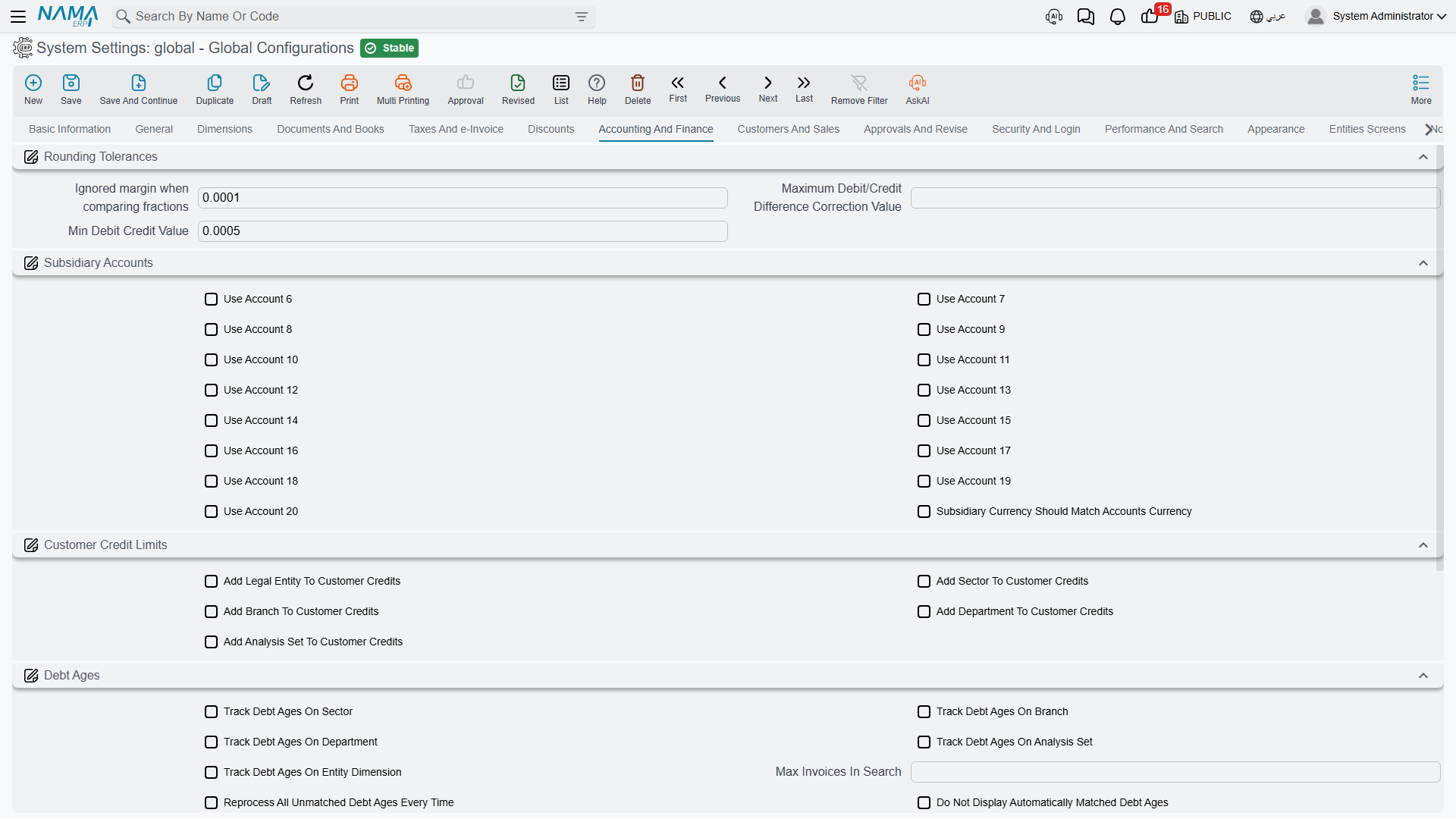
Rounding tolerances
Any system that multiplies quantities by prices and applies percentages eventually produces a debit total and a credit total that differ by a fraction of a piastre. These three numbers tell Nama when to shrug and when to refuse.
Ignored margin when comparing fractions value.info.lowMargin (default 0.0001) — The system's general "negligible amount". It is consulted in a lot of places: journal entries, inter-company transfers, ledger transactions, contracting extracts, price validation. A difference smaller than this is treated as zero.
Keep the low margin low
The name is a promise. The system refuses to save a value greater than 10 with an explicit complaint that the number "is not low at all", because a large low margin silently swallows genuine imbalances. The default of 0.0001 is right for almost everyone.
Maximum Debit/Credit Difference Correction Value value.info.maximumDrCrDiffCorrection — The largest imbalance the system will silently correct rather than reject when writing a ledger transaction. Sits above the low margin: below the low margin nothing happened, between the two the system fixes it, above it the entry is refused.
Min Debit Credit Value value.info.minDebitCreditValue (default 0.0005) — Amounts below this count as zero when deciding whether an entry is a debit or a credit, which stops a residual fraction from creating a meaningless one-sided line.
Subsidiary accounts
A customer, supplier or employee carries a set of account slots — receivables, payables, advances, and so on. Five are always present; slots 6 to 20 are optional.
Use Account 6 through Use Account 20 value.info.useAccount6 … value.info.useAccount20 — Each switch adds one more account slot to the relevant master file screens. Turn on only what you use: every slot you enable is another field on every customer, supplier and employee screen.
Subsidiary Currency Should Match Accounts Currency value.info.subsidiaryCurrencyShouldMatchAccountsCurrency — Validates that every account attached to a subsidiary carries the same currency as the subsidiary itself, and filters the account selector accordingly. Worth turning on wherever you deal in more than one currency, since a mismatched account is only discovered when the balances refuse to reconcile.
Customer credit limits
Add Legal Entity To Customer Credits / Add Sector To Customer Credits / Add Branch To Customer Credits / Add Department To Customer Credits / Add Analysis Set To Customer Credits value.info.addLegalEntityToCustCredits, ...addSectorToCustCredits, ...addBranchToCustCredits, ...addDeptToCustCredits, ...addAnalysisSetToCustCredits — Each adds that dimension as a column of the customer credit-limit table, so a single customer can be given a different limit per branch or per company. Enable only the dimensions your credit policy actually distinguishes — each one multiplies the number of rows credit control has to maintain.
Debt ages
Debt ages are how Nama matches receipts against the invoices they pay, and therefore how it answers "how old is this balance?".
Track Debt Ages On Sector / Track Debt Ages On Branch / Track Debt Ages On Department / Track Debt Ages On Analysis Set / Track Debt Ages On Entity Dimension value.info.trackDebtAgesOn.trackDebtAgesOnSector and friends — Which dimensions form the key that debts are tracked and matched on. Add a dimension here and a receipt in one branch will no longer match an invoice in another. That is correct when branches are genuinely separate ledgers, and a nuisance when they aren't.
Max Invoices In Search value.info.trackDebtAgesOn.maxInvoicesInSuggestionList (default 256) — Caps how many open invoices are offered when matching a receipt. Raise it for customers with very long open lists; every extra row costs time on screen.
Reprocess All Unmatched Debt Ages Every Time value.info.trackDebtAgesOn.reprocessAllUnmatchedDebtAgesEveryTime — Re-examines every unmatched debt on each run instead of only the new ones. Thorough but progressively slower as the unmatched backlog grows.
Do Not Display Automatically Matched Debt Ages value.info.trackDebtAgesOn.doNotDisplayAutomaticMatchedDebitAges — Hides rows the system matched by itself, leaving the screen showing only what needs a human decision.
Do Not Display Unpaid Debt Ages Before Date value.info.trackDebtAgesOn.doNotShowUnpaidDebtsBefore — A cut-off date. Old unpaid debts before this date stop cluttering the matching screen — useful after a migration that brought in years of historical open items.
Shorten Debt Ages In Same Document value.info.trackDebtAgesOn.shortenDebtAgesInSameDocument — Nets debits and credits belonging to the same document against each other before matching, so an invoice and its own credit note cancel out instead of appearing as two open items.
Never Automatically Match Debt Ages (Manual Matching Only) value.info.trackDebtAgesOn.neverAutoMatchDebtAges — Disables automatic matching entirely. Choose this where the accounting team insists on deciding every allocation itself.
Payments and receipts
Use System Entries For Payment/Receipt Documents Relationship to Invoices value.info.usePayReceiptDocsSysEntries (default on) — Payment and receipt documents create system entries against the invoices they settle, which is what makes an invoice aware of what has been paid against it.
Deduct Payments And Receipts In Invoices Remaining value.info.deductPaymentAndReceiptInRemaining — Those payments also reduce the invoice's remaining amount. This one depends on the option above; the system refuses to save it on its own and tells you so.
Enable Days Before Allowing Return in Payment Methods value.info.enableDaysBeforeAllowingReturnInPaymentMethod — Activates the per-payment-method rule that a sale cannot be returned until a certain number of days have passed. Card settlements are the usual reason.
Budgets
Allow changing in budget year 1 values through Allow changing in budget year 4 values value.info.allowValuesChangeOfYear1 … ...Year4 — A budget scenario compares up to four years. Each switch decides whether that year's figures may be edited. Typically the past years are locked and only the year being planned is open.
Use To Period In Financial and Sales Budgets value.info.useToPeriodInFinancialBudget — Adds a "to period" column to financial budget and budget scenario tables, so one line can cover a range of periods instead of a single one. Turn it on where budgets are set quarterly or annually rather than month by month.
Cost
Disable Warehouses Adjustment value.info.disableWarehousesAdjustment (default on) — When on, the system does not produce per-warehouse cost adjustment lines and skips the check that those adjustments balance. It is on by default because most installations do not track cost separately per warehouse. Turn it off only if you genuinely need warehouse-level cost adjustment, and expect additional ledger lines and a slower cost run.
Enable PresendRequests For Cost Ledger value.info.enablePresendRequestsForCostLedger — Allows a business request to be raised before its owning document is saved. This is what makes it possible to attach accounting effects to a stock issue, receipt or transfer through an entity flow; the flow refuses to run without it and says so.
Settings on this tab
Every field on this tab with its exact on-screen label in both languages, so you can find a setting by the name you see. The last column points to the section that explains it.
| Field id | English label | Arabic label | Meaning |
|---|---|---|---|
value.info.lowMargin | Ignored margin when comparing fractions | القيمة المتجاهلة عند مقارنة الكسور | Rounding tolerances |
value.info.maximumDrCrDiffCorrection | Maximum Debit/Credit Difference Correction Value | أقصى قيمة لتصحيح فرق المدين عن الدائن | Rounding tolerances |
value.info.minDebitCreditValue | Min Debit Credit Value | اقل قيمة للحركة المدينة والدائنة | Rounding tolerances |
value.info.useAccount6 | Use Account 6 | إستخدام حساب 6 | Subsidiary accounts |
value.info.useAccount7 | Use Account 7 | إستخدام حساب 7 | Subsidiary accounts |
value.info.useAccount8 | Use Account 8 | إستخدام حساب 8 | Subsidiary accounts |
value.info.useAccount9 | Use Account 9 | إستخدام حساب 9 | Subsidiary accounts |
value.info.useAccount10 | Use Account 10 | إستخدام حساب 10 | Subsidiary accounts |
value.info.useAccount11 | Use Account 11 | إستخدام حساب 11 | Subsidiary accounts |
value.info.useAccount12 | Use Account 12 | إستخدام حساب 12 | Subsidiary accounts |
value.info.useAccount13 | Use Account 13 | إستخدام حساب 13 | Subsidiary accounts |
value.info.useAccount14 | Use Account 14 | إستخدام حساب 14 | Subsidiary accounts |
value.info.useAccount15 | Use Account 15 | إستخدام حساب 15 | Subsidiary accounts |
value.info.useAccount16 | Use Account 16 | إستخدام حساب 16 | Subsidiary accounts |
value.info.useAccount17 | Use Account 17 | إستخدام حساب 17 | Subsidiary accounts |
value.info.useAccount18 | Use Account 18 | إستخدام حساب 18 | Subsidiary accounts |
value.info.useAccount19 | Use Account 19 | إستخدام حساب 19 | Subsidiary accounts |
value.info.useAccount20 | Use Account 20 | إستخدام حساب 20 | Subsidiary accounts |
value.info.subsidiaryCurrencyShouldMatchAccountsCurrency | Subsidiary Currency Should Match Accounts Currency | يجب أن تطابق العملة في الذمة عملة الحساب | Subsidiary accounts |
value.info.addLegalEntityToCustCredits | Add Legal Entity To Customer Credits | إضافة الشركة للحدود الإتمانية للعميل | Customer credit limits |
value.info.addSectorToCustCredits | Add Sector To Customer Credits | إضافة القسم للحدود الإتمانية للعميل | Customer credit limits |
value.info.addBranchToCustCredits | Add Branch To Customer Credits | إضافة الفرع للحدود الإتمانية للعميل | Customer credit limits |
value.info.addDeptToCustCredits | Add Department To Customer Credits | إضافة الإدارة للحدود الإتمانية للعميل | Customer credit limits |
value.info.addAnalysisSetToCustCredits | Add Analysis Set To Customer Credits | إضافة المجموعة التحليلية للحدود الإتمانية للعميل | Customer credit limits |
value.info.trackDebtAgesOn.trackDebtAgesOnSector | Track Debt Ages On Sector | متابعة اعمار الديون على القطاع | Debt ages |
value.info.trackDebtAgesOn.trackDebtAgesOnBranch | Track Debt Ages On Branch | متابعة اعمار الديون على الفرع | Debt ages |
value.info.trackDebtAgesOn.trackDebtAgesOnDepartment | Track Debt Ages On Department | متابعة اعمار الديون على القسم | Debt ages |
value.info.trackDebtAgesOn.trackDebtAgesOnAnalysisSet | Track Debt Ages On Analysis Set | متابعة اعمار الديون على المجموعة التحليلية | Debt ages |
value.info.trackDebtAgesOn.trackDebtAgesOnEntityDimension | Track Debt Ages On Entity Dimension | متابعة اعمار الديون على السجل | Debt ages |
value.info.trackDebtAgesOn.maxInvoicesInSuggestionList | Max Invoices In Search | اقصي عدد من الفواتير عند البحث | Debt ages |
value.info.trackDebtAgesOn.reprocessAllUnmatchedDebtAgesEveryTime | Reprocess All Unmatched Debt Ages Every Time | إعادة معالجة الديون المربوطة بالخطا كل مرة | Debt ages |
value.info.trackDebtAgesOn.doNotDisplayAutomaticMatchedDebitAges | Do Not Display Automatically Matched Debt Ages | عدم عرض اعمار الديون المسددة الياً | Debt ages |
value.info.trackDebtAgesOn.doNotShowUnpaidDebtsBefore | Do Not Display Unpaid Debt Ages Before Date | عدم عرض أعمار الديون الغير مسددة يدويا قبل تاريخ | Debt ages |
value.info.trackDebtAgesOn.shortenDebtAgesInSameDocument | Shorten Debt Ages In Same Document | اختصار أعمار الديون في نفس السند | Debt ages |
value.info.trackDebtAgesOn.neverAutoMatchDebtAges | Never Automatically Match Debt Ages (Manual Matching Only) | عدم ربط أعمار الديون آليا (يدويا فقط) | Debt ages |
value.info.usePayReceiptDocsSysEntries | Use System Entries For Payment/Receipt Documents Relationship to Invoices | استعمال الجداول النظامية لمتابعة ربط الصرف والقبض بالفواتير | Payments and receipts |
value.info.deductPaymentAndReceiptInRemaining | Deduct Payments And Receipts In Invoices Remaining | خصم المدفوع والمقبوض عند حساب المتبقي في الفواتير | Payments and receipts |
value.info.enableDaysBeforeAllowingReturnInPaymentMethod | Enable Days Before Allowing Return in Payment Methods | تفعيل عدد الأيام قبل السماح بالمرتجع حسب طريقة الدفع | Payments and receipts |
value.info.allowValuesChangeOfYear1 | Allow changing in budget year 1 values | إمكانية التعديل في قيم السنة الأولي للموازنة | Budgets |
value.info.allowValuesChangeOfYear2 | Allow changing in budget year 2 values | إمكانية التعديل في قيم السنة الثانية للموازنة | Budgets |
value.info.allowValuesChangeOfYear3 | Allow changing in budget year 3 values | إمكانية التعديل في قيم السنة الثالثة للموازنة | Budgets |
value.info.allowValuesChangeOfYear4 | Allow changing in budget year 4 values | إمكانية التعديل في قيم السنة الرابعة للموازنة | Budgets |
value.info.useToPeriodInFinancialBudget | Use To Period In Financial and Sales Budgets | استخدام إلى فترة فى الموازنات المالية و البيعية | Budgets |
value.info.disableWarehousesAdjustment | Disable Warehouses Adjustment | إيقاف قيود التسوية المخزنية | Cost |
value.info.enablePresendRequestsForCostLedger | Enable PresendRequests For Cost Ledger | Enable PresendRequests For Cost Ledger | Cost |