
Security and Login
Everything about getting into the system and what you can see once you are in: login attempts and sessions, password rules, two-factor authentication, LDAP, record-level visibility, and the public user-registration page.
For the wider picture of profiles and capabilities, see the Security overview.
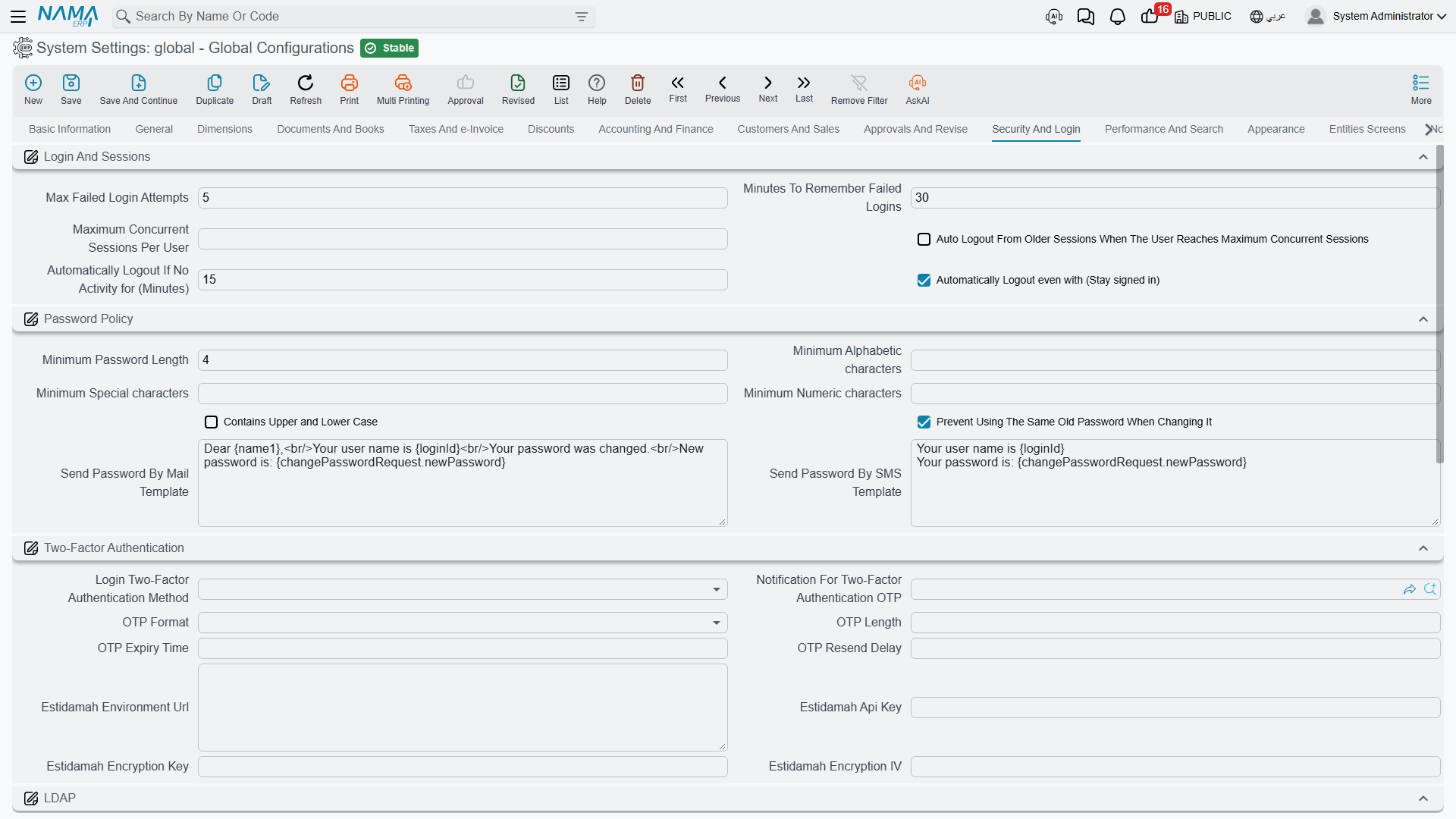
Login and sessions
Max Failed Login Attempts value.info.maxFailedLoginAttempts (default 5) — Consecutive failures before the account is blocked.
Minutes To Remember Failed Logins value.info.minutesToRememberFailedLogins (default 30) — The window those failures are counted over. Five attempts in thirty minutes locks the account; the same five spread across a day do not. Together the two numbers separate a forgetful user from someone guessing passwords.
Maximum Concurrent Sessions Per User value.info.maxLoginSessions — How many sessions one user may hold at once. Leave it empty for no limit.
Auto Logout From Older Sessions When The User Reaches Maximum Concurrent Sessions value.info.autoLogoutWithMaxSessions — What happens at that limit: with this on, the oldest session is logged out to make room; with it off, the new login is refused. The first is kinder to users who left a session open on another machine.
Automatically Logout If No Activity for (Minutes) value.info.autoLogoutTime (default 15) — Idle minutes before a session is closed automatically.
Automatically Logout even with (Stay signed in) value.info.autoLogoutRememberMe (default on) — Whether "remember me" sessions are also subject to that idle timeout.
Password policy
These are checked whenever a password is set or changed.
Minimum Password Length value.info.minPasswordLength (default 6), Minimum Alphabetic characters value.info.minAlphaChars, Minimum Special characters value.info.minSpecialChars, Minimum Numeric characters value.info.minNumbersChars, Contains Upper and Lower Case value.info.upperAndLowerCase — The usual complexity requirements.
Prevent Using The Same Old Password When Changing It value.info.preventSamePasswordWhenChanging (default on) — Refuses a "change" that sets the password back to what it already was.
Send Password By Mail Template / Send Password By SMS Template value.info.sendPasswordByMailTemplate, value.info.sendPasswordBySMSTemplate — The messages sent when a new password is delivered. Both accept placeholders — {name1} for the user's name, {loginId} for the login, and {changePasswordRequest.newPassword} for the new password itself.
Two-factor authentication
Login Two-Factor Authentication Method value.info.login2FAMethod — The second factor required at login: None, Message OTP (a one-time code sent to the user), or Estidamah API.
Notification For Two-Factor Authentication OTP value.info.notificationFor2FAOtp — The notification that carries the code. Required when the method is Message OTP — the system refuses to save otherwise, since a code nobody receives locks everyone out.
OTP Format value.info.otpFormat — Numeric, Alphanumeric or Alphabetic. Numeric is easiest to read off a phone and type; alphanumeric is stronger for the same length.
OTP Length / OTP Expiry Time / OTP Resend Delay value.info.otpLength, value.info.otpExpiryTime, value.info.otpResendDelay — How long the code is, how long it stays valid, and how long a user must wait before asking for another. The resend delay is what stops a stuck user from triggering a flood of messages.
Estidamah Environment Url, Estidamah Api Key, Estidamah Encryption Key, Estidamah Encryption IV value.info.estidamahEnvironmentUrl, value.info.estidamahApiKey, value.info.estidamahEncryptionKey, value.info.estidamahEncryptionIV — Endpoint and cryptographic material for the Estidamah service. All four are required when that method is selected.
Estidamah needs a server setting too
Selecting the Estidamah method also requires the custom password validator to be enabled in the server's nama.properties file (use-custom-password-validator=true). The configuration refuses to save until that is in place, and tells you exactly which setting is missing.
LDAP
Use LDAP For Users Login value.info.useLDAPForUsersLogin — Authenticates users against your directory server instead of against passwords held in Nama.
LDAP Server URL (eg. ldap://192.168.1.10:3268 ) / Default LDAP Domain value.info.ldapServerURL, value.info.defaultLDAPDomain — The directory server address and the domain assumed when a user types a bare user name.
LDAP also needs a server setting
Like Estidamah, this requires use-ldap-for-authentication=true in nama.properties before the configuration will save.
Record security
Allow Disabling Code Field With Security value.info.allowDisablingCodeFieldWithSecurity (default on) — Permits a security profile to disable the Code field.
Allow Filling Disabled Fields With Creators value.info.allowFillingDisabledFieldsWithCreators (default on) — Lets the system's own field creators write into fields the user is not allowed to edit. Usually what you want: a user who may not type the branch by hand should still get it filled in automatically.
Merge Alternate Security Profiles Into Main User value.info.mergeAlternateSecurityProfilesIntoMainUser — A user who has been given another user's permissions with a Security Profile Transfer always holds the union of their own permissions and those transferred to them; this option does not change that. It only changes how the union is worked out: normally each check asks the user first and then each transferring user in turn, while with this on their rows are merged once into a single copy of the user and every check reads that copy. The result is the same, worked out faster where many transfers are active.
Display Prevented Records In Search value.info.displayPreventedRecords — Records the user has no view capability for are still listed (blocked, not opened) instead of vanishing. Some organisations prefer the visible "you may not see this" to a silently shorter list.
Do Not Display Prevented Records In List View value.info.doNotdispPrevRecInListView — The same decision taken separately for list views. Both can also be set per security profile, which overrides what is set here.
Display Records With Update Capability To Users In Addition To Records With View Capability value.info.displayRecordsWithUpdateCapabilityToUsers — A record becomes visible if the user has either the view or the update capability, rather than requiring view specifically. Fixes the surprising case of a user who may edit a record but not see it.
Ignore Record Capabilities In All List Views value.info.ignoreRecordCapabilitiesInAllListViews — Switches record-capability filtering off across every list view.
Ignore Record Capabilities In Certain Entities value.info.ignoreRecordCapabilitiesIn (table) — The same, restricted to the entity types you list. Prefer this over the blanket option above.
Prevent Delete User Related To Entity System Entries value.info.preventDeleteUserRelatedToEntitySystemEntries (default on) — Refuses to delete a user that system entries still reference. Leave it on — deleting such a user breaks the audit trail those entries represent.
User add requests
Nama can expose a public page where new users request an account. These settings control it.
User Add Request Term / User Add Request Book value.info.userAddRequestTerm, value.info.userAddRequestBook — The document term and book used for the requests that page creates.
Don't Display Employee Type / Don't Display Contractor Type / Don't Display Customer Type / Don't Display Supplier Type value.info.dontDisplayEmployeeType, ...dontDisplayContractorType, ...dontDisplayCustomerType, ...dontDisplaySupplierType — Removes each account type from the choices the public page offers. A business that only registers customers should switch off the other three.
User Add Request Welcome Message In Arabic / User Add Request Welcome Message In English value.info.userAddRequestWelcomeMessageAr, value.info.userAddRequestWelcomeMessageEn — The text shown to someone arriving on that page, in each language.
Settings on this tab
Every field on this tab with its exact on-screen label in both languages, so you can find a setting by the name you see. The last column points to the section that explains it.
| Field id | English label | Arabic label | Meaning |
|---|---|---|---|
value.info.maxFailedLoginAttempts | Max Failed Login Attempts | اقصي عدد يتم السماح للمستخدم بادخال كلمة المرور خطأ | Login and sessions |
value.info.minutesToRememberFailedLogins | Minutes To Remember Failed Logins | تذكر أخر محاولة خاطئةلادخال كلمة المرور بالدقائق قبل السماح بالدخول مرة أخري | Login and sessions |
value.info.maxLoginSessions | Maximum Concurrent Sessions Per User | أقصي عدد مرات تسجيل الدخول المتزامن للمستخدم الواحد | Login and sessions |
value.info.autoLogoutWithMaxSessions | Auto Logout From Older Sessions When The User Reaches Maximum Concurrent Sessions | تسجيل الخروج اليا عند تعدي أقصي عدد مرات تسجيل دخول (من الجلسات الأقدم) | Login and sessions |
value.info.autoLogoutTime | Automatically Logout If No Activity for (Minutes) | تسجيل الخروج اليا عند عدم وجود نشاط لمدة (دقيقة) | Login and sessions |
value.info.autoLogoutRememberMe | Automatically Logout even with (Stay signed in) | تسجيل الخروج حتي مع (الاحتفاظ بتسجيل الدخول) | Login and sessions |
value.info.minPasswordLength | Minimum Password Length | أقل طول لحقل كلمة مرور المستخدم | Password policy |
value.info.minAlphaChars | Minimum Alphabetic characters | أقل عدد من الحروف الواجب توافرها | Password policy |
value.info.minSpecialChars | Minimum Special characters | أقل عدد من الرموز الواجب توافرها | Password policy |
value.info.minNumbersChars | Minimum Numeric characters | أقل عدد من الأرقام الواجب توافرها | Password policy |
value.info.upperAndLowerCase | Contains Upper and Lower Case | تحتوي على حروف صغيرة وكبيرة | Password policy |
value.info.preventSamePasswordWhenChanging | Prevent Using The Same Old Password When Changing It | منع استعمال نفس كلمة المرور القديمة عند تغييرها | Password policy |
value.info.sendPasswordByMailTemplate | Send Password By Mail Template | Send Password By Mail Template | Password policy |
value.info.sendPasswordBySMSTemplate | Send Password By SMS Template | Send Password By SMS Template | Password policy |
value.info.login2FAMethod | Login Two-Factor Authentication Method | نوع المصادقة الثنائية لتسجيل الدخول | Two-factor authentication |
value.info.notificationFor2FAOtp | Notification For Two-Factor Authentication OTP | تنبيه OTP للمصادقة الثنائية | Two-factor authentication |
value.info.otpFormat | OTP Format | OTP Format | Two-factor authentication |
value.info.otpLength | OTP Length | طول OTP | Two-factor authentication |
value.info.otpExpiryTime | OTP Expiry Time | وقت انتهاء صلاحية OTP | Two-factor authentication |
value.info.otpResendDelay | OTP Resend Delay | مدة الانتظار قبل إعادة إرسال OTP | Two-factor authentication |
value.info.estidamahEnvironmentUrl | Estidamah Environment Url | Estidamah Environment Url | Two-factor authentication |
value.info.estidamahApiKey | Estidamah Api Key | Estidamah Api Key | Two-factor authentication |
value.info.estidamahEncryptionKey | Estidamah Encryption Key | Estidamah Encryption Key | Two-factor authentication |
value.info.estidamahEncryptionIV | Estidamah Encryption IV | Estidamah Encryption IV | Two-factor authentication |
value.info.useLDAPForUsersLogin | Use LDAP For Users Login | Use LDAP For Users Login | LDAP |
value.info.ldapServerURL | LDAP Server URL (eg. ldap://192.168.1.10:3268 ) | LDAP Server URL (eg. ldap://192.168.1.10:3268 ) | LDAP |
value.info.defaultLDAPDomain | Default LDAP Domain | Default LDAP Domain | LDAP |
value.info.allowDisablingCodeFieldWithSecurity | Allow Disabling Code Field With Security | Allow Disabling Code Field With Security | Record security |
value.info.allowFillingDisabledFieldsWithCreators | Allow Filling Disabled Fields With Creators | Allow Filling Disabled Fields With Creators | Record security |
value.info.mergeAlternateSecurityProfilesIntoMainUser | Merge Alternate Security Profiles Into Main User | دمج ملفات الصلاحية البديلة في المستخدم الرئيسي | Record security |
value.info.displayPreventedRecords | Display Prevented Records In Search | عرض السجلات الممنوعة من الاستعمال في البحث | Record security |
value.info.doNotdispPrevRecInListView | Do Not Display Prevented Records In List View | عدم عرض السجلات الممنوعة من الاستعمال في القوائم | Record security |
value.info.displayRecordsWithUpdateCapabilityToUsers | Display Records With Update Capability To Users In Addition To Records With View Capability | عرض السجلات التي لها صلاحية تعديل مع المستخدم الحالي بالإضافة الي السجلات التي لها صلاحية مطالعه معه | Record security |
value.info.ignoreRecordCapabilitiesInAllListViews | Ignore Record Capabilities In All List Views | تجاهل صلاحيات السجل مع القوائم في كل الشاشات | Record security |
value.info.preventDeleteUserRelatedToEntitySystemEntries | Prevent Delete User Related To Entity System Entries | منع حذف المستخدم المرتبط ب Entity System Entries | Record security |
value.info.ignoreRecordCapabilitiesIn | Ignore Record Capabilities In Certain Entities | تجاهل صلاحيات السجل مع شاشات محددة | Record security |
value.info.ignoreRecordCapabilitiesIn.entityType | Entity Type | النوع | Record security |
value.info.ignoreRecordCapabilitiesIn.entityTypeList | Entity Type List | قائمة الأنواع | Record security |
value.info.userAddRequestTerm | User Add Request Term | توجيه إضافة مستخدم | User add requests |
value.info.userAddRequestBook | User Add Request Book | دفتر إضافة مستخدم | User add requests |
value.info.dontDisplayEmployeeType | Don't Display Employee Type | عدم عرض نوع المستخدم موظف | User add requests |
value.info.dontDisplayContractorType | Don't Display Contractor Type | عدم عرض نوع المستخدم مقاول | User add requests |
value.info.dontDisplayCustomerType | Don't Display Customer Type | عدم عرض نوع المستخدم عميل | User add requests |
value.info.dontDisplaySupplierType | Don't Display Supplier Type | عدم عرض نوع المستخدم مورد | User add requests |
value.info.userAddRequestWelcomeMessageAr | User Add Request Welcome Message In Arabic | رسالة الترحيب العربي في طلب إضافة مستخدم | User add requests |
value.info.userAddRequestWelcomeMessageEn | User Add Request Welcome Message In English | رسالة الترحيب الإنجليزية في طلب إضافة مستخدم | User add requests |