
Automatic Coding of Master Files
Master files need codes. Customers, items, suppliers, warehouses, employees — every one of them carries a code, and every code is supposed to follow a convention that somebody in the company decided years ago. In practice, if the person creating the record types the code by hand, the convention lasts about a month: one user writes CUST-001, the next writes cust 2, and a third reuses a code that was already taken.
The Files Auto Coding grid takes the pen out of the user's hand. You describe the code once, as a formula, and the system builds it when the record is saved — so a customer opened in the Riyadh branch in 2026 comes out as RYD-2026-00147 every time, without anybody having to remember the rule. The same grid can build the Arabic and English names and the alternative code from the same kind of formula.
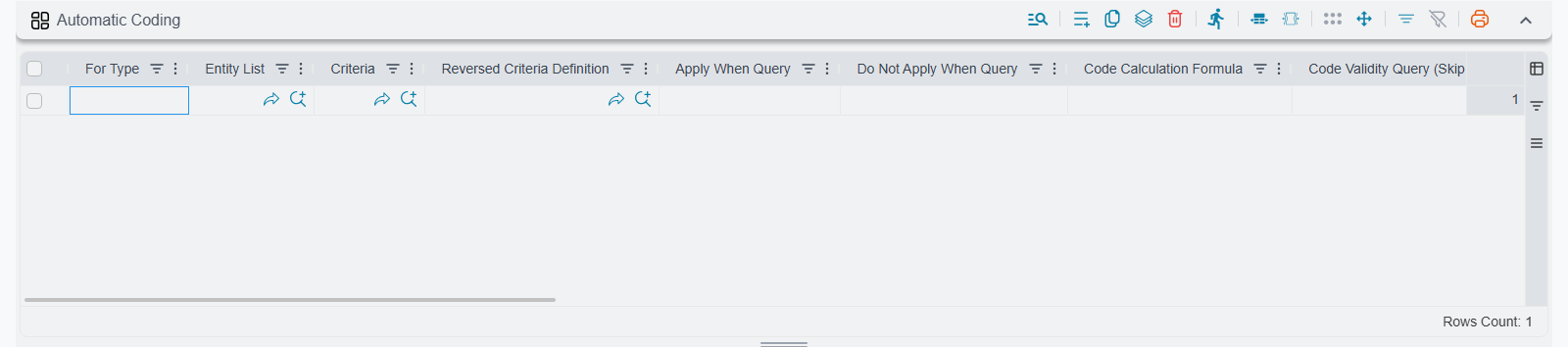
On the Main tab the grid is headed Automatic Coding; its own list and search screen is called Files Auto Coding.
What this grid does not cover
This is coding for master files only. Documents — sales invoices, stock issues, receipt vouchers — do not get their numbers from here. Document numbering belongs to document books, which decide the prefix, the serial and the reset period per document type. See Document Books for that side of the system.
If you put a document type in For Type here, the line is simply never reached.
It is also not the first thing tried for a master file. A record that belongs to a Master Group is coded by that group — by its per-criteria formula grid, then its own formula block — and only a record whose group has neither, or which has no group at all, reaches this grid.
Choosing the line that runs
A line first says which records it is for, then says how their code is built. The scope columns are the familiar ones described on the overview page, plus four condition columns of its own.
| Column | What it does |
|---|---|
| For Type | The single entity type the line codes, e.g. Customer or Warehouse. |
| Entity List | A reusable named list of entity types, so one line can cover several files at once. |
| Criteria Definition | A saved Criteria Definition record; the line only runs when the record being saved matches it. |
| Reversed Criteria Definition | The opposite: the line is skipped when the record matches this criteria. |
| Apply When Query | A query; the line only runs when the query returns a result for the record being saved. |
| Do Not Apply When Query | The opposite: the line is skipped when this query returns a result. |
| Inactive | Switches this single line off without deleting it. |
Matching is by entity type. When a master file is saved, the system looks for lines whose For Type or Entity List names that type. A line with no For Type and no Entity List is the system-wide default — it is used for any master file that no more specific line claims.
Only the first matching line for an entity type is ever used
The system picks the first line found for the entity type and works with that one alone. If its criteria do not match the record, the record simply gets no automatic code — the system does not move on and try the next line.
So a set of alternative lines for the same type — one per branch, one per category — does not behave the way it reads. The second and later lines are never reached. Build the alternatives into a single formula (the formula can read the branch or the category straight off the record), or into the criteria of the one line that runs.
The four condition columns are cumulative and each one works on its own: a line runs only if every condition you filled in is satisfied. Leave them all empty and the line always runs for its entity type. Use the criteria columns for rules you can express against the record's own fields, and the query columns when the decision depends on something the record does not carry — how many records the branch already has, whether the customer exists in another system.
Keep one entity type in one record
Because only the first matching line wins and the order across several Fields and Entities Settings records is not something you control, splitting the coding of the same entity type over two records makes the winner unpredictable. Keep all the coding lines for one file in one record.
The formula columns
The rest of the line is one block of formula and numbering columns. You rarely fill more than three or four of them.
| Column | Purpose |
|---|---|
| Code Calculation Formula | Builds the record's code — the fixed part, before the running number. |
| Code Validity Query (Skip code if 1 is returned, and calculate next) | A query that inspects the code just produced and rejects it, so the next number is tried. |
| Name1 Calculation Formula | Builds the Arabic name. |
| Name2 Calculation Formula | Builds the English name. |
| Alternate Code Formula | Builds the alternative code, on files that have one. |
| Code Sequence Prefix | Identifies which running counter the next number is drawn from. |
| Code Suffix Length | How many digits the running number is padded to. |
| Suffix First Number | The number the counter starts from. |
| Do Not Reset Code With Update | Keeps the existing code instead of recalculating it when the record is edited. |
Item revisions and size-and-colour variants are coded from the item's own coding setup — see Items have their own coding setup below.
Not every column is on screen
The grid ships with the most-used columns visible. If the one you need — Suffix First Number, say, or Do Not Reset Code With Update — is not among them, add it to the grid with the Screen Modifier.
Writing a formula
Every formula column understands the same language, and the language is chosen automatically by what you type.
The Tempo template language
If the formula contains no ${, the whole text is treated as a Tempo template: plain text with { } placeholders that read fields off the record being saved.
ITM-{category1.code}-Because it is real Tempo, the full manual applies — dotted paths through references, text and date helpers, conditions:
| You want | You write |
|---|---|
| A field of the record | {name1} |
| A field of a referenced record | {branch.code}, {group.code}, {category1.name2} |
| The year the record was created | {creationDate.$format."yyyy"} |
| The code of the user who created the record | {$user.code} |
| The first characters of a field | {left(name2, 3)} |
| A literal curly bracket | \{ |
The Tempo Language Manual documents the whole syntax; anything it lists for notification and print templates works here too, as long as the result is a sensible code.
The simple ${ } substitution
If the formula contains ${ anywhere, the system switches to a much simpler mode: each ${field} is replaced by that field's value, and nothing else is interpreted.
${branch.code}-${category1.code}-| Placeholder | Resolves to |
|---|---|
${code}, ${name1}, ${name2} | A field of the record being saved. |
${branch.code}, ${group.code}, ${category1.code} | A field reached through a reference — any dotted path the record supports. |
Three behaviours are worth knowing in this mode:
- A value whose text starts with
#is treated as blank. - Double spaces in the result are collapsed to a single space.
- A mis-spelled field name does not raise an error — it is substituted with
@error@followed by the name you typed. If the first record you create comes out with a code like@error@brnch.code@-00001, that is a typo in the formula, not a system fault.
Which mode should I use?
Use Tempo. The ${ } mode has no functions, no formatting and no conditions, and it hides mistakes instead of reporting them. It exists for older configurations. The only thing to remember is that the two cannot be mixed: the moment ${ appears anywhere in the text, the whole formula is read in the simple mode and your { } placeholders are left as literal text.
The running number
The formula produces the fixed part of the code. The digits at the end come from a counter, and the three numbering columns decide how that counter behaves.
Code Sequence Prefix is the counter's identity. Two records draw from the same counter when their Code Sequence Prefix resolves to the same text — so {branch.code}- gives you one independent counter per branch, while a constant CUST- gives one counter for the whole company. The prefix is itself a formula, written in the same language. Leave it empty and the calculated code doubles as the prefix, which is usually what you want.
Code Suffix Length is how many digits are appended, left-padded with zeros: 5 turns the 147th customer into 00147.
An empty Code Suffix Length means no number at all
If you leave Code Suffix Length empty, nothing is appended — every record gets exactly the text the formula produced. That is fine when the formula already yields something unique (a national ID, a supplier's own reference), and a disaster when it does not. Any time you want a serial, fill this column.
Suffix First Number is where a brand-new counter starts. Leave it empty and the first record is 1; set it to 1000 and the first record is 1000.
To find the next number the system takes the last existing record whose sequence prefix is the same, strips the prefix off its code, reads what is left as a number and adds one. Two consequences follow:
- If somebody has manually given a record a code that starts with the sequence prefix but ends in something that is not a number, the next save fails with a message naming that record. Fix the record's code and save again.
- If the number outgrows Code Suffix Length — a 3-digit suffix reaching 1000 — the save fails with a "prefix exceeded its maximum count" message. Widen the suffix (it is rejected on save above 20 digits) or start a new prefix.
Code Validity Query
Sometimes "the next free number" is not enough — the code has to be checked against something else before it is accepted. That is what Code Validity Query is for. The candidate code is written onto the record, then the query runs; it should return 1 to reject the code (the system adds one to the counter and tries again) and 0 to accept it.
The query is an ordinary Nama query, so it reads the record with { } placeholders exactly like the queries in Criteria Based Validation — including {code}, which by then holds the code being tested:
select case when exists
  (select 1 from Customer c where c.code = {code} and c.id <> {id})
then 1 else 0 end
The query must be able to return 0
A query that returns nothing at all, or always returns 1, never lets a code through. The system keeps incrementing up to 99,999 times and then fails the save. Test the query on real data before you rely on it, and always write it so that an acceptable code yields 0.
Worked examples
A branch-prefixed sequential customer code
The company wants customers numbered per branch: RYD-00001, RYD-00002, JED-00001.
| Column | Value |
|---|---|
| For Type | Customer |
| Code Calculation Formula | {branch.code}- |
| Code Sequence Prefix | (empty — the calculated code is the counter) |
| Code Suffix Length | 5 |
Because the code itself contains the branch, each branch automatically gets its own counter. The 147th customer opened in Riyadh is saved as RYD-00147.
The same code with the year in it
Add the year and the counter restarts naturally every January, because the sequence prefix changes:
| Column | Value |
|---|---|
| Code Calculation Formula | {branch.code}-{creationDate.$format."yyyy"}- |
| Code Suffix Length | 5 |
RYD-2026-00147. The first customer created in 2027 becomes RYD-2027-00001 without anybody touching the settings — a new prefix has no previous record, so the counter starts again from Suffix First Number.
Building the name as well as the code
A warehouse register where the name should always read the same way:
| Column | Value |
|---|---|
| For Type | Warehouse |
| Code Calculation Formula | WH-{branch.code}- |
| Name1 Calculation Formula | مخزن {branch.name1} |
| Name2 Calculation Formula | {branch.name2} Warehouse |
| Code Suffix Length | 3 |
The name formulas only overwrite the names when they produce something; a formula that resolves to nothing leaves whatever the user typed alone.
An item code built from its category
Items are the one file that normally gets its formula somewhere else (see the next section), but the formula text is identical wherever you put it:
| Column | Value |
|---|---|
| Code Calculation Formula | {category1.code}- |
| Code Suffix Length | 4 |
| Suffix First Number | 1 |
An item in category BEV is created as BEV-0001, the next one as BEV-0002, and an item in category SNK starts its own run at SNK-0001.
Keeping a code once it is assigned
By default the code is recalculated whenever the record is saved. That is usually harmless — the formula produces the same text and the counter recognises the record's existing number — but it is not what you want when the formula reads a field the user is allowed to change. Move a customer to another branch and the branch-based code would be rebuilt under the new branch, orphaning every document that already quotes the old code.
Tick Do Not Reset Code With Update and the whole calculation is skipped for records that have been saved before: the code, the names and the alternative code stay exactly as they were, and only brand-new records are coded.
Codes arriving from Replication are never recalculated
When a record reaches this database through Replication it keeps the code it already has. The formula only runs where the record is actually created.
Items have their own coding setup
Items do not start with this grid. When an item is saved the system looks first at the item's Item Section — the section's own coding formula, or the first of its criteria lines that matches. If nothing is defined there it falls back to the item coding formula held in the global configuration, and only if both are empty does it come down to a Files Auto Coding line.
Coding item variants
The revision code, the size-and-colour code, their four name formulas and the two "…If Empty Only" switches are applied on the item's own coding path — the Item Section and the global item coding formula. If you are coding item variants, configure the formula there and use this grid for the other master files.
A section can also be told to Prevent AutoCoding, in which case its items are never coded automatically at all, whatever any of these settings say.
When the settings take effect
This is server-side behaviour. The moment the Fields and Entities Settings record is saved, the next master file saved anywhere in the system uses the new formula — no restart, no sign-out, and no action to press. Existing records are not touched: automatic coding only ever runs while a record is being saved.
Settings on this tab
Every grid and column this page covers, with its exact on-screen label in both languages, so you can find a setting by the name you see. The last column points to the section that explains it. The scope columns (For Type, Entity List, On Field and the like) are the same on every grid and are listed on the overview page.
| Field id | English label | Arabic label | Meaning |
|---|---|---|---|
autoCodingLines | Automatic Coding | التكويد الآلي | Choosing the line that runs |
autoCodingLines.criteriaDefinition | Criteria | المعايير | Choosing the line that runs |
autoCodingLines.reversedCriteriaDefinition | Reversed Criteria Definition | معيار عدم التفيذ | Choosing the line that runs |
autoCodingLines.applyWhenQuery | Apply When Query | تطبيق عند التوافق مع الاستعلام | Choosing the line that runs |
autoCodingLines.doNotApplyWhenQuery | Do Not Apply When Query | منع التطبيق عند التوافق مع الاستعلام | Choosing the line that runs |
autoCodingLines.codingFormula.codeCalculationFormula | Code Calculation Formula | صيغة حساب الكود | The formula columns |
autoCodingLines.codingFormula.codeValidityQuery | Code Validity Query (Skip code if 1 is returned, and calculate next) | Code Validity Query (Skip code if 1 is returned, and calculate next) | The formula columns |
autoCodingLines.codingFormula.name1CalculationFormula | Name1 Calculation Formula | صيغة حساب الاسم العربي | The formula columns |
autoCodingLines.codingFormula.name2CalculationFormula | Name2 Calculation Formula | صيغة حساب الاسم الإنجليزي | The formula columns |
autoCodingLines.codingFormula.altCodeFormula | Alternate Code Formula | صيغه الكود البديل | The formula columns |
autoCodingLines.codingFormula.szName1Formula | Name 1 Encoding Formula For Colour And Size | صيغة تكويد اسم 1 للون والمقاس | The formula columns |
autoCodingLines.codingFormula.szName2Formula | Name 2 Encoding Formula For Colour And Size | صيغة تكويد اسم 2 للون والمقاس | The formula columns |
autoCodingLines.codingFormula.rvName1Formula | Name 1 Encoding Formula For Revision | صيغة تكويد اسم 1 للاصدارة | The formula columns |
autoCodingLines.codingFormula.rvName2Formula | Name 2 Encoding Formula For Revision | صيغة تكويد اسم 2 للاصدارة | The formula columns |
autoCodingLines.codingFormula.codeSequencePrefix | Code Sequence Prefix | بادئة حساب التسلسل | The formula columns |
autoCodingLines.codingFormula.codeSuffixLength | Code Suffix Length | طول لاحقة الكود | The formula columns |
Related pages
- Fields and Entities Settings — Overview — the scope columns every grid shares, and how the records combine.
- Document Books — numbering for documents, which this grid does not cover.
- Master Groups — the master-file coder that runs before this grid does.
- Tempo Language Manual — the full formula language, its functions and its date and text helpers.
- Criteria Based Validation — how the queries behind Criteria Definition and Code Validity Query are written and tested.
- Criteria from Text Parser — writing the criteria expressions themselves.
- Field Formats and Input Validation — the mirror image of this page: checking a code the user typed instead of generating one.
- Items & Master Data Configuration — where the item coding formula and its variant name formulas live.
- Item Barcode Specifications — reading structured item codes back out of a scanned barcode.