
Fiscal Periods, Period Locking & Multi-Currency
Two questions sit underneath a lot of support tickets: "why won't this document save into this date?" and "why did a foreign-currency balance suddenly change?" Both come down to the same two machineries — how time is divided into fiscal periods that can be opened and locked, and how the system handles more than one currency. This page is the reference the per-page "For Support" sections point to.
Fiscal years and periods
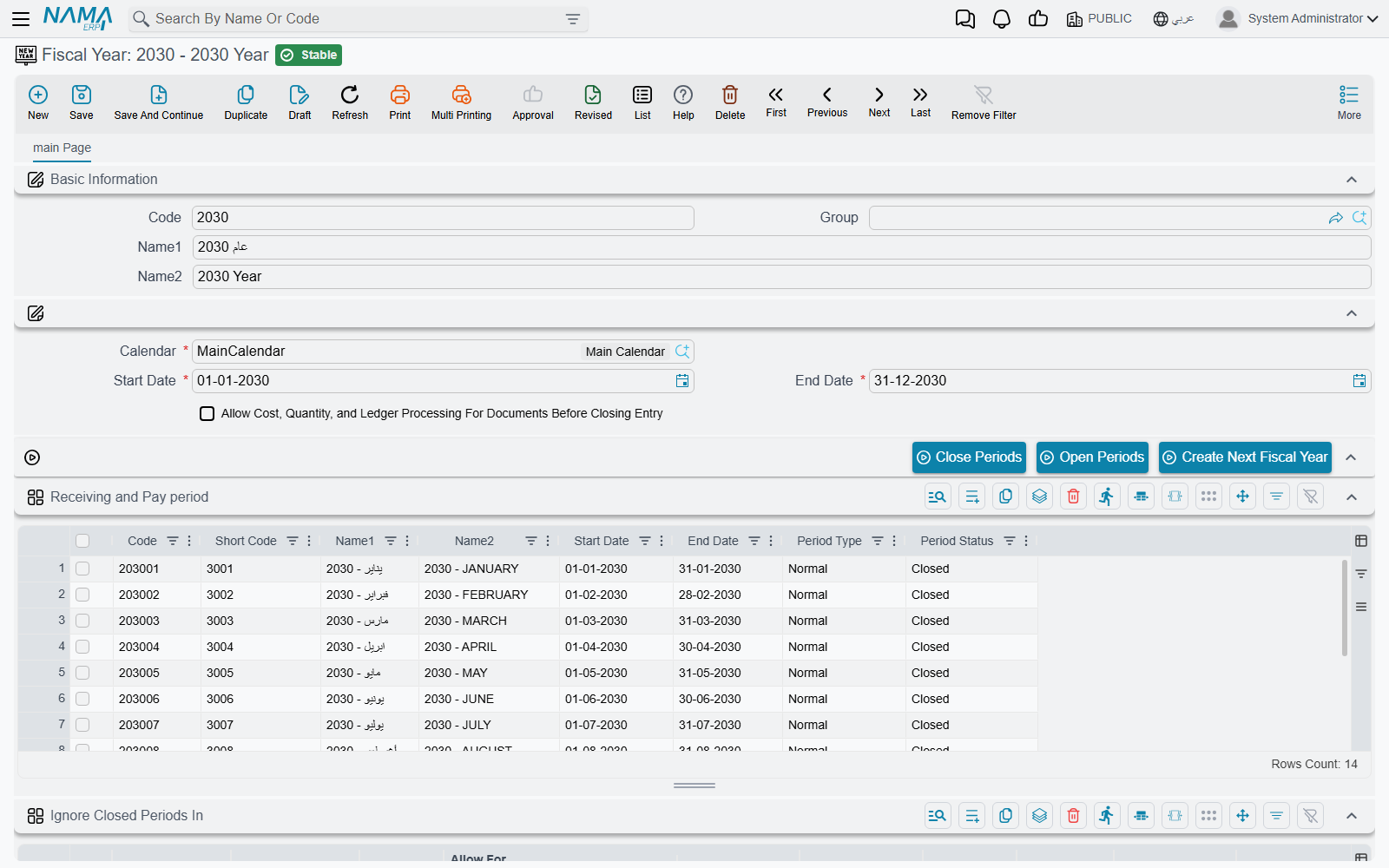
Accounting time is divided into a Fiscal Year (Basic > Master Files > Fiscal Year), and each year is split into fiscal periods (normally the twelve months, though the period structure is generated to suit the installation). Every document carries a value date, and from that date the system derives which period it falls into — that's the period stamped on its ledger effect and the one its figures roll up into.
This is why the value date matters so much: change it and you change which period (and which year) the document belongs to.
Opening and locking periods
A period can be open (documents allowed) or closed (locked). You open and close periods on the Fiscal Year screen (Basic → Master Files → Fiscal Year): change a period line's status, or use the Open Periods / Close Periods buttons, then save — so after a month is reviewed and reported, you close it and nothing can change underneath the numbers you've already published.
Two finer tools sit on top of that. Fiscal Year Status Update (Basic → Master Files → Fiscal Year Status Update) only narrows: it closes an open period further for chosen users, permission files, document types or dimensions, and it does nothing at all unless Enable Fiscal Year Status Update is ticked in Global Configuration. It cannot reopen a closed period. Ignore Closed Periods works the other way: it lets a chosen user or document type work in a period that is closed. Both are explained in Fiscal Period Control.
For finer control than a whole period, Prevent Transactions On Accounts Or Subsidiaries (Accounting > Master Files > Prevent Transactions On Accounts Or Subsidiaries) locks transactions on specific accounts or subsidiaries (optionally within a date range) — useful for freezing a single account while the rest of the period stays open. The year-end workflow that uses these is described in Year-end closing & period control.
Working in more than one currency
Multi-currency rests on the Ledger (دفتر حسابات), which defines the main currency the books are kept in, and a reporting currency that the consolidated statements use by default to present a group of companies in one currency. Every foreign-currency transaction is stored with both its original value and its local value at the day's rate, so balances can always be shown either way. Where the day's rate comes from — the Exchange Rate screen and the order in which a document looks it up — is on Currencies and exchange rates.
Rates move, though, and that creates currency differences on open foreign balances. Two documents handle this:
- Exchange Rate Update (
Accounting > Documents > Exchange Rate Update) — revalues foreign-currency account balances at a new rate and records the resulting gain/loss, so the local value of those balances reflects today's rate. - Currency Diff Journal (
Accounting > Documents > Currency Diff Journal) — records a currency-difference entry directly (see also Journal entries & adjustments, where currency-difference journals are covered).
Two account-level flags shape this behavior: one makes an account keep its transaction's local currency (rather than being revalued), and another excludes the account from the automatic exchange-rate update — so accounts that shouldn't be revalued (a fixed-rate settlement account, say) are left alone.
For Support
- "The document won't save into this date" — its period is closed, for everyone or (through a Fiscal Year Status Update rule) for this user or document type. Reopen it with Open Periods on the Fiscal Year, or add an Ignore Closed Periods rule for the user or document type — see Fiscal Period Control. Also check Prevent Transactions locks on the account/subsidiary.
- "A foreign balance's local value changed" — an Exchange Rate Update revalued it at a new rate; that's expected, and the difference is the currency gain/loss.
- "An account shouldn't be revalued but is (or vice-versa)" — check its keep transaction local currency and exclude from exchange-rate update flags.
- "The wrong period was stamped" — it follows the document's value date; correct the date and reprocess (see How documents are processed into accounting effects).