
Cheques & Financial Papers (Lifecycle)
A cheque isn't just an amount; it's a paper with a journey: it's received, deposited at the bank, collected or returned, and may be endorsed to another party or discounted before its due date. Tracking all that by hand is a nightmare, so Nama treats every cheque or bill as a financial paper with a status that moves through a clear lifecycle, driven by a set of specialized documents.
Required license
Financial papers are part of the banks license accounting-banks.
The financial paper and its status
The Commercial Paper (Banks > Master Files > Commercial Paper) represents the cheque or bill of exchange. Its key fields: the paper direction (Received from a customer or Issued to a supplier), the paper type (Cheque or Bill Of Exchange), the value, due date, cheque number, bank, and beneficiary/issuer, the commercial-paper book it belongs to, and the status.
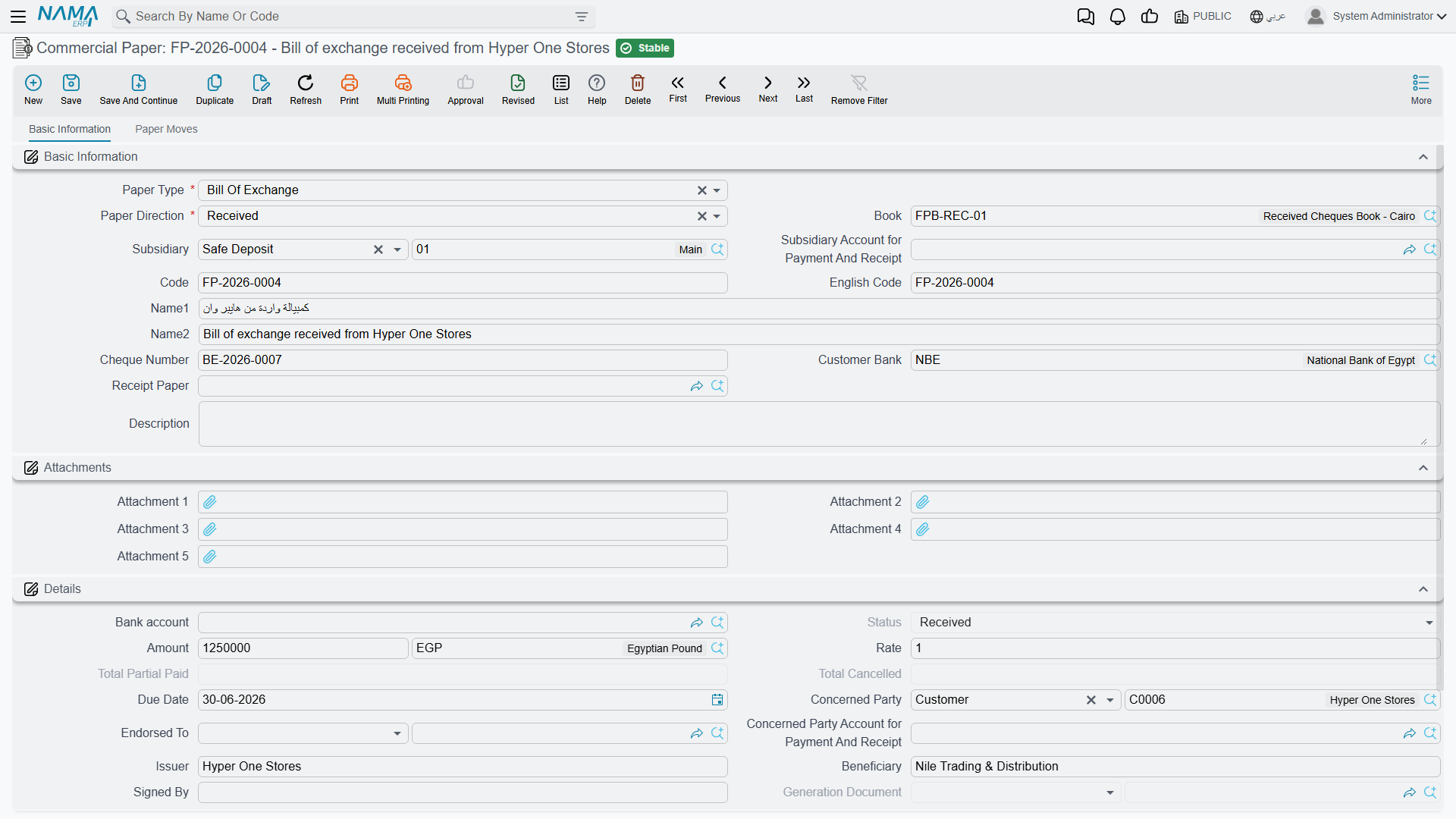
The paper is rarely created on its own; it's usually generated from a receipt voucher (for received papers) or a payment voucher (for issued papers), then its status moves via the documents below. The possible statuses:
| Status | Meaning |
|---|---|
| Created | The paper has been created but not yet received. |
| Received | The incoming paper has been received and is in your custody. |
| Issued | The outgoing paper has been issued to an external party. |
| Portfolioed | Deposited into the bank portfolio for collection. |
| Postponed Portfolioed | Deposited as a postponed deposit (before the due date). |
| Agio | Discounted at the bank before its due date (accelerated collection at a discount). |
| Endorsed | Endorsed (transferred) to another party. |
| Collected | Its value has actually been collected. |
| Temporary / Finally Bounced | Bounced temporarily (retryable) or finally. |
| Partial Paid / Partial Cancel | Part of its value has been paid/cancelled. |
| Cancelled | The paper has been cancelled. |
The commercial-paper book
The Commercial Paper Book (Banks > Settings > Commercial Paper Book) organizes the papers' numbering and custody — just like a physical chequebook — so you know which papers are in which book and with whom.
The documents that drive the cycle
- Opening Commercial Paper (
Banks > Cheques > Openning Commercial Paper) — to enter existing papers at go-live with their balance and current status. - Bank Portfolio (
Banks > Cheques > Bank Portfolio) — deposits received papers at the bank for collection (status moves to "Portfolioed"). There's also the Postponed Bank Portfolio and Postponed Portfolio Return for deposits before the due date and reversing them. - Bank Notice (
Banks > Cheques > Bank Notice) — the bank's notification of the paper's outcome: collection (moves to "Collected") or return (to "Temporary/Finally Bounced"). - Agio (
Banks > Cheques > Agio) and Agio Return — discounting the paper at the bank before its due date for a commission, and reversing it. - Financial Paper Cancel — to cancel a paper.
- Partial Payment — to record payment of part of a paper's value.
- Financial Paper Transfer — to move/endorse a paper.
- Receipt Request — to request receiving a paper before recording it.
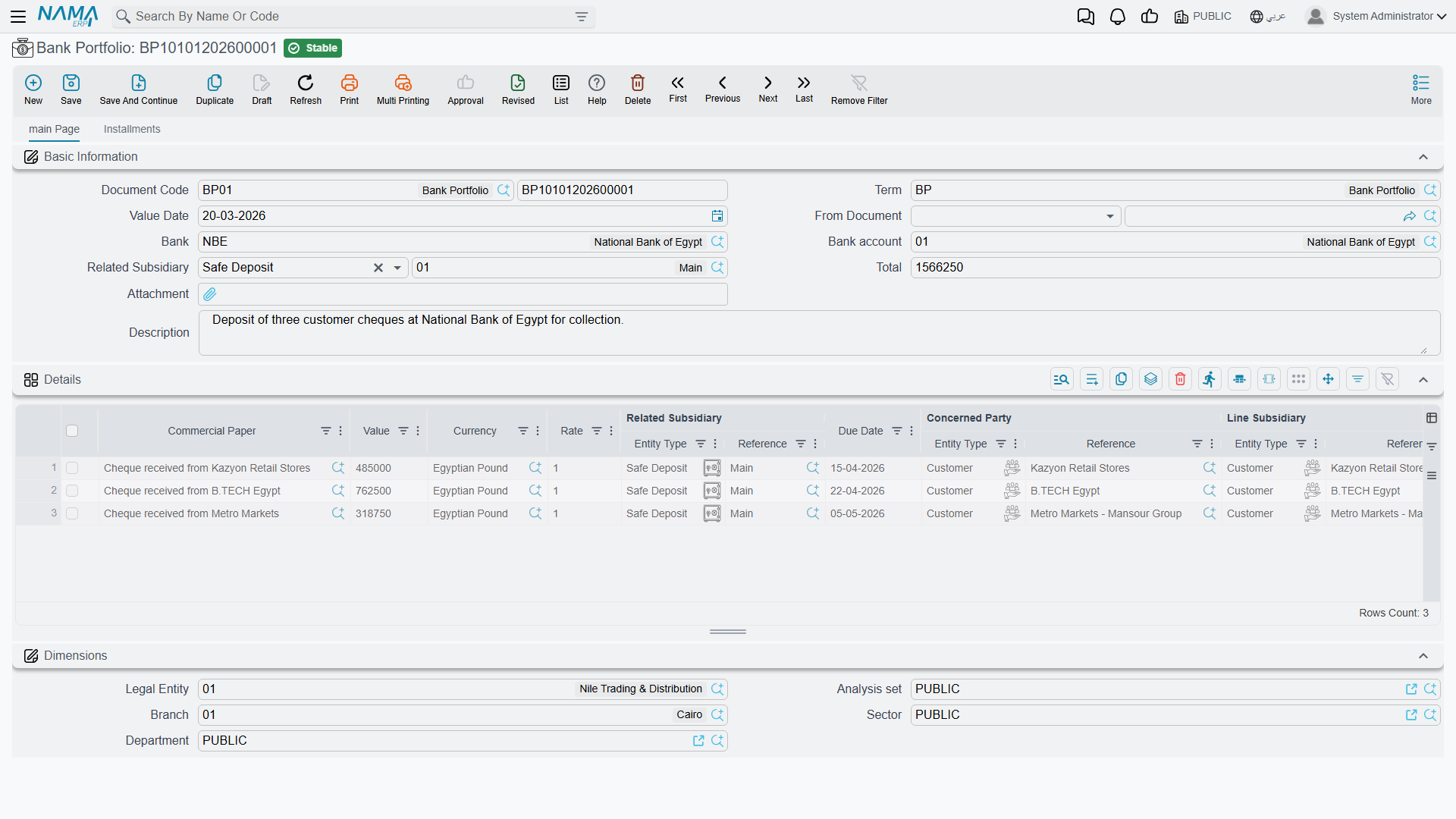
A simplified lifecycle for a received cheque
Receive (receipt voucher) → Received → Deposit (bank portfolio) → Portfolioed → Bank notice of collection → Collected. And if it bounces: bank notice of return → Temporary/Finally Bounced.
Each of these documents moves the paper's status and records its appropriate accounting effect (moving the value between a "cheques under collection" account and the bank account, for example), and the source of these accounts is each document's term.
Driving the cycle from the paper itself
You do not have to leave the Commercial Paper and go hunting for the right screen. Standing on a saved paper, the buttons below open the next document already carrying that paper — its value, due date, bank account, concerned party and rate — as a new record for you to complete and save:
- Create Bank Portfolio — deposits this paper at the bank for collection. The usual next step for a received cheque.
- Create Bank Notice — records the bank's verdict on it: collected, or returned.
- Create Receipt Voucher / Create Payment Voucher — raises the voucher that receives or pays this paper, when the paper was entered first and the voucher has yet to be written.
- Create Commercial Paper Cancel — cancels the paper.
Each of these buttons needs the paper saved first; on an unsaved paper there is nothing yet for the new document to point at.
On the Commercial Paper Book there is one more:
- Generate Cheques — creates the book's papers in bulk instead of one at a time. Fill in the cheques count and the auto-coding parameters first, and note that it works only for a book of issued cheques: a book of bills of exchange, or a received-papers book, will not generate.
Printing on bank forms
Printing the cheque itself uses bank-specific templates (Ahli United, Arab African, Audi, CIB, Gulf, NBAD, NBE, QNB...) within the cheque forms SYSF-BNK-CHQ-*, so the cheque comes out matching each bank's format.
Reports and forms
- Reports: commercial-paper statement
SYSR-BNK001, cheques under collectionSYSR-BNK002, cheques by statusSYSR-BNK003, financial-paper booksSYSR-BNK004(see Account statements & trial balance). - Forms: bank portfolio
SYSF-BNK003, bank noticeSYSF-BNK004, paper transferSYSF-BNK005, paper cancelSYSF-BNK006, agioSYSF-BNK007, agio returnSYSF-BNK008, opening paperSYSF-BNK009, receipt requestSYSF-ACC013.
For Support
- "The paper's status won't advance" — each transition needs its document: deposit via the portfolio, collection/return via the bank notice. Check that the right document was issued and processed.
- "A bounced cheque doesn't return to the customer's balance" — a bank notice of return must be issued to move the status and reverse the effect.
- "The wrong cheques-under-collection/bank account in the entry" — its source is the relevant document's term (portfolio/notice/agio); review the Document terms reference.
- "The cheque doesn't print in the correct bank format" — make sure the cheque template for the right bank is selected.
- Processing and reprocessing a stuck document are in How documents are processed into accounting effects.