
Fixed Deposits
A fixed deposit is the mirror image of a loan: instead of borrowing from the bank, you place an amount with it for a set term in return for interest. Nama tracks it with the same logic it uses for Bank Loans: a master file holding the deposit terms, then an issue document that posts it, then periodic interest-payment documents that lock in the interest.
Required license
Fixed deposits are part of the accounting-loans license — the same license that covers Bank Loans and Credit Facilities.
The deposit's lifecycle
Every screen hangs off the Banks > Fixed Deposits root:
- Fixed Deposit — the master file in its initial status "Initial".
- Fixed Deposit Issue — the moment the amount actually goes out into the deposit (it posts to the ledger, and the status flips to "Released").
- Interest Payment Document — locking in the periodic interest payments (the same document used for loans).
- Fixed Deposit Changing — amending the deposit data after it's been issued.
The deposit's master file
On the Fixed Deposit screen (Banks > Fixed Deposits > Fixed Deposit) the terms are defined: the bank and bank account, the deposit type, the deposit value, the from date / to date, the calculated per (the interest-calculation period), the interest percentage, interest type, interest calculation method and interest payment start date.
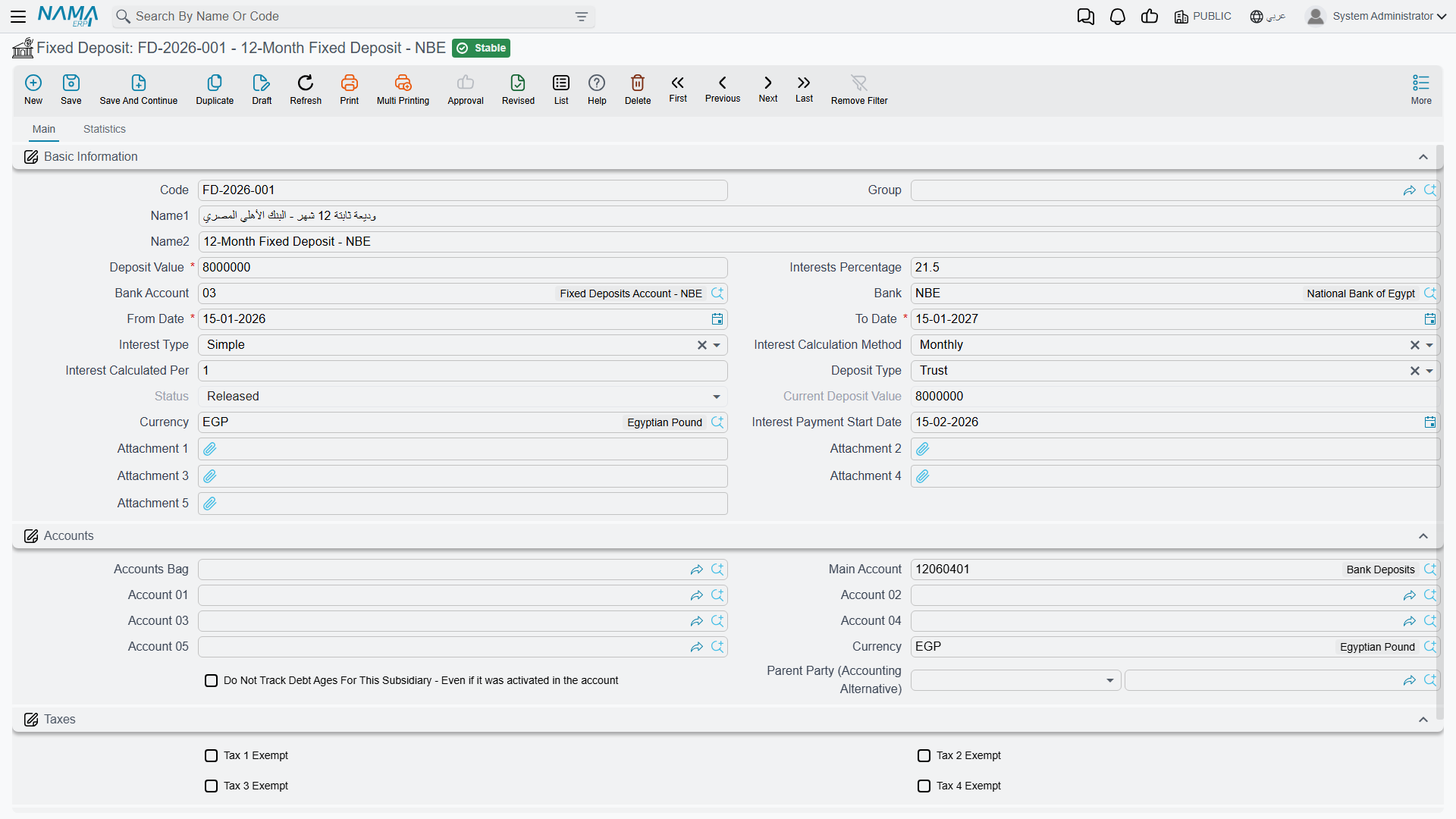
Interest type: Simple or Compound. The interest calculation method sets the calculation frequency: Yearly, Monthly or Daily.
Deposit statuses: Initial → Released → In Progress → Finished / Cancelled.
Issuing and paying interest
When a Fixed Deposit Issue (Banks > Fixed Deposits > Fixed Deposit Issue) is recorded, the amount goes out of your account into the deposit with the bank, the accounting effect posts via the interest value debit/credit sides alongside the principal, and the deposit's status flips to "Released".
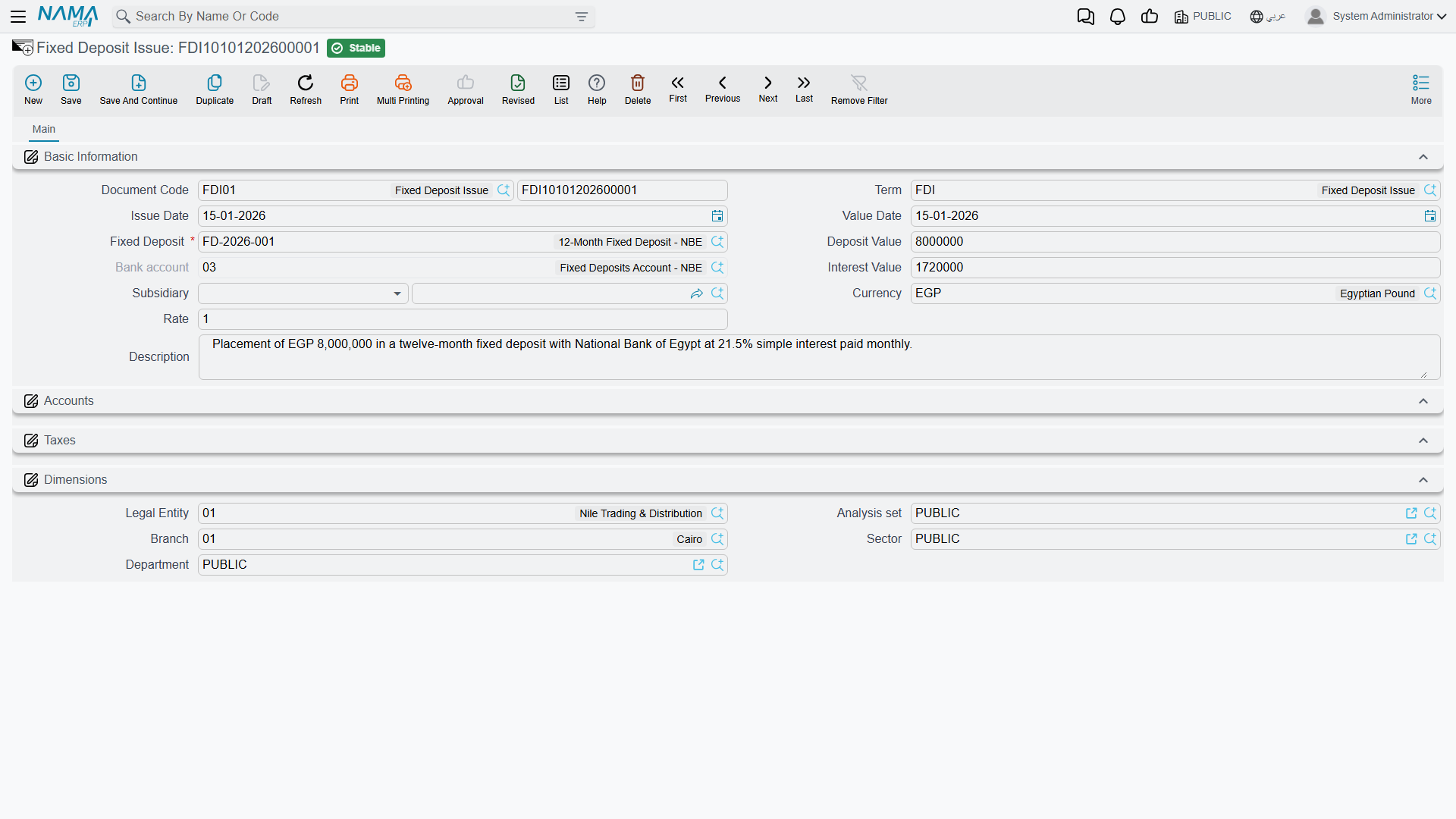
The due interest is then locked in periodically via the Interest Payment Document (Banks > Fixed Deposits > Interest Payment Document) — the document shared with loans. (Where the issue and interest accounts come from is in the Document terms reference.)
Amendment
A Fixed Deposit Changing document is used to amend the deposit data after it's been issued, within the system's controls.
Actions on this screen
The Interest Payment Document does not ask you to list the deposits by hand:
- Collect Deposits — set a from deposit / to deposit range and a date range, and it fills the document with the interest due on every matching deposit in that window, so one document proves a whole period's interest across several deposits. It needs a value date if you have not narrowed by a deposit or a from-date, and it skips deposits whose status puts them outside the calculation.
Printed forms
| Form | Document |
|---|---|
| Fixed Deposit (SYSF-BNK010) | The deposit's data printout. |
| Fixed Deposit Issue (SYSF-BNK011) | The deposit-issue document printout. |
For Support
- "The deposit is still Initial" — the deposit-issue document hasn't been recorded yet; issuing is what moves the amount out and advances the status.
- "The interest isn't computed as I expect" — check the interest type (Simple/Compound) and the interest calculation method (Yearly/Monthly/Daily) on the deposit.
- "The same interest-payment document shows up under loans" — that's correct; the document is shared between deposits and Loans.
- "Where do the interest accounts come from?" — from the Fixed Deposit Issue and Interest Payment Document terms; see Document terms.
- The accounting-processing mechanism is in How documents are processed into accounting effects.