
Subsidiary Reconciliation
A customer or supplier almost always keeps their own account of your dealings — and it rarely lines up with yours to the penny: an invoice they haven't booked, a payment in transit, a credit note one side recorded and the other didn't. Subsidiary Reconciliation is the systematic way to lay your books for a party next to their external statement, match what matches, and surface the differences. It's the customer/supplier twin of bank reconciliation, using the very same workflow.
Required license
Subsidiary reconciliation is part of the core accounting license. Its screen is under Accounting > Reconciliations.
Reconciliation doesn't post by itself
The subsidiary reconciliation document produces no accounting effect; it's a comparison and difference-detection process only. Any genuine differences it surfaces are corrected with the appropriate document (a credit/debit note, a voucher…) afterwards. "Reconciliation" is comparison, not an entry.
The three-step workflow
The document moves through a reconciliation step in three stages — exactly as bank reconciliation does:
- Collect Data — you specify the account and subsidiary (the customer/supplier) and an import date range, and the system gathers your transactions (system lines) and the party's statement (subsidiary lines).
- Reconciliation — you match the subsidiary lines against your system lines, within the allowed value tolerance and date-difference tolerance, optionally driven by a narration match sequence or matching from the subsidiary side. What doesn't match lands in the unmatched system lines and unmatched subsidiary lines grids, where the real discrepancies become visible.
- Finished — the document is closed once matching is complete.
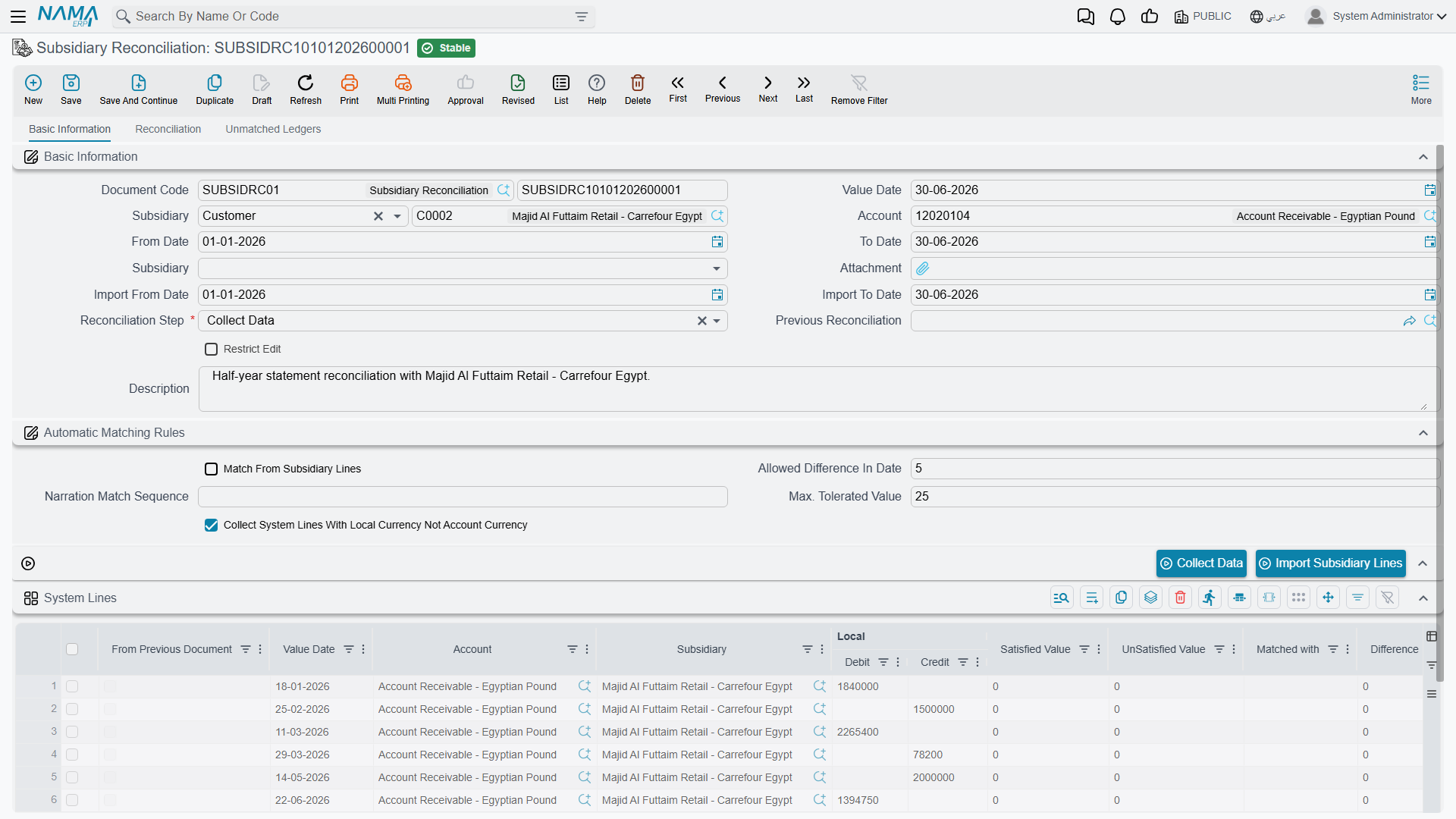
Each document links to the previous reconciliation for the same party, so it continues where the last one ended and locks the period behind it — a settled period isn't re-reconciled.
The buttons that drive the three steps
The toolbar is the same one bank reconciliation uses, and the same rule applies: a button that "does nothing" is almost always being pressed on the wrong step.
On the Collect Data step:
- Collect Data — step 1 in a button. With the account, the subsidiary and the import date range set, it pulls your books for that party into the system lines grid, continuing from the previous reconciliation for the same party.
- Import Subsidiary Lines — loads the party's own statement from a file. Attach the file and name the subsidiary first; miss either and the button tells you which. (Import Bank Lines sits beside it and behaves identically — it is the bank-reconciliation wording of the same import.)
- Update System lines of previous document — refreshes the system lines carried over from the previous reconciliation, so movements that changed since it was closed show their current figures. This step only.
On the Reconciliation step:
- Automatic Match — runs the matching engine over both grids, honouring the value tolerance, the date-difference tolerance and the narration match sequence, and working from whichever side match from subsidiary lines points at. This clears the bulk.
- Manual Match — the same engine restricted to the pairings you have set up, for what automatic matching could not resolve.
- Macth — applies what you typed into the unmatched grids: fill a row's matched with (or reverse of) column, press it, and those rows are matched and leave the unmatched lists. The label reads exactly like that on screen.
- Create Journal Entry — records a selected unmatched line as a journal entry carrying that line's account, subsidiary, value date and amount, ready for you to complete the other side and save. Note that the reconciliation still posts nothing itself — the entry does.
Any time:
- Calculate Totals — recomputes the system and subsidiary totals, both unmatched totals and the total difference from the grids as they stand. Press it after a round of matching to see where you are.
For Support
- "The reconciliation didn't change the party's balance" — correct; it doesn't post. Record any true difference with the appropriate document (note/voucher) afterwards.
- "Lines that clearly match aren't matching" — review the value tolerance, the date-difference tolerance, and the narration match sequence.
- "I can't edit an old reconciliation" — it's chained to a later document that locks it, preserving the reconciliation sequence; this is expected.
- "Which side is which?" — system lines are your books; subsidiary lines are the party's external statement.