
Credit & Debit Notes
Sometimes you need to adjust a customer's or supplier's balance without any cash receipt or payment: a settlement discount for a customer, a sales return, or an extra charge on a supplier. That's the role of the Credit Note and the Debit Note — two opposite documents that move the party's balance in opposite directions.
Required license
Credit and debit notes are part of the core accounting license.
The idea: adjusting a party's balance in two directions
- Credit Note (
Accounting > Documents > CreditNote) — makes the party's account credit: it reduces what a customer owes us (a return/discount in their favor), or increases what we owe a supplier. - Debit Note (
Accounting > Documents > DebitNote) — makes the party's account debit: it increases what a customer owes (a fee/extra cost), or reduces what we owe a supplier.
The two screens are identical in structure and differ only in the direction of the effect, so explaining one is enough.
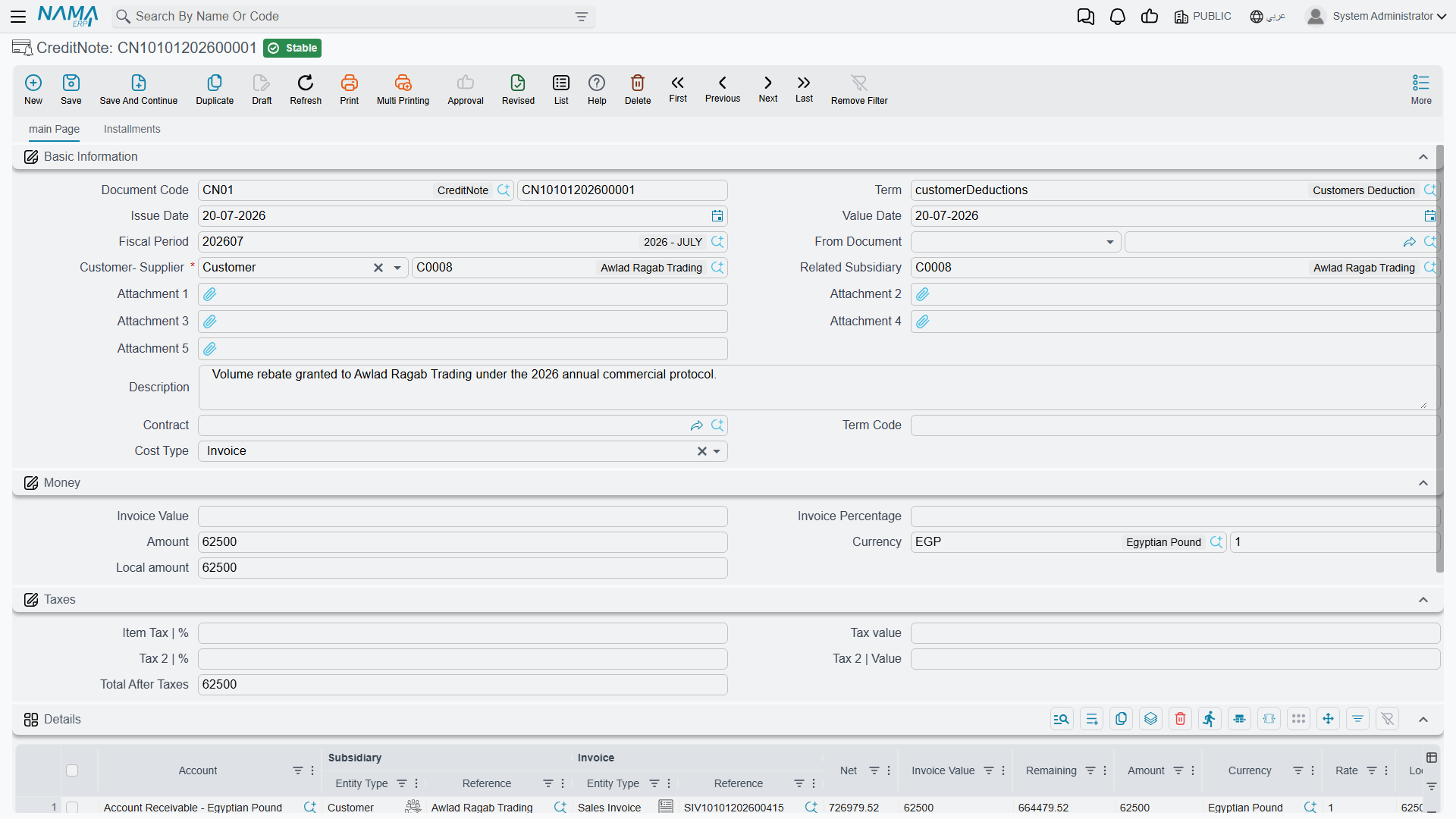
Anatomy of a note
In the header you set the Document Term and Value Date (which determines the Period), the Customer-Supplier (the party concerned), and the Related Subsidiary, Contract, and Cost Type as needed.
In the Amount block you enter the Amount and Currency (with the corresponding local value shown), and the value can be computed as a percentage of the linked invoice's amount.
The Taxes block carries the sales tax (percentage and value) and a second tax if needed, plus the net after tax. And because the note is an official tax document, it's integrated with the e-invoicing (ZATCA) system: it carries the Zakat and Tax Authority fields (submission identifiers and approval status) that track its submission to the authority.
In the Details tab you match the note's value against specific invoices (each line shows the invoice value, net, and remaining), so the note's effect is deducted directly from the invoice balance. The document also provides an installments grid and a Payments tab.
Settling the invoice the note is based on
A note issued based on an invoice can do more than move the party's balance: it can also count as a payment on that invoice and reduce what is still remaining on it, exactly as a receipt or payment voucher would. You switch that on in the note's document term, in the Invoice Payment Options group, with Add Credit/Debit Notes To Invoice Payment Documents.
The next question is which figure the invoice should be settled with. By default the system uses the note's Amount — the value before tax. That's the right answer when the tax on the note is handled separately, but not when the note is a full tax document in its own right: a customer who receives a credit note of 1,000 plus 150 sales tax expects 1,150 to come off the invoice, not 1,000.
For that case turn on Calculate Value Including Tax As Invoice Payment in the same group. The note then settles the invoice with its Total After Taxes instead of its Amount, so both the invoice's remaining balance and the debt-ages entry the note produces against it move by the full tax-inclusive value. The option applies to the invoice the note is based on in the header; invoices you match line by line in the Details tab keep the values entered on their own lines. Leave the option off and the behavior is unchanged.
Safe to enable on tax-free notes
If a note has no total after taxes (no tax was applied), the Amount is used anyway, so the option changes nothing for those notes. And if you later edit a saved note's amount or taxes, the invoice is re-settled with the corrected value — the old value is withdrawn and the new one applied — so there's no need to cancel and re-enter the note.
The accounting effect
The counter-side to the party's account — as well as the two tax sides — comes from the document term (see the Document terms reference). A credit note makes the party credit and the counter-side (revenue/return/discount) debit; a debit note reverses them.
Actions on this screen
Both notes carry the same three buttons — they are identical screens, so what is said of one holds for the other.
- Collect Vouchers — fills the Details tab with the party's outstanding invoices instead of you hunting for them. It asks for a from date, a to date and whether to ignore the amount in the header, then allocates the note's value across the documents it finds, oldest first. With "ignore amount in header" left off it stops once the note's amount is consumed; tick it to bring in everything in the range and match by hand.
- collect Installments By From Doc — when the note was raised based on another document, this pulls that document's instalment into the note's instalments grid for the note's amount, so the settlement lands on the right instalment rather than floating against the document as a whole.
- Invoices System Entry Related To Payment/Receipt Documents — opens the invoices this note was matched against. Use it when someone asks which invoice a credit note actually reduced.
Reports and forms
- Party movements resulting from the notes appear in the party's account statement under Account statements & trial balance.
- Printed forms: debit note
SYSF-ACC004, credit noteSYSF-ACC005.
For Support
- "The note didn't reduce/increase the invoice balance" — make sure it's matched to the invoice in the Details tab, not just entered as an amount in the header.
- "The invoice's remaining balance dropped by less than the note's total" — a note settles the invoice with its Amount (before tax) unless Calculate Value Including Tax As Invoice Payment is enabled in the term's Invoice Payment Options.
- "The direction is reversed" — make sure you're using the right type: credit to reduce a customer's receivable, debit to increase it.
- "The note wasn't submitted to the authority / its status is pending" — review the Zakat and Tax Authority fields and the approval status; e-invoicing integration is a topic separate from accounting.
- "The wrong revenue/return or tax account" — their source is the document term.
- Processing and reprocessing a stuck document are in How documents are processed into accounting effects.