
Document Terms (per-type processing rules)
One question recurs throughout this module's guides: "where do the debit and credit accounts for this document come from?" The answer is always the document term. This page explains the idea of a term and its shared vocabulary, so we don't have to repeat it on every page.
What is a term?
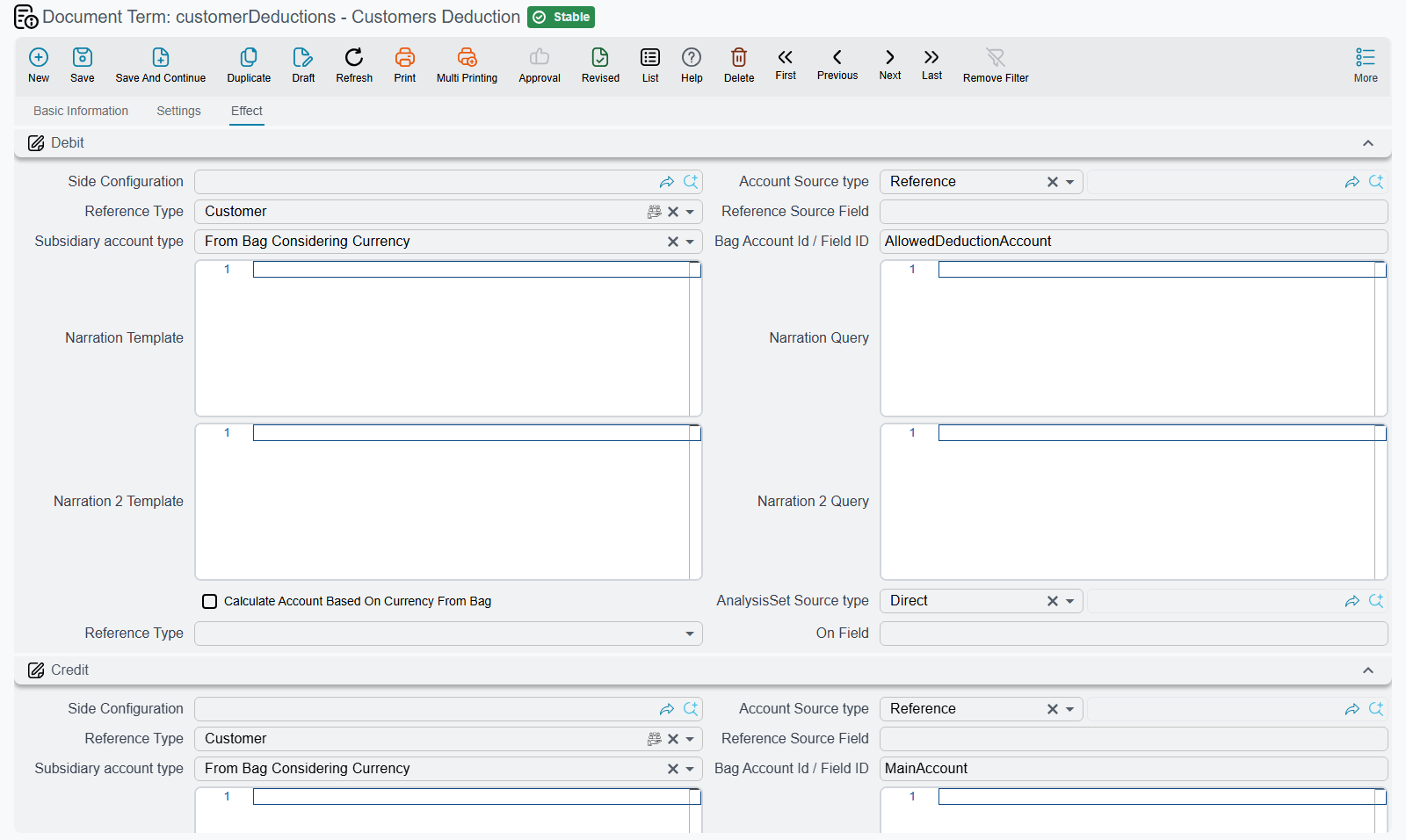
When you save any document that generates an accounting effect — a receipt voucher, a payment voucher, a loan issue, an LC opening… — the system doesn't pick the accounts out of thin air; it picks them from a term linked to the document type. The term is the recipe that says: "for this kind of document, make the debit side this account, the credit side that one, and handle tax like so." So by changing the term — rather than editing each document one by one — you govern the behavior of a whole class of documents.
The edit screen's tabs depend on the document type: most terms have an Effect tab holding the account sides, many have a Settings tab, and some have a tab per paper status or per amount. The top of the screen sets the term's basic data: the document type, the code, a System flag (for terms the system creates), an Inactive flag, a field filter and the printed template.
Where does each side come from?
Most terms hold one or more pairs of account sides — a debit and a credit for each amount the document records: the voucher amount, the fees, the tax, the cash cover of a letter of guarantee, and so on. A side is either a full account-side block, whose account source decides how the account is derived (a fixed account, the document's party with its subsidiary account type and account bag code, a field of the document…), or a single reference to a saved Accounting Side Config record.
Receipt and payment vouchers work differently. Their cash side comes from the account resource type: a fixed account (Specific), a Bank Account, a Safe Deposit, the Current User Subsidiary or an Employee; a payment method chosen on the voucher must belong to that safe or bank (see Payment Methods). The related subsidiary field on the other side names the kind of party on the lines, and you can constrain the user with prevent inserting values different from the term's so everyone sticks to the term's setup.
Conditional sources (based on "from doc")
When a document is created based on another (e.g. a voucher based on a request or order), the accounts needed may differ. So the term offers an Account and Subsidiary Source Settings grid that maps a from-doc type to a different account/subsidiary source, optionally applied conditionally when the from doc matches a criteria or a query, or by calculating the subsidiary from a field of the source document.
Taxes and dimension modifiability
- Taxes: the Taxes block sets the tax 1 and 2 debit/credit sides and whether each is a deduction, plus options to add the tax to the total debit/credit. (The tax fields appear on the document itself depending on the Accounting configuration options.)
- Details dimensions and modifiability: flags like cannot modify sector/branch/department/analysis set stop the user from changing the dimensions at the line level, so the term's values are enforced.
"Must / May / Cannot use"
Many term features (like invoice usage or commercial-paper usage) aren't set with just yes/no, but with three levels:
| Value | Meaning |
|---|---|
| Must Use | the feature is mandatory; the user must fill it in. |
| May Use | the feature is optional; available but not required. |
| Cannot Use | the feature is hidden/forbidden for this type. |
A term per document
Each document that creates a journal entry has its own term with its own sides — a receipt voucher's sides aren't a loan issue's sides. This quick map links each document to the page where its sides are described in detail:
| Document | Page |
|---|---|
| Receipt / payment voucher | Receipt & payment vouchers |
| Cashier voucher & shift close | Cashier shifts |
| Credit / debit note | Credit & debit notes |
| Bank transfer & bank reconciliation | Banks & bank accounts |
| Bank portfolio & financial papers | Cheques & financial papers |
| Loan issue & installment payment | Bank loans |
| LG issue | Letters of guarantee |
| LC opening | Letters of credit |
| Credit-facility issuance & payment | Credit facilities |
| Deposit issue & interest payment | Fixed deposits |
| Treasury-bill purchase & ROI proof | Treasury bills |
Option-by-option reference
Every option of every accounting term — with its field id, its label in both languages and what it actually does — is in Accounting Document Terms, grouped by document family: vouchers and requests, journals and closing, notes and miscellaneous invoices, commercial papers, letters of guarantee and credit, loans and deposits, and investments and prepaid expenses.
For Support
- "The document records its entry on the wrong account" — check the Debit/Credit sides in the document type's term, specifically the account resource type; the change in the term applies to all documents of that type.
- "A document created based on another takes a different account" — that's usually intended; inspect the Account and Subsidiary Source Settings grid in the term.
- "The tax field doesn't appear" — tax fields appear depending on the Accounting configuration, and their sides are set in the term's Taxes block.
- The processing mechanism itself is explained in How documents are processed into accounting effects.