
Accounting Configuration (module option catalog)
Many of the accounting module's behaviors aren't coded — they're configured from the accounting module's configuration screen (Accounting → Settings → Accounting Configurations). This page is a reference catalog of the most important of these options, grouped by purpose: what each option does, and which behavior it changes. It's designed to answer the recurring support question: "where do I set this behavior?"
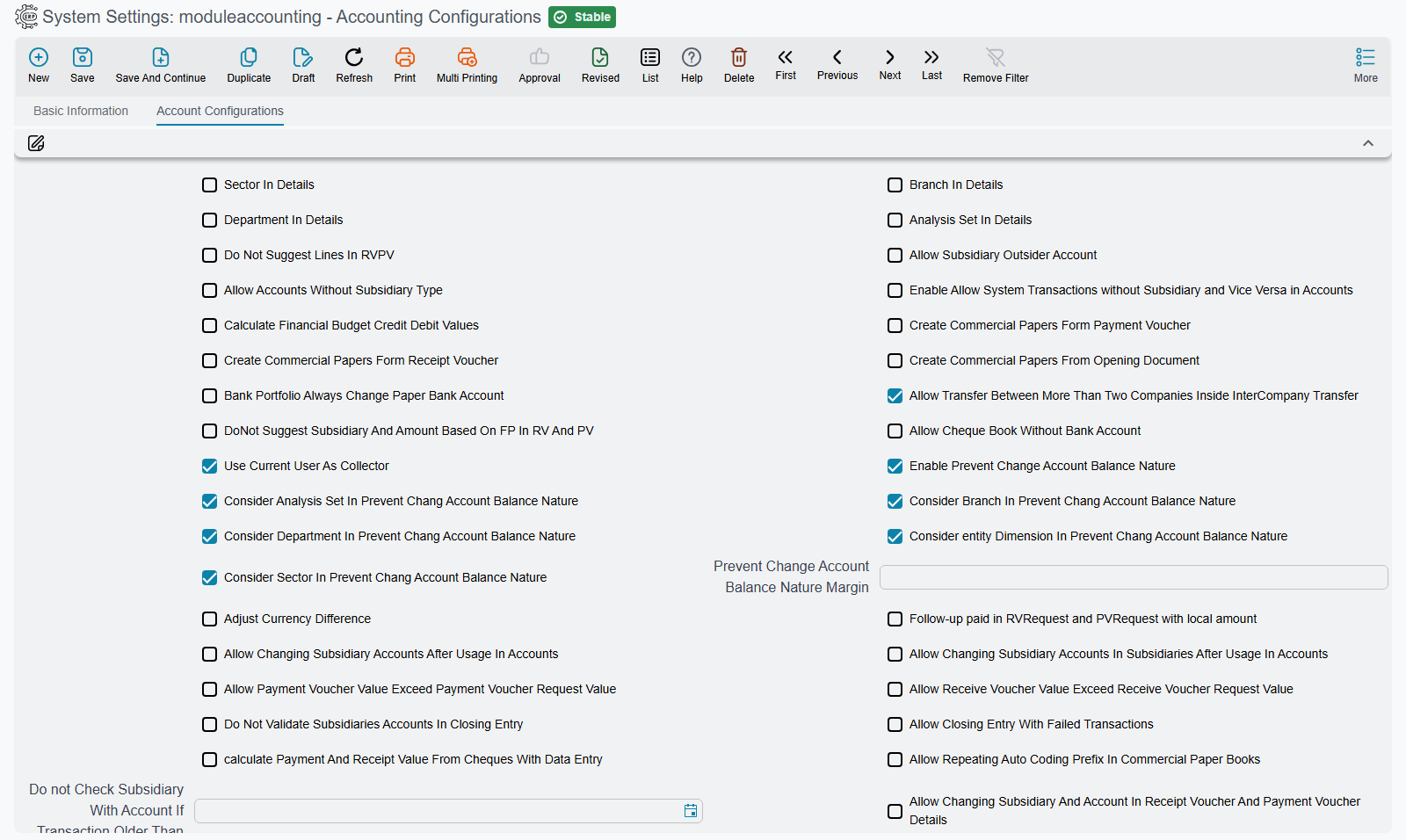
Dimensions in details
The five dimensions themselves — and the composite dimension — are covered in Dimensions and Composite Dimensions.
| Option | Effect |
|---|---|
| Show branch / department / analysis set / sector in details | Show each dimension at the document line level, not just the header. |
Receipt and payment vouchers
| Option | Effect |
|---|---|
| Do not suggest lines in receipt/payment voucher | Turn off the automatic suggestion of voucher lines. |
| Use current user as collector | Auto-fill the collector with the current user. |
| Allow multiple payment methods in receipt/payment vouchers | Enable multiple payment methods in the voucher. |
| Use local amount in receipt and payment | Adopt the local value in the voucher. |
| Allow changing subsidiary in receipt/payment details | Allow changing the subsidiary at the line level. |
| Allow voucher value to exceed request value (receipt/payment) | Permit the voucher to exceed its request's value. |
System accounts per document type
| Option | Effect |
|---|---|
| Allow using a system account in receipt / payment / bank transfer / journal entry | Permit manually picking a "system" account in each type individually. |
Each of these switches the check off for a whole document type — every user, every account, every date — so it is the bluntest of the three ways to open a system account. Prefer a dated exception record instead; both routes, and the account flags behind them, are on System Accounts & Transaction Exceptions.
Prevent change of account balance nature
| Option | Effect |
|---|---|
| Enable prevent changing account balance nature | Turn on the guard that blocks flipping an account's balance to its unnatural side. |
| Prevent balance-nature-change margin | A tolerance value at which the prevention is bypassed. |
| Consider department/sector/analysis set/entity dimension/branch in the prevention | Choose which dimensions are accounted for when applying the prevention. |
(This corresponds to the Prevent Change Account Balance Nature flag on the account itself.)
Subsidiaries
| Option | Effect |
|---|---|
| Allow accounts without a subsidiary type | Permit a subsidiary account with no party type set. |
| Enable allow transactions without subsidiary | Permit transactions on a subsidiary account with no party. |
| Allow changing subsidiary accounts after usage | Permit changing subsidiary-account mappings after movement begins. |
| Do not check subsidiary with account (until a date) | Disable the subsidiary-account consistency check before a date. |
| Do not validate subsidiaries in the closing entry | Skip the subsidiary check at closing. |
Financial papers and banks
| Option | Effect |
|---|---|
| Create financial papers from payment / receipt / opening document | Auto-generate financial papers from these documents. |
| Delete generated papers when deleting the owner document | Auto-clean dependent papers. |
| Allow the paper's due date to be empty | Don't mandate the due date. |
| Allow a notice on created papers | Allow a bank notice on a paper in "Created" status. |
| Allow a chequebook without a bank account | Don't mandate linking the book to a bank account. |
| Allow dealing with bills of exchange | Enable bills of exchange alongside cheques. |
| Aggregate paper lines with similar cheque numbers | Merge similar lines. |
Currency differences
| Option | Effect |
|---|---|
| Adjust currency difference | Enable automatic adjustment of currency differences. |
Closing
| Option | Effect |
|---|---|
| Allow making the closing entry even with unprocessed transactions | Bypass blocking the close when there are stuck business requests (see How documents are processed). |
Budgets
| Option | Effect |
|---|---|
| Enable approvals for budgets | Require approval when a budget is exceeded. |
| Enable prevent saving for budgets | Reject saving when a budget is exceeded. |
| Use from-date/to-date in validation and approval | Adopt the date range in budget checking. |
Tax and e-invoicing
| Option | Effect |
|---|---|
| Add tax fields to payment / receipt voucher | Show tax fields on the vouchers. |
| Add tax 1 / 2 fields to the journal entry | Show the tax sides in the manual entry. |
| Update tax-registration and commercial-registration numbers on save in misc purchase invoices | Auto-update tax data. |
Loans, deposits, and facilities
| Option | Effect |
|---|---|
| Days per year for credit-facility interest calculation | The interest-calculation basis (default 365). |
| Do not collect deposit interest payment lines after the deposit's end date | Tune deposit-interest calculation. |
| Do not validate loans and deposits before a date | Skip validation before a given date. |
Coding and others
| Option | Effect |
|---|---|
| Merge accounts and charts auto-coding | Unify the auto-coding logic. |
| Allow repeating the auto-coding prefix in the paper book | Permit prefix repetition. |
| Create System Transaction for Empty Lines | When a document's term writes no lines (every account side empty), still write an entry with no lines. Off, such a document is processed with no entry at all. |
| Allow transfers between more than two companies in inter-company transfer | Extend inter-company transfer beyond two parties. |
For Support
- For any "where do I enable/disable this behavior?" question, start from this screen before assuming it's a code issue.
- Account and subsidiary options intersect with the account setup itself; review both together.
- Period and closing options are complemented by the Year-end & period control page.