
CRM Risk Register
Licence
The three screens on this page are gated on the crm licence code.
Open the CRM menu, scroll past Support and Marketing, and you will find a folder called Management And Organization Documents (الإدارة والتنظيم) holding three documents: SMF Problem Declaration Document, SMF Solution Suggestion Document and SMF Initial Operation Document.
Almost everyone meets them by accident, assumes they belong to customer support, and starts looking for the button that links one to a trouble ticket. There is no such button. These three screens are an internal risk register — a quality-improvement notebook for the company's own processes. They do not know that customers exist.
What the register is for
The model is the familiar failure-mode-and-effects one. Somebody notices that something inside the company keeps going wrong — the maintenance store runs out of the same filter every quarter, say, or installation crews keep arriving on site without the customer's access permit. You write that down as a problem, score it on three factors, and multiply the three into one number you can sort a list by. Then you write one or more solution suggestions, each with its cost and with the score the problem would carry after the fix, and you record which step you took next.
That is the whole product. Nothing is generated, nothing is approved, nothing is escalated.
The three factors and the priority number
Every score on both scoring documents is built from the same three boxes:
| Arabic label | English label | What it records |
|---|---|---|
| درجة الخطورة | Risk Degree | How much damage the problem does when it happens |
| احتمال الحدوث | Probability Of Risk Occurrence | How often it happens |
| القدرة على الاكتشاف | Ability To Discover Risk | How likely you are to catch it before it hurts |
| رقم أولوية الخطر | Risk Priority Number | The three multiplied together |
They are plain numeric boxes. The system imposes no 1-to-10 scale and no upper limit, so agree a scale in-house and write it into your own procedure — otherwise one department's 8 and another department's 80 end up in the same sorted list.
Score a recurring stock-out at severity 8, probability 5 and detectability 3 and the priority number comes out at 120. Fix the reorder point so that the same stock-out becomes rare and easy to spot, and the after-solution score you record on the suggestion might be 8 × 2 × 2 = 32.
The Problem Declaration
This is where a problem is opened. Besides the usual book, code and dates, the Basic Information group asks for Problem Place (مكان حدوث المشكلة), the Employee Responsible For Following The Problem (المسؤول عن متابعة المشكلة), the Problem Discovery Date and the Employee Discovered The Problem, a from/to Problem Following Period window, the problem description, Problem Measurement (كيفية قياس المشكلة — how you will tell whether it is getting better), an estimated Problem Cost On Company, and then the three factors and the priority number. Ten attachment slots hold the photographs, reports and mail threads behind the case.
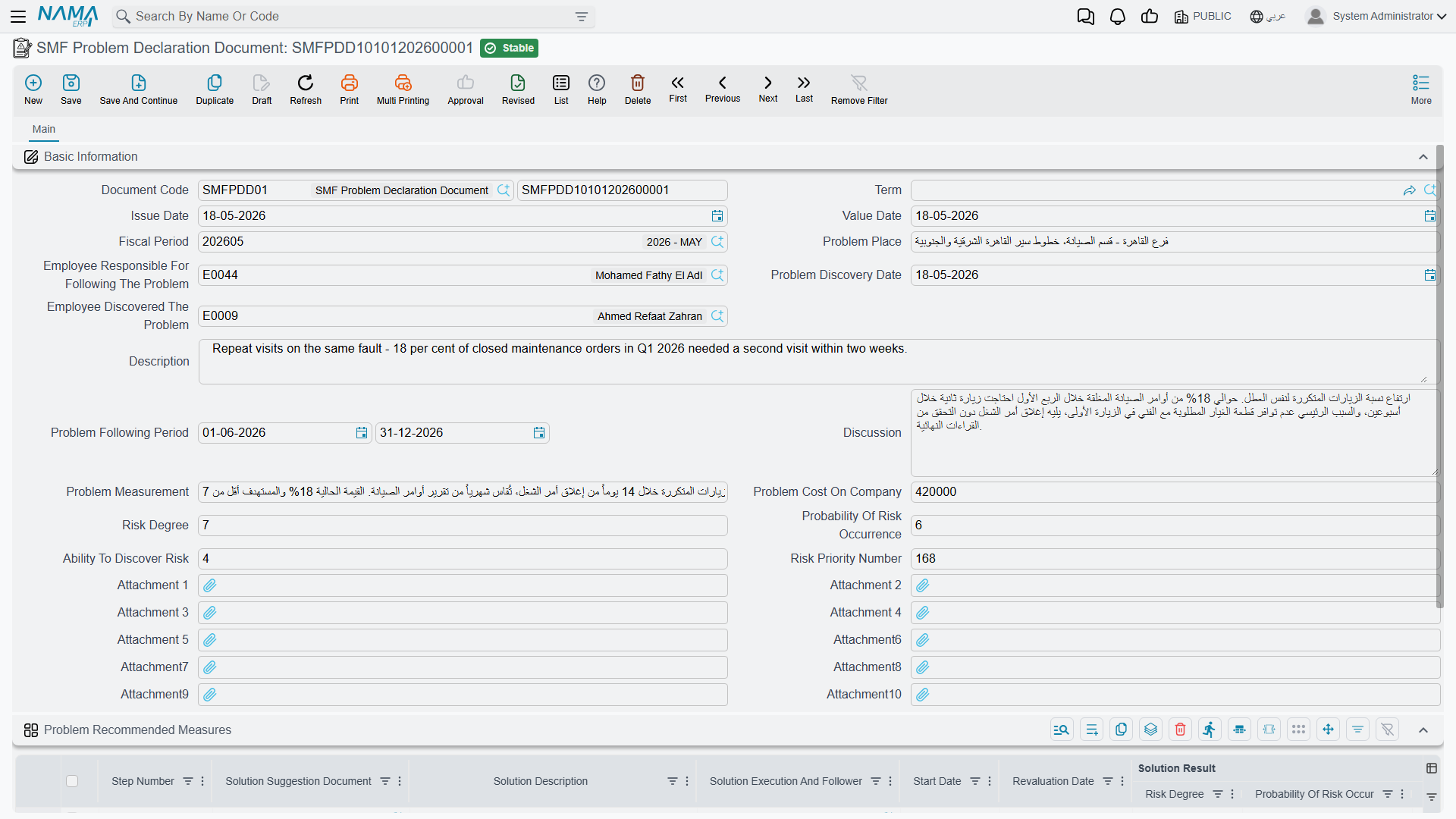
Below it sits the grid Problem Recommended Measures (الإجراءات الموصى بها لحل المشكلة) — one row per countermeasure. Each row carries a step number, a Solution Suggestion Document reference, a solution description, the person executing and following the solution, a start date and a Revaluation Date (تاريخ إعادة التقييم), its own copy of the three factors and its own priority number, a Solution Satisfaction Degree, a Next Step, a description, and the Problem Cost After Solution.
Pick a Solution Suggestion Document in a row and its solution description is copied into that row's Solution Description for you. That is the one automatic convenience in the whole area.
Next Step offers Problem Solved Temporarily (تم حل المشكلة مؤقتًا), Move To Another Solution (الانتقال إلى حل آخر), Expert Help (الاستعانة بخبير), Approve Solution As Best Practice (اعتماد الحل كـ BP) and Other (أخري).
The priority number is calculated in one place only
On the Problem Declaration the Risk Priority Number fills itself from the three factors, both in the header and in each countermeasure row. On the Solution Suggestion the identically-named field is typed by hand and is never checked against the three after-solution factors sitting right above it. Whoever fills in that screen has to do the multiplication themselves.
The Solution Suggestion
A proposal for fixing a declared problem. It carries From Document (بناءا على), a Solution Elements Description, the Solution Cost, the Problem Cost After Solution, the three after-solution factors, the hand-typed priority number, ten attachments, and a one-column grid Solution Proposers (أسماء مقترحي الحل) listing the employees behind the idea.
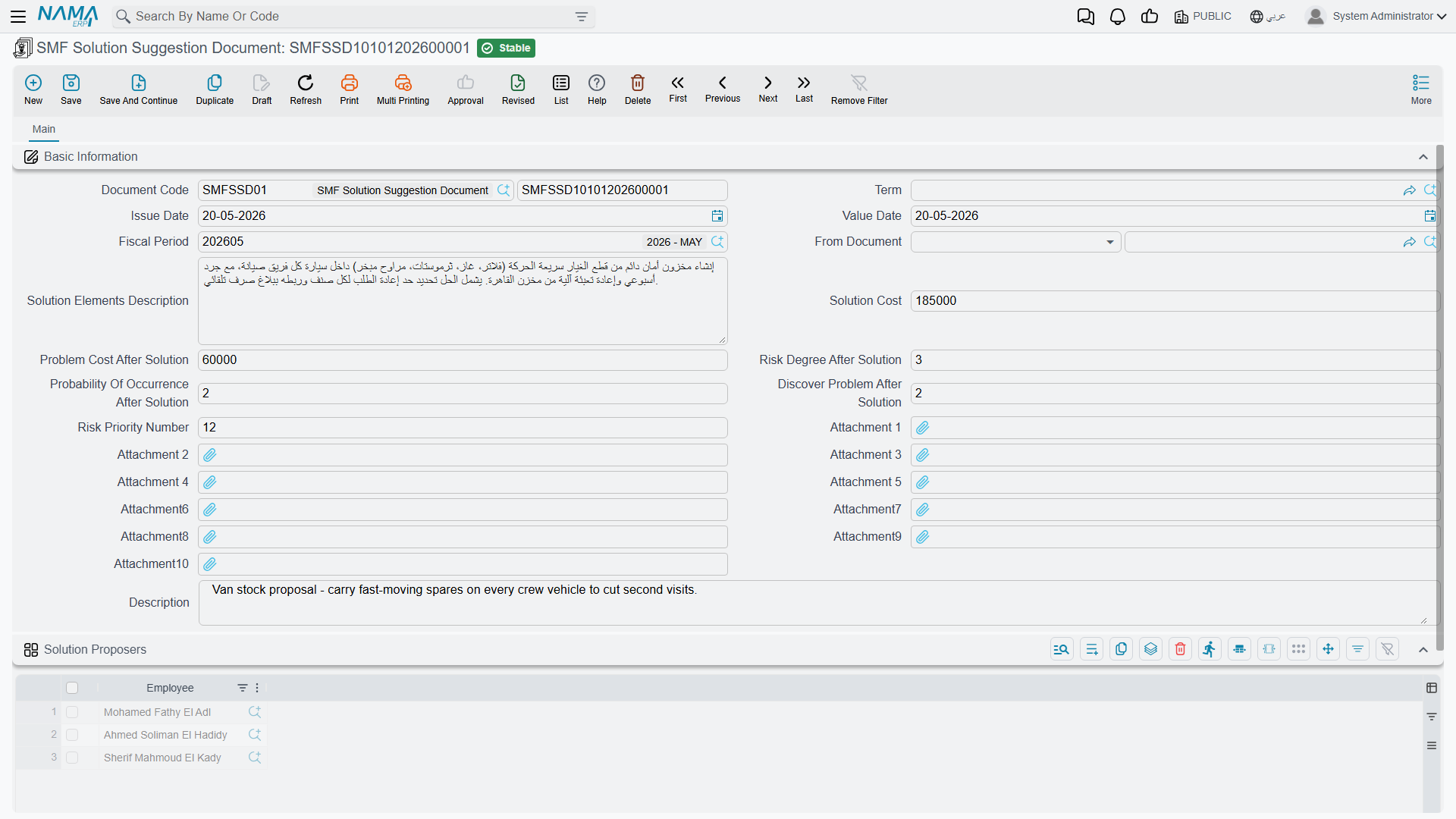
From Document accepts a Problem Declaration or another Solution Suggestion, and nothing else. Point it at another suggestion and that document's Solution Proposers are copied into your grid — and from then on you cannot remove any of the copied employees: saving without one of them is refused with a message naming the employee and the source document. You may add proposers freely; removing an inherited one means clearing From Document first.
So the two documents do reference each other, in both directions: a Problem Declaration reaches forward to its suggestions through the countermeasure rows, and a Solution Suggestion reaches back to its problem through From Document.
Initial Operation — a survey that stands on its own
The third document is not a risk score at all. It is a questionnaire for describing how a process runs today, before anybody tries to improve it: Operation Name, the responsible Employee, Operation Execution Seniority, a description, the Important Operation Tasks, how often the process repeats and how long it takes, where it is carried out, how important it is, how many employees are involved and what their jobs are, the Operation Output, the Operation Average Of Success, the Important Changes On Operation you would like to make, and finally Perfect Operation Suggestion (اقتراح لتكون من العمليات المثلى), answered with Yes, No or Yes After Editing (نعم بعد التعديل). Ten attachments again.
Initial Operation is connected to nothing at all
Nothing creates it, nothing reads it, and it does not link to the other two documents in this folder. It cannot be selected in a Problem Declaration's countermeasure row or in a Solution Suggestion's From Document, and neither of those points back at it. Treat it as a standalone form you fill in and file — not as step one of a three-step cycle.
What the register does not touch
This is worth being blunt about, because the menu placement invites the opposite assumption:
- No customer, no ticket, no complaint. None of the three documents has a customer field, and no trouble ticket, complaint, service contract or FAQ can be linked to them in either direction.
- No machine, no maintenance. Nothing in either maintenance suite refers to them, and they refer to nothing in it.
- No money, no stock. The cost figures are typed for your own record-keeping. Nothing reaches the ledger or the warehouse, and saving one of these documents creates no business request.
- No report, no dashboard. As everywhere in CRM, there is no system report here. Read the register from the list views, sort by the priority number, and use Excel export or BI if you need more than that.
- No reminder. The Revaluation Date on a countermeasure row is a note to yourself. There is no scheduler, alarm or notification anywhere in CRM, so nothing will tell you when it arrives.
One last small thing: all three screens display a Term (توجيه المستند) picker although none of them uses one, and there is no configuration behind it. Leave it empty — see How CRM Document Terms Work.