
Delivering and Transferring Custody
A custody item that nobody is holding is just stock. The point of the register is the moment it leaves the store and becomes somebody's responsibility — and the two documents on this page are the two ways that happens: delivery (تسليم عهدة) puts an item into an employee's hands for the first time, and transfer (نقل عهدة) moves it from whoever holds it now to somebody else.
Both live under Assets > Custodys, both need a book and a document term, and both need the fixedassets-custody licence.
The holder is always an employee
Everywhere in the custody family — the header of a delivery, every grid line, the From and To sides of a transfer, the holding history on the record — the person is picked from the HR employee file. Not a supplier, not a third party, not a free-text name. If somebody is to hold company property, they need an employee record, and that is what makes an employee's holdings listable and a stocktake by custodian possible.
Delivery: the first hand-over
Al-Waha Industries has bought the laptop CDY-0033; it is in status Purchased with a price of 6,000 on it. The delivery document is what puts it in Khaled Al-Mutairi's hands.
The screen has two pages, and you use one or the other — they are the same document seen from two directions, and filling in one side disables the other.
Page 1 — one item, one or more employees
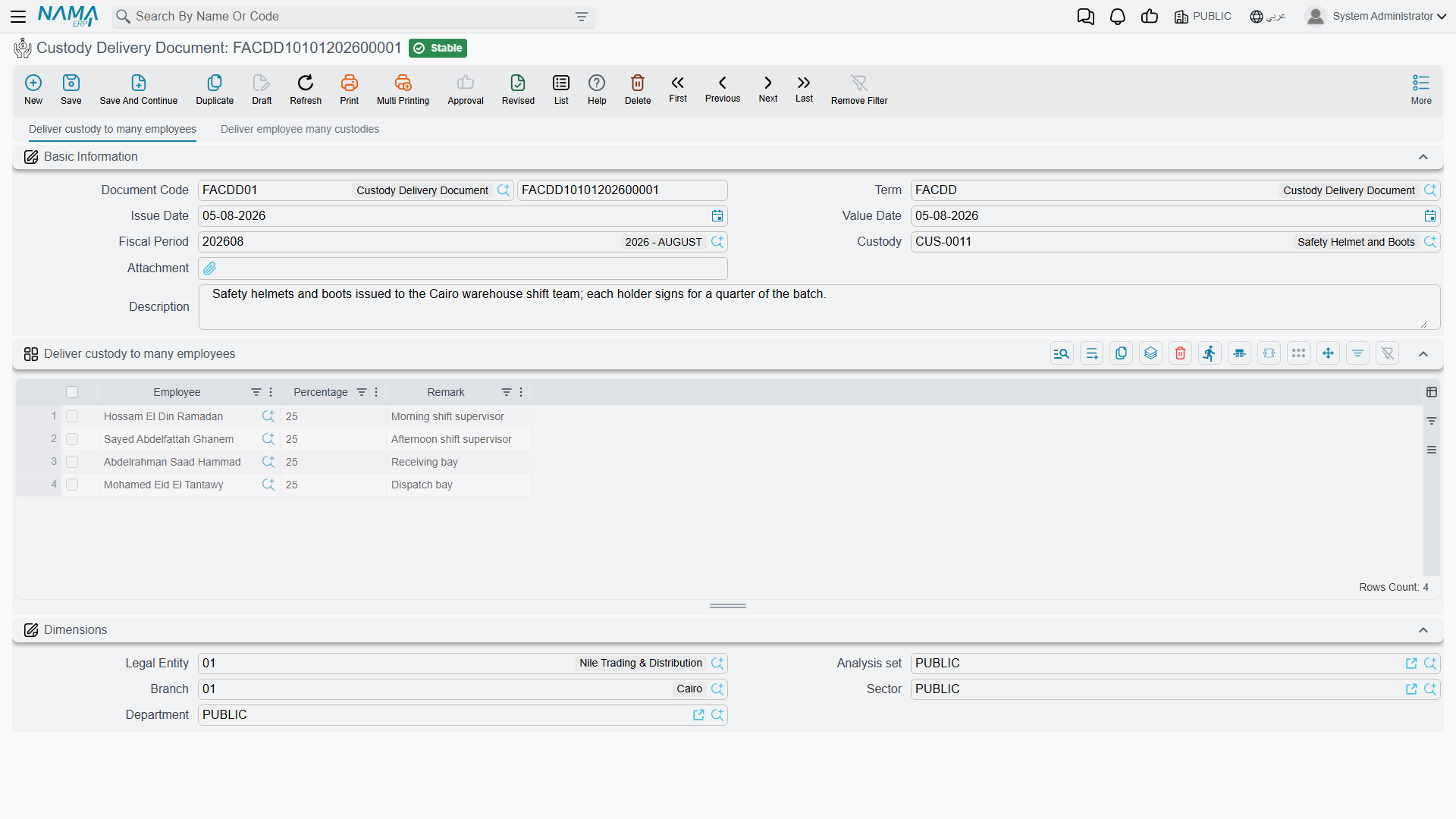
The header carries the document code and book, the term, issue date, value date, fiscal period, an attachment and remarks — plus the Custody (عهدة) field naming the single item being handed over. The grid underneath names the people:
| Column | Arabic | Notes |
|---|---|---|
| Employee | الموظف | Who is taking it |
| Percentage | نسبة | Their share of the item |
| Remark | ملحوظة | Free note, carried onto the holding line |
For the laptop that is one line:
| Employee | Percentage | Remark |
|---|---|---|
| Khaled Al-Mutairi | 100 | Primary work machine |
The shares must add up to exactly 100. That is not a formality — it is the rule that makes the register meaningful, because the item's value is split between the holders in those proportions. Al-Waha's workshop toolkit CDY-0050, worth 3,000, is issued to two technicians at 50 % each; both are answerable for it, and the accounting puts 1,500 against each name.
The Custody picker only offers items in status Purchased — an item that has not been bought yet has no value to hand over. The exception is an item marked Priceless (عينية بدون سعر): those are offered whatever their status, so a safety kit or an access badge can go straight out without a purchase document ever existing for it.
Page 2 — one employee, several items
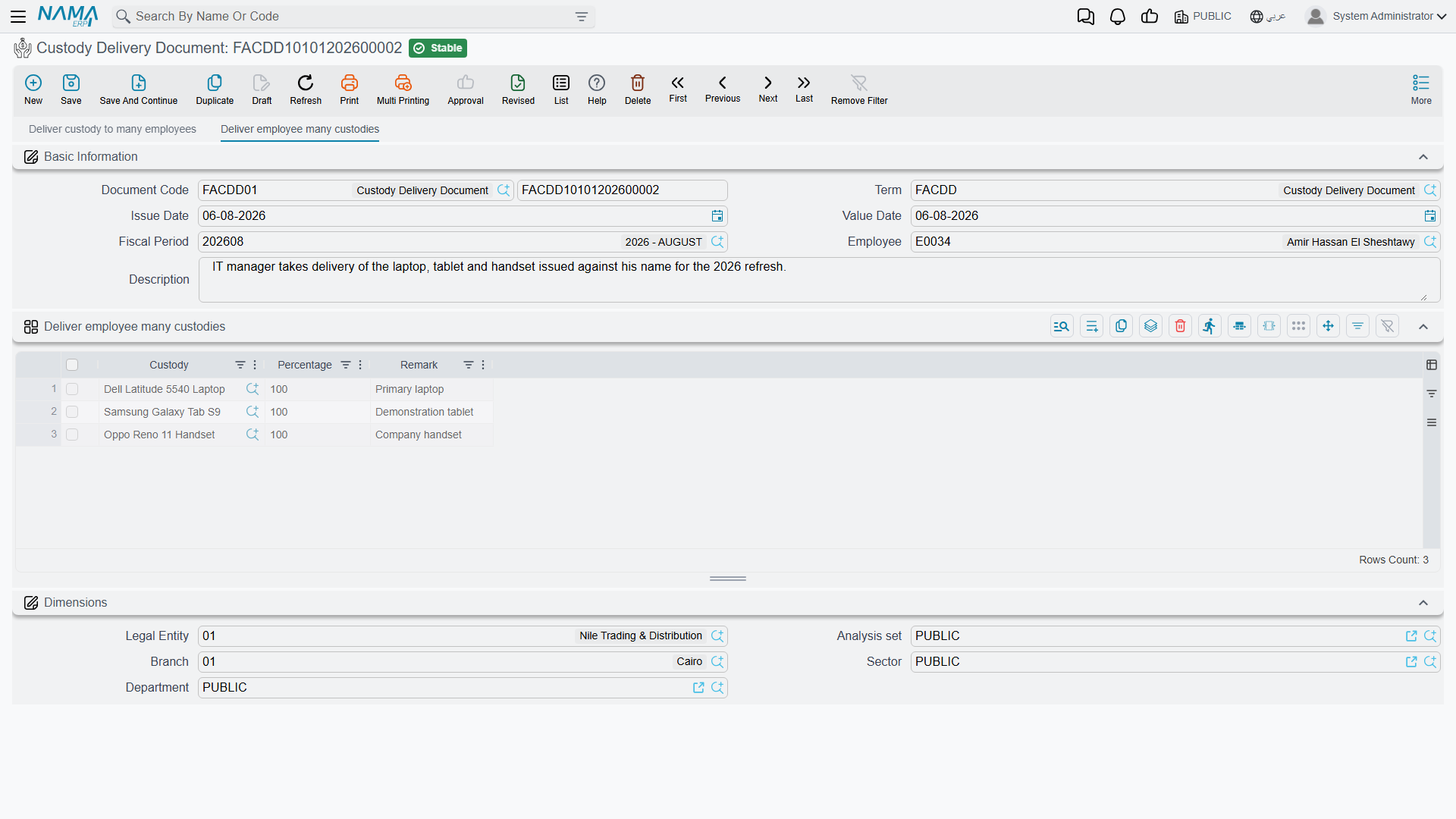
The second page is the joining kit. The header names an Employee (الموظف) instead of a custody, and the grid lists the items:
| Column | Arabic | Notes |
|---|---|---|
| Custody | عهدة | The item |
| Percentage | نسبة | The share this person takes of it — normally 100, since they take the whole item |
| Remark | ملحوظة | Free note |
When Nouf Al-Harbi joins in September 2027, one document hands over the mobile phone CDY-0034 (1,800) and the safety kit CDY-0035 (priceless), each at 100 %. No item may appear twice on the same document — one line per item.
Which page you are working on is decided by which field you fill first: name a custody and the employee field and its grid switch off; name an employee and the custody field and its grid switch off. There is no way to mix the two on one document, and no reason to want to — raise two documents.
What committing a delivery does
Three things, whichever page you used:
- The item's status moves to Delivered, and stays there through any number of later transfers.
- A holding line opens on the custody record for each employee — their name, their share, the value date as its From Date, an empty To Date, and this document as the line's creator. If an earlier line was still open, it is closed off on the same date.
- The accounting entry is created, as a business request processed in the background.
That entry is the interesting part, and it is worth being precise about what it does not do: it does not expense the item. It moves the value onto the person. Each line produces one debit and one credit for that line's share of the item's price:
line value = custody price × percentage ÷ 100
For Khaled's laptop, 6,000 × 100 ÷ 100 = 6,000:
| Debit | Credit | |
|---|---|---|
| Custodies with employees — Khaled Al-Mutairi | 6,000 | |
| Custodies in store | 6,000 |
The debit side is normally set up with an account source of type Employee, so each person's holdings collect on their own subsidiary account and "what is Khaled carrying?" becomes a balance you can read. For the toolkit at 50/50 the same term produces two lines of 1,500 each, against two different employee accounts. A priceless item has no price, so its entry carries no value — the document still records the hand-over, it simply has no money to move.
Undoing a delivery
Cancel or delete it and — provided nothing has touched the item since — the status drops back to Purchased, the holding lines it created are cleared, and the accounting entry is cancelled. If a transfer has happened in the meantime, the delivery cannot be deleted at all: the message tells you a later movement exists on the item. Undo that transfer first, then come back to the delivery.
Transfer: moving it to somebody else
Khaled Al-Mutairi moves to another site in September 2027 and the laptop goes to Nouf Al-Harbi. That is a transfer: one custody item per document, from its current holders to its new ones.
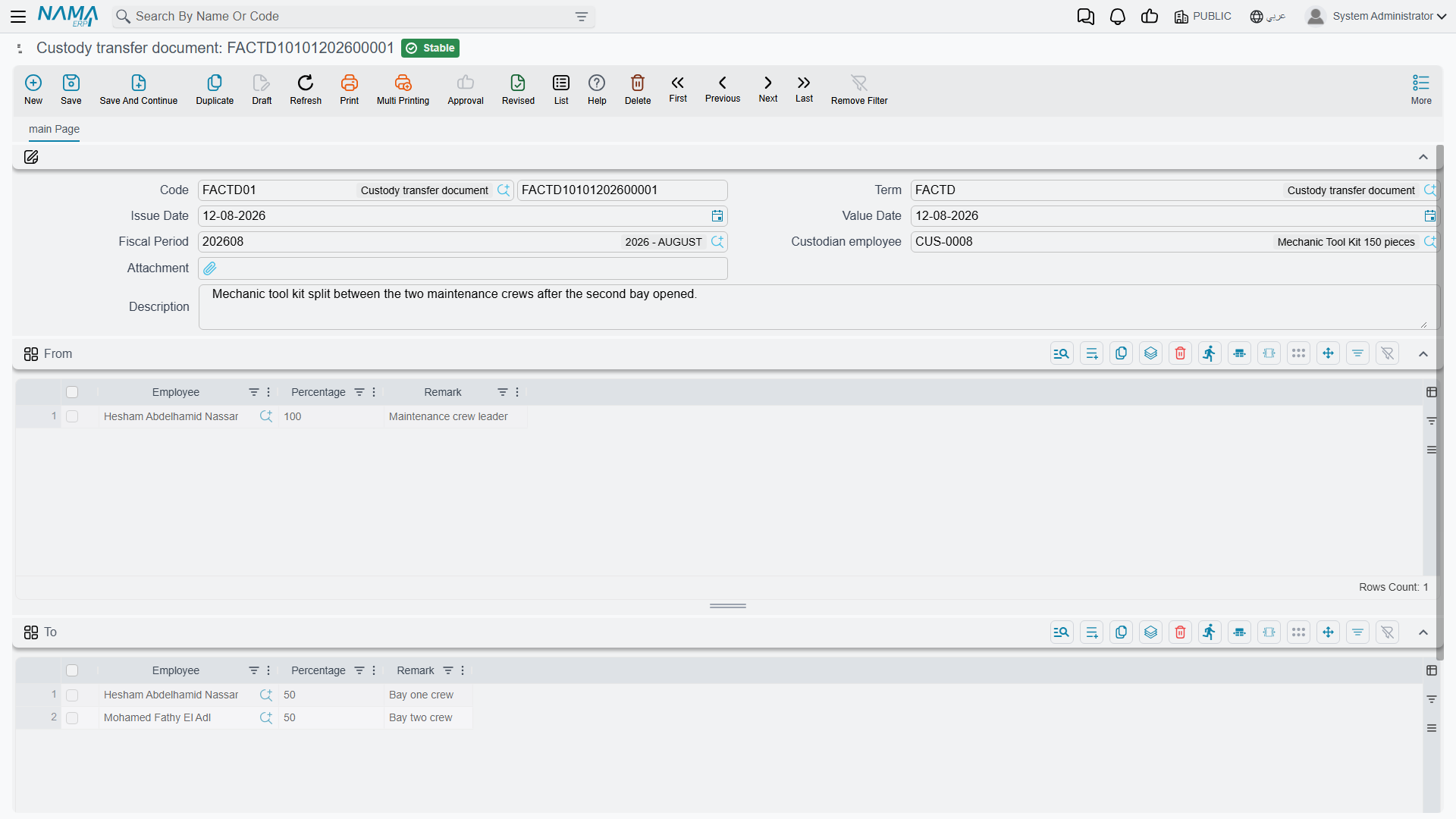
The header is the familiar set — book and code, term, issue date, value date, fiscal period, attachment, remarks — plus the field that names the item being moved. Its picker offers only items in status Delivered, which is exactly right: you cannot move on something nobody is holding.
Then two grids, each with employee, percentage and remark:
- From (من) fills itself. The moment you pick the item, its current holding lines are copied in — for the laptop, Khaled Al-Mutairi at 100 %. You are not meant to edit this side; it is the system showing you what it is about to take away.
- To (إلي) is yours to fill, and the shares here must add up to exactly 100 again.
| From | To | |||
|---|---|---|---|---|
| Khaled Al-Mutairi | 100 % | → | Nouf Al-Harbi | 100 % |
A transfer is also how you re-divide an item. The workshop toolkit held 50/50 by two technicians can be transferred to three at 40/30/30, and the shares simply have to total 100 on the To side.
What committing a transfer does
The status does not change — the item was out with somebody and it still is, so it stays Delivered. What changes is who: the item's holding lines are cleared and rebuilt from the To grid, dated the document's value date.
The accounting entry has two halves, and the term carries two pairs of accounts for exactly this reason — one pair for the outgoing holders and one for the incoming ones. Each From line reverses that holder's share off them; each To line charges the new holder's share:
| Debit | Credit | |
|---|---|---|
| Custodies with employees — Nouf Al-Harbi | 6,000 | |
| Custodies with employees — Khaled Al-Mutairi | 6,000 |
Khaled's balance is clean again; Nouf now carries the laptop. Had the laptop gone to two people at 50 % each, the To half would have produced two lines of 3,000 instead of one of 6,000, and the From half would still have been a single 6,000 off Khaled.
Undoing a transfer
Cancelling or deleting a transfer does something slightly cleverer than the delivery: it looks back for the document that held the item before this one — the previous transfer, or failing that the delivery — and rebuilds the holding lines from that document. The laptop goes back to Khaled at 100 %, and the accounting entry is cancelled. If nothing came before it at all, the item is simply left with no holding lines.
As always, the newest document has to be undone first. If the item has been transferred again since, or disposed of, deal with that document before coming back to this one.
Actions on these screens
Neither the delivery document nor the transfer document carries a button of its own. Both are filled in and saved, and everything they do — writing the holding lines, stamping the custodian, raising the accounting entry — happens on commit and is undone by cancelling or deleting the document. The delivery screen's one piece of behaviour worth knowing is not a button either: the two pages lock each other out. Fill in the Custody field on page 1 and the employee and lines of page 2 grey out; fill in the Employee on page 2 and the custody and details of page 1 grey out. Clear the field you filled first and the other side comes back.