
Buying Custody Items
Al-Waha Industries buys a laptop for 6,000 from Riyadh IT Supplies. The obvious accounting treatment — charge 6,000 to office expenses and move on — is exactly what the custody register is designed to avoid, and understanding why explains the shape of this document.
Why the 6,000 does not simply become an expense
If the laptop is expensed on the day it is bought, the ledger forgets about it immediately. Six months later, when the engineer holding it leaves the company, there is no figure anywhere that says what the company is owed if the laptop does not come back, and no balance to reconcile a stocktake against.
So the custody purchase document does what a purchase document does for any asset: it puts the value somewhere it can be seen. The 6,000 lands in an account that means custody items we own but have not issued yet — a stock of issuable items. It sits there until the delivery document hands the laptop to a named person, at which point the same 6,000 moves out of that account and onto that person's own subsidiary account. From then on the ledger can answer "how much are our employees holding, and who is holding it" by reading account balances, and the answer will agree with the register. The value is only released — written off, sold, or charged to a loss — when the item is disposed of.
That is the whole design: the value follows the item, and the item follows a person.
The custody record comes first
The document buys an item that already exists in the register. So the order is: create the custody record (it saves in status Initial with no price), then raise the purchase document and point a line at it. There is no option here that creates the record for you — this is one of the ways the custody family differs from the fixed asset purchase document, which can create the asset it capitalises.
Assets > Custodys > Custody purchase document (الأصول > عهد > شراء عهدة), licence fixedassets-custody. Like every document in the module it needs a book and a document term.
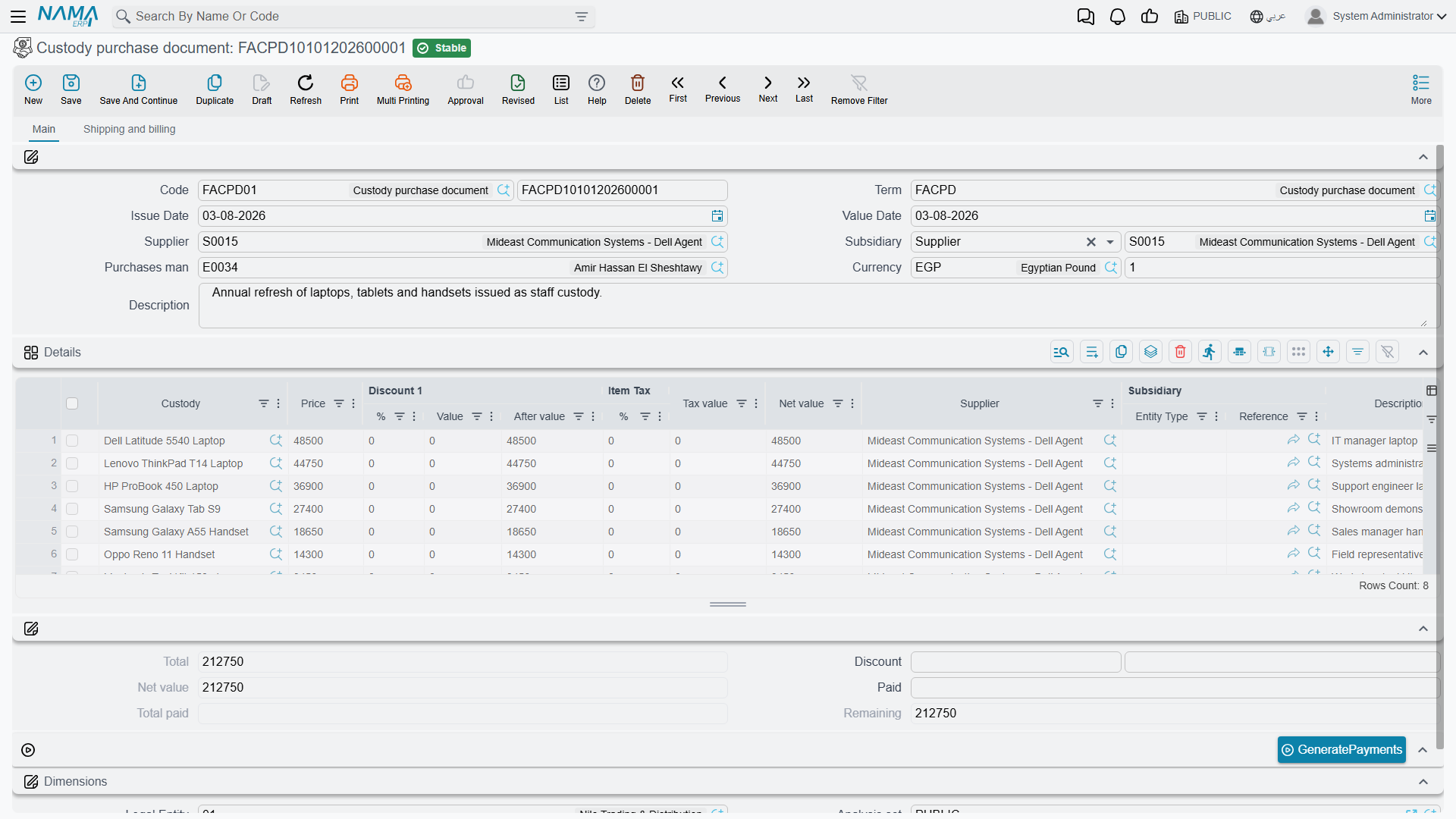
The screen is a full purchase invoice
This is not a stripped-down internal form. The custody purchase document is a proper invoice and carries the whole invoice machinery: supplier, currency and rate, line discounts, tax, a header discount, cash paid and remaining, external payment vouchers, and an instalment schedule with a GeneratePayments action. If you know the supply-chain purchase invoice, you already know this screen.
The header (page Main) asks for the book and code, the term, issue date and value date, the Supplier (مورد) and the Subsidiary (الذمة) that the entry will be booked against, the purchases man (مندوب المشتريات), the currency and its rate, and remarks.
The Details grid is where the custody items go:
| Column | Arabic | Notes |
|---|---|---|
| Custody | عهدة | The record being bought — CDY-0033 |
| Price | السعر | What the supplier is charging for it |
| Discount 1 — % / Value / After value | خصم 1 — % / قيمة / صافي | Line discount |
| Item Tax — % / Tax value | ضريبة مبيعات — % / القيمة | Tax on the line, driven by the item's tax plan |
| Net value | الصافي | The important one — what the line is finally worth |
| Supplier, Subsidiary, Remarks | مورد، الذمة، ملاحظات | Line-level overrides of the header |
Under the grid, the totals: total, header discount, net value, paid in cash, total paid and remaining. The second page (Shipping and billing) holds the shipping and billing addresses, the grid of payment vouchers already raised against this invoice, the payment template, and the instalment schedule — code, description, percentage, amount, due date, what has been paid and what remains.
What committing it does
Al-Waha's document CPD-2026-014, value date 1 February 2026, supplier Riyadh IT Supplies, one line: custody CDY-0033 at 6,000, no discount, no tax — net value 6,000.
Committing it does three things.
- It stamps the price. The line's Net value is written onto the custody record as its Price. Note net value, not the price you typed: if the line had carried a 5 % discount and 15 % tax, the figure landing on the register would be the one in the Net value column, not the 6,000. This is the number every later custody entry works from, so it is worth a glance before you commit.
- It stamps the purchase date from the document's value date — 1 February 2026 — and moves the item from Initial to Purchased. That status change is what makes the item visible to the delivery document's picker.
- It creates the accounting entry, as a business request processed in the background. The entry is an ordinary purchase invoice entry: the debit side named on the term (in Al-Waha's setup, the custodies-in-store account) takes the value, the supplier is credited, and the tax, discount and cash sides behave exactly as they do on any invoice.
For CPD-2026-014 that is simply:
| Debit | Credit | |
|---|---|---|
| Custodies in store | 6,000 | |
| Riyadh IT Supplies | 6,000 |
If the request fails — a closed period, a missing account — the document is still saved. Find it in the Business Requests list view, filter for failed rows, select them and use More → Reprocess.
One document, many items
There is no reason to raise a document per item. A single custody purchase can carry every laptop, phone and toolkit on one supplier invoice, one line per custody record, and each line stamps its own line's net value onto its own record. Al-Waha buys ten laptops on one invoice as ten lines pointing at ten custody records.
Paying for it
Because this is a real invoice, the money side works the way it does everywhere else: enter what was paid in cash on the document, or leave the whole amount as remaining and settle it later with payment vouchers, or build an instalment schedule with GeneratePayments (إنشاء الدفعات) and settle the instalments as they fall due. Vouchers already raised against the invoice appear in the payment documents grid on the second page, and the Remaining figure moves as they are recorded.
Correcting one
Cancelling or deleting a custody purchase reverses its accounting entry and clears the price the document stamped on the item. If several items were on the document and you remove one line and re-commit, that item's price is cleared too while the others keep theirs.
Because each custody remembers the last document that touched it, the usual ordering rule applies: if the item has since been delivered or transferred, cancel or delete those documents first and work backwards. See Custody — Items Handed to Staff for the full ordering rule.