
Terms for Acquiring Assets
Everything in this group answers one question: when an asset arrives, who gets credited? The asset side of the entry is never in doubt — it is the asset's own cost account, taken from its accounts bag. What the term supplies is the other half: the supplier who is owed, the tax authority, the discounts, the suspense account that carries an opening balance.
If you have not read how terms work, start there — in particular the section on the asset as the account source, because it explains why these screens have fewer account boxes than you expect.
The Fixed Asset Purchase Term
This is the term that does real work. Al-Waha Industries buys MCH-0007 from Gulf Machinery Trading for 240,000 plus 15% VAT, and the term decides everything about the resulting entry except the asset account itself.
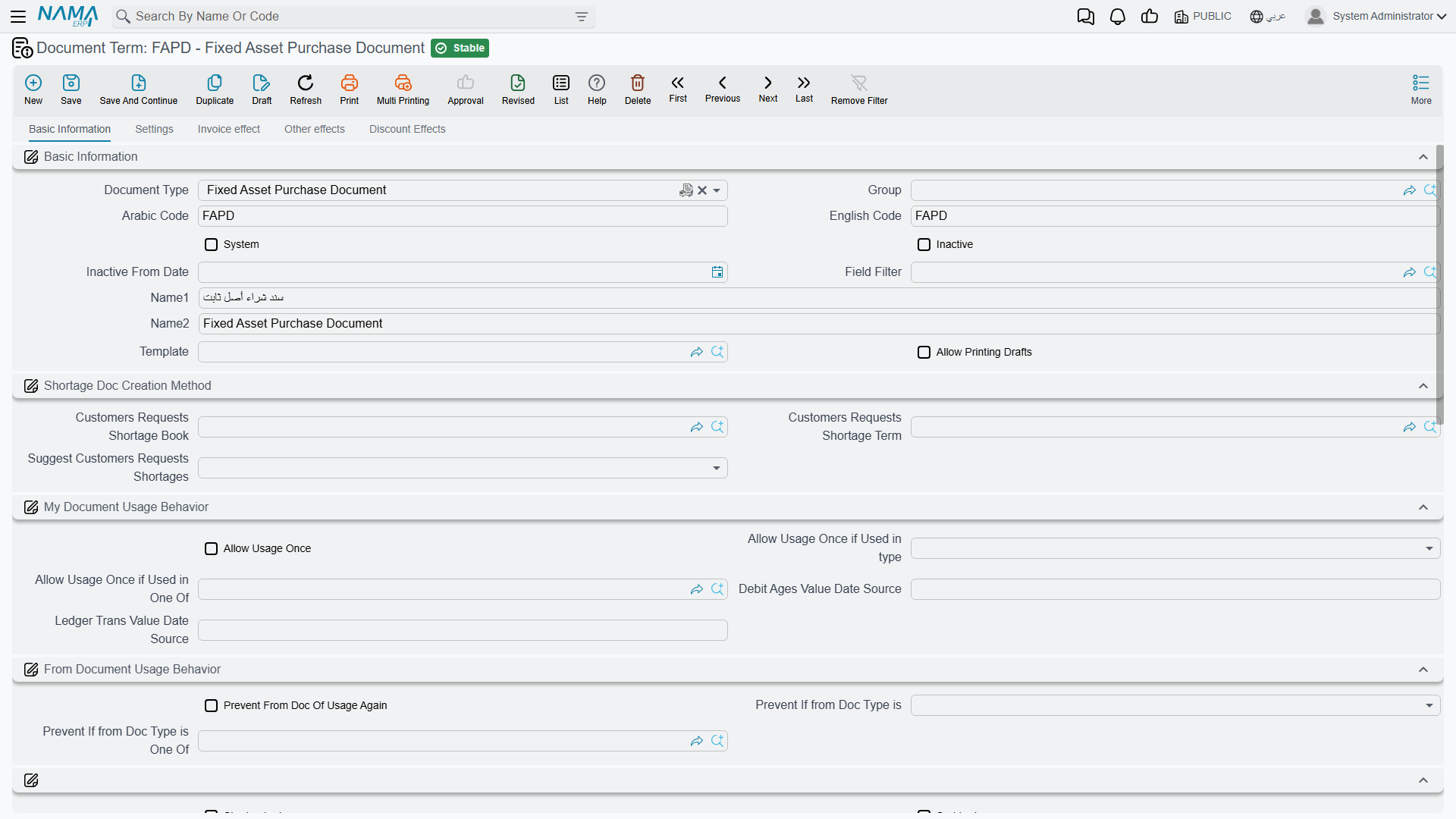
The screen has four pages.
Page 1 — Settings
The first page carries the term's own identity — its document type, code and name — followed by the tax behaviour that every purchase on this term inherits:
| Option | Field id | What changes |
|---|---|---|
Taxable (خاضع للضريبة) | termConfig.taxable | Turns the tax columns on for documents using this term |
Tax Plan (سياسة الضريبة) | termConfig.taxPlan | The plan the header taxes are computed from |
Is tax modifiable (الضريبة قابلة للتعديل) | termConfig.modifiableTax | Whether the user may type over a computed tax value |
| Header taxes editable per line | termConfig.allowEditingHdrTaxInDetails | Whether a line may depart from the header's taxes |
| Prevent adding tax 1 to 4 | termConfig.preventAddTax1 … termConfig.preventAddTax4 | Blocks a specific tax from being added on a line, whatever the plan says |
| Link with invoice lines in the accounting document | termConfig.linkWithInvoiceLinesInAccountingDocument | Ties each ledger line back to the invoice line that produced it, so the entry can be read line by line |
And the one option people come to this screen for:
Create Asset If Not Found (إنشاء الأصول إذا لم تكن موجودة, termConfig.createAssetIfNotFound) decides whether the purchase document may create the fixed asset record itself. With it off — the normal setting — every line must point at an asset that already exists in its initial state, and committing a line with an empty asset fails. With it on, a line that names no asset produces one at commit time, taking the name, type, classifications, custodian and location from the line's own columns.
Which setting do you want?
Use two terms. Keep a plain purchase term with the option off for the everyday case where the asset records were prepared in advance, and a second term with it on for bulk arrivals where you are creating the register as you buy. Do not run existing assets through the creating term: that term is for lines that bring their own asset data with them.
Page 2 — Invoice effect
The credit side (termConfig.config.credit) lives here. This is the account that faces the asset — normally the suppliers control account, so that committing the purchase leaves the supplier owed.
Alongside it:
- Shorten ledger (
termConfig.config.shortenLedger) — collapses the entry into fewer lines instead of one per invoice line. - Pay installments in order (
termConfig.payInstallmentsInOrder) — forces the payment schedule to be settled oldest first. - Allow Payment More Than Invoice Amount (
السماح بدفع مبلغ أكبر من قيمة الفاتورة,termConfig.allowPaymentMoreThanInvoiceAmount) — lets the payment documents settled against the purchase add up to more than its value. With it off, a payment that would push the document's remaining amount below zero is refused with Remaining {0} in document {1} became negative — «المتبقي {0} فى المستند {1} أصبح بالسالب». - Update asset dimensions from the invoice (
termConfig.updateAssetDimensionsFromInvoice) — pushes the line's legal entity, sector, branch, department and analysis set onto the asset itself, so the asset inherits the dimensions of the document that bought it.
Pages 3 and 4 — Other effects and Discount effects
Page 3 holds the cash side (termConfig.cash) and four tax account groups, named tax1 to tax4 on the screen (termConfig.tax, termConfig.tax2, termConfig.htax, termConfig.htax2). Each group is a full account side, so a tax can be routed to a different account per term, and each carries its own other side option (termConfig.taxesOtherSide.tax1OtherSide … termConfig.taxesOtherSide.tax4OtherSide).
Page 4 holds the discount accounts: a line-discount side (termConfig.lineDiscount), an invoice-discount side (termConfig.invoiceDiscount), and seven further discount slots under the group titles additionalDiscount2 to additionalDiscount8 (termConfig.firstDiscountAcc … termConfig.seventhDiscountAcc). It also carries the other side of each discount (termConfig.taxesOtherSide.discount1OtherSide … termConfig.taxesOtherSide.discount8OtherSide, and termConfig.taxesOtherSide.headerDiscountOtherSide for the invoice discount), and the external-effect lines grid (termConfig.externalEffectLines) for entries that must reach accounts outside this document's normal reach.
Worked example — MCH-0007
Term FAPD-01: taxable, 15% VAT plan, Create Asset If Not Found off, credit side = the suppliers control account, tax 1 debit = VAT input.
Purchase document dated 1 January 2026, one line: MCH-0007, value 240,000, useful life 60 months, salvage value 24,000.
| Debit | Credit | |
|---|---|---|
MCH-0007 cost account — from the asset | 240,000 | |
| VAT input — from the term's tax 1 debit | 36,000 | |
| Gulf Machinery Trading — from the term's credit side | 276,000 |
Only two of those three lines were decided by the term. The first came from the machine.
Offers, Orders and the Initial Receipt
The Fixed Asset Purchase Offer, the Purchase Order and the Initial Receipt are configured through one shared arrangement, and it is a short one: document type, code, name, and the same tax settings as the purchase term's first page.
There is deliberately nothing else, because none of these three documents reaches the ledger. They compute prices, discounts and taxes so that you can compare a quotation against another and carry the figures forward — but nothing is booked until a purchase document is raised. Treat the tax figures on an offer or an order as informational: they tell you what the invoice will look like, they do not create a liability.
The Purchase Order term adds one switch in a From Document group: Consider Satisfied Qties In From Doc (اعتبار الكميات المسلمة في بناءا علي, termConfig.considerSatisfiedQtiesInFromDoc). An order is often raised from a purchase request or an offer, and normally it copies every line at its full quantity. With this switch on, it copies only what is still outstanding on each line of the source document — the quantity not yet covered by earlier orders — and leaves out the lines that are already fully covered. Use it when one request is ordered in several instalments.
The Purchase Request shares the same configuration too, and needs even less: a request records what somebody wants, with no prices and no effects at all.
The Opening Term
The opening document brings assets you already own into Nama — a machine bought in 2023 with 120,000 already depreciated elsewhere. Its entry is built entirely from the asset's own accounts and from the mediator account you type on the document, so the opening term carries no account sides at all.
What it does carry is four switches, and they exist because legacy data never arrives clean. Each one changes how the system derives dates and remaining life from what you typed:
termConfig.makeLastDepreciationDatePeriodEndDatemakes the asset's last-depreciation date the end of the document's own month rather than the end of the previous fiscal period — useful when your go-live date sits mid-period.termConfig.calcDepStartDateForDepreciatedAssetshandles assets that arrive already fully depreciated: it forces remaining life to zero and back-computes the depreciation start date from the useful life.termConfig.calcDepreciationStartDateBasedOnDiffBetweenDefaultUsefulLifeAndRemainingLifederives the depreciation start date from the difference between useful life and remaining life, for registers that recorded remaining life but not a start date.termConfig.doNotCalcRemainingLifeFromDatestells the system to keep the remaining life you typed instead of recomputing it from the dates on the line.
Pick the pair that matches the shape of the data you are importing, load a handful of assets, and check the resulting instalments before you load the rest.
The Opening Update term, used for correcting an opening after the fact, carries no accounts either, but it has one switch on its Effects page: Do Not Copy Details Of From Doc (عدم نسخ التفاصيل من بناءاً على, termConfig.doNotCopyDetailsOfFromDoc). When you pick the opening document to correct, the update normally copies its header and every one of its lines — asset, depreciation start date, properties, acquisition and accumulated depreciation values, location and purchase date — so you only change what was wrong. With the switch on, only the header is copied and you enter the lines to correct yourself, which is quicker when one asset out of a large opening needs fixing.
The Delivery and Receipt of Custodies Term
This document hands everything an employee holds — fixed assets and custody items alike — to somebody else. Its term is two pages, one for each side of the hand-over, and each page carries a debit and a credit account side — termConfig.debit2 / termConfig.credit2 on the delivering side's page and termConfig.receivedDebit / termConfig.receivedCredit on the recipient's.
The amount is the same on every side you configure: the total value of the custody items on the document. Fixed assets on the document move custodian without contributing a value, so a hand-over of machinery alone moves the paperwork without moving money.
That symmetry is worth understanding before you configure it. Each side you fill in is recorded with that same total, so configure the pair that represents the entry you actually want — filling in all four sides books the value twice.
The page also carries Change Custodian In Asset (تغيير مسؤول العهدة في الأصل, termConfig.changeCustodianInAsset), which decides whether the hand-over rewrites the custodian shown on the fixed asset's own record, or merely adds a row to its custody history.
The Creation Document Term
The Fixed Asset Creation Document generates purchase documents for the assets it creates, and its term exists to say which book and term those generated purchase documents should use (termConfig.faPurchaseBook, termConfig.faPurchaseTerm). Point it at the purchase term you configured above and the generated documents will be wired exactly like a hand-typed purchase.
Documents in This Group with No Term
The Fixed Asset Receipt Document (مستند أستلام أصل) — the note that records who took delivery and where the asset ended up — has no term and no Term field on its screen. It writes a custodian and a location onto the asset and books nothing, so there is nothing to configure. See receipts for how it is used.