
Expenses and Distribution
This is where the import stops being paperwork and starts being money. Every invoice that lands on the shipment — the supplier's own invoice, the shipping line's, the insurer's, the customs declaration, the clearance agent's bill, the bank's commission — is entered on a Fixed Asset Expense Document, and each one is immediately split across the machines listed on the proforma invoice.
You can raise as many expense documents on one credit as you like, and in practice you raise one per invoice as it arrives, over weeks. The split happens per document, per line, and the results accumulate on the credit until the cost document collects them.
The line everyone forgets
The supplier's goods value goes on an expense document like every other cost. The proforma invoice's 500,000 is a distribution base; it capitalises nothing on its own. Omit the goods line and the two presses will be capitalised at freight and customs only.
First, the expense item
Before any of this works you need a small master file for each kind of expense you will charge: customs duty, ocean freight, marine insurance, clearance fees, bank commission, inland haulage — and the goods value itself. That file is the Expense item (بند مصروف), and it sits in the same menu folder as the letter of credit, at Assets › Fixed Asset Letter of Credits › Expense item. It is a shared file: the supply-chain letter-of-credit chain uses the very same records for imported goods, so a site that imports both stock and machinery keeps one catalogue of expense items and two sets of document books.
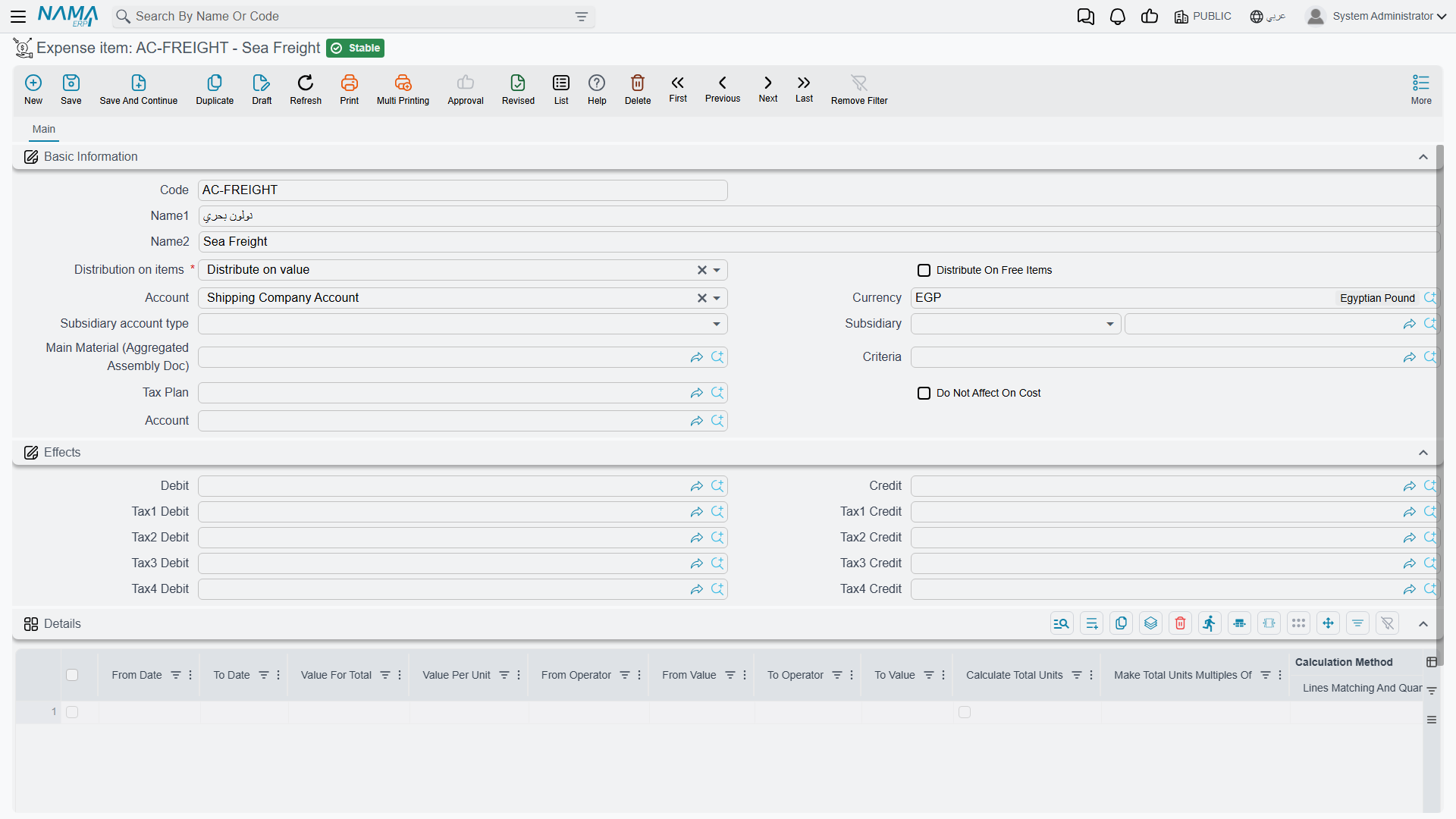
An expense item is a tiny record and only a handful of its fields matter for imported assets:
| Field | What to put in it |
|---|---|
| Code, Name (Arabic), Name (English) | FREIGHT — الشحن / Ocean freight |
| Distribution on items — required | how this cost is spread over the machines. The whole point of the file; see the table below |
| Account | the account the cost is debited to — normally a single "assets under letters of credit" holding account shared by every expense item. It must be a detailed account: an account that carries a subsidiary type is rejected when you save |
| Tax Plan | if the expense is taxed, the plan that supplies the percentages |
| Do Not Affect On Cost | tick it for a cost that is booked but must not be folded into the machines' value — a demurrage penalty, a fine. The entry still reaches the ledger; the cost document simply ignores it |
| Currency | optional, a convenience default |
Al-Waha's catalogue for this import is four records, all pointing their Account at 13910 Assets under letters of credit:
| Code | Name | Distribution |
|---|---|---|
GOODS | قيمة البضاعة / Goods value | Distribute on value |
FREIGHT | الشحن / Ocean freight | Distribute on value |
CUSTOMS | الجمارك / Customs duty | Distribute on value |
CLEAR | التخليص / Clearance fees | Manual |
The expense item's account is the debit; the credit is chosen on the document
The expense item supplies the account the cost is debited to. Who is credited — the supplier, the bank, the customs agent, a specific account — is chosen on each expense-document line, not here. Unlike the supply-chain purchase documents, the fixed-asset chain does not copy any credit-side setting down from the expense item onto the line, so the line is where that decision is made and the only place it takes effect.
The distribution rules
Distribution on items is the field that makes an expense item worth having. It decides what the cost is proportional to:
| Distribution | Arabic label | Spread in proportion to | Use it for |
|---|---|---|---|
| Distribute on value | توزيع على القيم | each line's total price on the proforma invoice | the goods value, customs duty, insurance, bank commission — anything charged ad valorem. The safe default |
| Distribute On Weight | توزيع على الوزن | the Weight column | sea and road freight, port handling |
| Distribute On Volume | توزيع على الحجم | the Volume column | air freight and container space |
| Distribute On Area | توزيع على المساحة | the Area column | costs charged by floor or deck space |
| Distribute On Length | توزيع على الطول | the Length column | over-length surcharges |
| Distribute On Density | توزيع على الكثافة | the Density column | specialist freight tariffs quoted on density |
| Distribute on quantity | توزيع على الكميات | each line's quantity | a per-unit charge on a batch line |
| Manual | يدوي | nothing — you type the amount per machine | an invoice the supplier already itemised per machine |
Two of them deserve a note.
Distribute on quantity behaves differently from what its name suggests when the proforma lines name specific assets: those lines are always quantity 1, so the cost is split equally between them regardless of size or value. That is genuinely what you want for a per-machine flat fee, and is genuinely not what you want for freight.
Manual is the escape hatch, and it is the right answer more often than people expect. When the clearance agent's bill says "Press A: 9,000, Press B: 6,000", no formula will reproduce that as faithfully as typing it.
Whichever basis you pick, the column it reads has to be filled on the proforma invoice. Choosing Distribute On Weight on a shipment whose lines carry no weights leaves that cost with nothing to divide by.
The expense document
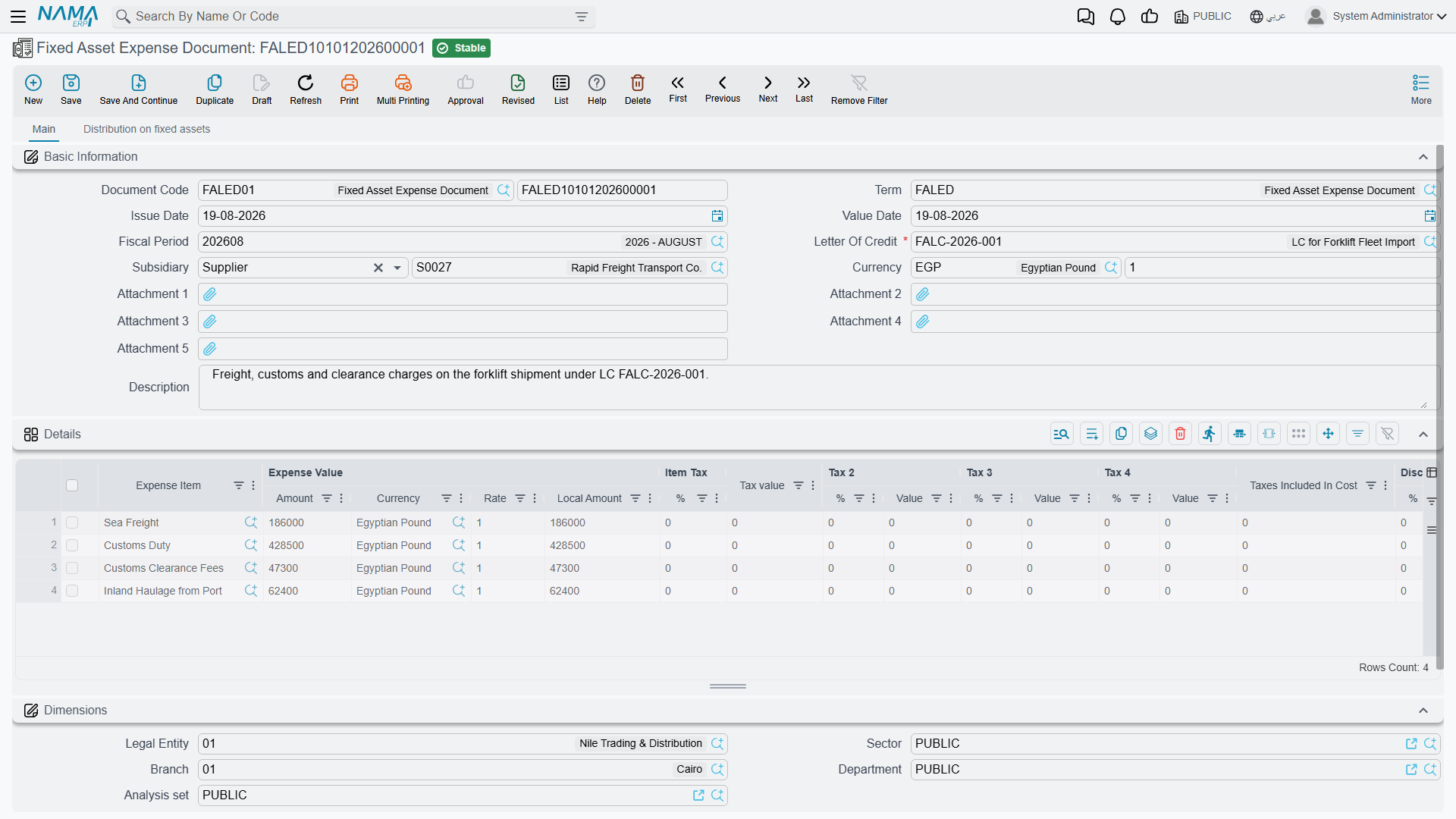
The header
Document Code and its book, Term, Issue Date, Value Date, Fiscal Period, the Letter Of Credit (required — this is what tells the document which machines to divide over), an optional Subsidiary, the document Currency and Currency Rate, five attachment slots for scans of the invoices, and a description. Picking the credit pulls its currency in.
The document's term is what tells the system how to build the accounting entry, so unlike the proforma invoice this document does need one.
The lines — the costs as invoiced

One line per invoice, or per invoice line:
| Column | Notes |
|---|---|
| Expense Item — required | which kind of cost this is, and therefore how it will be spread |
| Expense Value — Amount, Currency, Rate, Local Amount | the invoiced amount. Each line carries its own currency and rate, so freight in euros and customs duty in local currency can sit on the same document. Leave the currency blank and the header's is used at rate 1 |
| Item Tax 1 to 4, each a percentage and a value | filled from the expense item's tax plan and the term's |
| Taxes Included In Cost | the part of the tax that is capitalised rather than reclaimed |
| Discount 1 — percentage and value | a discount on the invoice line |
| the credit-side column (الجانب الدائن) | who is owed this money — see below |
| Subsidiary, Subsidiary account type, Account | the counterparty, when the credit side calls for a specific one |
| Reference 1, Reference 2, Description | the supplier's invoice number and any note |
The credit-side column is the one to get right, because it is what turns "40,000 of freight" into a real liability to a real party:
| Choice | Credits |
|---|---|
| Supplier Account | the supplier named on the letter of credit |
| Bank Account | the bank account named on the letter of credit |
| Customs Company Account | the customs party named on the letter of credit |
| Insurance Company Account | the insurance party named on the letter of credit |
| Specific Account | the account typed on this line |
| Specefic Subsidiary | the account on this line if there is one, otherwise the line's subsidiary |
| Current User Subsidiary | the employee record of whoever entered the document |
The first four are why it is worth filling in the parties on the credit: with them set, the whole line reduces to "credit the customs company" and the system finds the rest.
Al-Waha's expense document for LC-2026-004, all in the ledger currency:
| Line | Expense item | Amount | Credited to |
|---|---|---|---|
| A | GOODS Goods value | 500,000 | Supplier Account → Gulf Machinery Trading |
| B | FREIGHT Ocean freight | 40,000 | Specific Account → 21450 Freight payable |
| C | CUSTOMS Customs duty | 60,000 | Customs Company Account → Al-Faris Clearance |
| D | CLEAR Clearance fees | 15,000 | Customs Company Account → Al-Faris Clearance |
| Total | 615,000 |
The distribution page
The second page is where the split is set up and where the result is read back.
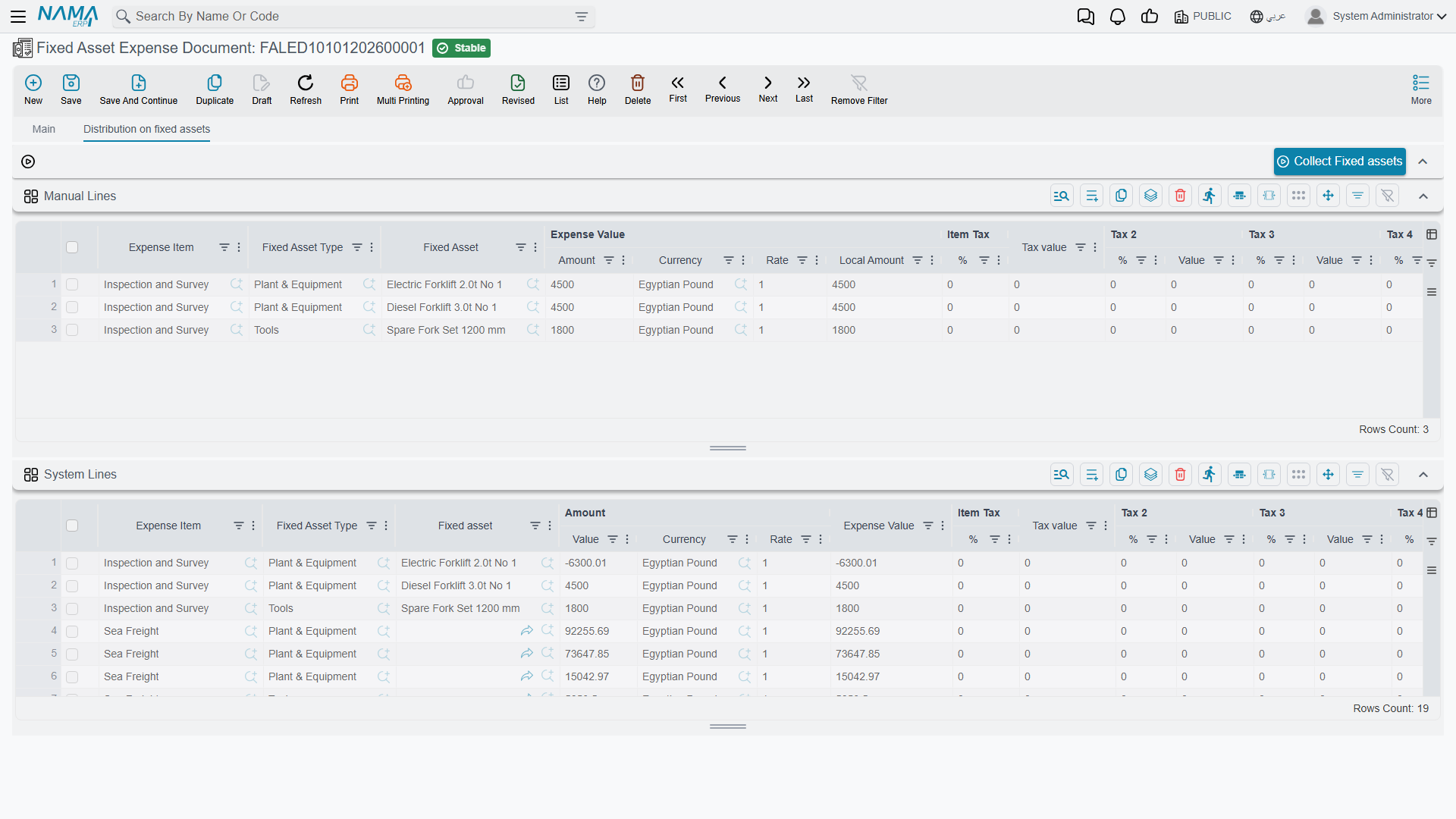
It carries one button, Collect Fixed assets (تجميع الأصول الثابته), and two grids.
Pressing Collect Fixed assets reads the credit's proforma invoice and, for every line whose expense item distributes manually, creates one row per machine in the Manual Lines grid — the asset type and the asset already filled in, the amount left for you. Al-Waha presses it once and gets two rows for the CLEAR line, and types 9,000 against Press A and 6,000 against Press B.
The manual amounts have to add up. Per expense item, the total of the manual rows must equal the total of the document lines using that item — 9,000 + 6,000 = 15,000. If they do not, the commit is refused and the message names the expense item and both totals.
The second grid, System Lines, is the answer: one row per machine per expense item, showing the amount, its currency and rate, and the expense value in the ledger's currency. It is read-only, because it is computed.
System Lines are produced on commit, not on save
A saved draft shows an empty System Lines grid. The distribution runs when the document is committed. That is normal and is not a sign that anything is wrong — commit the document and the grid fills.

The by-value calculation, line by line
Here is the whole of Al-Waha's shipment worked out. The formula is the same every time:
                        the expense line's local amount  ×  this machine's base
share of one machine  =  ──────────────────────────────────────────────────────
                            the total of that base over all proforma lines
The base comes from the proforma invoice, which lists Press A at 300,000 and Press B at 200,000, so for a value-based expense item:
- Press A's share of everything = 300,000 ÷ 500,000 = 0.60
- Press B's share of everything = 200,000 ÷ 500,000 = 0.40
Line A — Goods value, 500,000, distributed on value
- Press A: 500,000 × 300,000 ÷ 500,000 = 300,000
- Press B: 500,000 × 200,000 ÷ 500,000 = 200,000
Line B — Ocean freight, 40,000, distributed on value
- Press A: 40,000 × 0.60 = 24,000
- Press B: 40,000 × 0.40 = 16,000
Line C — Customs duty, 60,000, distributed on value
- Press A: 60,000 × 0.60 = 36,000
- Press B: 60,000 × 0.40 = 24,000
Line D — Clearance fees, 15,000, distributed manually
Not calculated at all — taken straight from the Manual Lines grid:
- Press A: 9,000
- Press B: 6,000
Eight system lines, and the totals per machine:
| Expense item | PRS-0001 Press A | PRS-0002 Press B | Line total |
|---|---|---|---|
| Goods value | 300,000 | 200,000 | 500,000 |
| Ocean freight | 24,000 | 16,000 | 40,000 |
| Customs duty | 36,000 | 24,000 | 60,000 |
| Clearance fees | 9,000 | 6,000 | 15,000 |
| Landed cost | 369,000 | 246,000 | 615,000 |
Those two totals, 369,000 and 246,000, are what the cost document will write onto the presses.
When the shares do not divide evenly
Each share is rounded to the number of decimal places the line's currency uses, and rounded shares rarely add back up to the invoice exactly. The system does not leave the difference lying around: it compares the sum of the distributed shares against the expense line's own amount and puts the whole difference on the first system line of that expense line.
Al-Waha's shipment splits cleanly at every amount, so nothing shows. Change the clearance fee to 15,000.05 and split it evenly between two identical machines, and it does:
- each machine's raw share is 15,000.05 × 0.5 = 7,500.025, which rounds to 7,500.03;
- the two rounded shares sum to 15,000.06 — one unit more than was invoiced;
- the difference, −0.01, is applied to the first line, leaving 7,500.02 and 7,500.03.
Total distributed: 15,000.05, exactly the invoice. This is worth knowing when you read the System Lines grid and one machine's share looks a fraction off the percentage you expected. The distribution always ties back to the invoice to the last decimal, and the first machine on the list absorbs the remainder.
What reaches the ledger
The expense document creates a journal entry: one debit-and-credit pair per system line — that is, per machine per expense item — plus any tax and discount lines the term configures:
| Account | Debit | Credit | |
|---|---|---|---|
| Dr | 13910 Assets under letters of credit — the GOODS item's account | 500,000 | |
| Dr | 13910 Assets under letters of credit — FREIGHT | 40,000 | |
| Dr | 13910 Assets under letters of credit — CUSTOMS | 60,000 | |
| Dr | 13910 Assets under letters of credit — CLEAR | 15,000 | |
| Cr | Gulf Machinery Trading | 500,000 | |
| Cr | 21450 Freight payable | 40,000 | |
| Cr | Al-Faris Clearance (60,000 + 15,000) | 75,000 | |
| 615,000 | 615,000 |
The debits sit in the holding account, waiting. Nothing has touched a press yet — as far as the asset register is concerned, PRS-0001 and PRS-0002 are still empty records in their initial state. The cost document is what moves 615,000 out of the holding account and onto the machines.
Each line is booked at its own currency and rate, so a euro freight invoice and a local-currency customs bill on the same document each convert at the rate on their own line. The entry is created as a business request processed in the background: the document saves instantly, and a failed entry is retried from the Business Requests list view rather than re-keyed.
What stops an expense document committing
| It is refused when | Because |
|---|---|
| the credit has no proforma invoice | there is nothing to distribute over |
| the details grid is empty | there is nothing to distribute |
| a line has no expense value | the same |
| an expense item distributes on value and the proforma total is zero | there is nothing to divide by |
| an expense item is set to Manual and the Manual Lines grid has no rows for it | the amounts were never typed |
| the manual rows for an expense item do not add up to the document lines using that item | the split would not equal the invoice |
| the credit is already closed | the import has been capitalised; cancel the cost document first |
An expense document belonging to a closed credit also cannot be deleted, for the same reason: its figures are already inside somebody's asset cost.
Cancelling a committed expense document reverses its ledger entry and clears its distributed lines, which removes those costs from anything the cost document recalculates afterwards.
Messages you may see
| Message | Why | What to do |
|---|---|---|
| There is no invoice for this letter of credit {0} — «لا توجد فاتورة لهذا الإعتماد {0}» | The letter of credit on the document has no proforma invoice yet, so there is no total to distribute over. | Enter and commit the proforma invoice on the credit first. |
| Can Not Handel Closed Letter Of Credit — «لا يمكن التعامل مع اعتماد حالته مغلقة» | The credit named on the document is already Closed. | Cancel the cost document to reopen the credit, then enter the expense. |
| Can not delete expense docs for closed letter of credit {0} — «لا يمكن حذف سند مصروفات لاعتماد مستندي حالته مغلق {0}» | You tried to delete an expense document that belongs to a closed credit. | Cancel the cost document first; until then the expense's figures are already inside an asset's cost. |
Next: The Cost Document.