
The Letter of Credit
Everything about one import deal has to hang off a single peg: the proforma invoice, half a dozen expense invoices from four different parties, and finally the document that turns all of it into asset cost. The Fixed asset Letter of Credit is that peg.
It is deliberately a master file, not a document. There is no book, no document term, no commit and no accounting entry. You open it the way you open a supplier or a warehouse: fill it in, save it, and from then on every document of the import points at it. The record's second job is to be the thing you look at when somebody asks "how much have we spent on the Riyadh presses so far?" — it carries its own running breakdown.
You find it at Assets › Fixed Asset Letter of Credits › Fixed asset Letter of Credit, in the same folder as the three documents and the expense item file. The folder needs the fixedassets-lc licence.
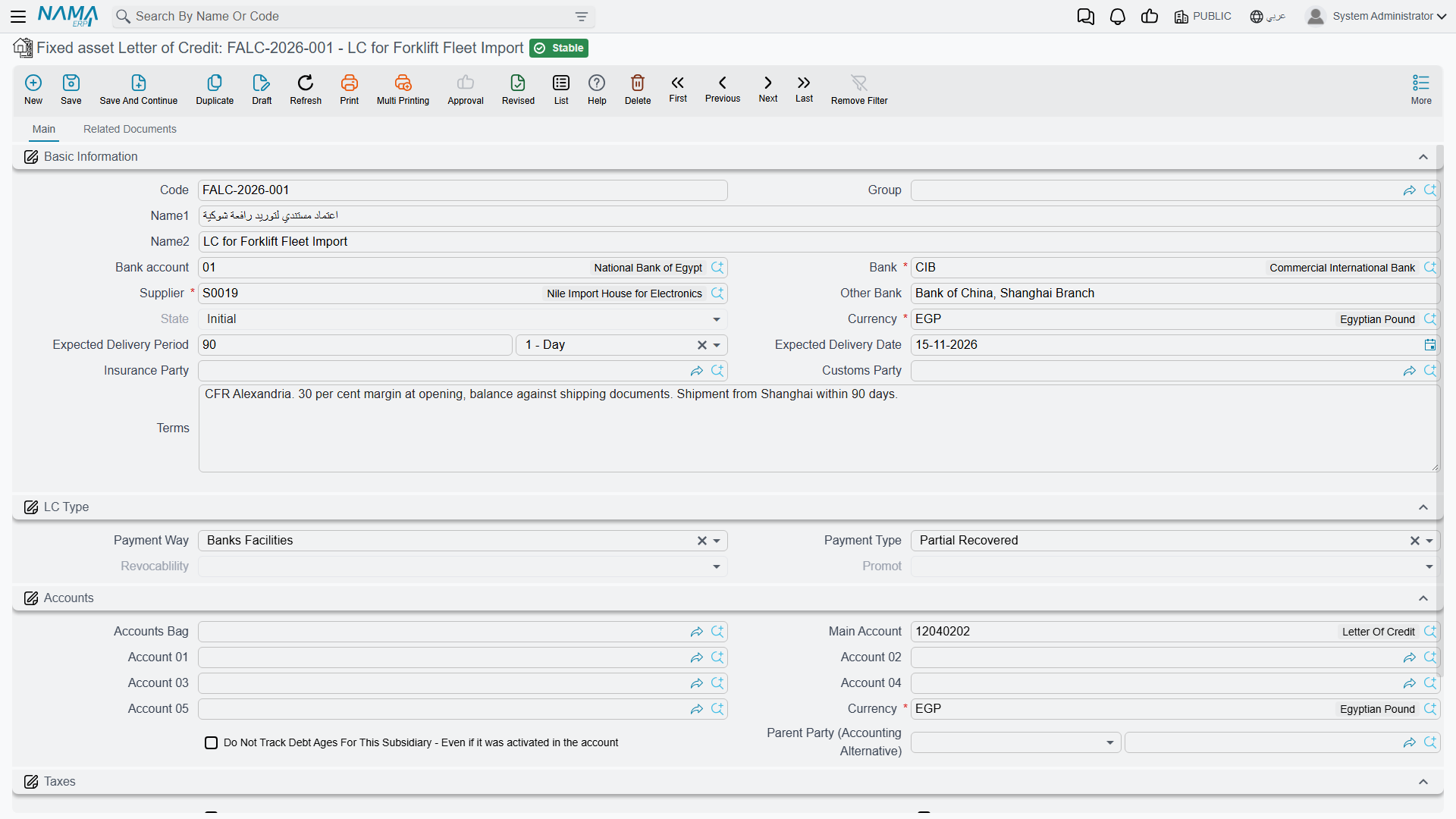
Opening LC-2026-004
Al-Waha Industries is importing two hydraulic presses. The credit is opened before anything else exists — before the proforma invoice, before a single invoice has arrived.
Who is involved
The header names every party the import will owe money to, and it names them here rather than on the invoices because the expense documents look them up from the credit. A freight or customs invoice therefore does not have to repeat who the customs agent is; it just says "credit this to the customs company" and the system reads the name off the credit.
| What you fill in | Why it matters later |
|---|---|
| Code, Name (Arabic) and Name (English) | how the credit is found and printed — LC-2026-004, Presses – Riyadh Plant |
| Group | the coding group that numbers the record |
| Supplier — required | the party the goods value is owed to. Copied automatically onto the proforma invoice and the cost document |
| the supplier's bank — required | the bank on the other side of the credit |
| Bank account | your own account the credit is drawn on. An expense line can be credited straight to it |
| Other Bank | the correspondent bank, as a free note |
| Customs Party | the clearance agent. An expense line credited to the customs company lands on this party |
| Insurance Party | the insurer. Same idea for the marine insurance invoice |
For LC-2026-004 the supplier is Gulf Machinery Trading, the customs party is Al-Faris Clearance, and the bank account is the plant's current account.
Fill in the parties even when you are not sure
The customs and insurance parties cost nothing to set and save real work later. If they are blank, every expense line has to name an account or a subsidiary by hand instead of simply saying "credit the customs company".
The commercial terms
The rest of the first group records the deal itself: the Currency the credit is opened in, an Expected Delivery Period (a number and a unit, defaulting to months) and an Expected Delivery Date, and a long free-text Terms field for the shipping and payment conditions as agreed with the bank. A small LC Type group classifies how the credit is funded — whether it runs on supplier facilities or bank facilities, and whether it is fully covered, partly covered or uncovered. These are reference and filtering fields; they describe the deal rather than drive it.
The Currency matters more than the rest. It is the credit's currency, and it is pushed onto the proforma invoice and onto every expense document the moment you pick the credit on them. Individual expense lines can still be entered in another currency — freight in euros, customs duty in the local currency — but the credit's currency is the starting point.
The accounts block, and using the credit as a subsidiary
The credit carries a full set of accounts — accounts bag, main account, accounts 01 to 05, its own currency, a parent party — and a tax-exemption block, exactly like a supplier or a customer. That is not decoration: a letter of credit is one of the things the accounting module can analyse a control account by. If you want an "assets under letters of credit" account whose balance can be read per credit rather than as one lump, this is what makes it possible, and the expense documents' holding entries are what fill it.
Last comes the Dimensions group — legal entity, sector, branch, department, analysis set — which behaves as it does everywhere else in the system.
The related documents page
The second page is a reading page. It gathers, filtered to this credit and nothing else:
- the proforma invoice, with its total;
- every expense document raised on the credit;
- every cost document;
- a summary of expense items — one row per kind of expense with the total distributed under it, which is the fastest answer to "how much freight has this shipment cost so far?";
- the detail behind that summary — every distributed line: which expense item, which asset type, which asset, the amount, the currency and rate, the net value.
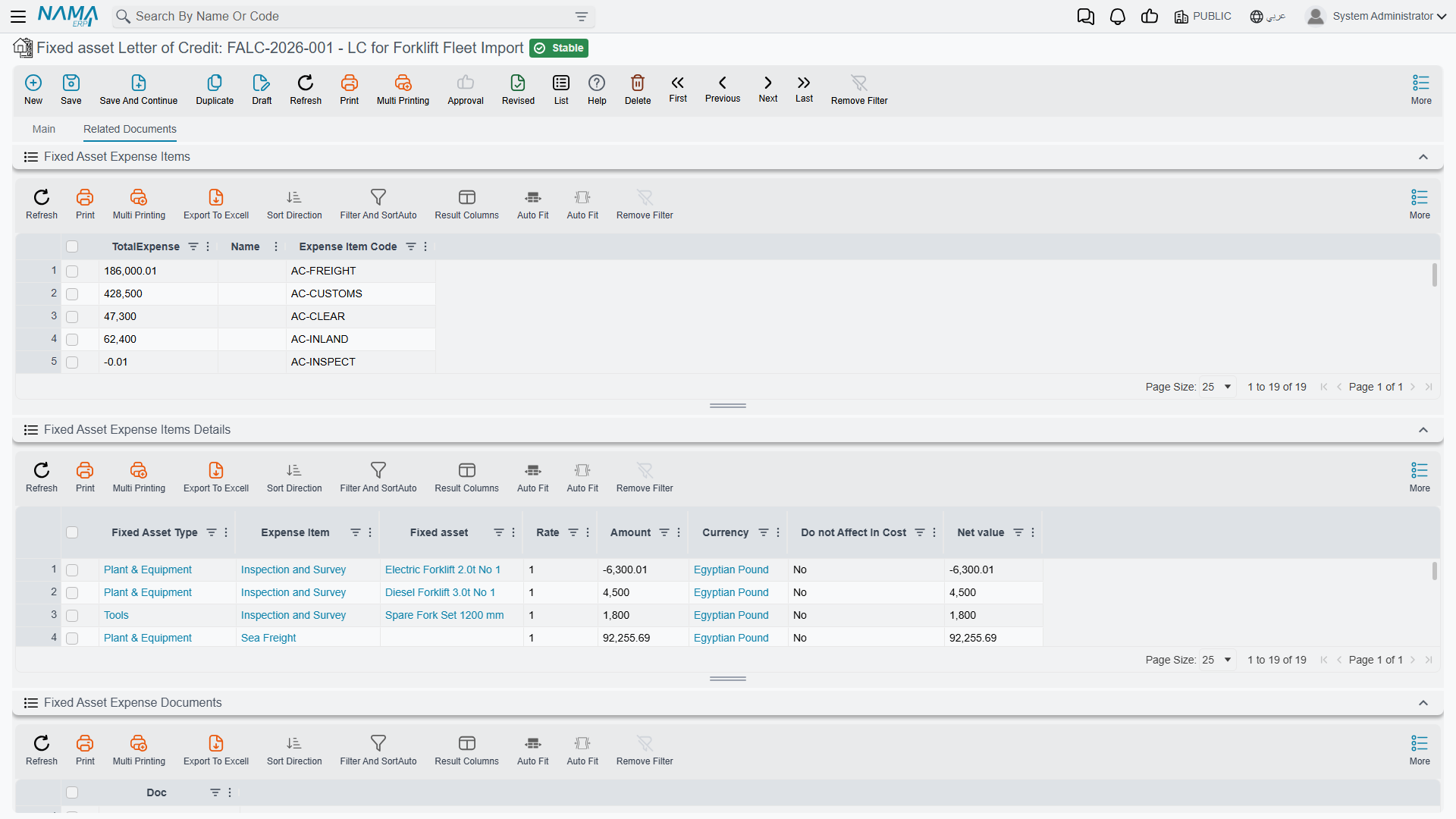
Those last two lists are the useful ones during an import. They are the same distributed lines that the cost document will later add up per asset, so what you see there is what each press is going to be capitalised at. If a figure looks wrong at this stage, it is far cheaper to fix the expense document than to unwind a committed cost document.
The lists are built on commit, not on save
A distributed line only exists once its expense document has been committed. A draft expense document contributes nothing to these lists — which is exactly the point of looking at them: they show committed cost.
Actions on this screen
The letter of credit itself has no buttons of its own — it is the peg the other documents hang from, not a document that generates anything. What looks like an action on it is the Related Documents page described above: those grids are live lists of the expense, proforma and cost documents raised against this credit, and opening one from there is how you move around the chain.
The state of the credit, and what closes it
A read-only status field on the header tells you where the credit stands. In fixed assets it has exactly two meaningful positions:
| State | Meaning |
|---|---|
| Initial (مبدئى) | the credit is open. Proforma invoices, expense documents and the cost document can all be entered against it |
| Closed (مغلقة) | the import is finished and capitalised |
Nothing on the credit itself moves it between the two. Committing a cost document closes it, and cancelling that cost document reopens it. That single rule explains most of the behaviour people notice:
- The letter-of-credit picker on a cost document offers only credits that are not closed — a closed credit has already had its cost document, and there is nothing left to capitalise.
- A proforma invoice cannot be committed unless the credit is still open.
- An expense document of a closed credit can be neither committed nor deleted. A late freight invoice therefore needs the cost document cancelled first: cancel it, the credit reopens, enter the expense, then commit the cost document again with the corrected figures.
Finding credits later
The list screen is the ordinary one, and the fields worth filtering on are the supplier, the customs and insurance parties, the currency, the dimensions and the state — the last of these separating imports still in flight from imports already capitalised.
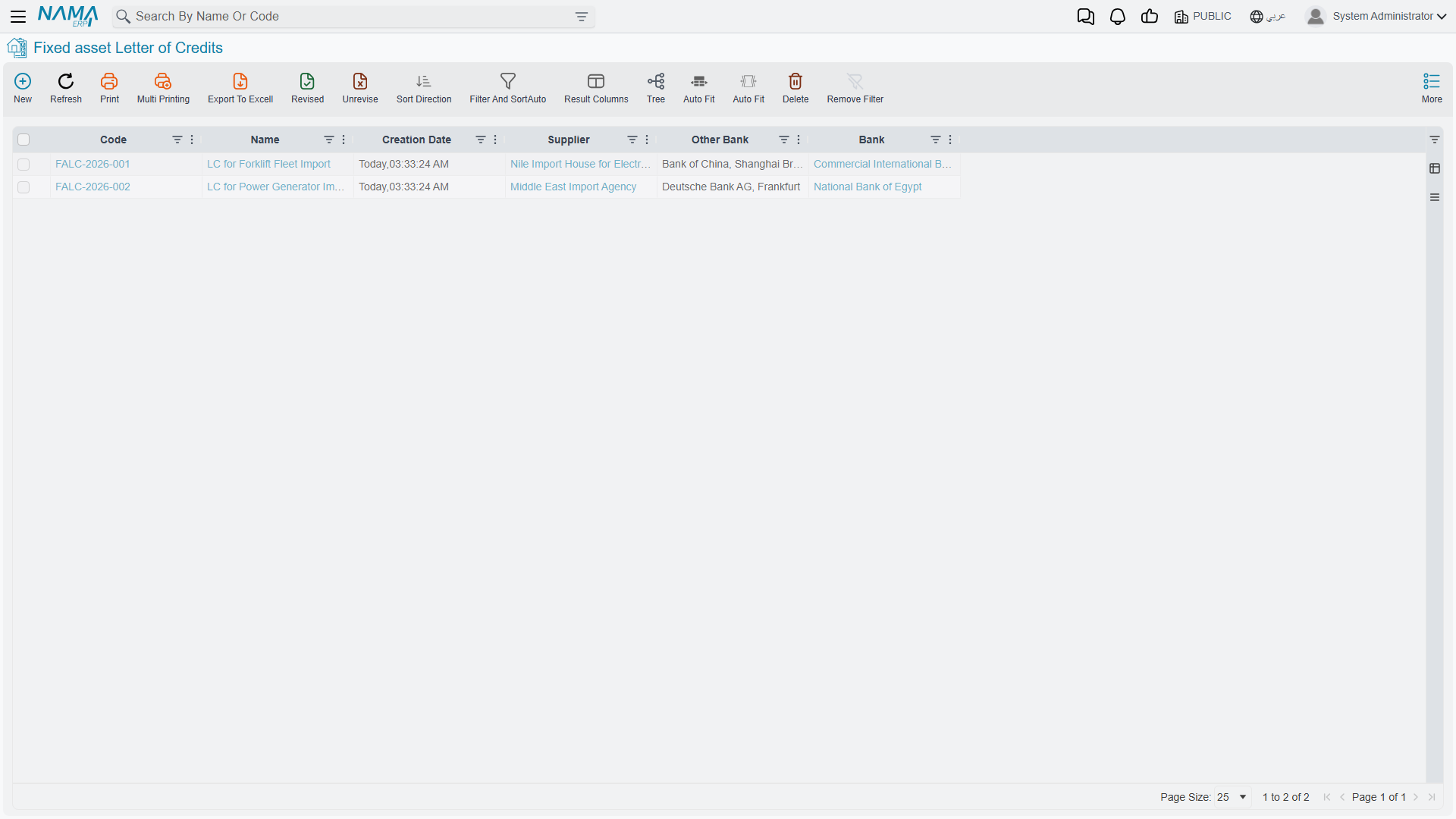
There is one credit per import deal, and it stays for good. Long after the presses are running, the credit is where the answer lives to "what did we actually pay to get that machine into the hall, and to whom".
Next: The Proforma Invoice, which lists the machines the credit covers.