
Evacuation Approval
Before a departing employee can be paid off — or before a long leave is signed off — most companies run a clearance: the person has to be signed out by each department they owe something to. IT takes back the laptop, the warehouse confirms nothing is on loan, Finance checks there are no outstanding advances, the line manager releases the handover. In Nama this departmental clearance (إخلاء طرف) is modelled as a small workflow that sits around the settlement as a procedural gate: it decides whether the paperwork may proceed, but it never touches the money math itself.
A gate, not a calculation
Evacuation approval carries no accounting effect and computes no gratuity. It is purely a sign-off chain. The figures — gratuity, vacation cash-out, loans, net pay — all live on the Dues Liquidation document. Think of the clearance as the checklist that must be green before that settlement is released. It needs the advanced HR licence (humanresource-advanced).
The three pieces
The feature is three records working together, all under Payroll → Dues Liquidation and Firing (الرواتب > التصفية وانهاء الخدمات):
- Evacuation Approval Settings (
إعدادات الموافقة على سند إخلاء طرف) — the reusable template that lists the clearance steps and their order. - Evacuation Party Document (
سند إخلاء طرف) — the actual clearance opened for one employee, which fans out into one approval per step. - Evacuation Approval Document (
الموافقة على إخلاء طرف) — a single step's sign-off, approved or rejected by the responsible party.
Step 1 — Define the clearance template
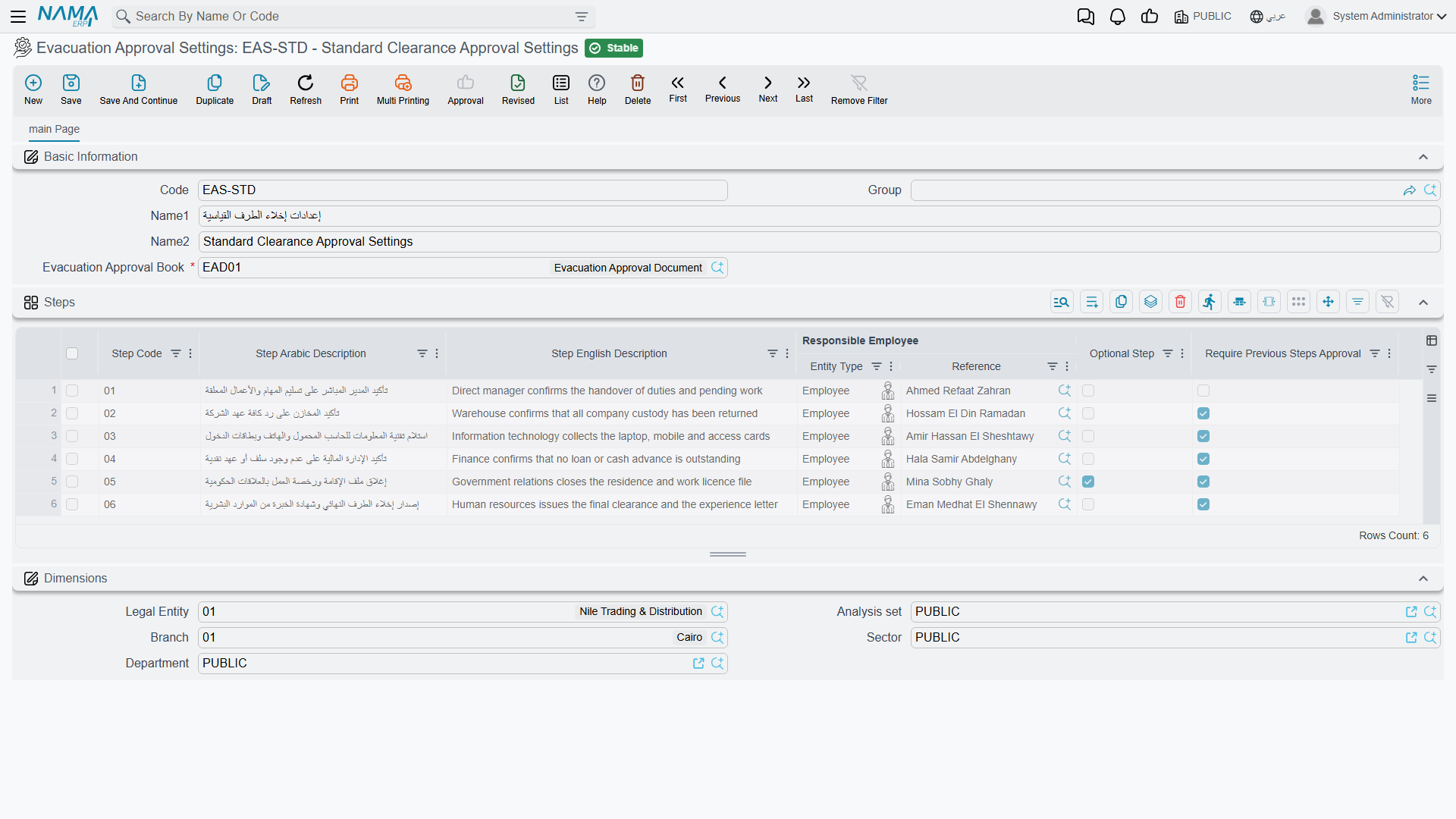
The Evacuation Approval Settings record is where you design the clearance once and reuse it. It names an Evacuation Approval Book (دفتر الموافقة على إخلاء الطرف) the individual approvals are booked into, and carries a Steps grid — one row per department or checkpoint the employee must pass:
| Column (English) | Arabic label | Purpose |
|---|---|---|
| Step Code | كود الخٌطوة | A short identifier for the step. |
| Step Arabic Description / Step English Description | وصف عربي للخطوة / وصف إنجليزي للخطوة | The bilingual name of the checkpoint (e.g. "Return IT equipment"). |
| Responsible Employee | الموظف المسئول | Who signs this step off. |
| Optional Step | خطوة اختيارية | If ticked, the step may be skipped without blocking the clearance. |
| Require Previous Steps Approval | تتطلب تنفيذ الخطوات السابقة أولا | Enforces the order — this step cannot be approved until the ones before it are. |
The Require Previous Steps Approval flag is what turns a flat checklist into an ordered approval chain: a step so marked stays locked until everything ahead of it is signed, so Finance can't clear the employee before IT has taken the laptop back.
Step 2 — Open the clearance for an employee
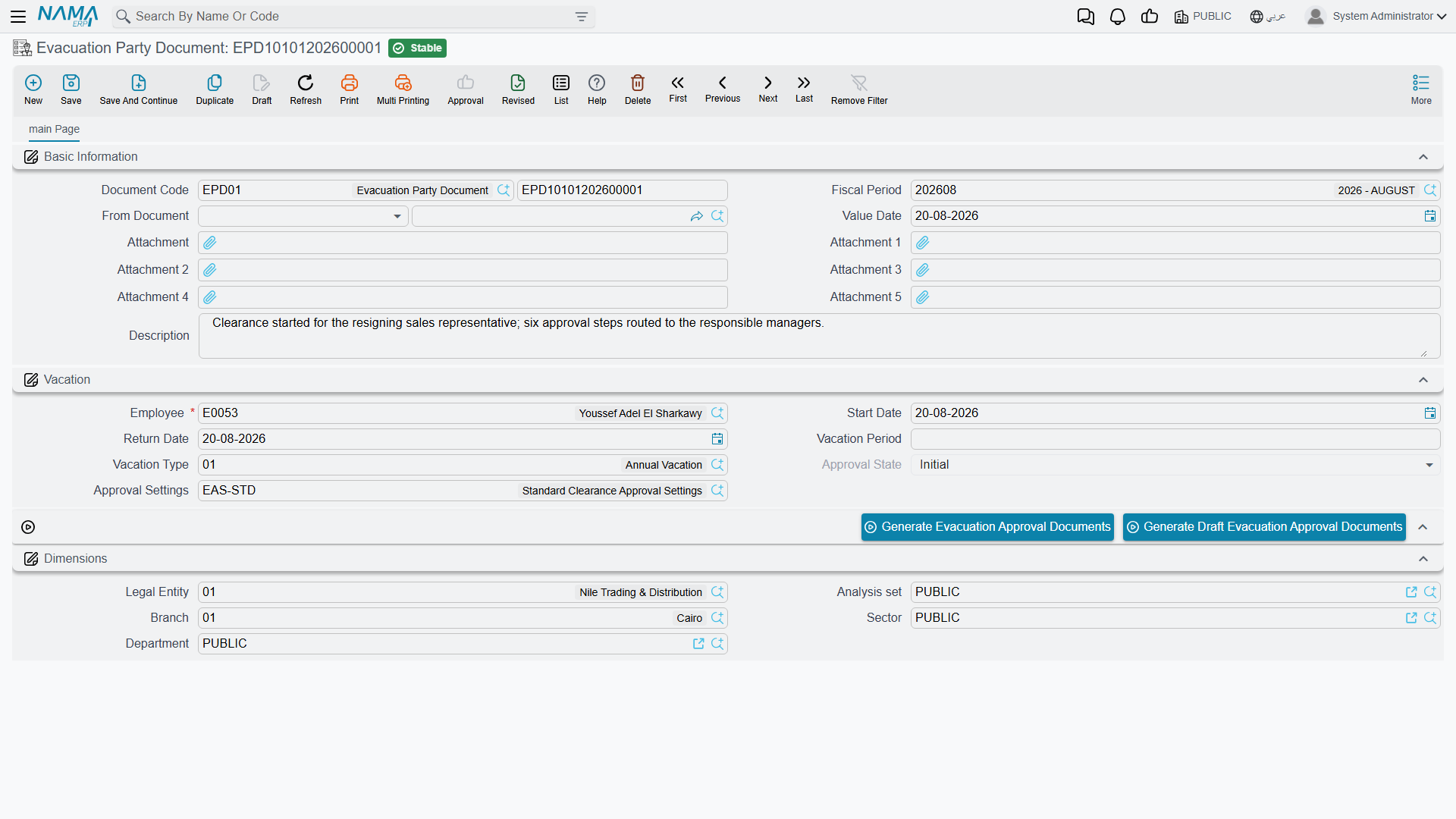
An Evacuation Party Document is raised for the leaving (or departing-on-leave) employee. It identifies the person and the leave in question — Employee (الموظف), Start Date (تاريخ البداية), Return Date (تاريخ العودة), Vacation Period (مدة الأجازة) and Vacation Type (نوع الأجازة) — and points at the Approval Settings (إعدادات الموافقة) template to use.
Its Approval State (حالة الموافقة) tracks the whole clearance through four values:
| State (English) | Arabic label |
|---|---|
| Initial | مبدئي |
| Approval In Progress | الموافقة قيد التنفيذ |
| Approved | مقبول |
| Approval Rejected | تم الرفض |
Two buttons fan the clearance out into its steps: Generate Evacuation Approval Documents creates a live approval per step, while Generate Draft Evacuation Approval Documents produces them as drafts first. The party document only reaches Approved once every non-optional step has been approved; a single rejection flips it to Approval Rejected.
Step 3 — Each responsible party signs their step
Each generated Evacuation Approval Document represents one step. It carries the Step Code and the Arabic / English step description copied from the template, the Employee being cleared, the Responsible Employee (الموظف المسئول) who owns the decision, and a Decision (القرار) that is one of:
| Decision (English) | Arabic label |
|---|---|
| Initial | مبدئي |
| Approve | موافقة |
| Reject | رفض |
The responsible party opens their approval, records what they checked, and sets the decision. When the last required step turns to Approve, the parent party document becomes Approved and the settlement is free to proceed.
The checklist slots are yours to define
Each approval also exposes a set of generic capture slots — several reference, number, text and date fields, plus attachments — that carry no fixed meaning in the standard product. They are there so each company can turn a step into a real checklist: one installation might use a slot to record an asset tag, another a clearance certificate number, another the date equipment was returned. Treat them as configurable fields to be labelled and used per your own clearance procedure, not as predefined semantics.
How it's processed
Evacuation approval is a workflow, not a ledger document — it generates no accounting effect and posts nothing to the general ledger. Its only "processing" is the state machine: approvals roll up into the party document's approval state, and that state is what a settlement can be made to respect. Because the clearance and the money are deliberately separate, you can run the two in parallel and simply require the clearance to be Approved before the dues liquidation is paid.
Actions on this screen
On the Evacuation Party Document (both need the document saved first and its Approval Settings filled):
- Generate Evacuation Approval Documents — creates and saves one Evacuation Approval Document per step of the approval settings, each assigned to the step's responsible person and carrying the party document's company and dimensions. Steps already approved are skipped, but every other step gets a new approval document each time you press it — so press it once, not again while steps are still pending. When every step is already approved it stops with All steps are approved — «تم الموافقة علي كل الخطوات».
- Generate Draft Evacuation Approval Documents — the same, but the approval documents are left as drafts, so you can review or adjust them before they go out.
The Evacuation Approval Settings and the Evacuation Approval Document have no buttons of their own.
Messages you may see
| Message | Why | What to do |
|---|---|---|
| Please define one required step at least — «من فضلك قم بتعريف خطوة واحدة مطلوبة علي الأقل» | Every row in the settings' Steps grid is marked Optional Step, so the whole clearance could be skipped. | Untick Optional Step on at least one row — the step no departure may bypass. |
| There is no approval steps for this document — «لا توجد خطوات موافقة اخلاء طرف لهذا المستند» | The approval is being signed against an Evacuation Party Document whose Approval Settings are missing, or whose settings carry no steps at all. | Point the clearance at a settings record that has steps defined, and define them there first. |
| Invalid approval step code — «كود خطوة غير صحيح» | The Step Code on the approval does not match any step in the settings the clearance uses. | Pick the step code from the settings' Steps grid; codes are per settings record, not global. |
| Step state is {0} — «حالة الخطوه{0}» | You moved the approval onto a step that has already been approved on this clearance, so signing it again would overwrite a decision. | Choose a step that is still pending, or amend the approval document that already signed that step. |
| The step {0} requires the approval of steps {1} — «الخطوة {0} تتطلب تنفيذ للخطوة {1} اولا» | The step has Require Previous Steps Approval ticked and the steps listed in the message are still at Initial — the ordered chain has not reached this step yet. | Have the listed steps signed first; the message names exactly which ones are outstanding. |
Related pages
- Dues Liquidation — the final settlement the clearance gates; all the gratuity and vacation-payout math lives there.
- Firing & Termination — the termination that sets the whole end-of-service process in motion.