
HR Provisions (End-of-Service & Vacation Accrual)
When an employee eventually leaves, the company owes them money it has been quietly building up for years: an end-of-service gratuity (a lump sum based on how long they served) and the cash value of any vacation days they never took. If you only recognised that liability in the single month the person walks out the door, your books would look healthy for years and then take a sudden, distorting hit. Provisions solve this. Every period you set aside — accrue — a small slice of the eventual bill, so the general ledger always shows the true, up-to-date liability the company is carrying for its people.
This is general HR functionality: the accrual mechanism works the same everywhere, regardless of which country's labour law defines the final gratuity formula.
What a "provision" actually is
A provision (مخصص) is not a checkbox on the employee record. It is built from ordinary salary components that you have flagged to take part in the final settlement. On a salary component, three switches decide whether it feeds a provision:
- Included Termination Liquidation (
يستخدم في حساب تصفيه نهاية الخدمة) — the component contributes to the end-of-service gratuity accrual. - Included Annual Vacation Liquidation (
يستخدم في حساب تصفيه الاجازة السنوية) — the component feeds the unused-vacation cash value accrual. - Include Compulsory Vacation Liquidation (
يستخدم في حساب تصفية الأجازة الإضطرارية) — extends the vacation accrual to compulsory-leave balances.
Because the provision rides on the salary components themselves, the daily value that gets accrued is always drawn from the employee's real, current pay. See Salary Components for how those flags and their debit/credit account lines are set up.
The provisions lifecycle uses just two documents: you open the provision once per employee, then recalculate it every period from then on.
Where to find it
Both screens live under Payroll → Payroll:
- Opening:
الرواتب > الرواتب > سند إفتتاحي مخصصات موظف— Payroll → Payroll → Employee Provisions Opening Document. - Recalculation:
الرواتب > الرواتب > سند إعادة احتساب مخصصات موظف— Payroll → Payroll → Employee Provisions Recalculation Document.
Provisions recalculation requires the advanced HR licence (humanresource-advanced).
Step 1 — Open the provision (once per employee)
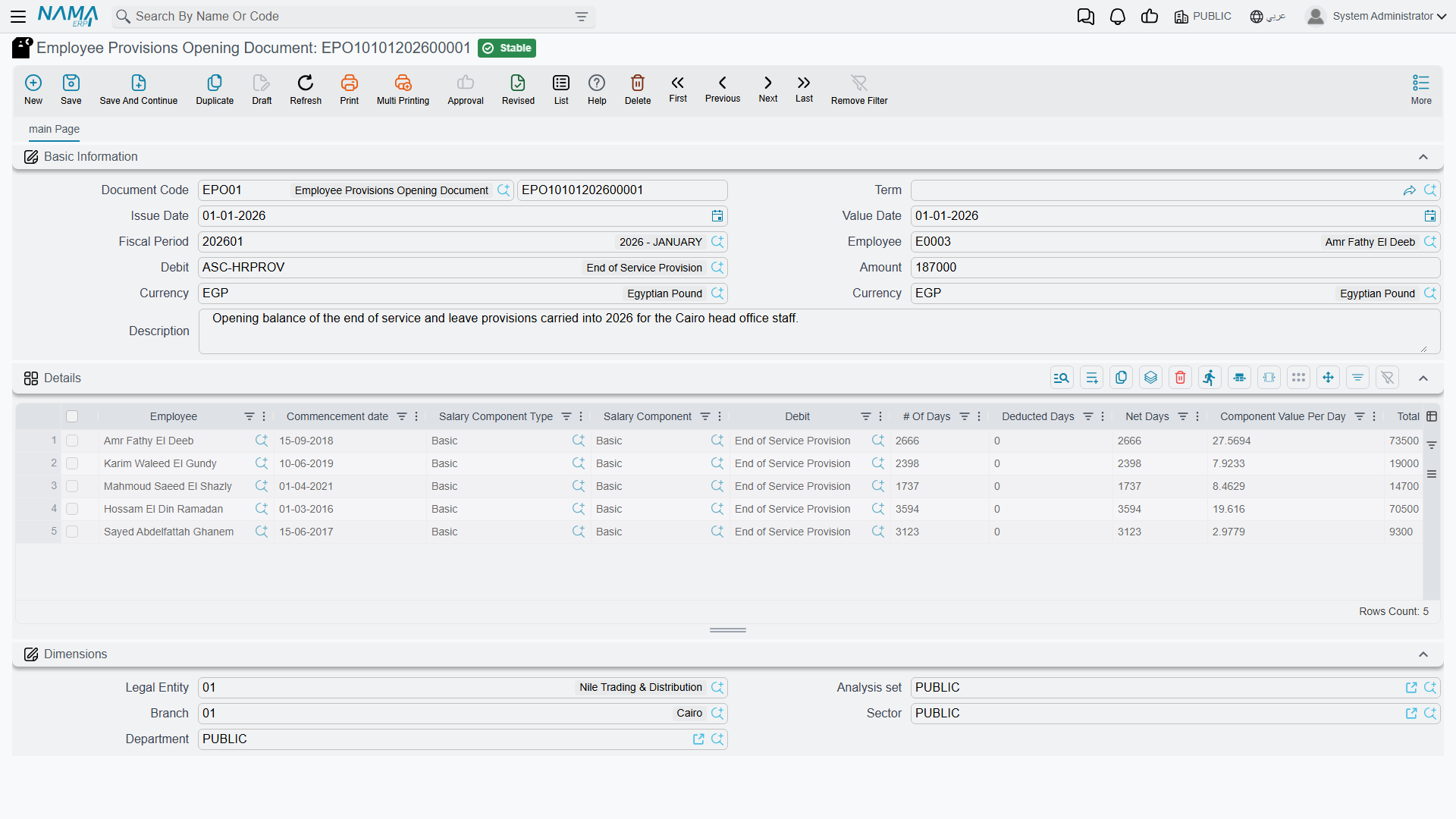
The Employee Provisions Opening Document establishes the starting balance for a person whose service began before you started tracking provisions in Nama. It records how many days of gratuity and vacation value have already been earned, so the first recalculation doesn't try to book the entire historical liability in one period.
| Field (English) | Arabic label | Purpose |
|---|---|---|
| Employee | الموظف | The person this opening balance belongs to. |
| Commencement date | تاريخ المباشرة الفعلية | The service start date the accrual counts from. |
| Value Date | التاريخ الفعلي | The accounting date of the opening entry. |
| Fiscal Period | الفترة | The financial period the opening posts into. |
The Details grid carries one line per provision component, where you enter the historical # Of Days (عدد الايام) already earned, any Deducted Days (عدد الأيام المخصومة), the resulting Net Days (صافي الأيام), the Component Value Per Day (قيمة المفرد لليوم), and the Total Value (الإجمالي). If the employee is genuinely new (started under Nama), you can skip the opening entirely and let the recalculations build the balance from zero.
Step 2 — Recalculate every period
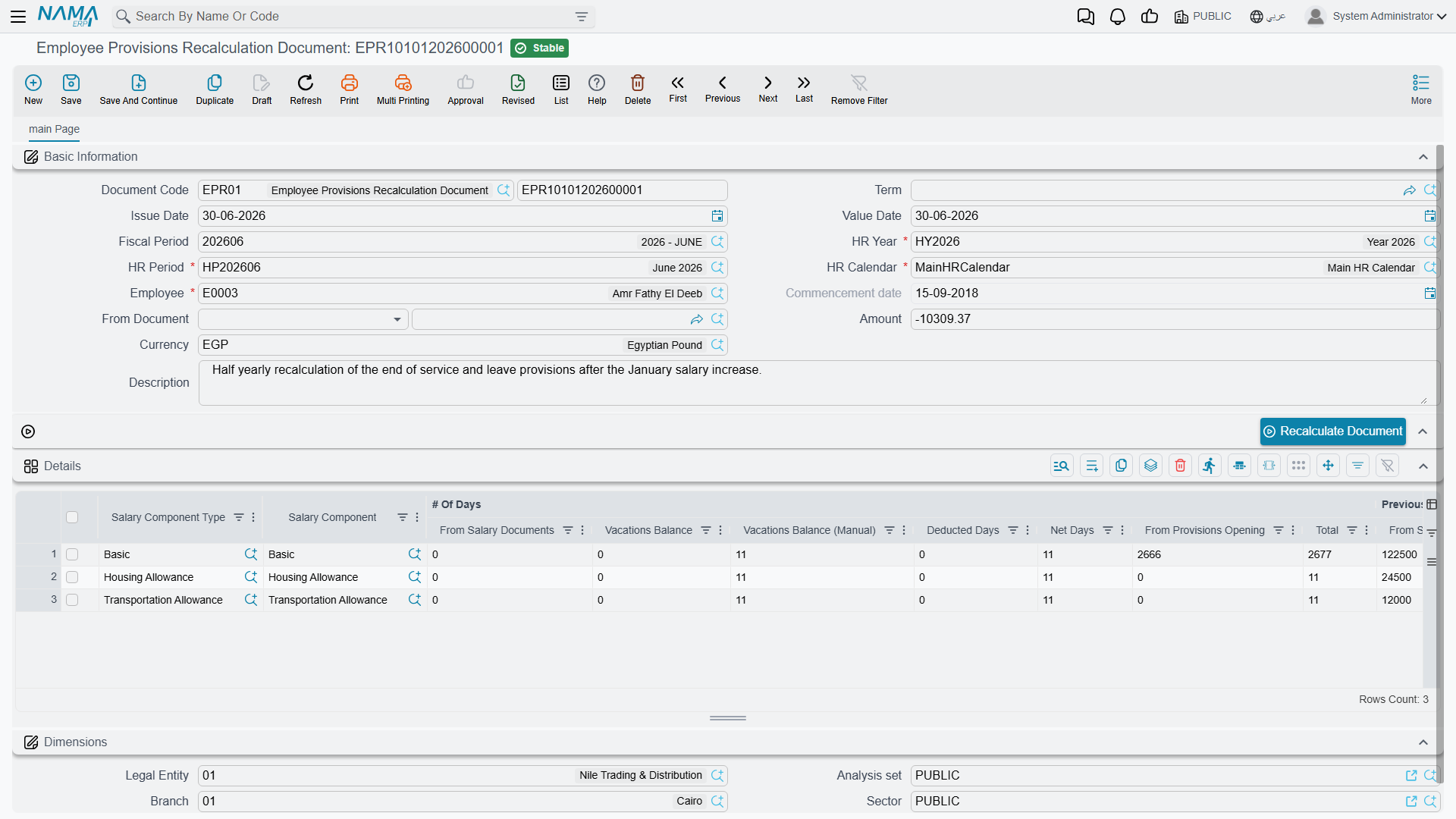
The Employee Provisions Recalculation Document is the workhorse. It is issued for one employee and one HR period at a time, and each run does two things: it works out the total provision the employee has earned to date, and it posts the difference between that figure and everything already accrued — the adjustment — so the accrued balance catches up to reality.
| Field (English) | Arabic label | Purpose |
|---|---|---|
| Employee | الموظف | Who is being recalculated. |
| HR Year / HR Period | سنة الرواتب / فترة الرواتب | The payroll period this accrual belongs to. |
| HR Calendar | تقويم الرواتب | The calendar the period is read from. |
| Commencement date | تاريخ المباشرة الفعلية | Service start date driving the day count. |
| From Document | بناءا على | Links back to the opening (or a prior recalc) it builds on. |
| Amount | المبلغ | The total adjustment this document posts. |
Press Recalculate Document and Nama fills the Details grid — one line per provision component. The columns walk you through the arithmetic, grouped under # Of Days, Previous Periods Total, and the final adjustment:
| Column (English) | Arabic label | Meaning |
|---|---|---|
| # Of Days · Total | عدد الأيام · الإجمالي | Total service days now counted for this component. |
| # Of Days · From Provisions Opening | عدد الأيام · من إفتتاح مخصصات | Days carried in from the opening document. |
| Current Day Value | قيمة اليوم الحالية | What one day of this provision is worth today. |
| Current Total | الإجمالي الحالي | The full provision earned to date (day value × net days). |
| Previous Adjustment Total | إجمالي التسويات السابقة | Everything accrued in earlier recalculations. |
| Adjustment | التسوية | Current Total − Previous Adjustment Total — what this run posts. |
A worked example
Take an employee whose end-of-service gratuity provision is worth 50 per day of service.
- Period 1. After the recalc, 100 net days of service have accrued. Current Total = 50 × 100 = 5,000. Nothing was accrued before, so Previous Adjustment Total = 0 and the Adjustment = 5,000. The document posts 5,000.
- Period 2. Another period passes; net days rise to 120. Current Total = 50 × 120 = 6,000. Previous Adjustment Total is now 5,000, so the Adjustment = 6,000 − 5,000 = 1,000. This run posts only the incremental 1,000 — never the whole 6,000 again.
The same logic runs in parallel for the unused-vacation provision: if the employee's daily wage is 200 and they hold a 10-day balance, Current Total = 2,000; had 1,600 been accrued already, this period's adjustment is 400.
Runs must happen in order — and a settlement resets the clock
Recalculation is strictly sequential: a period can only be recalculated after the ones before it, because each run needs the previous accrued total to compute its adjustment. Nama refuses to process a recalc (or a dues liquidation) that would run out of order. Crucially, once a dues liquidation is committed, accrual restarts — the settlement has paid out the accumulated provision, so the next accrual cycle begins fresh from the day after. See Dues Liquidation.
How it's processed / what it posts
Saving a recalculation is instant; the ledger effect is raised as a background business request (طلب أعمال) with its own processing status (حالة المعالجة), retryable from the Business Requests view if it fails.
What it posts is an accrual adjustment, not a full re-booking. For every detail line, Nama takes that line's Adjustment value and creates a matching debit and credit using the debit/credit account lines defined on the salary component — specifically the account lines marked to be used with automatic adjustment. In accounting terms the period's accrual debits the end-of-service (or vacation) expense and credits the corresponding provision-liability account, each for the adjustment amount. Because the figure posted is the difference from the previous total, a period where the earned provision happens to fall can post a negative adjustment, releasing part of the liability instead of adding to it. If the document term is configured to run without an accounting effect, the recalc still tracks the numbers but posts nothing to the ledger.
Recalculating many employees at once
Running one document per employee every period does not scale, so the Aggregated Employee Provisions Recalculation Document (سند إعادة احتساب مخصصات موظف مجمع) is a batch factory. You give it an HR period and an employee range — from/to employee, department, job position, branch, sector, nationality and more — press Collect Employees, and Nama lists every matching employee. On commit it spawns one individual recalculation document per employee, each posting its own adjustment. As with all aggregated documents, you manage the batch, not the generated singles — see HR Requests, Documents & Aggregated Documents.
Actions on this screen
On the Employee Provisions Recalculation Document:
- Recalculate Document — recomputes the Details grid from the employee, period and dates currently on screen (step 2 above). It does not need the document saved, so you can change the period and press it again to see the new figures before saving.
On the Aggregated Employee Provisions Recalculation Document:
- Collect Employees — adds a line for every employee who matches the employee range and the document's company and dimensions and had started work by the end of the chosen HR period. The HR Period must be filled first. Employees who already have a recalculation document for that period — even a draft — are left out, and employees already on the grid are not added twice.
The Employee Provisions Opening Document has no buttons of its own.
Messages you may see
| Message | Why | What to do |
|---|---|---|
| Employee {0} has an Employee Provisions Recalculation Document {1} on date {2} which is after current value date {3} — «الموظف {0} له سند إعادة إحتساب مخصصات موظف {1} بتاريخ {2} و هو بعد التاريخ الفعلى للمستند الحالي {3}» | A later recalculation already exists for this employee, so recalculating an earlier period again would leave the accrual running from a figure the later document has already superseded. | Work forward from the latest recalculation, or cancel the later document first and redo the chain in date order. |
| Salary Component {0} has no Debit Lines used in Auto Adjustment — «مفرد الراتب {0} لا يوجد سطور مدين تستخدم في التصفية الاّليه» | The provision line's salary component has no debit account line marked Use With Auto Adjustment that matches this employee, so the accrual has no expense side to post to. | On the salary component, tick Use With Auto Adjustment on the debit account line that should carry the provision — and check the line's own employee criteria actually covers this employee. |
| Salary Component {0} has no Credit Lines used in Auto Adjustment — «مفرد الراتب {0} لا يوجد سطور دائن تستخدم في التصفية الاّليه» | The same on the credit side: no liability account line is flagged for auto adjustment. | Flag the credit account line that holds the provision liability. |
| Salary Component {0} for the Employee {1} Repeated — «مفرد المكون {0} للموظف {1} مكرر» | The opening document lists the same employee and salary component twice. | Delete the duplicate line; one opening figure per employee per component. |
| Found another value for the Salary Component {0} for the Employee {1} in Document {2} — «يوجد قيمة لمفرد الراتب {0} للموظف {1} في المستند {2}» | Another provisions opening document already carries an opening figure for that employee and component — an opening balance is set once. | Amend the document named in the message instead of opening a second one; use a recalculation document to move the figure afterwards. |
Related pages
- Salary Components — where the liquidation flags and provision accounts are configured.
- Dues Liquidation — the final settlement that pays out the accrued provision and resets the accrual.
- Firing & Termination — how a termination triggers the settlement.