
Employee Health Insurance
In the Gulf, private health insurance is not optional paperwork — it is a government-mandated benefit, and covering the wrong category, missing a spouse, or letting a policy lapse creates real liability. Nama's Health Insurance area follows one employee's insurance from the day the company picks a policy to the day that employee is finally removed from it: set up the policy the insurer offered, enrol employees (and their families) onto it, submit medical claims against it, upgrade someone to a richer coverage tier mid-year, credit a batch of employees to a new company, and — when someone leaves — take them off cleanly.
Gulf-specific
Every document on this page needs the Gulf health-insurance licence (Gulf Health Insurance). It sits in its own Human Resources → Health Insurance menu group, separate from the government-relations procedures (residency, work licence) even though both are Gulf-only and both read/write the same employee master file.
Before anyone is enrolled: the policy and the offer
Two different "policy" concepts show up in this area, and they are easy to confuse because both translate loosely as "insurance policy":
- Insurance Offer (عرض تأمين مقدم من شركة) is the pricing sheet a specific insurance company quoted your organisation — a document you fill in yourself, line by line, once a year or whenever you switch insurers.
- Social Insurance Policy (سياسة التأمينات الاجتماعية) is an unrelated, much simpler master file used for the government social-insurance contribution brackets on an employee's HR record (fixed and variable percentages, by date range, capped at a minimum/maximum) — it lives under Payroll licensing and has nothing to do with the private health-insurance offer described below. It is only grouped in this same menu because Nama files health-related setup together.
Filling in the Insurance Offer
Open Human Resources → Health Insurance → Health Insurance Offer and pick a Type — health insurance offers use Healthy, while the same screen family is reused elsewhere in Nama for fire, car and other insurance types, so always confirm Healthy is selected. Set the Insurance Period (From Date / To Date) the quote covers, and note the insurer's own reference in Policy — a free-text field, not a link to the Social Insurance Policy master file above.
The offer's Details grid is the actual price list: one line per combination of Insurance Category (the tier — VIP Plus, VIP, A, AA, B, B Plus, C, CC), who it insures (Insured From — Employees, Wifes, Husbands, Childrens, and so on down to named children Child 1–5), an age bracket (Age | From/To), and Gender. Each line carries its own Value, the resulting Total Cost, and a Coverage cap (percentage and/or maximum value) — the portion the insurer pays versus what falls back on the company or employee.
| Field (English) | Arabic label | Purpose |
|---|---|---|
| Type | النوع | Insurance line of business — choose Healthy for this area. |
| Policy | الوثيقة | The insurer's own reference number (free text). |
| Insurance Period | فترة التأمين | The from/to dates this quote covers. |
| Insurance Category | فئة التأمين | The coverage tier (VIP Plus, VIP, A, AA, B, B Plus, C, CC). |
| Insured From | المؤمن عليهم من | Who this price line covers — employee, spouse, child, etc. |
| Coverage | التحمل | The percentage and/or maximum value the insurer covers on this line. |
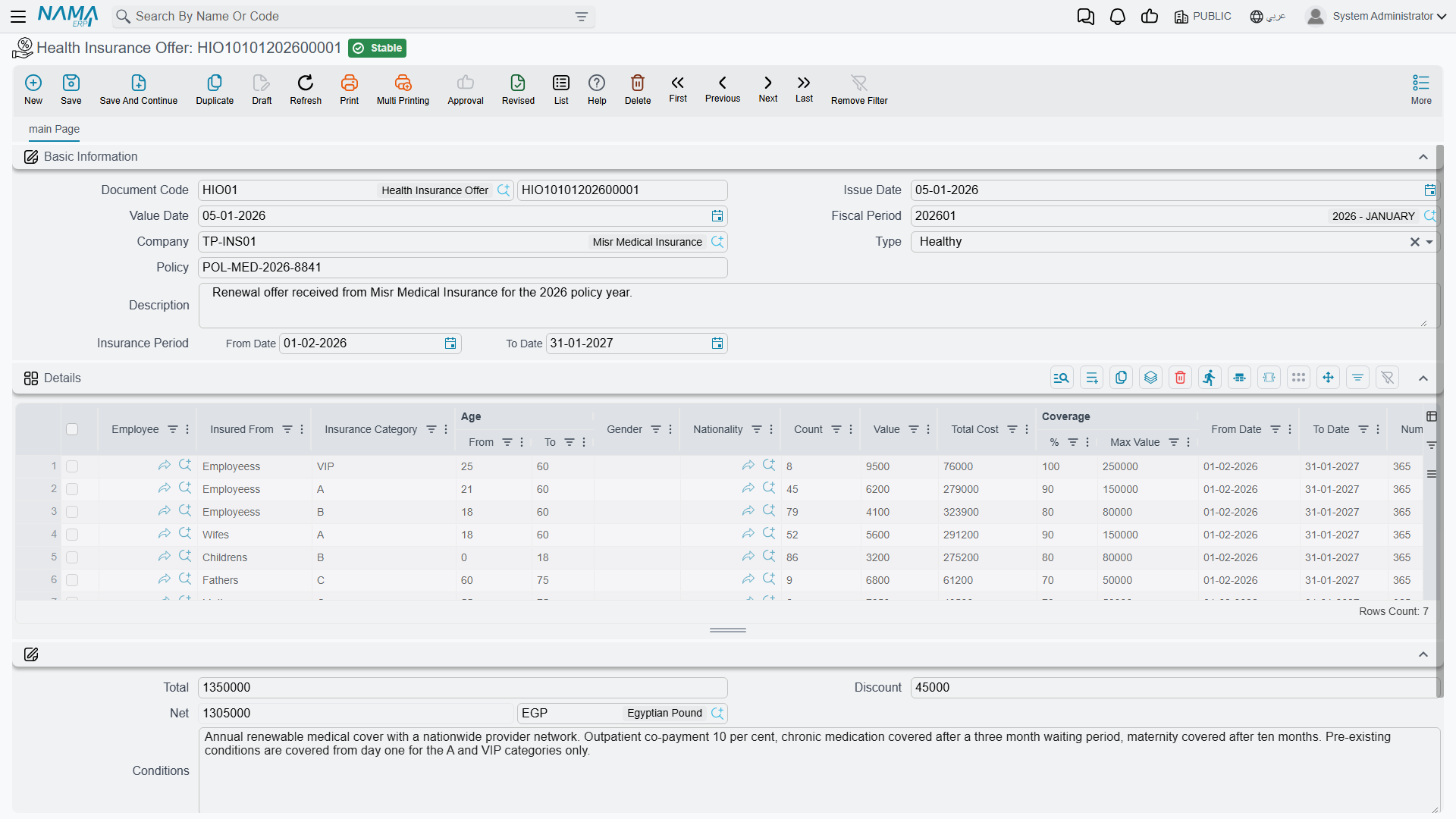
Once an offer is agreed, everything else on this page — enrolment, claims, upgrades, credence — points back to it through an Insurance Offer field, so its category list and coverage rules become the menu every later document picks from.
Collecting employees onto an offer request
Before committing to an offer, HR often needs an accurate headcount by category. The Health Insurance Offer Request (طلب عروض تأمين) exists for exactly that: set a From/To range on employee, department, job position, branch, nationality, and so on, press collect Employees (تجميع الموظفين), and Nama pulls in every matching employee as a line — a quick way to size a quote before signing it, without yet committing anyone to a real policy.
Adding an employee to the insurance
With an offer in hand, Employee Health Insurance (سند إضافة موظف للتأمين) is the document that actually puts people on it. Open it from Human Resources → Health Insurance → Employee Health Insurance, pick the Company and the Insurance Offer, and set a Start Date — the day coverage begins for everyone added on this document.
The Details grid carries one line per person insured — not necessarily one per employee, because a spouse or child is its own line with its own Relation Type (Himself, Wife, Husband, Son, Daughter, Father, Mother, and further categories down to Second Degree or Friend). Each line copies in the person's Insurance Category, Birth Date, Age, Nationality, Gender, Residency Id, and works out Insurance Cost Per Day / Insurance Cost Per Month, together with the Coverage and Employee Due split — how much of the cost the company absorbs versus what is deducted from the employee.
| Field (English) | Arabic label | Purpose |
|---|---|---|
| Company | شركة | The insurer whose offer is being applied. |
| Insurance Offer | البوليصة | The priced offer this enrolment draws its categories and rates from. |
| Start Date | تاريخ البداية | The day coverage begins for the people on this document. |
| Add Attendants Only | إضافة مرافقين فقط | Limit this document to adding family members onto an employee already insured, without re-adding the employee. |
| Relation Type | نوع الربط | Who this line is, relative to the employee — self, spouse, child, parent, etc. |
| Insurance Cost Per Month | تكلفة التأمين الشهرية | The line's monthly premium, calculated from the offer. |
| Employee Due | المستحق من الموظف | The percentage/value of the cost deducted from the employee rather than borne by the company. |
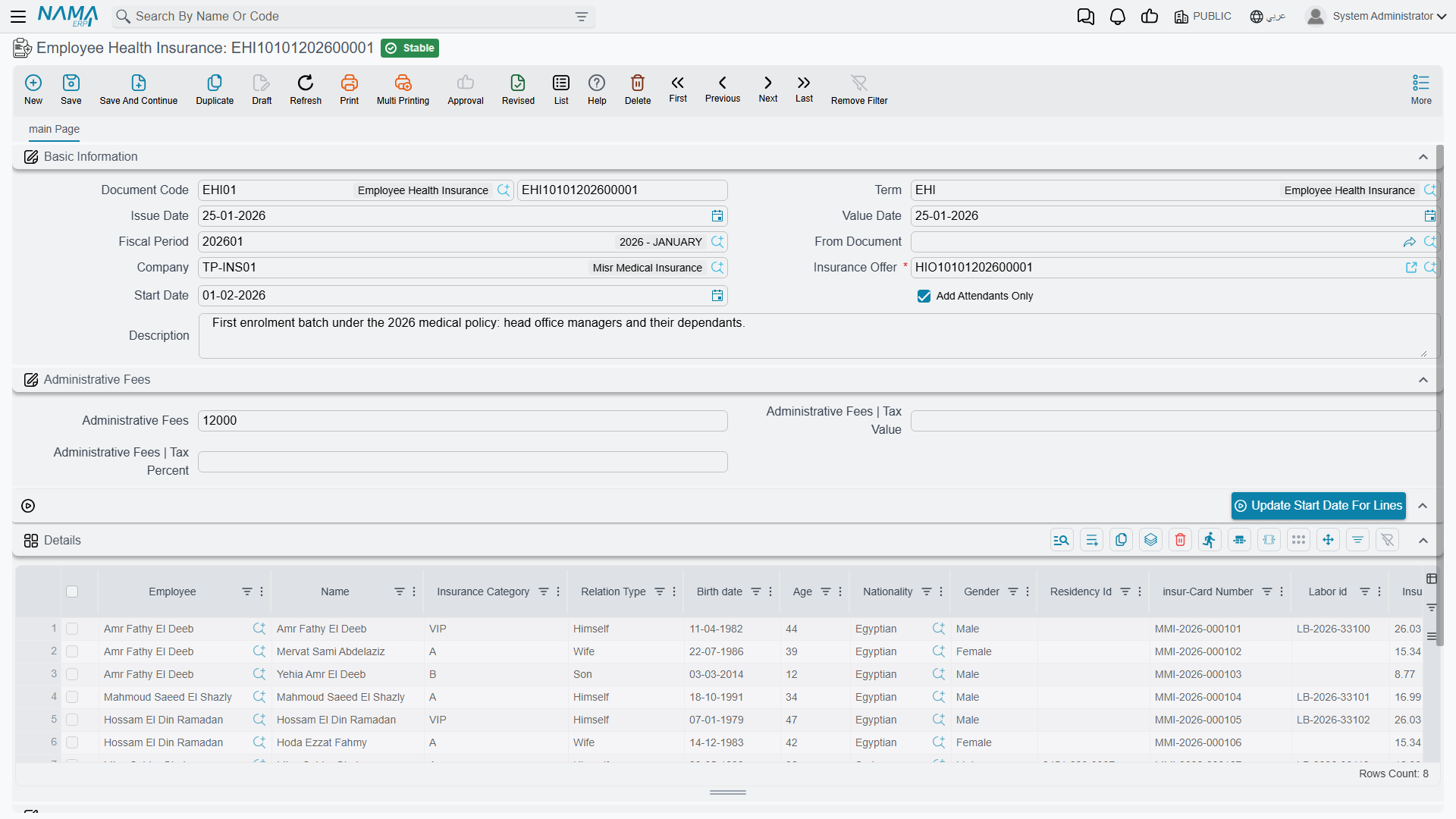
Separately, Administrative Fees (with their own tax percentage/value) capture any flat handling charge the insurer bills per enrolment, on top of the per-person premiums in the grid — the Update Start Date For Lines action lets you push a single corrected start date down to every line at once rather than editing them one by one.
Request first, if your organisation wants approval
Exactly like every other HR area, an Employee Health Insurance Request (طلب إضافة موظف للتأمين) carries the identical Company/Offer/Details shape and goes through the standard Request → Document accept/generate cycle before the real enrolment document is created — use it where enrolling someone needs a manager's sign-off first, and skip straight to the document where it does not.
Claiming a medical expense
Once an employee is insured, Health Insurance Claim Document (سند تعويض طبي) is how a medical bill actually gets reimbursed. Open it from Human Resources → Health Insurance → Health Insurance Claim Document, pick the Employee, and Nama pulls in their current Insurance Offer, Repaid Percentage, and the Health Insurance block (card Number, Issue date, End at date) straight from their enrolment — so the claim is always evaluated against the coverage that was actually active for them.
The Details grid holds one line per invoice: Invoice Number, Service Description, Invoice Amount, the line's own Repaid Percentage, the resulting Repaid Value, and up to two scanned Attachment slots for the receipt or medical report. The document totals both Claim Total Amount (what was billed across every line) and Repaid Total Amount (what the insurer or company actually reimburses).
| Field (English) | Arabic label | Purpose |
|---|---|---|
| Employee | الموظف | The insured employee the claim is filed for. |
| Insurance Offer | البوليصة | The offer this employee is enrolled under, copied in automatically. |
| Repaid Percentage | نسبة التعويض | The share of the claim that gets reimbursed. |
| Invoice Amount | مبلغ الفاتورة | The billed amount on one medical invoice line. |
| Repaid Value | مبلغ التعويض | The calculated reimbursement for that line. |
| Claim Total Amount | إجمالى مبلغ المطالبة | The sum of every invoice line on the document. |
| Repaid Total Amount | إجمالى مبلغ التعويض | The sum actually reimbursed across every line. |
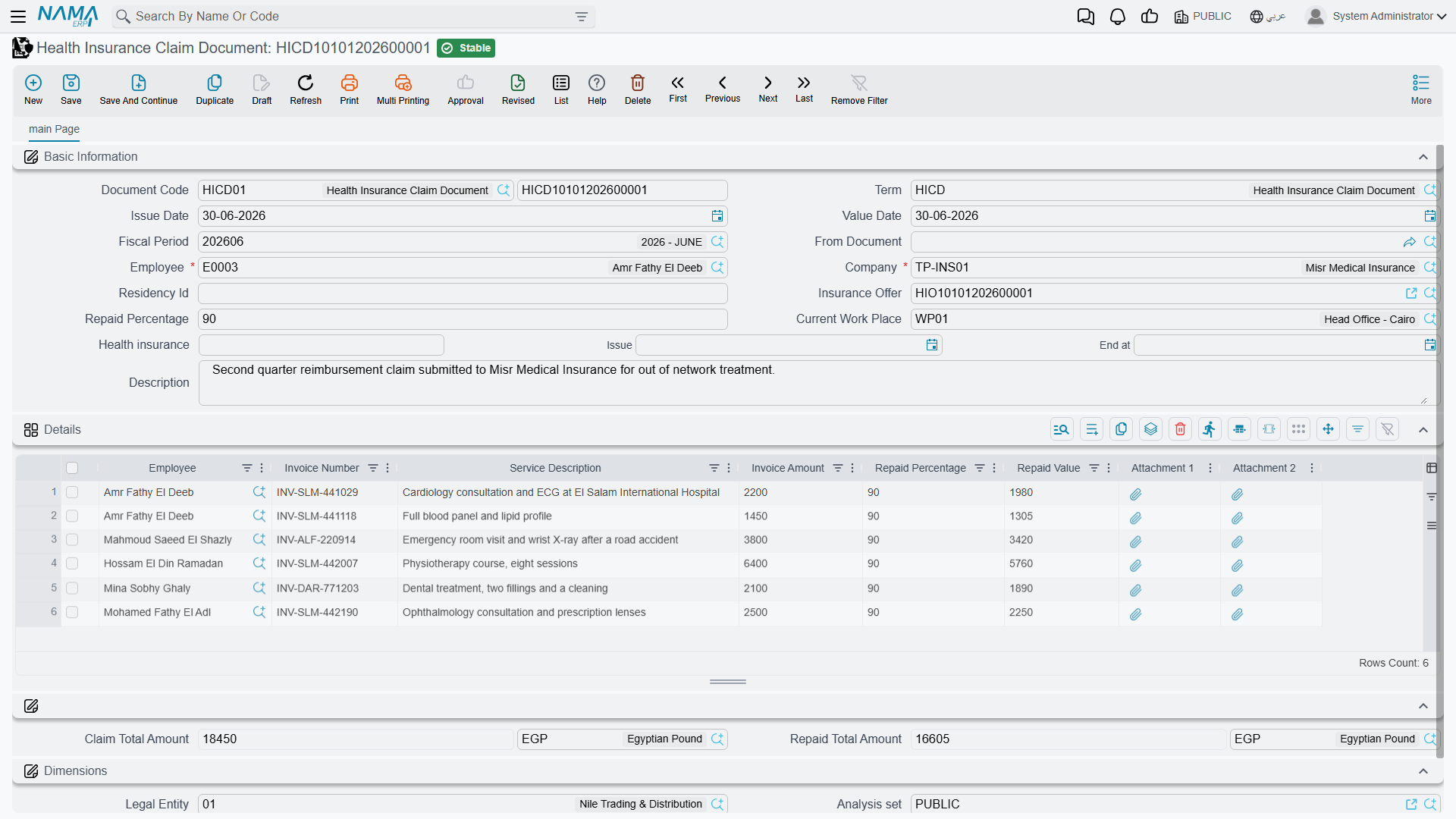
A Health Insurance Claim Request (مطالبة تعويض طبي) mirrors the same Employee/Invoice/Attachment shape as an approval step before the claim document — the same accept-then-generate pattern used everywhere else in HR.
Upgrading a category mid-term
When an employee (or a family member on their policy) needs richer coverage than their current category offers — moving from B to A, say — Health Insurance Upgrade (سند ترقية تأمين) handles the switch without waiting for the next renewal. Each line in its Details grid names the Insurance Category the person is leaving and the New Insurance Category they are moving to, along with Previous Insurance Category Days and Previous Insurance Category Value — the unused portion of what was already paid for the old tier — and a Refund Value (with its own tax percentage/value) that credits that unused portion back against the cost of the new category.
| Field (English) | Arabic label | Purpose |
|---|---|---|
| Insurance Category | فئة التأمين | The tier the person currently holds. |
| New Insurance Category | الفئه المراد الترقية إليها | The tier they are upgrading to. |
| Previous Insurance Category Value | قيمة تأمين الفئة السابقة | What was already paid for the old tier's remaining period. |
| Refund Value | القيمة المستردة | The unused value credited back against the new category's cost. |
An Administrative Fees block and an Update Start Date For Lines action work exactly as they do on the enrolment document, and a matching Health Insurance Upgrade Request (طلب ترقية تأمين) offers the same approval step before the upgrade is committed.
Moving a batch of employees to a new insurer: Credence
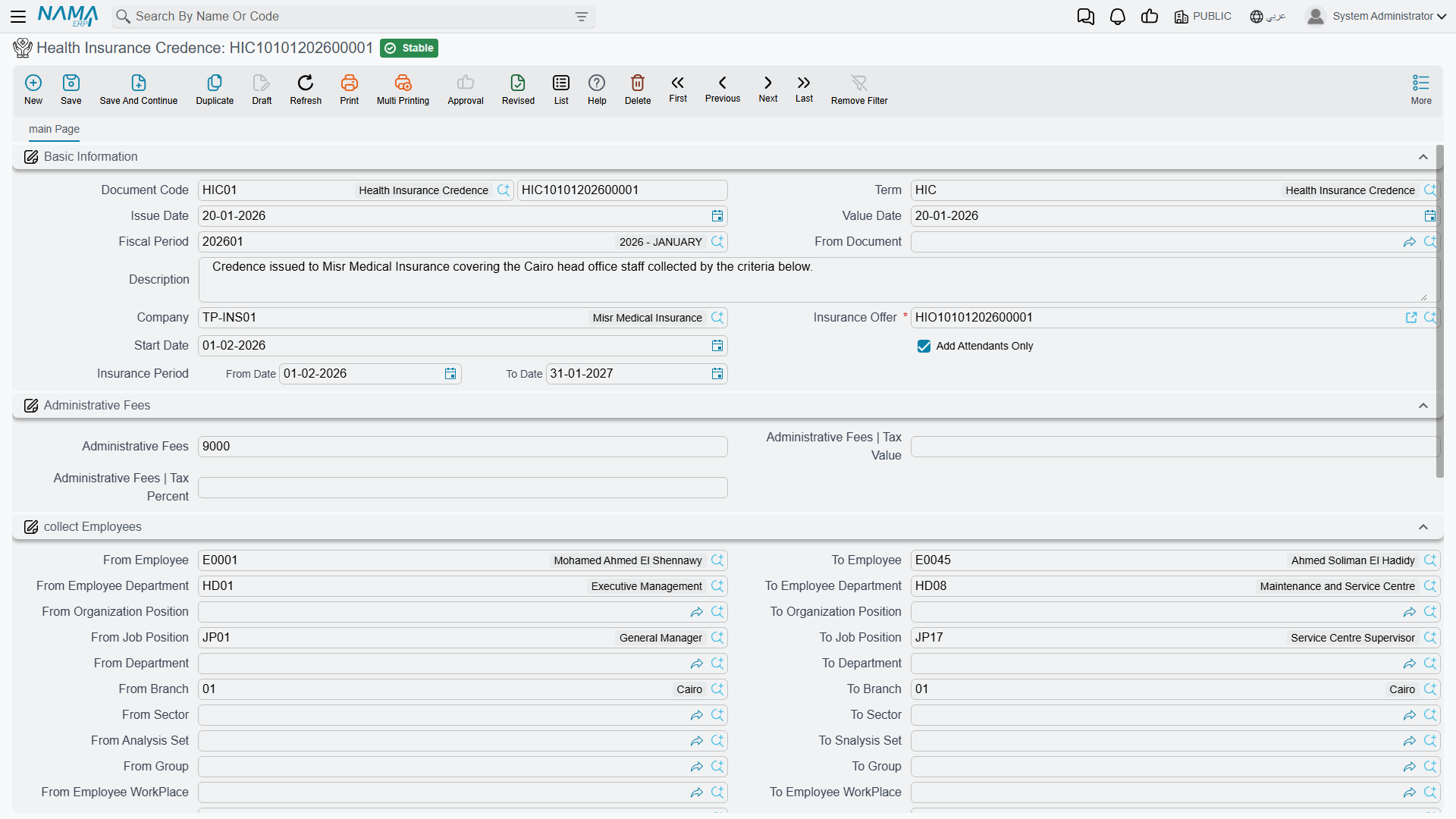
Health Insurance Credence (سند تعميد شركة تأمين) is the batch tool for re-assigning a whole group of already-insured employees to a new insurance offer at once — typically when the company switches insurers and needs every current policy-holder re-registered under the new company's offer in a single operation, rather than one Employee Health Insurance document per person.
Like the Offer Request above, it can build its employee list for you: fill in the Collect Employees range (department, job/organization position, branch, sector, nationality — plus a From/To Health Insurance Company filter unique to this screen, letting you target specifically the people currently insured with the insurer you are leaving) and press collect Employees (تجميع الموظفين). Every matching employee is added as a line with the same category/relation/cost detail described for enrolment, ready to be committed under the new Insurance Offer in one save.
Taking someone off the insurance
When an employee (or a dependant) no longer needs coverage — they left the company, a child aged out, a dependant relation ended — Employee Health Insurance Delete (سند حذف تأمين موظف) removes them. It mirrors the enrolment document field for field (Company, Insurance Offer, Start Date, Administrative Fees, the same Details grid of employee/relation/category lines) but its effect runs the other way: it takes the listed people off the policy from the given date rather than adding them. An Employee Health Insurance Delete Request (طلب حذف تأمين موظف) again offers the same accept-then-generate approval step first, for organisations that require sign-off before someone is dropped from coverage.
Actions on this screen
The insurance documents carry only two buttons between them, and both save typing rather than doing anything you could not do by hand.
On Employee Health Insurance, Health Insurance Upgrade, Employee Health Insurance Delete, Health Insurance Credence and the three matching requests:
- Update Start Date For Lines — copies the header Start Date onto every line of the Details grid. With the header date empty it stops with Start Date Is Empty — «تاريخ البداية فارغ».
On the Health Insurance Offer Request and Health Insurance Credence:
- Collect Employees — replaces the Details grid with one line per employee who is in the Working state and matches the Collect Employees range, each with their insured family members as separate lines. When an Insurance Offer is chosen, each line's category and cost are taken from it. Tick Add Attendants Only to collect the family members without the employees themselves.
The Health Insurance Offer, the Health Insurance Claim Document and the claim request have no buttons of their own.
How it's processed
Every document on this page — enrolment, upgrade, credence and deletion — shares the same underlying accounting logic and posts through the term's configured sides: a covering debit/credit pair for the base premium, a matching tax debit/credit pair, an employee tax pair for any tax portion recovered from the employee, and — where Administrative Fees were filled in — their own Administrative Fees Value and Administrative Fees Tax Value debit/credit pairs. The Health Insurance Upgrade additionally posts a Previous Insurance Category debit/credit pair and a Refund Tax pair for the value credited back from the old tier. All of it runs as a background business request with a processing status, exactly like postings elsewhere in Nama — retry a failed one from the Business Requests view rather than re-saving the document.
The Health Insurance Claim Document posts separately and more simply: a single Credit 2 / Debit 2 pair sized to the claim's Repaid Total Amount, moving the reimbursed medical cost between the accounts configured on the claim document's own term.
Messages you may see
| Message | Why | What to do |
|---|---|---|
| Employee {0} is repeated in line {1} — «الموظف {0} مكرر فى السطر رقم {1}» | The same employee appears twice in the details grid under the same name — one enrolment line per person (attendants are separate lines with their own names). | Delete the duplicate line, or correct the name if the second line is meant to be a dependant. |
| The employee {0} Has valid Health Insurance — «الموظف {0} لم ينتهى تأمينه بعد» | The employee's current health-insurance cover has not expired yet at this document's value date, so enrolling them again would leave two overlapping covers. | Wait until the current cover ends, remove the employee from the existing policy first, or use the upgrade document if the aim is a better category. |
| Cant upgrade To Low or same Category — «لايمكن الترقية إلى نفس الفئة او فئة اقل» | On a Health Insurance Upgrade line the New Category is the same as, or lower than, the employee's present one. The ladder runs B, B+, A, AA, VIP, VIP+. | Pick a higher category, or drop the line — moving someone down is done by removing them and re-enrolling, not by an upgrade. |
Related pages
- Employee HR Information — the employee master file these documents read from and, for residency/passport dates, cross-check against.
- HR Requests, Documents & Aggregated Documents — the general Request → Document approval pattern every "Req" screen on this page follows.