
Entity Type Lists
Settings in Nama ERP are usually written against one screen. A required field belongs to the Sales Invoice; a security line grants rights on the Employee file; a validator watches Stock Issue. Sooner or later you want the same setting on all the sales documents, or on the twelve screens the warehouse team uses, and repeating it twelve times is both tedious and the thing that drifts.
An Entity Type List is the answer: a named list of screens, saved once, that a setting can point at instead of naming a single screen. You will meet it under a handful of labels — Entity Type List, Apply Also To, For Type List, Entity List — and they all take the same record. Rename the record's contents and every setting that borrowed it follows.
You will find it under Administration → Display Customization → EntityType List.
The screen
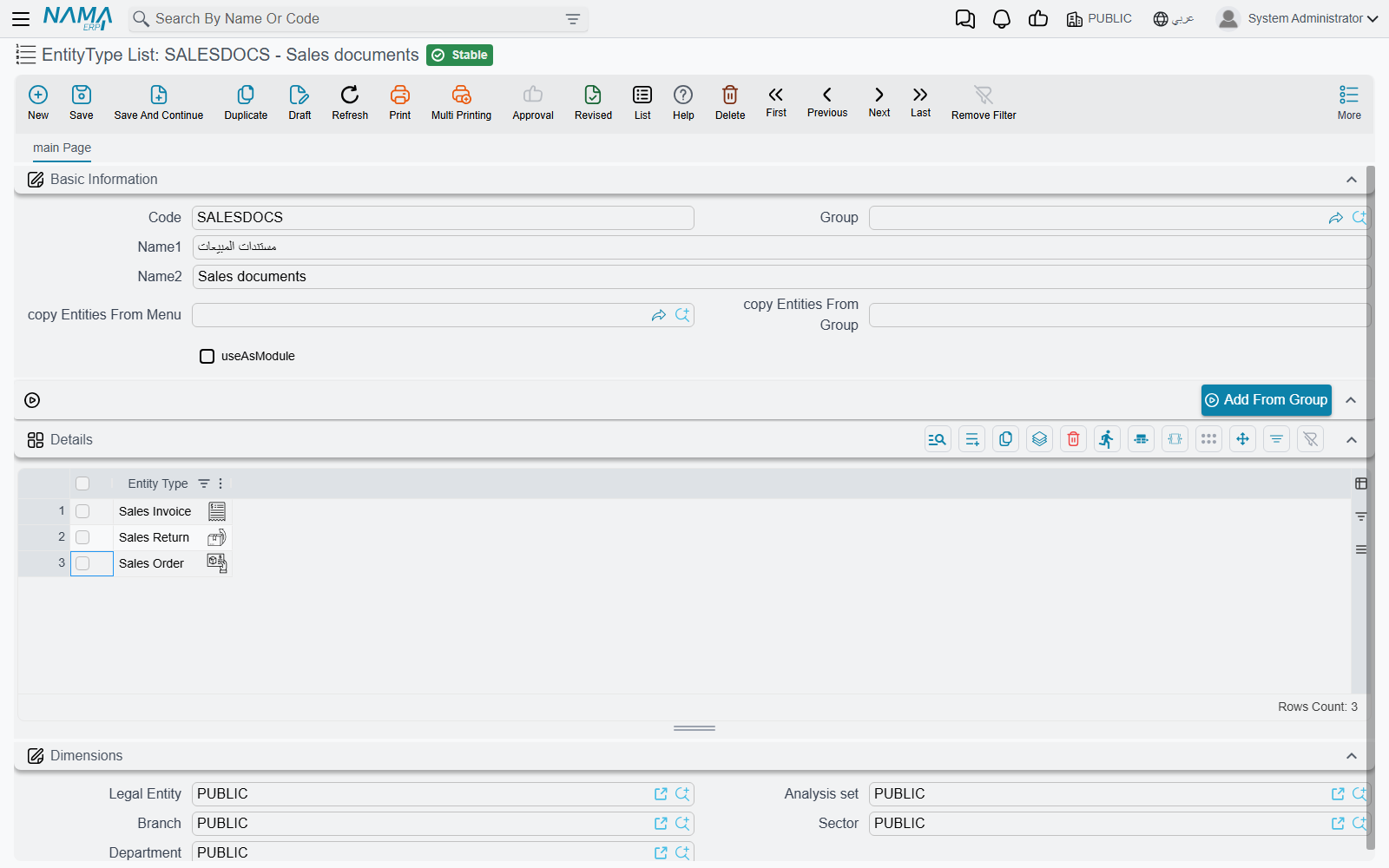
A code, a name, and a grid with one column: Entity Type, one row per screen. That is the whole record — the rest of the screen is there to spare you typing.
| Field | What it does |
|---|---|
| copy Entities From Menu and copy Entities From Group | A menu and one of its groups. They are not saved as part of the rule; they are the input to the button below. |
| Add From Group | Reads that menu group — and the groups under it — and adds every screen it opens to the grid, skipping any already there. |
| useAsModule | Turns the list into a filter group named Module on the screens described below. |
Building a list from a menu group, not by hand
Add From Group is how a list of "everything in Sales → Documents" gets built in one click: pick the menu in copy Entities From Menu, the group in copy Entities From Group, then press the button. With either box empty it answers "Please select group and menu". You can press it more than once, with a different group each time, and keep adding to the same list.
The same screen may not be listed twice: save with a repeated row and the grid answers "Repeated EntityType" on the offending line.
The Use As Module tick shows its field id in English
The checkbox described here as useAsModule has no English label of its own, so the English screen renders the field id itself — useAsModule. In Arabic it reads «تستعمل كموديول». It is the last field in the top group, beside the two copy-from-menu boxes.
What Use As Module does
Some system screens list records of every kind at once — pending tasks, version history, the notification inbox, the employee approvals screen. A list of entity types with useAsModule ticked becomes a filter group called Module on exactly those screens, with one button per list, so a user can narrow a mixed list down to "the documents my team cares about" in a click. The list's own name is the button's name.
The buttons are rebuilt when the list is saved or deleted, so a change reaches the screens at once. Leave the tick off — the normal case — and the list is only ever a target for other settings.
Where a list gets used
The label differs from screen to screen, but the intent is always "apply this to more than one screen". The most common places support meets it:
| Screen | The field |
|---|---|
| Security profiles | Entity Type List on the permission lines — one line granting the same rights over a family of screens |
| Approvals | Apply Also To — one approval definition covering several document types |
| Notifications | Apply Also To, likewise |
| Criteria-Based Validation | Apply Also To — one validator over a whole family, alongside or instead of Target Type |
| Required Fields | The target-entities column, making one rule cover several screens |
| Screen Modifier | For Type List — one layout change across a set of screens |
| Fields and Entities Settings | The entity-list column on most of its grids — field appearance, disabled fields, automatic coding and the rest |
| Custom list views | For Type List, so one saved view serves several screens |
| Entity Flows | The entity-type list a flow runs on |
See also
- Criteria Definitions — the other shared building block: a saved filter, rather than a saved set of screens
- The Menu — where the menu and the groups that Add From Group reads come from