
Executive Budgets
The estimated budget is what the estimating team thinks the job will cost. The executive budget is the number the business has agreed to spend. Same shape, different authority — and one real functional difference, which is that the executive budget is the only record in the module that can generate customer submittals: the per-item approvals a client or consultant signs before you are allowed to buy.
Carrying on with Tower A for Al-Fanar Development: contract PC-2026-001 at 230,000, estimated budget CEB-EST-001 at 180,000, and now the approved version of that same plan, CEB-EXE-001, at 185,000.
You will find it at Contracting > Master Files > Contracting Executive Budget, under licence contracting.
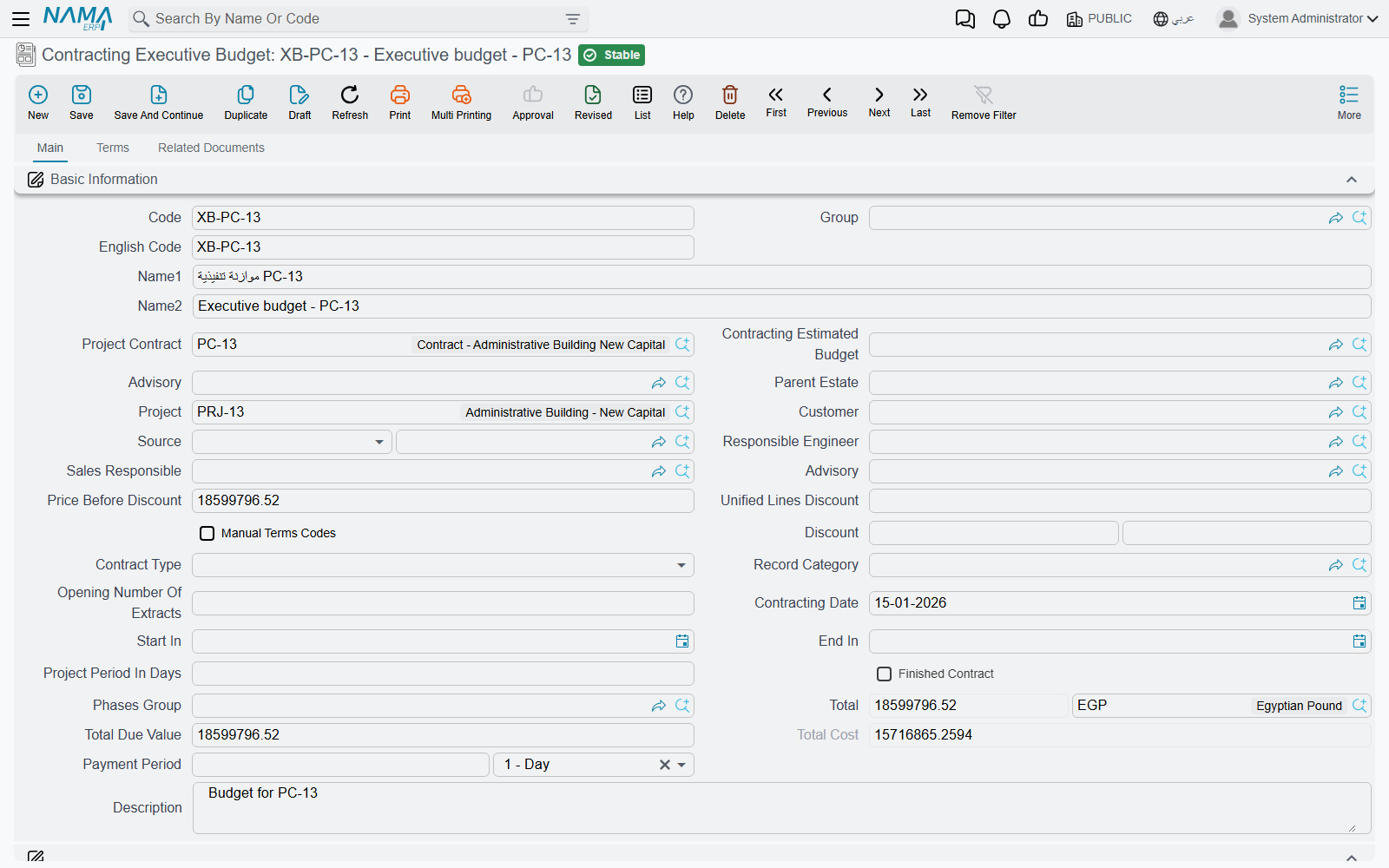
What it is, and what it is not
Everything said about the estimated budget's nature applies here word for word, and it is worth repeating because it is the part people get wrong:
- It is a master file, not a document. No document book, no value date, no fiscal period, no document term (توجيه) — and therefore no accounting effect and no stock movement, ever. Committing an executive budget moves no money.
- It lives under the Master Files menu group, not under a documents group, even though it behaves like a plan you revise over time.
- Neither budget creates the other. The two are linked by a mutual reference field plus a pair of symmetric copy buttons, and that is the whole relationship. There is no approval step that promotes an estimated budget into an executive one.
- A project contract can exist with neither budget, and an executive budget can exist with no contract. The Project Contract (عقد المشروع) field is optional on both sides.
The practical order of work
Price the job with an offer or an assay → sign the project contract → create the estimated budget and point it at the contract → create the executive budget, point it at the contract and at the estimated budget, then press Collect Estimated Budget Terms to bring the structure across and refine the numbers. None of those steps is enforced; this is a convention, not a workflow.
The header — one option the estimated budget does not have
The header is the estimated budget's header: project contract, the counterpart budget link, project, customer, the consultant, parent estate, source, contract type, phases group, the dates, the calculated money block, attachments and the Dimensions (المحددات) block.
The addition is on page 2, and it is important:
Do Not Edit Saved Submittals (عدم التعديل في الإعتمادات التي تم إنشاؤها). Tick it and the submittal-generation described below is skipped entirely from then on. It is the switch you use once the client has approved a set of submittals and you do not want a later edit of the budget to touch them.
The Terms page
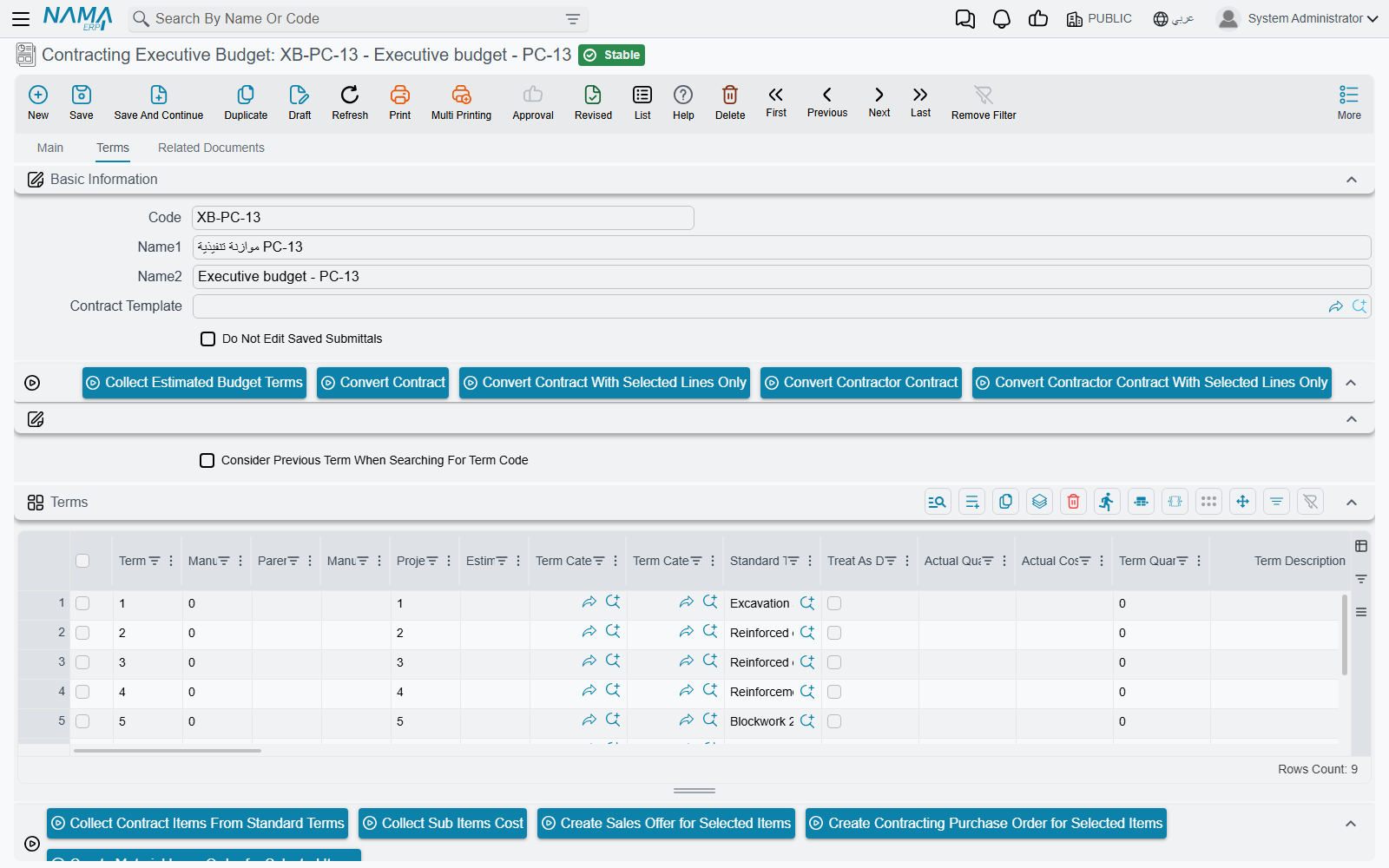
The grid is the bill-of-quantities grid, with the budget-specific columns pointing the other way from the estimated budget's:
| Column | What it does |
|---|---|
| Project Term Code (كود بند المشروع) | the matching term code on the linked project contract; checked on save |
| Estimated Term Code (كود بند الموازنة التقديرية) | the matching term code in the paired estimated budget; checked on save, in both directions |
| Actual Quantity (الكمية الفعلية) / Actual Cost (التكلفة الفعلية) | filled by the system. Every spending document writes a cost record against a term code when it is processed, and those records are summed back onto the matching budget line. This pair is your budget-versus-actual. |
| Quantity | From Execution (الكمية | من حصر الكميات) | filled by a budget quantity survey — physical progress rather than money |
| Permitted Percentage (نسبة السماحية) | how much over-execution this item tolerates; it is what the budget survey's quantity check measures against |
Above the grid: Collect Estimated Budget Terms (تجميع بنود الموازنة التقديرية), the Update Codes / Update Empty Term Codes Only pair, and the four Convert to contract buttons.
Collect Estimated Budget Terms replaces the grid
It clones every term line of the paired estimated budget — prices and costs included — into this grid. It is a copy, not a merge. Press it first, then re-code and refine; do not press it after you have done the refining.
Below the terms grid sit the four cost-analysis grids (Material, Workers, Contractors, Other Expenses) that break a line's unit cost into its components, and a Conditions grid.
Naming an item on a budget line
One column decides whether this budget can drive purchasing at all: Item (الصنف), and next to it Customer Submittal (اعتماد العميل للصنف). Neither appears by default. They show up only when the module setting Show Item And Submittal In Contract And Executive And Estimated Budgets is on — see Contracting Configuration.
That matters because submittal generation, below, only looks at lines that name an item. A budget of pure work items — excavation, blockwork — generates nothing. A budget whose lines name the materials those items consume generates one approval per material.
Actions on this screen
Every button on the budget sits on the Terms page.
- Collect Estimated Budget Terms — replaces the terms grid with a copy of every term line of the paired estimated budget (see the warning above).
- Convert Contract — opens a new, unsaved project contract built from this document's terms and conditions, for you to review and save. The document must be saved first.
- Convert Contract With Selected Lines Only — the same, carrying only the term lines you ticked.
- Convert Contractor Contract and Convert Contractor Contract With Selected Lines Only — the same pair, producing a subcontract instead.
- Update Codes — renumbers every term line from scratch by walking the grid top to bottom (
1,1.1,1.2,2…), following the parent/leaf type of each line. It overwrites codes you typed yourself. - Update Empty Term Codes Only — the safe version: gives a code only to lines that have none, leaving existing codes alone.
Above the cost grids:
- Collect Contract Items From Standard Terms — explodes every term line into its cost ingredients: it reads each line's standard term, scales the term's cost recipe to the line's quantity (allowing for waste and productivity) and routes each row into the Material, Workers, Contractors or Other Expenses grid. It also fills any empty term codes first.
- Collect Sub Items Cost — the reverse: sums those four cost grids by term code and writes the result back onto each term line as its total cost and unit cost.
- Create Sales Offer for Selected Items, Create Contracting Purchase Order for Selected Items and Create Material Issue Order for Selected Items — each opens a new, unsaved contracting offer, miscellaneous contracting order or project material issue in a pop-up, carrying the rows you ticked in the cost grids. With nothing ticked you are asked to select rows.
The tower's executive budget
CEB-EXE-001, paired with CEB-EST-001, linked to contract PC-2026-001. The user pressed Collect Estimated Budget Terms, then re-coded the four cloned lines and revised the numbers upward:
| Term code | Project term code | Estimated term code | Item of work | Quantity | Unit cost | Total cost |
|---|---|---|---|---|---|---|
X-1 | 1.01 | E-1 | Excavation | 1,000 m³ | 37.50 | 37,500 |
X-2 | 2.01 | E-2 | Reinforced concrete | 60 m³ | 760.00 | 45,600 |
X-3 | 3.01 | E-3 | Blockwork | 2,000 m² | 41.00 | 82,000 |
X-4 | 3.02 | E-4 | Plastering | 1,000 m² | 19.90 | 19,900 |
Header total cost 185,000 against the 230,000 contract — an approved gross margin of 45,000, 5,000 tighter than the estimate. On commit the three cross-checks pass: E-1…E-4 exist in the estimated budget, X-1…X-4 exist here, and 1.01, 2.01, 3.01 and 3.02 exist on the contract.
Customer submittals — the one thing only the executive budget does
Many construction contracts oblige the contractor to get the client's or the consultant's written approval of each material before buying it: this brand of steel, at this price, in this quantity. In Nama that approval is a Customer Submittal (اعتماد العميل للصنف), and the executive budget can create them for you rather than making somebody type one per material.
It works like this, at the moment the budget is committed:
- If Do Not Edit Saved Submittals is ticked, nothing happens at all.
- Otherwise, generation runs only if the module setting Create Submittal For Each Line With Item (إنشاء سند اعتماد عميل للصنف لكل سطر به صنف) is on. With it off, nothing happens either — this is the master switch.
- For each term line that names an item — lines with no item are skipped — the system finds the submittal it made for that line before, or creates a new one, and copies across the quantity, the unit of measure, the description, the unit price, the unit cost and the term code, with the budget recorded as the submittal's source document.
- The new submittal's document book and document term come from the module settings Generated Submittal Book and Generated Submittal Term. Set those two before you turn generation on, or there is nothing for the submittal to be filed under.
- The submittal's id is written back onto the budget line, into the Customer Submittal column, so you can see from the budget which approval belongs to which line.
Re-saving the budget prunes submittals it no longer recognises
Generation is a synchronisation, not an append. Any submittal previously generated from this budget that no longer matches one of its lines is deleted when the budget is saved again — and deleting the budget deletes its generated submittals too. If approvals have already been obtained, tick Do Not Edit Saved Submittals before touching the term lines.
What happens to a submittal afterwards — who records the quantity and price approvals on it, and what the approval statuses mean — is covered in Measurements, Submittals and Handover.
The Related Documents page
The executive budget has a third page, Related Documents, that the estimated budget does not. It carries two embedded lists filtered to this budget: the Customer Submittals generated from it, and the Executive Budget Item Requests raised against it. It is a convenience view — there is nothing to fill in there — but it is the quickest way to see what a budget has set in motion.
What the system checks, and what it does not
The three checks on save are the same as on the estimated budget, and they are all about term codes lining up: the counterpart budget must not already be paired elsewhere; every Estimated Term Code must exist in the paired estimated budget (checked both ways); every Project Term Code must exist on the linked project contract. The conditions grid and the parent/child term-code tree are validated too.
The executive budget does not lock spending
Approving a budget here does not stop a single purchase, issue or invoice. The only budget-aware ceiling in the module lives on the documents that spend, and only when an option on their document term is ticked. That is explained in full, with the exact option to tick, on Budget Item Requests.