
Contracting Projects
Ask a site manager what he is working on and he will not answer "contract PC-2026-001". He will say "Tower A". The project (مشروع مقاولات) is that answer written down: the site, the development, the job everybody on it names in conversation. Everything else in the module — the offer that won the work, the contract that governs it, the material that goes to site, the labour that builds it, the inspection records, the extracts that get you paid — carries a reference back to one project so that a single site can be pulled together into one picture.
It is deliberately a thin record. A project holds who is responsible, who the client is, who supervises, where the site is, and which insurance covers it. It holds no quantities, no rates and no money.
- Where to find it: Contracting > Master Files > Contracting Project
- Licence:
contracting - It is a master file, not a document: no book, no value date, no document term (توجيه).
A Project Has No Accounting Life of Its Own
Saving a project produces no journal entry. Neither does creating a contract against it — that is the rule that governs the whole module: revenue reaches the ledger only when an extract (مستخلص) is raised. So the project record is a container and a reporting key, not an accounting event.
That said, a project can be an account holder, which is a different thing and easy to confuse with the first. The screen carries the standard Accounts block, so a project may be used as an accounting subsidiary (ذمة) in its own right: give it a main account and an accounts bag and every ledger line that resolves its subsidiary "from the project" lands on that project's own balance. Sites run as separate cost and revenue centres are usually set up this way; sites that only need dimension reporting are not.
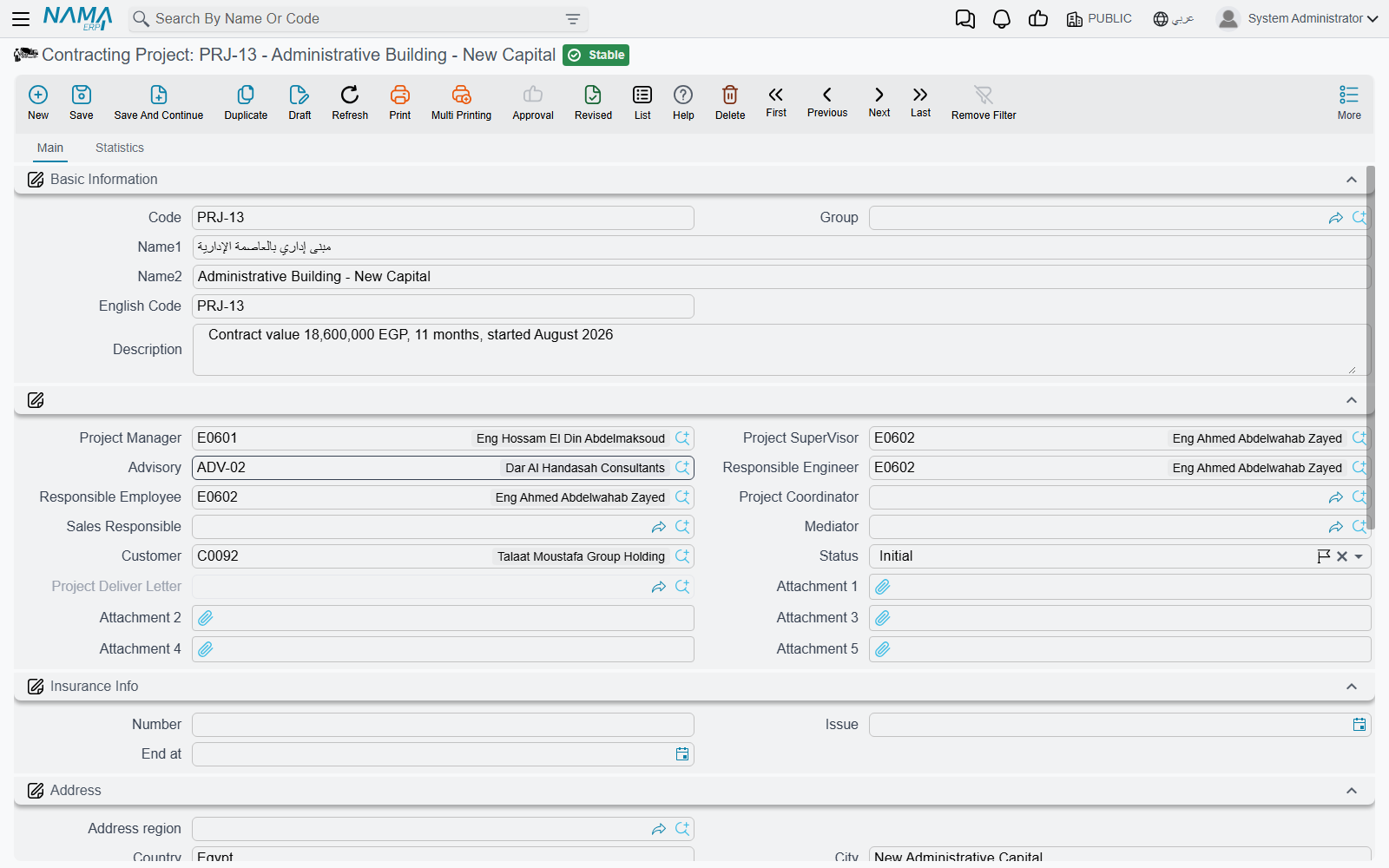
What the Record Carries
Identity — Code, Group, Name1 (Arabic name), Name2 (English name), English Code and Description. The group tree is worth using from the start: developments, maintenance jobs and internal works filter very differently in every list view in the module.
The people — this is the bulk of the screen, and it is all reference fields:
| Field | Who it names |
|---|---|
| Project Manager, Project Supervisor, Responsible Engineer, Responsible Employee, Project Coordinator | your own staff on the job |
| Sales Responsible | who owns the commercial relationship |
| Advisory | the supervising consultant — see Contractors and Consultants |
| Customer | the project owner you will bill |
| Mediator | the broker or intermediary, where one is involved |
| Status | a descriptive state you maintain by hand |
| Attachment 1 … 5 | the site drawings, the award letter, the permit |
The consultant field earns its keep on the contract
Filling Advisory here is not just labelling. When you later create a project contract and pick this project on it, the project's consultant is copied onto the contract for you. It is one of only two places the consultant is read at all, and it saves the most commonly forgotten field on the contract screen.
Status is a descriptive label — in progress, suspended, finished, and so on — that you can filter and report on. It does not lock the project; to stop documents being raised against a project, use the platform's Prevent Usage action.
Insurance Info — the policy number and its issue and expiry dates. One policy per project, which is the normal case for a CAR or a third-party policy taken out per site.
Address — region, country, city, state, area, two address lines, the building number and a map location. This is the site address, not the customer's, and it is what a driver or an inspector needs.
Accounts and Taxes — the subsidiary block described above, plus four "not subject to tax" flags for the four tax slots, which matter on projects that are exempt or zero-rated.
Dimensions — legal entity, analysis set, branch, sector and department, as on every master file.
Fixed Asset Creation Doc is the one button on the screen. When a project you built is going to stay on your own books — a head-office building, a rented tower you developed for yourself — press it and a new, unsaved Fixed Asset Creation Document opens with one line already pointing at this project as both the project and the subsidiary. Save the project first, because the button needs a saved record. The document itself is described under Employees, Equipment and Their Costs.
Nothing on this screen is required
There is no validation on a project at all: no mandatory customer, no date rules, no status transitions, nothing that must be filled before it saves. That is convenient on day one and expensive in month six, when half the projects have no customer and reporting by client becomes guesswork. Decide the handful of fields your company insists on — customer, project manager, group — and enforce them by habit or by a screen modifier, because the system will not.
One Project, Several Contracts
A project is not the same thing as a contract, and the module deliberately keeps them one-to-many. The project is the container; a project contract — the priced agreement with the owner — names it, and several contracts may name the same project. That is how you model:
- a development let in packages: enabling works under one contract, superstructure under another;
- a project with an owner contract and the subcontracts that deliver parts of it, all sharing one project;
- addenda, where a second contract is attached to the first as its main contract, giving a second layer of grouping.
The project's second page, Statistics, is where that becomes visible: a read-only list of every project contract raised against this project, with its customer, contracting date, end date and total price. It is the fastest answer to "what have we signed on this site?".
The full anatomy of the contract itself is in Project Contracts.
Actions on this screen
- Create Fixed Asset Creation Doc — opens a new, unsaved fixed-asset creation document in a pop-up, with one line already pointing at this project, for capitalising a project you built for yourself. The project must be saved first.
Tower A
Here is the project record that the rest of this documentation set uses.
| Field | Value |
|---|---|
| Code | PRJ-TWR-A |
| Name1 / Name2 | برج A / Tower A |
| Group | Residential developments |
| Customer | Al-Fanar Development |
| Project Manager | the tower's site manager |
| Advisory | Al-Mizan Engineering Consultants |
| Status | In Progress |
| Insurance | policy CAR-2026-118, issued 1 January 2026, expiring 31 December 2027 |
| Address | the plot address, with the map location dropped on the site gate |
Saved, it has produced no journal entry and no stock movement whatsoever. What it has produced is a key. From this point on:
- The project contract
PC-2026-001, worth 230,000, is created againstPRJ-TWR-A, and picking the project copies Al-Fanar Development and Al-Mizan onto it. - The subcontract
CC-0042for the blockwork names the same project, so the cost of the blockwork and the revenue from it sit on one site. - Every material issue, daily labour book, equipment allocation and miscellaneous invoice for the tower names
PRJ-TWR-Aand a term code, which is what makes actual cost per item of work possible at all. - Every extract — owner side and subcontractor side — carries the project, so cash in and cash out are reportable against it.
- When the tower is handed over, the Project Delivery Letter records the handover date and stamps itself back onto this project record. See Measurements, Submittals and Handover.
Where to Go Next
- Standard Terms — the catalogue of work the contract will be built from. This is the next thing to get right.
- Phases and Work Areas — the two other ways a project's work is broken down: milestones, and physical locations on site.
- Contractors and Consultants — the subcontractors you will award packages to, and the consultant you just named here.
- The Project Contracting Cycle — offer, contract, execution, extract, collection.
- How Project Cost Is Built — where the actual cost that appears against this project comes from.