
Target Plans
Hala is expected to make forty calls in January, eight site visits, and to open six new leads. Karim, over in maintenance, is expected to record twenty-five ticket executions a month. That is a quota — and it is a quota of activities, not of money.
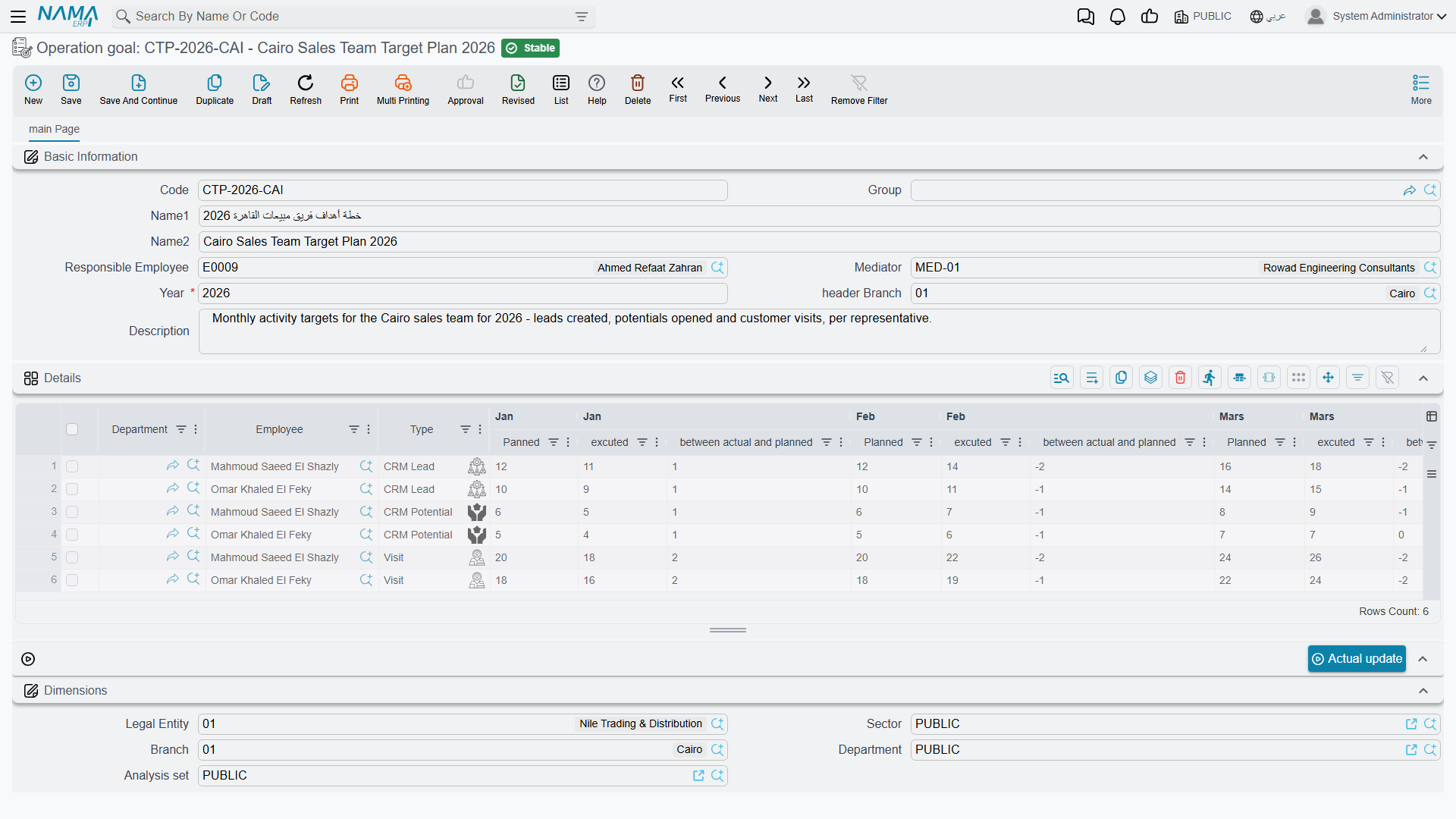
The screen the menu calls Operation goal (هدف تشغيل) is where that quota lives. It is the closest thing the CRM module has to a sales-target sheet, and the single most important sentence about it is this: a target plan counts activities. Calls, visits, leads, tasks, potentials, projects and ticket executions. It has no amount column, no currency, no item and no product, and it is never compared with an order, an invoice or a revenue figure. If you came looking for "Hala must sell 4 million this year", this screen cannot hold that sentence.
Required licence
crm
| What | Where |
|---|---|
| Operation goal | Customer Relationship Management > Marketing > Operation goal |
Like the Marketing Plan next to it, this is a master file — no document book, no document term, no document number, no approval cycle, no accounting effect.
The header
- السنة / Year — a whole number, and it is required. Unlike the marketing plan's free-text year, this one is a real number, so
2026it is. - الفرع / Branch — the branch. Record it for your own filing; nothing filters or restricts by it.
- Responsible employee, mediator and remarks.
One row per employee, per activity type
The details grid is where the quota is written. Each row answers "who, and what are we counting?":
| Column | Meaning |
|---|---|
| الإدارة / Department | the department the target belongs to |
| الموظف / Employee | whose quota this row is |
| النوع / Type | what is being counted |
| مخطط · فعلي · الانحراف, twelve times | planned count, actual count and deviation for each month |
| إجمالي المخطط / Total Planned | the sum of the twelve planned counts |
| إجمالي المنفذ / Total Executed | the sum of the twelve actual counts |
The Type column offers seven things to count, and only these seven: CRM Call, Visit, CRM Lead, CRM Potential, CRM Task, CRM Project and Ticket Execution.
So an employee with three kinds of quota gets three rows. Al Nokhba's plan for 2026 (TGT-2026) looks like this:
| Department | Employee | Type | Monthly plan | Total planned | Jan | Feb | Mar | Total executed |
|---|---|---|---|---|---|---|---|---|
DPT-SLS | EMP-1042 Hala | CRM Call | 40, 40, 40, 45, 45, 45, 30, 30, 45, 50, 50, 40 | 500 | 36 | 44 | 41 | 121 |
DPT-SLS | EMP-1042 Hala | Visit | 8 every month | 96 | 7 | 9 | 8 | 24 |
DPT-SLS | EMP-1042 Hala | CRM Lead | 6 every month | 72 | 5 | 8 | 6 | 19 |
DPT-MNT | EMP-1055 Karim | Ticket Execution | 25 every month | 300 | 22 | 27 | 24 | 73 |
This quota can never be expressed in money
There is no amount, no currency, no item and no price anywhere on this screen, and nothing in the system compares a target plan with a sales order, an invoice, a contract value or a collection. A target plan says "forty calls", never "four hundred thousand".
That is a real limitation, not a setting you can switch on. If your sales targets are monetary, the target plan is the wrong sheet for them — use the Marketing Plan, which is at least denominated in money (per section rather than per employee), or keep the monetary target outside NaMa and use this screen for the activity discipline that supports it.
The deviation, and the trap next door
Deviation on this screen is planned − actual. A positive number is a shortfall — Hala planned 40 calls in January and made 36, so January reads +4. A negative number means she beat the target: February planned 40, achieved 44, deviation −4.
The Marketing Plan reads the other way round
The Marketing Plan grid looks identical and calculates actual − planned, so there a positive number is good news. Same layout, same Arabic column header, opposite sign.
Whenever a deviation figure leaves the screen — in an e-mail, a meeting, an exported sheet — say which plan it came from.
The good news is that this screen's arithmetic is reliable. Both totals and all twelve deviations are recalculated on the server every time the record is saved, so a target plan you open is always internally consistent, however it was filled in.
The Actual update button
The screen carries a button labelled تحديث فعلي / Actual update, sitting in the actions block on the main page. Its intention is obvious and appealing: press it, and the twelve actual cells fill themselves with the real number of calls, visits and leads the employee recorded that year.
Actual update does not work — it fails with a database error
Pressing the button returns a database error instead of filling anything in. The query behind it refers to a table that does not exist in the database, so it fails before a single row is read. This happens on every installation, on every target plan, every time.
Target achievement is therefore never measured automatically. Treat the target plan as a sheet you fill in and read by eye: the planned counts are typed, and so are the actual counts.
Do not try to make the button work
It is worth saying plainly, because the failure looks like a small database problem somebody could patch. It is not, and repairing the query would make things worse rather than better:
- Each employee-and-type row comes back from the query carrying one month's count, and the screen would copy that single value across all twelve months — writing a real figure into one month and zero into the other eleven, wiping any actual counts already typed there.
- The query has no filters at all: no year, no branch, no legal entity, no dimensions, and no distinction between a saved document and a draft. It would count everything in the database, including other companies' records and unfinished drafts, towards an employee's target.
So the honest position is not "this feature is broken and will be fixed shortly by your database administrator" — it is "this feature does not exist yet". Fill the actual columns by hand.
Getting the real counts by hand
Typing actuals is less painful than it sounds, because every count this screen wants is one filtered list view away. For each employee and month:
- Open the matching list view — CRM Call, Visit, CRM Lead, CRM Potential, CRM Task, CRM Project or Ticket Execution.
- Filter by the employee and the month's date range.
- Read the record count off the list, or export the filtered list to Excel and count there.
- Type the number into the month's فعلي / Actual cell.
If this is a monthly ritual for a dozen employees, it is worth building a small BI dashboard that produces the whole matrix in one place — the underlying data is complete and perfectly countable; what is missing is only a screen that adds it up. Then transcribing twelve numbers per row takes a few minutes and the target plan stays the single sheet everybody reviews.
Keep an eye on the year
Because the plan's actual figures are typed and nothing re-derives them, a target plan is a snapshot of whoever last updated it. Nothing in the module reminds anybody that a month has closed — there is no scheduler, no alarm and no notification anywhere in CRM. Put the update in someone's monthly routine, and use the Remarks box to record how far the actuals have been brought up to date — there is no "last updated" indicator that means anything on this screen.
Reporting
Reporting: none. This module ships no system reports, and this screen has no print form. The activity list views, their Excel export and BI are where achievement figures actually come from.
A note on the English column headers
As on the marketing plan, some English month headers in this grid are misspelt (Jan|Panned, Mars|Planned, Jan |excuted, Sept|Planned, total Excuted). They are cosmetic; the Arabic headers are correct and the columns behave as described above.