
Warranties
CRM Warranty / ضمان — Customer Relationship Management > Support > CRM Warranty.
Required licence
crm.
A CRM Warranty is a small register entry that says this product, optionally this serial number, is under warranty between these two dates. One record per warranty. It exists for exactly one reason: so that when a support agent opens a trouble ticket about that product, the ticket shows the agent whether a warranty is running.
That single sentence is also the whole of what it does, and the rest of this page is mostly about how narrow that is. Read the danger box below before you design anything around this file.
The screen
One page. Everything on it is typed by hand.
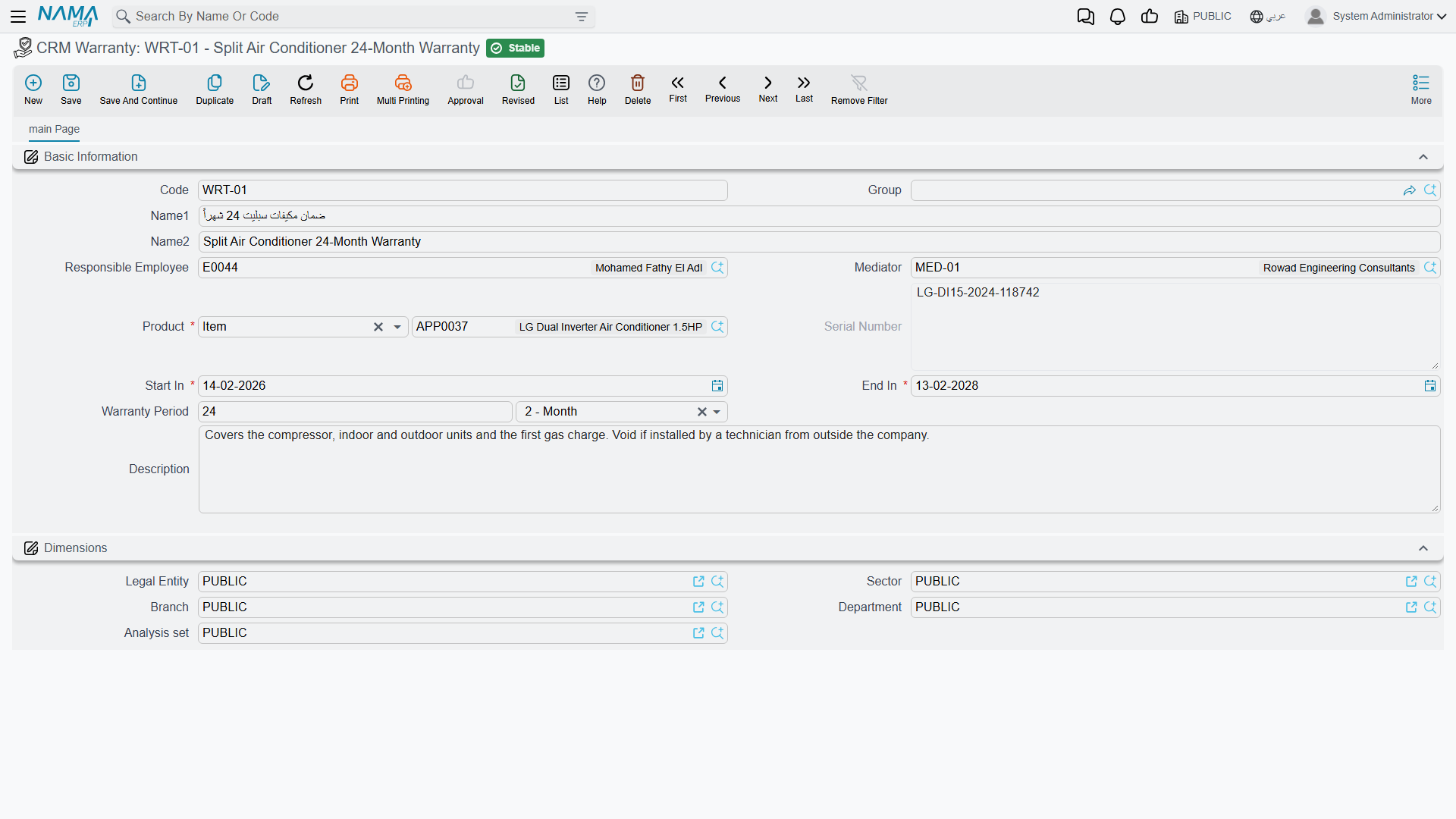
| Field | Notes |
|---|---|
| Code, Group, Name1, Name2 | The usual basic block. |
| Responsible Employee / الموظف المسئول | Filled with your user's employee when you press New — unconditionally, whatever the Fill Responsible Employee With Current Employee setting says. That option is honoured by the Lead screen only. |
| Mediator / الوسيط | Optional. |
| Product / المنتج | Required. An inventory item, or a rental unit. |
| Serial Number / الرقم المسلسل | The individual unit, when the product is serial-tracked. |
| Start In / يبدأ في | Required. |
| End In / ينتهى | Required. |
| Warranty Period / فترة الضمان | A length of time — a number plus a unit. |
| Description / الوصف | The notes box. It is labelled Description, not Remarks, on this screen only. |
Then the Dimensions / محددات group.
The list screen shows Product and Serial Number and lets you filter by Product.
The dates and the period fill each other in
You never have to work out the third value yourself. Type any two of Start In, End In and Warranty Period and the screen supplies the missing one:
- Type Start In when End In is already there → the Warranty Period is worked out from the gap.
- Type Start In when End In is empty but a period is there → End In = Start In plus the period.
- Type End In when Start In is already there → the Warranty Period is worked out from the gap.
- Type End In when Start In is empty but a period is there → Start In is worked backwards.
- Change the Warranty Period with a Start In already there → End In is recalculated.
Check the date when you work backwards
Filling End In first and letting the system produce Start In is the one direction that is not calendar-aware: it measures the period in fixed-length units rather than real months, so a "1 Month" warranty can land a day or two away from where you expected. Glance at the Start In it produced before you save.
Serial Number switches itself on and off
The Serial Number box follows the product you chose. Pick an inventory item that is serial-tracked and the box is enabled. Pick an item that is not, and anything already typed there is cleared. Pick a rental unit and the box is greyed out — rental units have no serials.
What is not checked
Only one rule is enforced on save: Start In cannot be after End In, and the screen highlights both dates if it is. There is no uniqueness check and no overlap check — two warranties covering the same product, the same serial and the same dates will both save without a murmur, and both will then match the same ticket.
What the warranty actually does — and does not do
A trouble ticket carries two read-only boxes, Covering Type / نوع التغطيه and Covering Document / سند التغطية, that are recalculated every time the ticket is opened. They look for a CRM service contract line first and a warranty second, and they report Covered By Contract / مغطي بعقد خدمة, In Warranty Period / في فترة الضمان or Not Covered / غير مغطي. A contract always beats a warranty.
In the worked example, WR-00219 covers AC-SPL-24 serial SPL24-2025-11-0783 from 2025-11-18 to 2026-11-18. Ticket TKT-0451, raised on 2026-04-06 on that exact unit, falls inside it — and still reports Covered By Contract, because CSC-0044 also covers that serial and contracts win. Had the contract not existed, the ticket would have read In Warranty Period and pointed at WR-00219.
Coverage is display-only, and it never checks the customer
This is the single most important fact about the CRM warranty register, and it surprises everybody.
What the match uses: the ticket's Product, the ticket's Serial Number only when the ticket carries one, and the ticket date falling between the record's Start In and End In.
What the match ignores: the customer — any customer's warranty or contract can cover any other customer's ticket; the contract's status, so cancelled, finished and renewed contracts still cover; whether the contract was ever committed, so drafts cover; a contract's frozen extension, so the screen may show a later end date than coverage actually tests; and every dimension — legal entity, branch and sector are not part of the match.
What coverage does: nothing but display. No rule refuses a charge, changes a price, blocks a status change or produces a different document because a ticket says In Warranty Period. There is no document term on the trouble ticket that could react to it either. Whether the repair is free is a decision your agent makes and records by hand.
The practical instruction: always fill Serial Number on serialised items. A warranty registered for a product with the serial left blank will match every ticket ever raised on that product, for every customer, in every branch, and will be shown to all of them as their warranty.
There are two warranty systems, and they are strangers
The word "warranty" appears in more than one place in this module, and the places do not talk to each other.
- The register on this page is read by the trouble ticket, and by nothing else.
- The machine-maintenance suite keeps its own: named warranty period types, warranty start and end dates on the machine file, and a ledger of dysfunction warranties that maintenance orders write and read back. That system genuinely works — and it never looks at a CRM Warranty, and the trouble ticket never looks at it.
- The Complaint screen has its own typed Warranty Period and Warranty End Date boxes, filled from the invoice search. They are notes on that complaint; nothing reads them either.
- A CRM service contract line carries its own start and end dates, and those are what the ticket's coverage check prefers.
So: repairing a machine under a maintenance order does not make a trouble ticket say In Warranty Period, and registering a CRM Warranty does not appear anywhere in the maintenance documents. A site that uses both halves of the module has to enter its warranty data twice, in two unrelated screens, with two different shapes.
Setting them up
Create one record per warranty you want an agent to see: the product, the serial if there is one, the two dates, and a description a human can read at a glance. Keep them for the products your support desk actually gets called about — a register that covers everything you have ever sold is a register nobody trusts, especially given that a serial-less entry matches every customer.
Reporting
Reporting: none. This module ships no system reports, and this screen has no print form. Expiring warranties are found from the list view and Excel export, or in BI — there is no expiry alarm, reminder or notification anywhere in the module.