
Trouble Tickets
Required licence
crm.
The Trouble Ticket (طلب دعم) is the case file. It is the one document in the support folder that a desk cannot do without: it holds the customer, the product, who is working on it, how long they have been working, what the running conversation says, and — the part everybody looks at first — whether the product is under warranty or under contract.
Marina Plaza's split unit becomes ticket TKT-0451, raised on 6 April 2026 from complaint CMPL-0207. Follow it through this page.
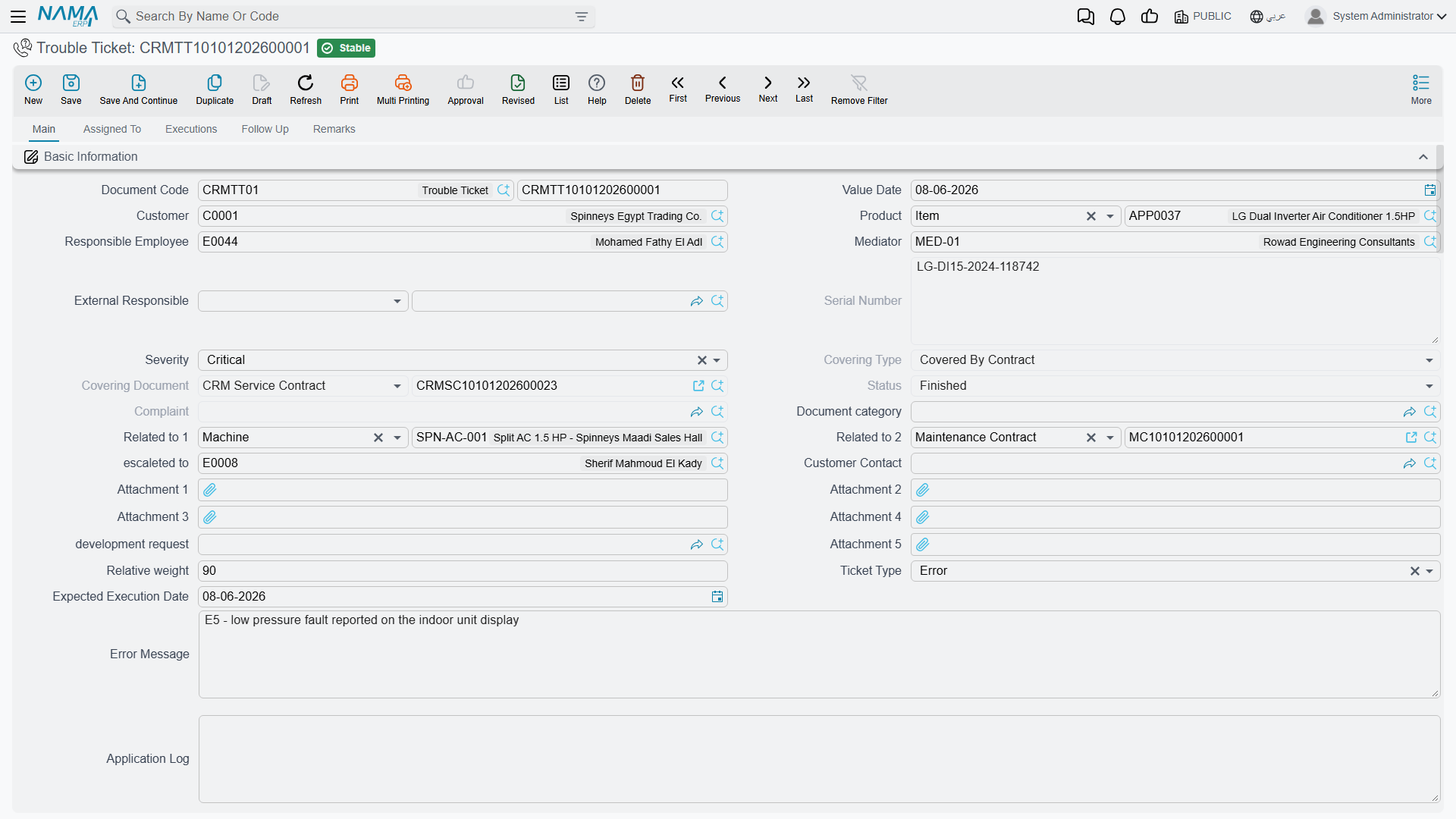
Opening a ticket
A ticket arrives one of two ways: pressing تحويلة إلي طلب دعم / Convert To Ticket on a complaint, which opens a ticket pre-filled with the customer, product, serial number, description and external responsible party; or by opening Customer Relationship Management → Support → Trouble Ticket and starting from scratch.
Either way the new record opens with Ticket Date set to today, Estimated Fix Period measured in hours, Responsible Employee set to whoever is logged in, and Status = مبدئي / Initial.
The Main tab holds the case identity: Customer, Product, Serial Number, Responsible Employee, the Mediator, External Responsible, Severity, Ticket Type, Relative Weight, Expected Execution Date, the contact block, and four wide text fields — Error Message, Log, Technical Support Remarks and Description.
Severity and its neighbours are recorded and never read
Severity (Minor / Major / Feature / Critical), Ticket Type, Relative Weight and Expected Execution Date are stored on the ticket and consulted by nothing. No queue is sorted by them, no rule reacts to them, nothing alerts when the expected date passes. Estimated Fix Period is likewise never compared with the actual hours the ticket accumulates.
Fill them in if your reporting wants them — they export perfectly well to Excel — but do not build a priority process on them, because the system will not enforce one.
The Ticket Time group
Four fields, two of which you cannot type into:
- Estimated Fix Period (وقت التنفيذ المقدر) — your estimate, in hours by default.
- Actual Fix Period (وقت التنفيذ الفعلي) — read-only, accumulated from Ticket Execution documents.
- Ticket Date (تاريخ الطلب) — defaults to today, and it is this date the coverage lookup tests.
- Closing Date (تاريخ الإغلاق) — read-only.
Closing Date is usually empty
Closing Date is stamped in only two situations: on the document's first commit, if the ticket was already Closed at that moment, or when a Ticket Execution reaches 100 % completion. The realistic path — open a ticket, work it for a week, then Change Status → Closed — leaves Closing Date blank. Any "time to close" analysis built on it will be mostly empty.
The discussion thread
Below the main fields sits the ticket's conversation: twenty text boxes. Type into one and, on save, the system stamps your user name and the current date and time into the read-only pair beside it. It is the internal running commentary on the case — and it is capped at twenty entries, after which there is nowhere else to write.
Coverage — the one lookup that really works
The moment you pick a Customer and a Product, two read-only fields fill themselves in:
- نوع التغطيه / Covering Type — Covered By Contract, In Warranty Period or Not Covered.
- سند التغطية / Covering Document — the contract or warranty that produced the answer.
They are recomputed every time the ticket is read, so they always reflect today's contracts and warranties rather than a snapshot taken when the ticket was raised.
On TKT-0451 both a warranty and a contract match the split unit on 6 April:
| Candidate | Window | Matches? | Wins? |
|---|---|---|---|
CRM warranty WR-00219 | 2025-11-18 → 2026-11-18 | yes | no |
Service contract CSC-0044, line 1 | 2026-03-01 → 2027-03-01 | yes | yes |
A service contract always beats a warranty. Had CSC-0044 not existed, the ticket would read In Warranty Period with WR-00219 as the covering document; with neither, Not Covered.
What coverage matches, and what it ignores
What coverage matches: the ticket's Product, the ticket's Serial Number only when the ticket carries one, and the Ticket Date falling inside the line's Start In → End In window. A service contract wins over a warranty when both match.
What coverage ignores: the customer (any customer's contract or warranty can cover any other customer's ticket), the contract's status (Cancelled, Finished and Renewed contracts still cover), whether the contract has ever been committed (drafts cover), the frozen extension (the contract screen shows an extended To date, but coverage tests the original End In), and all dimensions — legal entity, branch, sector.
What coverage does: nothing but display. Covering Type and Covering Document are an on-screen indicator for the agent. No validator, pricing rule, status guard or document generation reads them, and there is no document term on the Trouble Ticket that could react to them. The commercial decision — whether to charge for the work — remains entirely manual.
Practical advice: always fill Serial Number on serialised items, or one warranty registered without a serial will cover every ticket raised on that product, for every customer, in every branch.
The lifecycle
Status is not something you type. The field is read-only on screen, and the ticket is moved between states by three different mechanisms that do not entirely agree with each other.
1. Assign — and the status jumps on its own
Open the مسند إلي / Assigned To tab and add rows to the الموظفين / Employees grid. On TKT-0451 that means the two technicians, EMP-2011 and EMP-2014.
Filling the Employees grid forces the status to Assigned
Every single time the ticket is saved, if the Employees grid has at least one row the status is set to مسند / Assigned before anything else is applied. You cannot leave a ticket on Initial once technicians are on it, and — more surprisingly — a status set by some other route can be pushed back to Assigned by an unrelated later save. This is the mechanism behind the reverting behaviour described under Ticket Executions.
The grid is also what makes the ticket's technicians selectable on a Ticket Execution: the employee picker there offers only the ticket's responsible employee and the people in this grid.
2. Change Status — and what it will not offer you
The تغيير الحالة / Change Status action on the Main tab opens a small dialog. It offers exactly five choices:
In Progress · Cancelled · Closed · Finished · ReOpen
Choosing one writes that status onto the ticket and makes it stick across later saves. Choosing In Progress also starts a stopwatch row for the current employee; choosing anything except ReOpen stops it.
3. The status gateway — eight statuses live somewhere else
The ticket has thirteen statuses, and this is the single least discoverable fact in the whole support area:
| Reachable from Change Status | Reachable only through a Ticket Follow-Up |
|---|---|
| قيد التنفيذ / In Progress | مبدئي / Initial |
| ملغي / Cancelled | مسند / Assigned |
| مغلقة / Closed | تم التنفيذ / Done |
| منتهي / Finished | مؤجل / Postponed |
| معاد فتحه / ReOpen | طلب تطوير / Development Request |
| بانتظار رد العميل / Customer Feedback | |
| OutSideContractScope (no translation in either language) | |
| خارج الضمان / Out Of Warranty |
The eight missing statuses are not on the ticket screen at all
If your desk wants to park a case as Postponed, Waiting for Customer Feedback, Out Of Warranty or Development Request, the Change Status dialog will never offer them and the Status field itself is read-only. The only way to set those eight is to raise a Ticket Follow-Up with the value in its Ticket New Status field and commit it.
(Initial and Assigned also appear in the right-hand column because the system sets them for you — Initial on a new record, Assigned whenever the Employees grid has rows — but if you ever need to put a ticket back to one of them by hand, the follow-up is again the only route.)
Two of those statuses show a raw Latin word rather than a translated label: OutSideContractScope has no translation in Arabic or English, and Modification on the Ticket Type list is translated in Arabic only.
Train the desk on this early. Sites that do not know about it end up using only five statuses and inventing conventions in the description field to express the rest.
4. Close
Two routes, and they behave differently:
- Change Status → Closed — the ticket is closed. Closing Date is filled only if this happens to be the document's first commit.
- Commit a Ticket Execution at 100 % completion — the ticket shows Finished and Closing Date is set to that line's From Date. On
TKT-0451, executionTEXE-0679on 13 April does exactly this. But see the warning on Ticket Executions: that route sets the visible status without making it stick.
ReOpen puts the ticket back into play; nothing else changes, and the Closing Date is not cleared.
The ticket's stopwatch
The Assigned To tab carries a second grid, وقت تنفيذ الطلب / Ticket Execution Time, with one row per stretch of work: Employee, Start Date And Time, End Date And Time, Execution Time, Employee Total Execution Time. Every one of those durations is recomputed on save, and the header's إجمالي وقت التنفيذ / Total Execution Time is their sum.
Rows are created and closed by بدء / Start and إنهاء / End on the same tab, and by Change Status → In Progress.
On TKT-0451 the stopwatch reads:
| Employee | Start | End | Duration |
|---|---|---|---|
EMP-2011 | 2026-04-07 08:25 | 2026-04-07 15:40 | 7:15 |
EMP-2014 | 2026-04-13 09:00 | 2026-04-13 12:20 | 3:20 |
| Total Execution Time | 10:35 |
Two clocks that will never agree
Total Execution Time (10:35 here) comes from this stopwatch. Actual Fix Period (7.0 hours here) comes from the Ticket Execution documents. They measure different things, are maintained independently, and nothing reconciles them. Decide which one your business reports on and be consistent.
Starting work stops the same technician's clock on a different ticket
When a technician's clock starts here, the system first looks for any open stopwatch row belonging to that technician — across every ticket in the database — and closes it. One person can only be "in progress" on one ticket at a time.
Worse, the end time written onto the abandoned row is not the current time. It is the timestamp of that employee's most recent recorded action on the same day, and if there is none, the row is closed at its own start time — zero minutes recorded for a morning of work. The other ticket is re-saved silently as part of this.
Tell technicians to press إنهاء / End before starting work on another ticket. A row also may not span more than one day; the screen refuses one that does.
The buttons on the Main tab
| Button | What it does |
|---|---|
| تنفيذ / Execute | Opens an unsaved Ticket Execution in a pop-up, already pointing at this ticket, with one line for the responsible employee starting now |
| تغيير الحالة / Change Status | The five-value dialog described above |
| تحويل إلي سؤال شائع / Convert To FAQ | Creates a CRM FAQ entry: the question is the ticket's description, the answer is every Ticket Execution note recorded against this ticket, run together |
| تصعيد الي / Escalate To | Stamps the chosen employee into Escalated To |
| إنشاء طلب تطوير / Development Request | Opens an unsaved Development Request carrying this ticket, customer, product and description |
| عمل متابعة / Create CRM Follow Up | Opens an unsaved Ticket Follow Up |
Two buttons that do not do what their label says
Create CRM Follow Up opens a Ticket Follow-Up, not the CRM Follow-Up document from the Activities folder. Those are two different screens with different fields; the CRM Follow-Up is reachable only from its own menu item. See Tasks and Follow-Ups.
Escalate To saves and commits the whole stored record the moment you press it — and it commits the version held on the server, so any edits you have made on screen but not yet saved are not included. It also does not change the status: there is no Escalated state for a ticket, no escalation queue and no notification. Save your work before pressing it.
The rest of the screen
- Executions tab — a read-only list of the Ticket Execution documents raised against this ticket. (Its columns list Employee twice; that is a display quirk, not two different employees.)
- Follow Up tab — a read-only list of the Ticket Follow-Ups raised against this ticket.
- الملاحظات / Remarks tab — a free-notes grid with a remark and two attachments per row, on top of the five attachment slots on the Main tab.
No effects, no term
The Trouble Ticket posts nothing and moves no stock. It has no document term, so there is nothing to configure and nothing that can be made to react to a status or to the coverage result. If a repair consumes spare parts, they are issued with an ordinary stock document raised separately, and no link back to the ticket exists.
The "Create Trouble Ticket" button on other screens is something else entirely
Nama's own toolbar carries a generic Create Trouble Ticket action that can appear on any screen. That action does not create a ticket in your installation — it files a support request with NaMaSoft's own support desk over the internet, and it only works when your Global Config carries the Nama server address and credentials. What you see locally is a queue entry, not a CRM document. It has nothing to do with the tickets described on this page.