
Ticket Follow-Ups
Required licence
crm.
On the face of it the Ticket Follow Up (متابعة طلب دعم) looks like the least important document in the support folder — a small one-page form for writing down what the customer said. In practice it is the most important one to know about, because it is the only place in the product where eight of the ticket's thirteen statuses can be set.
Nobody discovers that by exploring the screens. This page exists so that your desk does not spend a year working with five statuses.
The status gateway
The Trouble Ticket's تغيير الحالة / Change Status dialog offers five values. The status field itself is read-only. So where do the other eight live?
| Reachable from the ticket's Change Status dialog | Reachable only by committing a Ticket Follow-Up |
|---|---|
| قيد التنفيذ / In Progress | مبدئي / Initial |
| ملغي / Cancelled | مسند / Assigned |
| مغلقة / Closed | تم التنفيذ / Done |
| منتهي / Finished | مؤجل / Postponed |
| معاد فتحه / ReOpen | طلب تطوير / Development Request |
| بانتظار رد العميل / Customer Feedback | |
| OutSideContractScope (untranslated in both languages) | |
| خارج الضمان / Out Of Warranty |
Initial and Assigned are normally set for you — Initial when the ticket is created, Assigned whenever the ticket's Employees grid has rows — but if you ever need to force a ticket back to one of them, the follow-up is again the only route.
The mechanism is the field تغير حاله طلب الدعم الى / Ticket New Status. Whatever you put there is written onto the ticket when the follow-up is committed. That is the whole gateway.
The practical rule
"If the status you want is not in the Change Status dialog, raise a follow-up."
Teach the desk that one sentence and everything else on this page becomes detail.
Raising one
Open Customer Relationship Management → Support → Ticket Follow Up, or press عمل متابعة / Create CRM Follow Up on the ticket — a button whose label says CRM Follow Up but which actually opens this screen. Either way you get an unsaved single-page document.
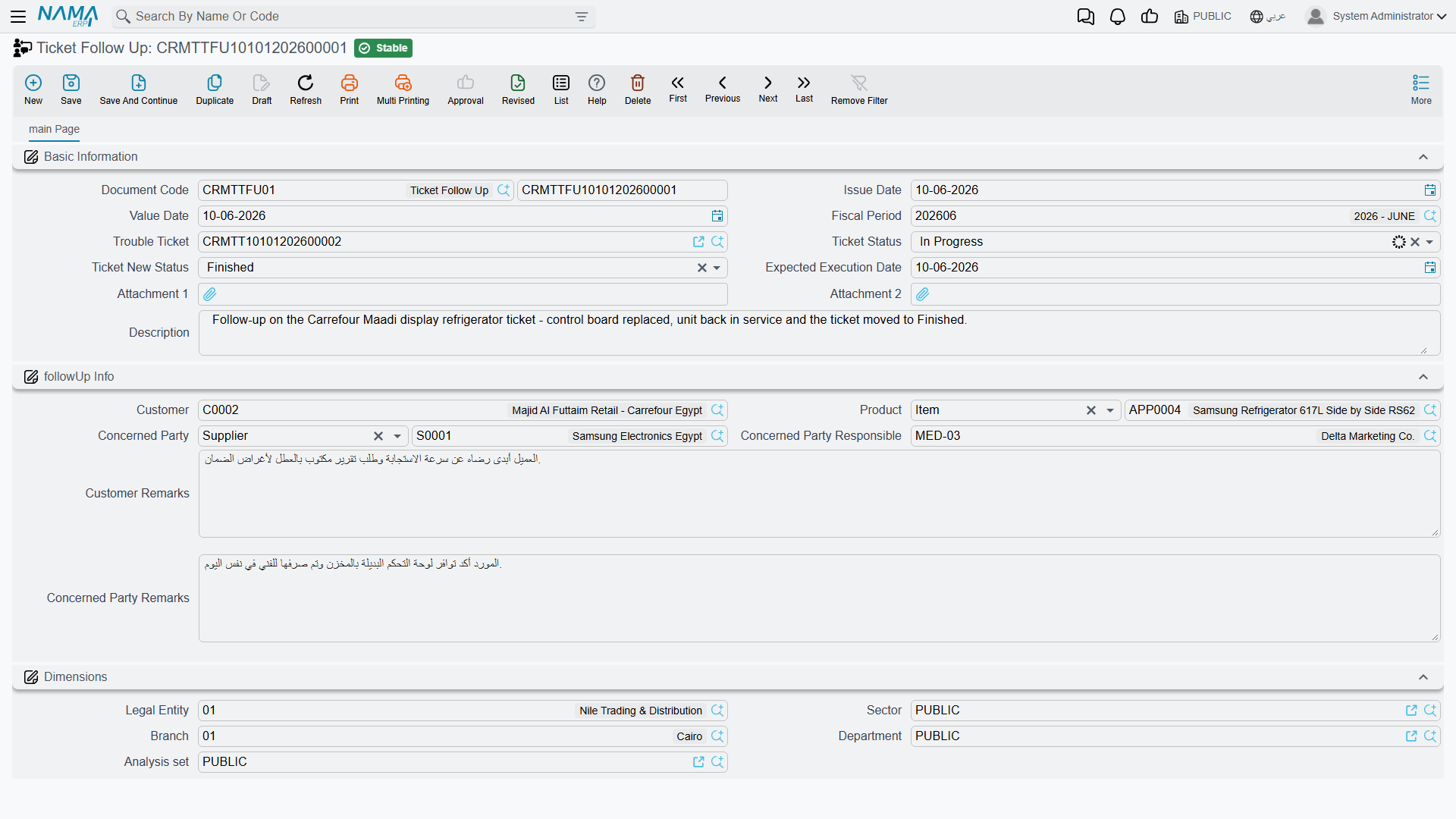
Basic Information — the Book and Code, Issue Date, Value Date, Fiscal Period, then:
| Field | Arabic | What it does |
|---|---|---|
| Trouble Ticket | طلب الدعم | The ticket this follow-up belongs to. Treat it as mandatory — see below. |
| Ticket Status | حاله طلب الدعم | A snapshot of where the ticket stood. You can type in it; nothing reads it. |
| Ticket New Status | تغير حاله طلب الدعم الى | The field that moves the ticket. |
| Expected Execution Date | تاريخ التنفيذ المتوقع | Copied onto the ticket along with the status. |
| Attachment 1 / 2, Description | Free capture. |
بيانات المتابعه / followUp Info — Customer, Product, الجهة المختصة / Concerned Party (a third party or a supplier), المسئول لدى الجهة المختصه / Concerned Party Responsible, ملاحظات العميل / Customer Remarks and ملاحظات الجهة المختصة / Concerned Party Remarks.
That second group is what makes the follow-up a genuine conversation record rather than just a status switch: one side of it holds what the customer told you, the other holds what the supplier or subcontractor told you.
Follow-up TFUP-0333 in the canonical example, dated 8 April 2026 against ticket TKT-0451:
- Concerned Party —
SUP-0311, Egyptian Refrigeration Services Co. - Customer Remarks — "Customer asks to postpone until the compressor arrives"
- Ticket New Status — مؤجل / Postponed
- Expected Execution Date — 13 April 2026
On commit, TKT-0451 moves to Postponed and picks up 13 April as its expected execution date. Postponed is one of the eight; there is no other way to get the ticket there.
The two things that will bite you
A blank Ticket New Status wipes the ticket's status
Ticket New Status is optional on the screen and mandatory in practice.
If you file a follow-up purely to record what the customer said and leave that field empty, the empty value is written onto the ticket anyway. The ticket's Status goes blank — and it stays blank through every later save, because the value the ticket remembers was blanked too. The Expected Execution Date on the ticket is cleared with it.
Recovering means filing another follow-up that carries the correct status. There is no undo, and cancelling the offending follow-up does not put the old status back.
Always set Ticket New Status. If the status is not changing, set it to the status the ticket already has.
Saving without a Trouble Ticket produces a technical error
The Trouble Ticket field is not marked as required on the screen, but the document cannot be committed without it. Leaving it blank raises a raw technical error on save instead of a friendly "this field is required" message. Pick the ticket first.
Only the latest follow-up wins
When a follow-up is committed, the system checks whether it is the latest follow-up for that ticket by Value Date. Only then does it write the status.
Two practical consequences:
- Back-dating does nothing. A follow-up dated before an existing one is stored perfectly well and leaves the ticket exactly as it was. If you are correcting history, this is what you want; if you were trying to change the status, it is not.
- The newest follow-up owns the ticket's status. File a follow-up dated today and it overrides whatever an earlier follow-up said, regardless of what the ticket has been through in between.
The status is written straight onto the committed ticket rather than through a normal edit of it, so it does not run the ticket's own checks and it does not show up as somebody having edited the ticket. What it cannot escape is the ticket's own rule that a populated Employees grid forces the status to Assigned on every save — so a ticket you parked on Postponed will jump back to Assigned the next time anybody saves it. If a parked status has to survive, the ticket must not be saved again until you are ready to move it on.
What a follow-up does not do
- No effects. It posts nothing, moves no stock, and has no document term — so there is nothing to configure and nothing that can be made to react to it.
- No notification. Nobody is told that a follow-up was filed, including the ticket's responsible employee and the concerned party named on it.
- No reminder. The Expected Execution Date it stamps on the ticket is never watched by anything. Nothing alerts when it arrives or passes.
- No chaining. A follow-up does not create the next follow-up, and there is no "next contact date" process anywhere in CRM.
The follow-ups filed against a ticket are visible on that ticket's متابعات / Follow Up tab, and on the originating complaint's Related Records tab. There is no list of "follow-ups due" because nothing is ever due.