
Ticket Executions
Required licence
crm.
The Ticket Execution (تنفيذ طلب دعم) is a timesheet. A technician finishes a stretch of work on a ticket and records it: which day, from what time to what time, what was done, and how far along the job now is. Committing the document adds those hours to the ticket's Actual Fix Period and nudges the ticket's status.
That is genuinely all it is. It is worth saying up front what it is not:
- It moves no stock. Spare parts consumed on the visit are not on this document and cannot be. If parts were used, somebody issues them with an ordinary stock document and nothing links that document back to the ticket.
- It posts nothing. There is no rate, no labour cost, no invoice. Net Time is captured for reporting only.
- It has no document term, so there is nothing to configure on it.
Raising one
The natural route is the تنفيذ / Execute button on the Trouble Ticket, which opens an unsaved execution in a pop-up already pointing at that ticket, with one detail line for the responsible employee starting now. You can also open Customer Relationship Management → Support → Ticket Execution directly.
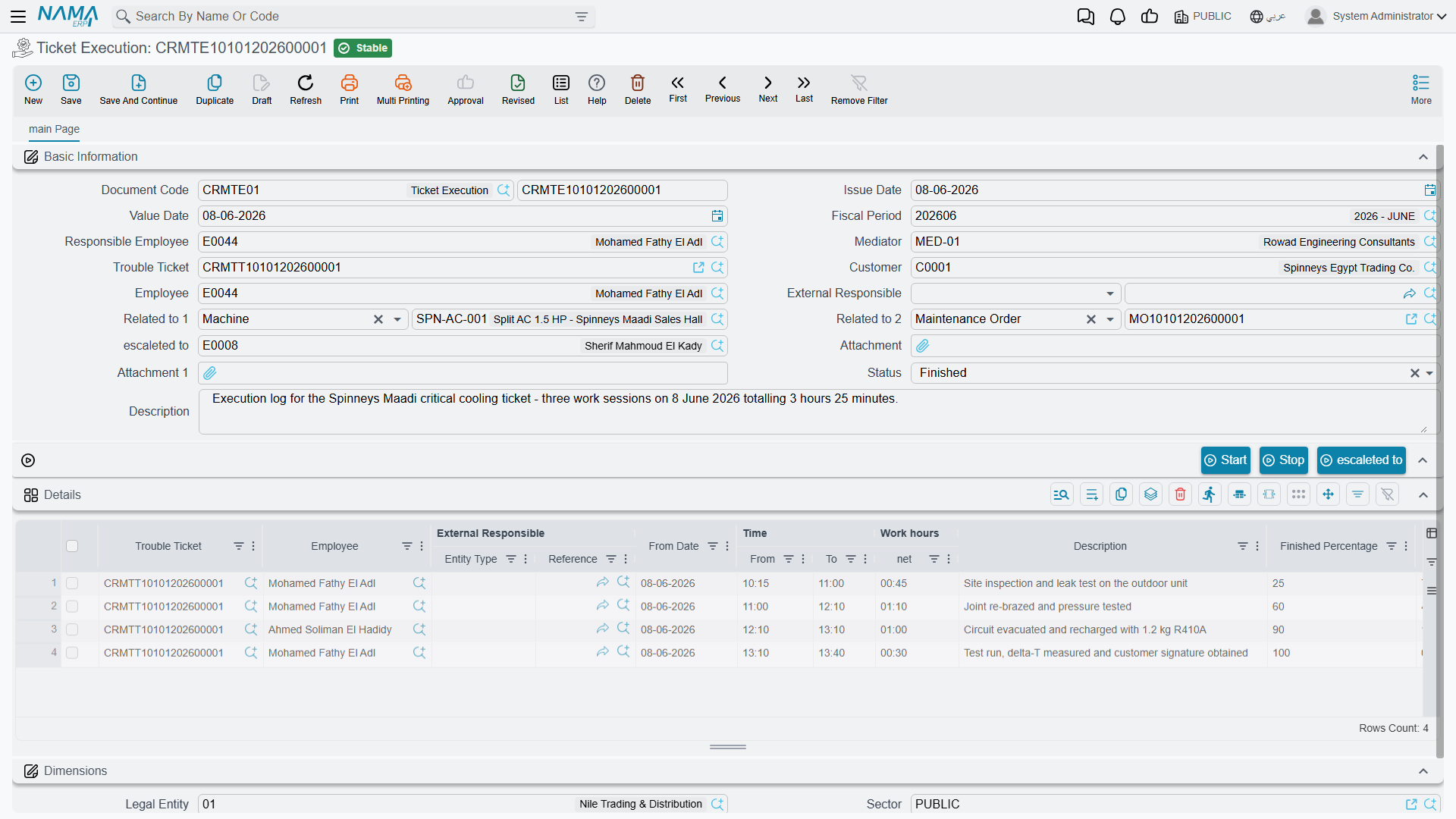
The header carries the Book and Code, Issue Date, Value Date, Fiscal Period, Responsible Employee, the Mediator, Trouble Ticket, Customer, Employee, External Responsible, Escalated To, two attachments, a Status and a Description.
The pickers on this screen are unusually helpful, and worth knowing about:
- The Employee picker offers only the ticket's responsible employee plus the technicians in the ticket's Employees grid. If somebody is missing from the list, they have not been assigned on the ticket.
- The Customer picker offers only the ticket's customer.
- The Trouble Ticket picker offers only tickets in In Progress, Assigned or Finished for the chosen customer or employee.
The Details grid
One row per stretch of work: Trouble Ticket, Employee, External Responsible, من تاريخ / From Date, الوقـت من / From Time, الوقـت إلى / To Time, ساعات العمل / Net Time, a Description, نسبة الإتمام / Finished Percent, a read-only النسبة المتبقية / Remaining Percent, and an attachment.
Notice what is not there: a To Date. Every line ends on the day it started, so a night shift that runs past midnight has to be entered as two lines.
The بدء / Start and stop buttons on the header drive the last line for you: Start fills its From Date and From Time (or appends a fresh line if the last one is already complete), and stop stamps the To Time and works out the Net Time. Start refuses to move on while an otherwise-complete line still has a blank To Time.
Following the example, TEXE-0662 records Mahmoud's first day on TKT-0451:
| From date | From time | To time | Net time | Finished % |
|---|---|---|---|---|
| 2026-04-07 | 08:30 | 11:00 | 2.5 | 60 |
| 2026-04-07 | 13:00 | 14:30 | 1.5 | 60 |
| Document total | 4.0 |
Committing it sets TKT-0451 to قيد التنفيذ / In Progress and raises its Actual Fix Period to 4.0 hours.
Six days later TEXE-0679 records Sayed finishing the job:
| From date | From time | To time | Net time | Finished % |
|---|---|---|---|---|
| 2026-04-13 | 09:00 | 12:00 | 3.0 | 100 |
Because a line reached 100 %, the ticket now shows منتهي / Finished, its Closing Date is stamped with 13 April, and Actual Fix Period reaches 7.0 hours — against an estimate of 4.0. Nothing anywhere compares those two figures; if the overrun matters to you, it is a list-view or Excel exercise.
What the checks catch — and what they miss
This is the only document in the support folder with real validation, so it is worth knowing where it stops.
What it refuses:
- A ticket in Cancelled, Closed or Initial — on the header and on every line ("Invalid State"). A ticket in Finished is accepted only if it was already on the previous version of this document.
- A header Customer that is not the ticket's customer ("Not the Ticket Customer").
- A negative Net Time, or a From Time later than the To Time.
- Two lines for the same employee on the same date where one is a duplicate of the other or sits entirely inside it.
Genuinely overlapping periods are not caught
The overlap check only rejects duplicate or fully-contained entries. 09:00–10:00 and 09:30–11:00 both pass, and the same technician is credited 2.5 hours for 2 hours of elapsed time — an inflated figure that then flows straight into the ticket's Actual Fix Period.
If accurate labour hours matter, review the Details grid rather than trusting the check.
The status effect — and why it does not stick
Each committed detail line pushes the ticket to Finished when Finished Percent is 100, and to In Progress otherwise, and adds its hours to the ticket's Actual Fix Period. Re-saving the execution subtracts the previous version's hours first, so editing is safe. Cancelling it subtracts all of them, puts the ticket back to In Progress and clears its Closing Date.
Completing an execution does not close the ticket
An execution at 100 % makes the ticket display Finished — but it does not update the status the ticket itself remembers. The next time anybody saves TKT-0451 for any reason, the ticket re-applies its remembered status and, because its Employees grid has rows, silently drops back to مسند / Assigned.
Read that again if your desk plans to close tickets this way: the ticket looks finished, then quietly un-finishes itself. Close a ticket explicitly — with Change Status → Closed on the ticket, or with a Ticket Follow-Up carrying the closing status. Treat the execution as reporting completion, not as performing it.
The Status field on the execution does nothing
The header carries a الحالة / Status dropdown with four values — Awaiting Review, Reviewed, Rejected and Finished.
There is no review or approval cycle here
Nothing sets this field and nothing reads it. A supervisor who marks an execution Rejected has changed a label and nothing else: the ticket still went to Finished, and the rejected hours are still counted in its Actual Fix Period. Nothing is reversed, nobody is told, and no list shows executions awaiting review.
Use it as a note to yourself if you like. Do not build an approval process on it.
Two clocks, and a third-party hazard
The hours on Ticket Execution documents are not the same as the ticket's stopwatch. The ticket's Assigned To tab keeps its own Ticket Execution Time grid, driven by the بدء / Start and إنهاء / End buttons there and by Change Status → In Progress. On TKT-0451 the stopwatch totals 10:35 while the executions total 7.0 hours. They are maintained independently and nothing reconciles them — pick one as your reporting figure.
Starting the ticket's stopwatch stops the same technician elsewhere
This belongs to the ticket rather than to this document, but it catches people out on the same working day: starting a technician's clock on one ticket automatically closes their open clock on any other ticket, often recording zero minutes for it. The full story is on Trouble Tickets. Have technicians press End before moving on.
Where executions are visible
- The Executions tab on the ticket lists the executions raised against it.
- The Related Records tab on the originating complaint lists the executions descending from that complaint.
- The Executions tab on a service contract lists execution lines for tickets that were matched to that contract — with the caveat described on Service Contracts.
- The Ticket Execution list screen filters by Trouble Ticket, Employee, External Responsible and Customer. This is the closest thing to a labour report the module has; there are no system reports and no dashboards for it.