
Project Expenses
Licence
All three screens on this page are gated on the ecpa licence code.
A design office sells its people's time, but time is never the whole bill. Somebody takes a taxi to the client's site, pays a municipality permit fee, prints a set of tender drawings, couriers a signed contract back to the customer's office. Project Management (ECPA) handles that money with three screens, all sitting together under Expense (المصــاريف) in the module's menu:
- Project Expense Item — the short catalogue of things that may be claimed, and the place where each one's expense account is decided.
- Project Expense Request — the claim itself: who spent what, on which task of which project.
- Project Expense Document — the accountant's record of a batch of accepted claims.
The word "Request" undersells the middle screen. A Project Expense Request is a full document: it has a book, a term (توجيه), a commit, and an accounting effect of its own. It is also the record the project invoice re-bills to the customer — the expense document plays no part in billing at all. Keep that asymmetry in mind while you read; it explains most of what follows.
And one column on the claim — Internal Account (مصروف داخلى) — quietly decides both which accounts the entry uses and whether the customer ever sees the amount. It has its own section below, and it is the field to get right before anything else.
The expense catalogue
Project Expense Item is a small master file: a code, an Arabic and an English name, an optional group for sorting, the usual dimensions (محددات) — and one field that carries real weight, the Account.
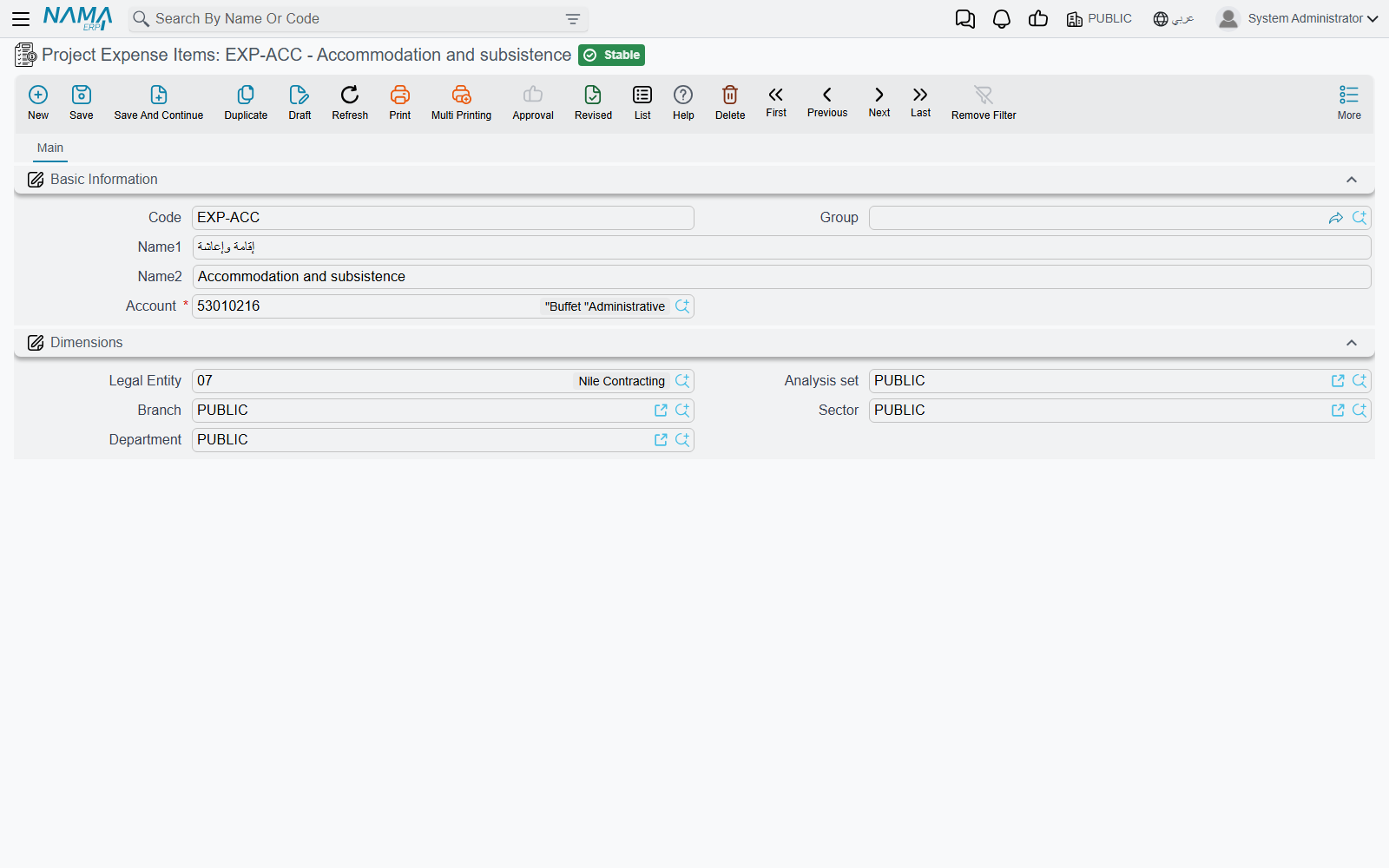
The account is required, and its lookup only offers detail accounts. That is not decoration. When an expense line becomes an accounting entry, the account you put on the expense item is what the term's Line Subsidiary source hands back. In other words, the expense item is how a claim line chooses its expense account, and it is the only way it can. A firm that keeps one item called "Travel" for every kind of spending will get one lump in the ledger; a firm that opens EXP-TAXI, EXP-PRINT, EXP-PERMIT and EXP-COURIER, each pointing at its own detail account, gets an expense breakdown for free.
So build this list with the chart of accounts open beside you. It is the shortest configuration task in the module and the one with the longest reach.
Raising a claim: the Project Expense Request
An employee opens Project Expense Request, names the project, and lists what was spent.
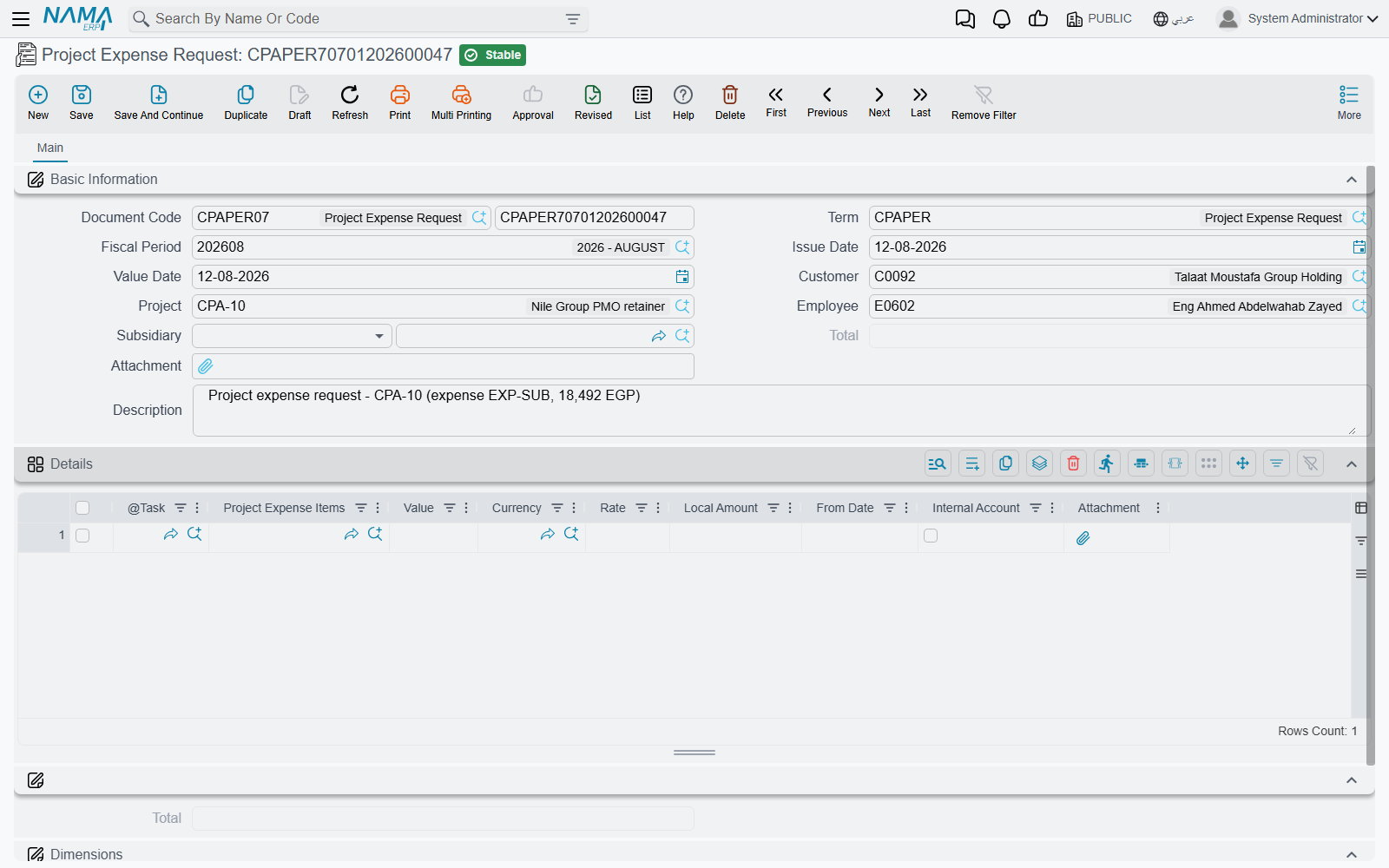
The header says who is claiming, and against what:
| Field | What it holds |
|---|---|
| Document Code (Book / Code) | The usual book and number |
| Term | The document term (توجيه) that decides which accounts the claim uses |
| Fiscal Period, Issue Date, Value Date | Standard document dating. The Value Date also stamps the date carried by every line |
| Project | The project being charged. Its lookup is narrowed by the customer if you filled one, otherwise to projects the employee is listed on |
| Customer | Filled in for you the moment you pick the project, and cleared again if you clear it |
| Employee | The person who spent the money |
| Subsidiary | The account party the claim is owed to — a supplier, a customer or an employee. This is what a term side set to Document Subsidiary will use, and it is normally the claiming employee |
| Total | Added up by the system from the lines |
| Attachment, Description | The receipt bundle and a free note |
| Dimensions | Legal entity (شركة), analysis set, branch, sector, department |
Each line of the Details grid is one thing bought:
| Column | What it holds |
|---|---|
| Task | The task being charged. The lookup only offers tasks of the header project whose status is In Progress or Not Started |
| Project Expense Item | Which catalogue entry — and therefore which account |
| Value, Currency, Rate, Local Amount | The amount claimed. A value is required and it may not be zero; the local amount is recalculated on every save |
| Internal Account | Whether the firm absorbs this line or re-bills it — see the next section |
| Attachment | The receipt for this one line |
Committing is deliberately permissive. The single rule that will stop you is an empty or zero Value on a line: "Please specify a value". Nothing else blocks the commit, so the discipline about filling Project, Employee and Subsidiary properly has to come from your own procedure — the accounting entry is only as good as those three fields.
If your site runs an approval definition over the document, the claim goes through the ordinary approval cycle, and the approval case shows the approver the requested total and the expense items being claimed before they decide.
Internal Account — who ends up paying for it
This is the field a reader must not get wrong, because it is doing two jobs at once.
Job one: which accounts the entry uses. The expense term (توجيه) carries four account sides in two pairs — an internal debit and credit pair, and an external debit and credit pair. When the entry is built, the lines are split: lines with Internal Account ticked are processed with the internal pair, lines with it unticked with the external pair. Both pairs are genuinely used, so both must be configured on any term you intend to use for mixed claims.
Job two: whether the customer is billed. The project invoice's Collect Expenses button only sweeps up claim lines where Internal Account is unticked. A ticked line is invisible to invoicing; there is no later switch that re-exposes it.
Put the same amount through both settings and the difference is stark. Take one line of 500 for travel, on task TSK-0042-03 of project PRJ-0042, claimed by employee EMP-7 (Sara), whose employee account is the document's Subsidiary:
| Internal Account ticked | Internal Account unticked | |
|---|---|---|
| What it means | The firm absorbs the 500 | The firm expects the customer to pay the 500 |
| Accounts used | The term's internal debit and credit pair | The term's external debit and credit pair |
| A typical setup | Debit the travel expense account carried by the expense item; credit Sara's employee account | Debit a billable / work-in-progress account for the project; credit Sara's employee account |
| On the project invoice | Never appears — Collect Expenses skips it | Collected as a 500 line and billed to the customer |
| Net effect | 500 of cost, no revenue | 500 of cost, 500 of revenue |
The tick is the default — untick it deliberately
The moment you pick a project or a task on a line, Internal Account is ticked for you if it is still empty. Left alone, every claim you enter is one the firm swallows. Anything you intend to re-bill has to be unticked by hand, on every line, before the claim is committed.
Because billing runs off the request, that decision is settled when the claim is committed, not when the accountant records it. A committed, unticked line is invoiceable whether or not anyone ever raises an expense document for it — see Project Invoice for the collecting end of that.
Claims that raise themselves from a timesheet
Not every request is typed. A Tasks Executing line can carry an expense item and a value of its own — the courier fee incurred during the same site visit whose hours are being recorded. When the matching TimeSheet Approval is committed, the system creates a Project Expense Request for that timesheet automatically, using the book and term named on the timesheet's own term (توجيه), and copying each qualifying line's project, task, expense item, value and its Internal Account setting. The generated request points back at the timesheet it came from, and cancelling the approval deletes it again.
Only timesheet lines that actually name an expense item produce claim lines, and the generation happens when the approval is committed, never on the timesheet itself. The mechanics are on Recording Worked Hours and Approving Worked Hours.
Recording the claims: the Project Expense Document
Once the firm has decided to honour a batch of accepted claims — typically everything one employee has outstanding on one project — the accountant raises a single Project Expense Document.
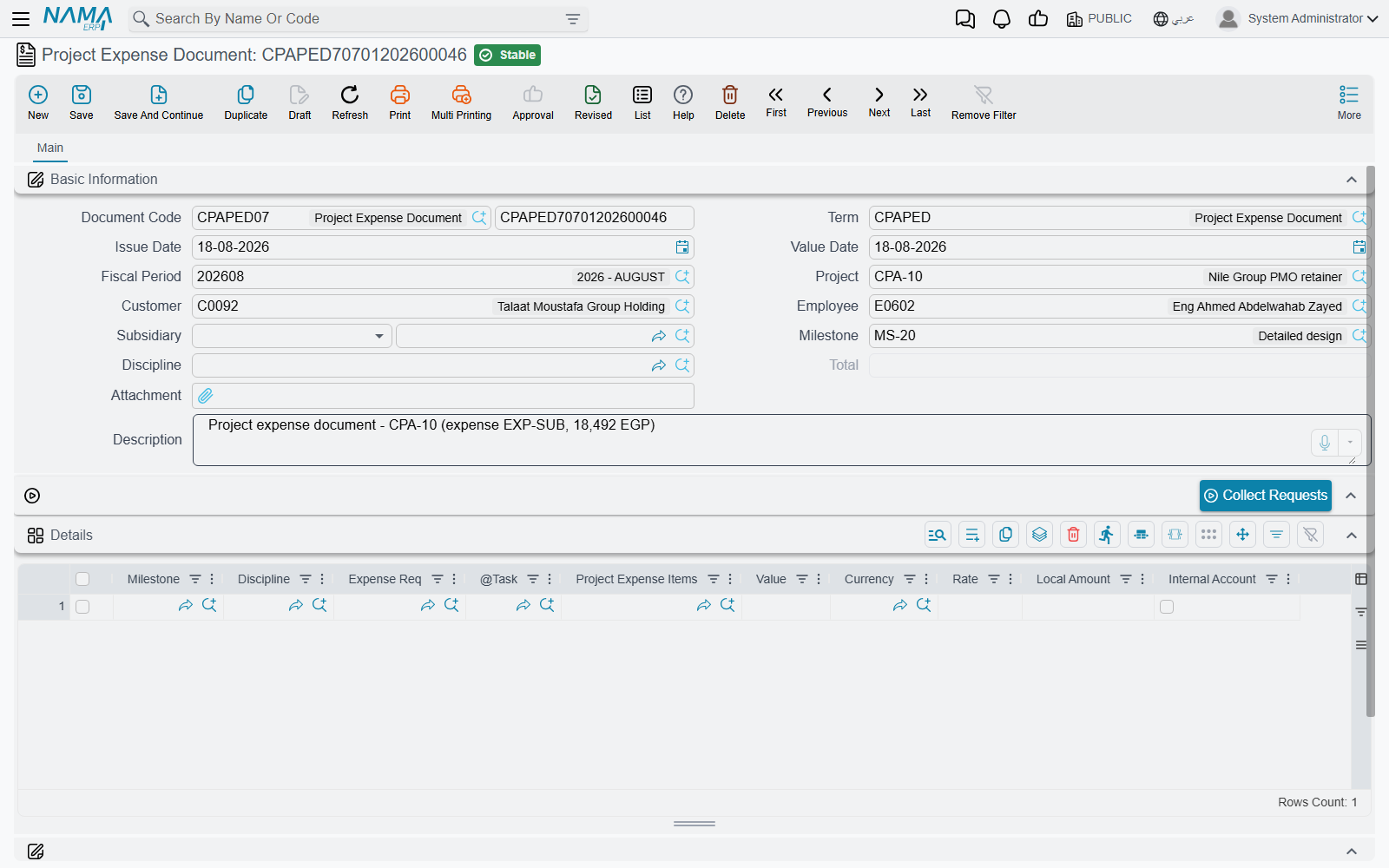
Its header is the request's header with two additions, Milestone and Discipline, which act as defaults for the lines: any line left empty takes the header's values on save, so a document raised for one phase of one discipline needs the pair typed once, on the header. The details grid is the request's grid with the per-line date and attachment dropped, and three columns added — Milestone, Discipline and Expense Req, which names the claim each line came from.
Collect Requests
You do not type the lines. Fill the header Employee and Project, then press Collect Requests (تجميع الطلبات). It searches every committed claim line that no expense document has processed yet, narrowed by those two header fields, and writes one document line per hit carrying the source request, the task, the expense item, the value and the Internal Account setting.
Collect Requests replaces the whole grid
The button does not append — it rebuilds the details grid from its search result, so anything already in the grid is discarded. And with Employee and Project both empty it is not narrowed at all: it will pull every unprocessed committed claim line in the database. Always fill the header first.
Two rules are enforced when the document is committed, and both are about consistency with the header: a line's task must belong to the header Project, and that task must list the header Employee among its executers. This is why one expense document covers one employee on one project — treat that as the shape of the document rather than a limitation.
Committing also stamps every collected claim line as processed, so the next Collect Requests on any document will not offer it again. Editing a committed document redoes that bookkeeping for you: lines you removed become collectable again, lines you added are stamped, and the accounting entry is re-issued as an update. Cancelling releases all of them.
What a commit actually does
Neither document writes to the ledger inside the save. Committing raises a business request, which is processed in the background against the accounts configured on the document's term (توجيه) — the internal pair for ticked lines, the external pair for the rest. The document itself comes back instantly.
Per entry line the system supplies the value and currency from the claim line, the expense item's account where the term asks for the Line Subsidiary, the header Subsidiary where it asks for the Document Subsidiary, and the header's Customer, Employee or Project where the term's account or analysis-set source names one of those. The document's Description becomes the entry's narration, and the document's dimensions travel with it.
If processing fails — a closed period, or an account missing on one of the four sides — the document stays committed and the failure appears in the Business Requests list view. Filter it by failed status, select the rows, and use More → Reprocess to run it again once the cause is fixed. The account sides themselves are described on Document Terms for Project Documents.
From claim to ledger: a worked example
Project PRJ-0042 "Tower Fit-out Design" for customer CUST-011; employee EMP-7 (Sara) is working task TSK-0042-03 "Site survey".
Sara raises request
PER-000117with value date2026-03-05, projectPRJ-0042, employee and subsidiaryEMP-7, and two lines againstTSK-0042-03:- expense item
EXP-TAXI, 220, Internal Account unticked — the taxi is being re-billed; - expense item
EXP-PRINT, 80, Internal Account ticked — the printing is on the firm.
The header total shows 300, and the approval case tells the approver exactly that: 300, for items
EXP-TAXIandEXP-PRINT.- expense item
Committing
PER-000117raises its accounting business request. The 80 is processed with the term's internal pair — typically debiting the printing account carried byEXP-PRINTand crediting Sara's employee account. The 220 is processed with the external pair, landing on whichever account the firm uses for spending it intends to recover.The accountant opens a new expense document
PED-000058, sets employeeEMP-7and projectPRJ-0042, and presses Collect Requests. Both lines arrive, each showingExpense Req = PER-000117; the total reads 300.Committing
PED-000058marks both claim lines as processed — a second expense document will no longer see them — and raises its own accounting business request, again split 80 internal and 220 external, this time according to the expense document's own term.Later, the project invoice for
PRJ-0042runs Collect Expenses. It picks up only the 220: the 80 is internal and invisible to it. The 220 is billed toCUST-011, and the claim line is stamped so it can never be billed a second time.The project's own Total Project Cost is unchanged by every step above. It still shows only approved timesheet hours × rate.
That last point surprises people, so it is worth stating on its own.
Where the money goes next
No payment is created, and none can be linked. Neither the request nor the expense document holds a remaining balance, an instalment plan or a payment reference, and nothing on the payments side of the system can point back at either of them. Settlement is ordinary accounting: configure the credit side of your term to credit the employee's — or the supplier's — subsidiary account, and then clear that account with a normal Payment Voucher. Sara gets her 300 back through her employee account, and the voucher that pays her simply will not carry a link to PER-000117.
Nor do these documents feed the project screen's cost figure. Expense claims reach the general ledger and they reach the customer's invoice, but the Total Project Cost on the Managed Project screen is labour cost only — the sum of task executer hours × rate. To see spending by project including expenses you need an accounting report filtered on the project dimension, not an ECPA screen. The whole map of which cost lands where is on Where Project Cost and Revenue Come From.