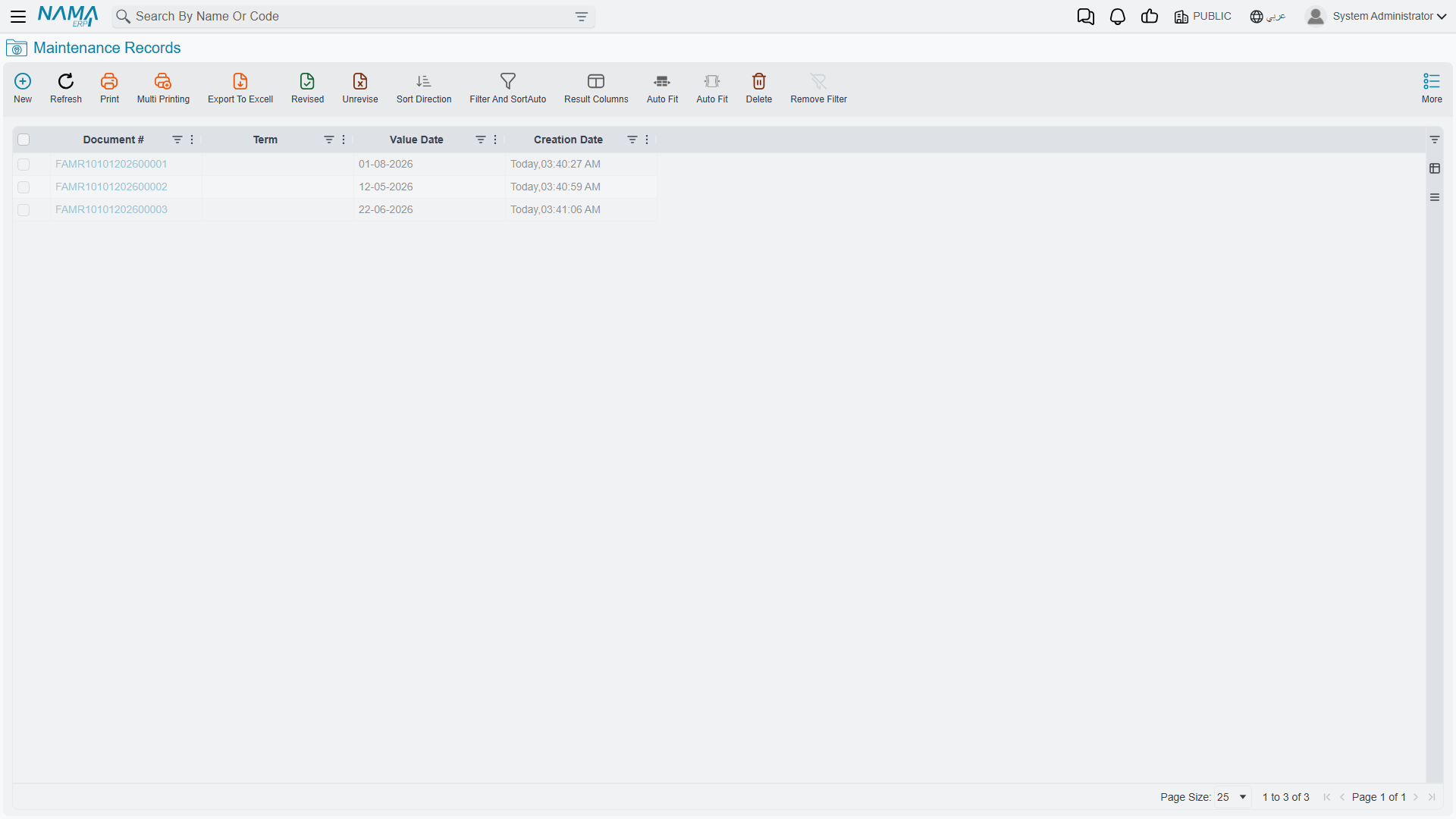
Maintenance Records and Requests
Everything else in this area is preparation. The Maintenance Record is the thing itself: the document a technician closes at the end of a visit, saying what was done, to which part of which machine, by whom, between which hours, against which inspection sheet, at what cost, and when the next visit is expected.
Ahead of it, optionally, sits the Maintenance Record Request — the ask, raised before the work happens. The two screens are almost identical, which is deliberate: the request is a draft of the record, and the record is normally created from it.
Both live under Assets > Fixed Asset Maintenance and need the fixedassets-maintenance licence. Both are documents — they have a book, a code, an issue date, a value date and a fiscal period — but neither carries a document term and neither produces an accounting entry.
The request: recording the ask
Assets > Fixed Asset Maintenance > Maintenance Record Request.
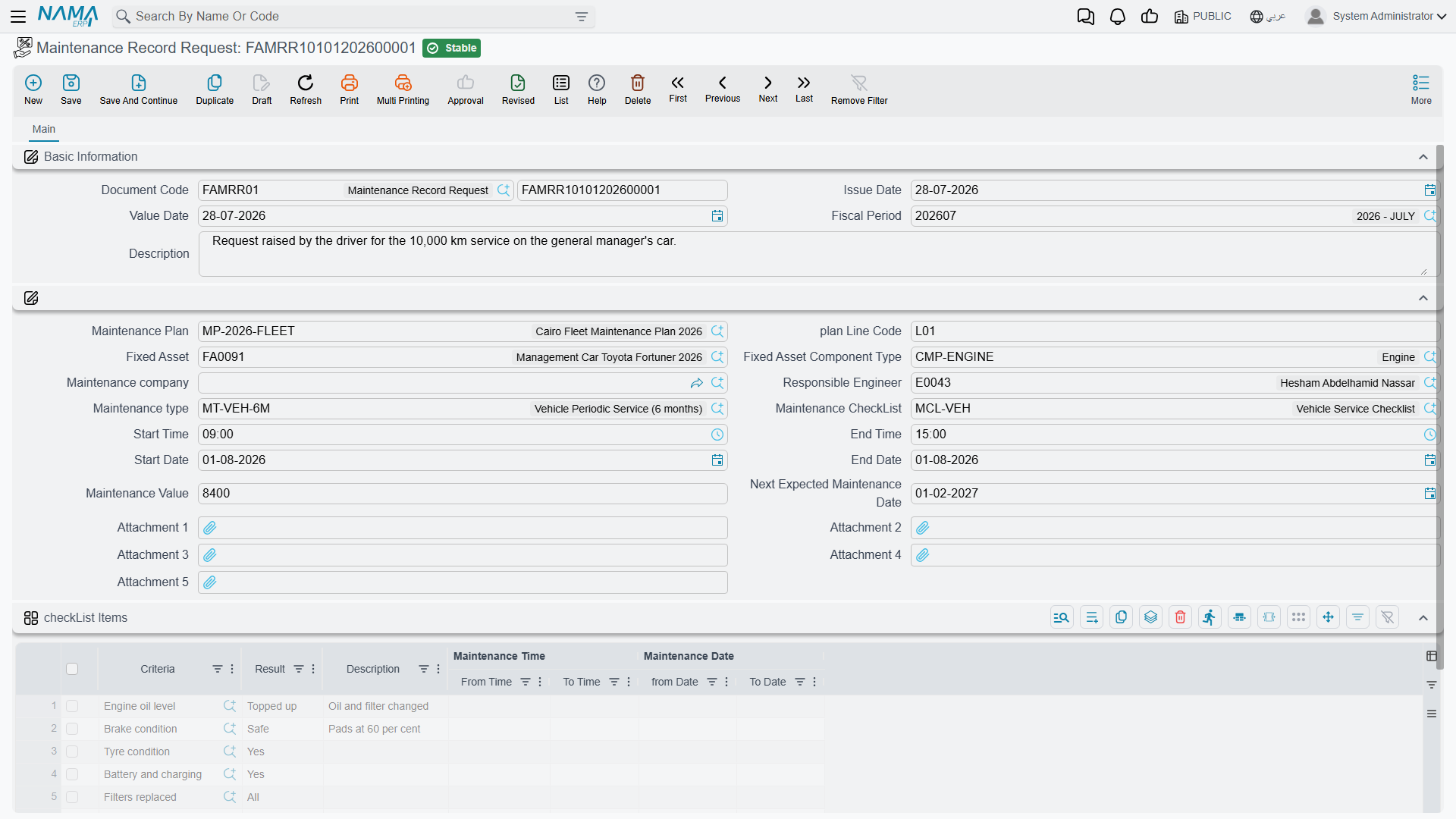
A request is raised when the work has been identified but not yet done: the plant engineer sees the April visit coming up on the plan, or an operator reports a noise. It captures the scope — the asset, the component, the kind of maintenance, the proposed contractor and engineer, the window it should happen in, an estimated value, and the checklist the job will be inspected against.
Committing a request changes nothing at all. It does not touch the plan, the asset, the component line or the ledger, and no line anywhere is marked as satisfied when the work is eventually done. Its value is that it exists as a record of the ask, that it can be circulated and approved like any other document, and that everything on it can be poured into the record with one field.
The record: what was actually done
Assets > Fixed Asset Maintenance > Maintenance Record.
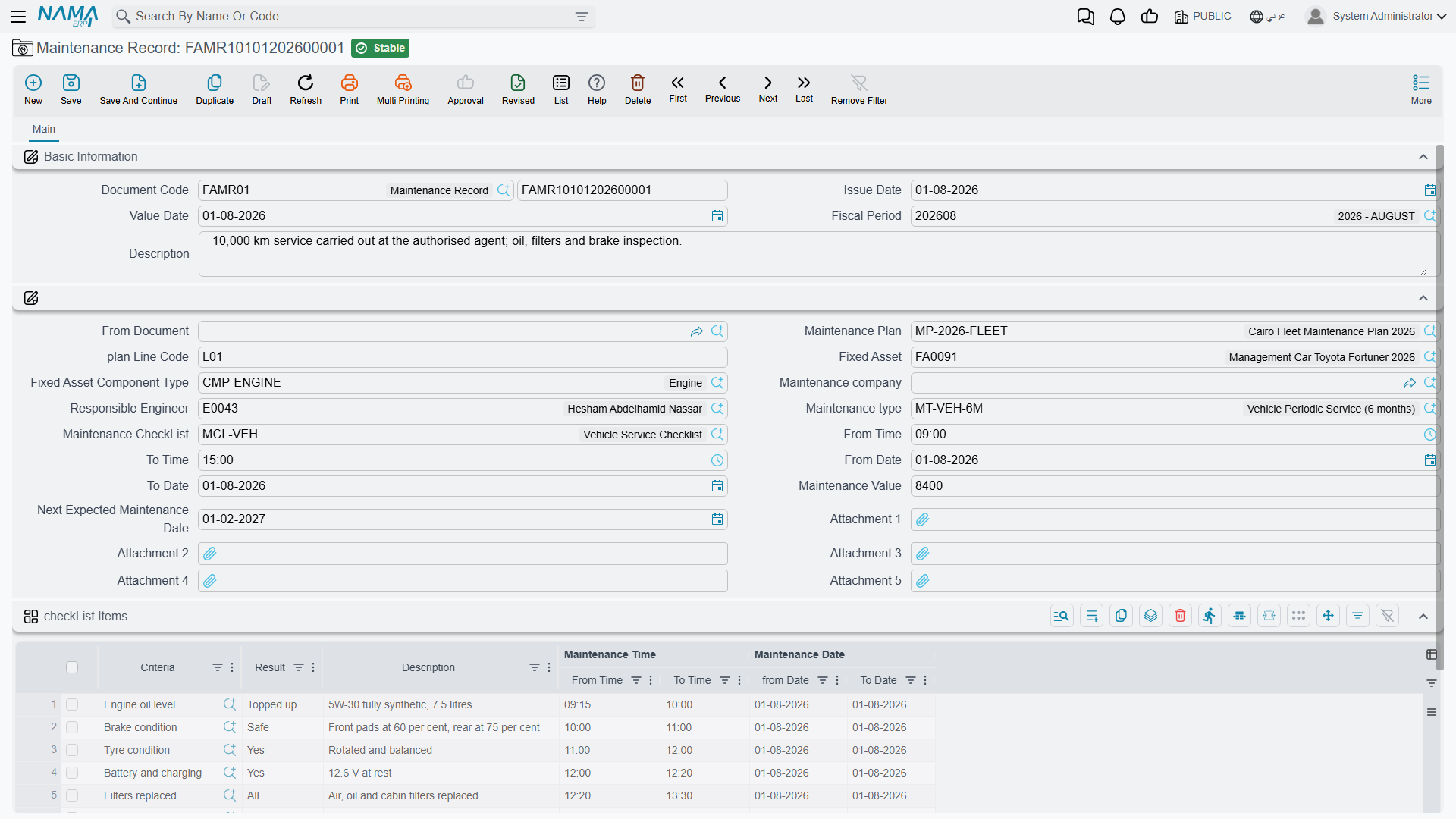
The top of the screen is the ordinary document block: Document Code (book and code), Issue Date, Value Date, Fiscal Period and Description.
Below it, the fields that describe the job:
| Field | What it is for |
|---|---|
| From Document | Points at the maintenance record request this record fulfils. Choosing it copies the request across — see below. This field is on the record only; a request has nothing to be raised from. |
| Maintenance Plan | The plan the visit belongs to. |
| plan Line Code | Which line of that plan is being carried out. Use the suggestion list — it offers exactly the plan's outstanding lines. |
| Fixed Asset | The machine. |
| Fixed Asset Component Type | Which part of it. The picker offers only the components listed on that asset. |
| Maintenance company | The contractor who did the work. |
| Responsible Engineer | The employee who owns the job internally. |
| Maintenance type | The kind of maintenance. The picker offers only the types the component type allows. |
| Maintenance CheckList | The inspection sheet. Choosing it fills the grid below with its questions. |
| From Date / To Date, From Time / To Time | When the work ran. |
| Maintenance Value | What the visit cost. Recorded as history — see the section on cost below. |
| Next Expected Maintenance Date | When the next visit is due. Proposed from the maintenance type's interval; overwrite it freely. |
| Attachment 1–5 | The contractor's report, photographs, the signed job sheet. |
Then the checkList Items grid — the inspection sheet, one line per question:
| Column | What it holds |
|---|---|
| Criteria (السؤال) | The question, brought in with the checklist. |
| Result (الإجابة) | What the technician found. A text box with the item's suggested answers offered as you type. |
| Description | Anything worth saying about that particular point. |
| Maintenance Date — from / to, Maintenance Time — from / to | Per-question timings, for jobs where individual tasks are worth timing separately. |
Finally the dimensions group, as on every document.
Raising a record from a request
Fill in From Document with the request and the system copies over the responsible engineer, the maintenance company, the value, the plan, the checklist, the asset, the plan line code, the maintenance type, the start and end dates and times, the five attachments, and the whole checklist grid — questions and any answers already on it.
What it does not copy is the date arithmetic. The next expected maintenance date on the request was calculated from the request's value date; if the record carries a different value date, re-pick the maintenance type — or type the date — so that what gets stamped onto the asset is measured from the day the work actually happened.
Actions on these screens
Neither the maintenance request nor the maintenance record carries a button of its own. The two pieces of automation that make the record quick to fill are not buttons: choosing the Fixed Asset narrows the component-type lookup to that asset's own components, and choosing the Maintenance CheckList — or a plan line — copies its questions onto the record ready to be answered. Picking the Maintenance Type also fills in the next expected maintenance date from the type's repeat interval. Everything the record does to the asset and to the plan happens on commit.
Two rules that decide whether a record will commit
Both are about components, and both are worth knowing before your first record rather than after.
The component type must belong to the asset. Every maintenance record is filed against a part of the machine, so the Fixed Asset Component Type field has to be filled in and has to match one of the lines in the asset's Asset Components grid. The screen does not mark the field as required, but a commit without it is refused, and so is a commit against an asset that has no components at all. If you are meeting the message "Fixed asset component type does not belong to fixed asset", the fix is on the asset, not on the record — go and define its components first.
The maintenance type must be allowed for that component type. Each component type carries its own list of permitted maintenance types; if that list is not empty, the record's maintenance type has to be on it. An empty list means anything is allowed.
One further check applies to the record only: a plan line that has been cancelled will not accept a record. Reinstate the line, or point the record at a different one.
What committing a record does
Three things, none of them financial.
- The plan line closes. Every line on the named plan whose code matches the record's plan line code becomes Executed and is stamped with this record.
- The asset's component line is updated. The system finds the component line on the asset that matches the record's component type — and whose maintenance type either matches the record's or is blank — and writes onto it the maintenance start date, the maintenance end date, the next expected maintenance date, and a link back to this record. That is where the "when is this next due" answer lives, readable from the asset without opening a plan.
- Nothing else. No journal entry, no business request, no change to the asset's cost, accumulated depreciation, book value, remaining life or depreciation instalment.
Cancel or delete the record and all of it is undone: the plan line goes back to Planned with its record cleared, and the component line's three dates and record link are wiped. Edit a committed record and point it at a different plan line and the old line is released back to Planned before the new one is marked Executed.
Maintenance cost is history, not value
The Maintenance Value field holds what the visit cost. It is saved, it is searchable, it prints, and it is exactly the number you want when you compare this quarter's service bill with last quarter's or one contractor with another.
It is not accounting. The maintenance record creates no entry in the general ledger, and the amount does not touch the asset: cost stays where it was, accumulated depreciation stays where it was, and next month's depreciation instalment is calculated as though the visit never happened. The contractor's invoice reaches the ledger through the ordinary purchasing and payables route, as an expense, like any other service you buy.
That is the right treatment for maintenance in the ordinary sense — an oil change does not make a machine more valuable. When money spent on an asset genuinely does belong in its cost, because it extends the machine's life or its capacity rather than restoring it, that is a different document: the addition and deduction document adds the amount to the asset's cost base and re-derives the instalment from it. Recording an upgrade as a maintenance record files it as a story; recording it as an addition files it as money.
Spare parts are not part of this document
There is no item, quantity or warehouse field on a maintenance record and no link to a stock document. If parts were drawn from your own stores, issue them with the appropriate supply-chain document; the two are not connected, so note the issue reference in the record's description if you want to be able to find it later.
Al-Waha's first visit on MCH-0007
25 March 2026 — the request. The plant engineer raises a Maintenance Record Request against MCH-0007, component type Spindle, maintenance type Periodic Maintenance, plan MP-CNC-2026, plan line code 0120260401, contractor Gulf Machinery Trading, responsible engineer Khaled Al-Mutairi, estimated value 1,800. Choosing the maintenance type proposes a next expected date of 23 June — 90 days from the request's own date. Choosing the CNC Routine Inspection checklist fills the grid with its four questions. Commit: nothing moves.
1 April 2026 — the record. Maintenance Record FAMR-000031 is created with value date 1 April and From Document set to the request. Everything copies across. The engineer re-picks the maintenance type so that the next expected date is recalculated from 1 April, giving 30 June 2026 — the second line of the plan. The technician's results go into the grid:
| Criteria | Result | Description |
|---|---|---|
| Is the spindle vibration within tolerance? | OK | |
| Coolant level and condition | Replaced | 20 litres, new filter fitted |
| Are the guards and way covers intact? | Yes | |
| Control-unit error log reviewed and cleared? | Yes | Two over-travel warnings from February |
Work ran from 09:00 to 13:30 on 1 April, and the confirmed cost is 1,800.
Commit. Plan line 0120260401 becomes Executed and names this record. On the asset, the Spindle component line now reads: maintenance start 1 April 2026, maintenance end 1 April 2026, next expected 30 June 2026, with a link to the record. The Maintenance Record page on the asset shows the visit in its list.
And the machine's numbers are untouched: cost 240,000, accumulated depreciation 10,800 after three periods, instalment 3,600 for April as it was for March. The 1,800 is a fact about the machine's service history, and nothing more.